Skip to content
View in the app

A better way to browse. Learn more.

Unraid

A full-screen app on your home screen with push notifications, badges and more.

To install this app on iOS and iPadOS
  1. Tap the Share icon in Safari
  2. Scroll the menu and tap Add to Home Screen.
  3. Tap Add in the top-right corner.
To install this app on Android
  1. Tap the 3-dot menu (⋮) in the top-right corner of the browser.
  2. Tap Add to Home screen or Install app.
  3. Confirm by tapping Install.

Insidious95

Members
  • Joined

  • Last visited

Everything posted by Insidious95

  1. now is that works well wen i restart the lxc or reboot server thx @ich777
  2. with new usb stick has work that directly thank you sir @JorgeB
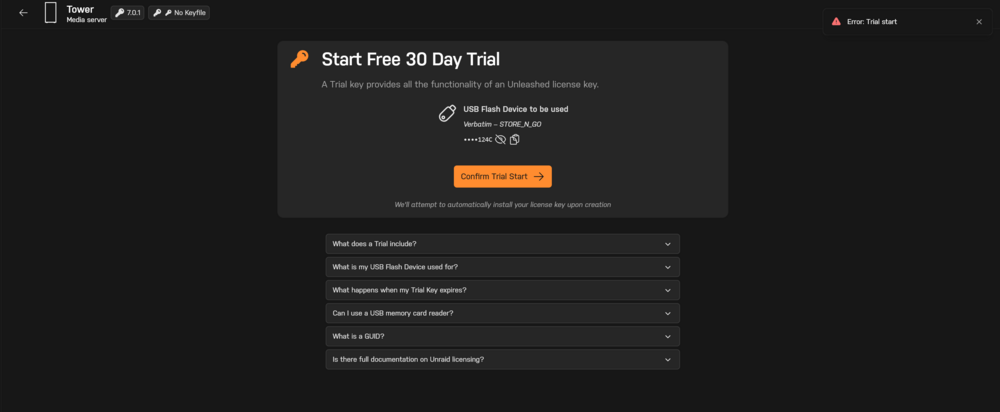
  3. here is screenshot
  4. i got some error massage wen i will start trail did you knows why
  5. okey i try that now and i will see that work then without problem im looking now for all that and i typ you back
  6. thats mean that stick that give me friend is not original suport okey now im understand but wen i made now a fresh installed version on the stick an i can made 30 days testing you mean that will works then becouse im new with unraid

Account

Navigation

Search

Search

Configure browser push notifications

Chrome (Android)
  1. Tap the lock icon next to the address bar.
  2. Tap Permissions → Notifications.
  3. Adjust your preference.
Chrome (Desktop)
  1. Click the padlock icon in the address bar.
  2. Select Site settings.
  3. Find Notifications and adjust your preference.