chrisgtl
Members
-
Joined
-
Last visited
Everything posted by chrisgtl
-
I'd recommend selling the Samsung and going with WD. Not one single issue since I did that. Samsung don't care about this issue, we are a tiny minority and it doesn't make sense for them to pump any resources into it.
-
Hi all, I've encountered a problem with my dockers. Recently noticed one of my docker containers no longer starts due to an IP conflict. I don't have anything else using that IP so looked further in to it. When I inspect my custom br0.6 (VLAN6) network, I see the following; root@unraid:~# docker network inspect br0.6 [ { "Name": "br0.6", "Id": "c4d01ec67b5eb12d47f691fac81955192b0ec33116cc972ab70b24196844dac8", "Created": "2025-04-09T19:55:27.753465705+01:00", "Scope": "local", "Driver": "macvlan", "EnableIPv6": false, "IPAM": { "Driver": "default", "Options": {}, "Config": [ { "Subnet": "192.168.6.0/24", "Gateway": "192.168.6.1", "AuxiliaryAddresses": { "server": "192.168.6.5" } } ] }, "Internal": false, "Attachable": false, "Ingress": false, "ConfigFrom": { "Network": "" The docker container that won't start is at 192.168.6.5, and surely enough I see this IP under the custom network config. I've tried removing the custom docker network and completely disabling VLANs, and then setting up from scratch but it keeps coming back. Where is this "server: IP" coming from? I can change my docker container IP to something different, and it works, but this is really bugging me. Anyone know how to remove this from the config?
-
I have a strange problem I'm unable to fix. If I login to my OPNsense box via its IP everything on the dashboard (widgets) work. If I login using the hostname which redirects to HTTPS via NPM then some of the 'live view' widgets don't show any data/graphs. All I see are these in the NPM logs. 2025/01/30 19:06:11 [warn] 2268#2268: *6878 an upstream response is buffered to a temporary file /var/cache/nginx/proxy_temp/3/01/0000000013 while reading upstream, client: 10.0.3.3, server: opnsense.mydomain.net, request: "GET /ui/assets/fontawesome/webfonts/fa-solid-900.woff2 HTTP/1.1", upstream: "https://192.168.5.1:443/ui/assets/fontawesome/webfonts/fa-solid-900.woff2", host: "opnsense.mydomain.net", referrer: "https://opnsense.mydomain.net/ui/assets/fontawesome/css/solid.min.css?v=92561a8740a1d3da" 2025/01/30 19:07:28 [warn] 2277#2277: *6979 an upstream response is buffered to a temporary file /var/cache/nginx/proxy_temp/4/01/0000000014 while reading upstream, client: 10.0.3.3, server: opnsense.mydomain.net, request: "GET /api/diagnostics/systemhealth/getSystemHealth/opt3-packets/0/0 HTTP/1.1", upstream: "https://192.168.5.1:443/api/diagnostics/systemhealth/getSystemHealth/opt3-packets/0/0", host: "opnsense.mydomain.net", referrer: "https://opnsense.mydomain.net/ui/diagnostics/systemhealth" 2025/01/30 19:13:40 [warn] 2261#2261: *7111 an upstream response is buffered to a temporary file /var/cache/nginx/proxy_temp/5/01/0000000015 while reading upstream, client: 10.0.3.3, server: opnsense.mydomain.net, request: "GET /api/core/firmware/info HTTP/1.1", upstream: "https://192.168.5.1:443/api/core/firmware/info", host: "opnsense.mydomain.net", referrer: "https://opnsense.mydomain.net/ui/core/firmware" 2025/01/30 19:20:50 [warn] 2262#2262: *7276 an upstream response is buffered to a temporary file /var/cache/nginx/proxy_temp/6/01/0000000016 while reading upstream, client: 10.0.3.3, server: opnsense.mydomain.net, request: "GET /api/diagnostics/systemhealth/getSystemHealth/opt3-packets/0/0 HTTP/1.1", upstream: "https://192.168.5.1:443/api/diagnostics/systemhealth/getSystemHealth/opt3-packets/0/0", host: "opnsense.mydomain.net", referrer: "https://opnsense.mydomain.net/ui/diagnostics/systemhealth" 2025/01/30 19:28:46 [warn] 2263#2263: *7560 an upstream response is buffered to a temporary file /var/cache/nginx/proxy_temp/7/01/0000000017 while reading upstream, client: 10.0.3.3, server: opnsense.mydomain.net, request: "POST /diag_backup.php HTTP/1.1", upstream: "https://192.168.5.1:443/diag_backup.php", host: "opnsense.mydomain.net", referrer: "https://opnsense.mydomain.net/diag_backup.php" 2025/01/30 19:31:44 [warn] 2265#2265: *7754 an upstream response is buffered to a temporary file /var/cache/nginx/proxy_temp/8/01/0000000018 while reading upstream, client: 10.0.3.3, server: opnsense.mydomain.net, request: "GET /ui/assets/fontawesome/webfonts/fa-solid-900.woff2 HTTP/1.1", upstream: "https://192.168.5.1:443/ui/assets/fontawesome/webfonts/fa-solid-900.woff2", host: "opnsense.mydomain.net", referrer: "https://opnsense.mydomain.net/ui/assets/fontawesome/css/solid.min.css?v=92561a8740a1d3da" 2025/01/30 19:49:38 [warn] 2267#2267: *8652 an upstream response is buffered to a temporary file /var/cache/nginx/proxy_temp/9/01/0000000019 while reading upstream, client: 10.0.3.3, server: opnsense.mydomain.net, request: "GET /api/core/firmware/info HTTP/1.1", upstream: "https://192.168.5.1:443/api/core/firmware/info", host: "opnsense.mydomain.net", referrer: "https://opnsense.mydomain.net/ui/core/firmware" 2025/01/30 19:51:19 [warn] 2267#2267: *8654 an upstream response is buffered to a temporary file /var/cache/nginx/proxy_temp/0/02/0000000020 while reading upstream, client: 10.0.3.3, server: opnsense.mydomain.net, request: "GET /api/diagnostics/firewall/log/?digest=&limit=1000 HTTP/1.1", upstream: "https://192.168.5.1:443/api/diagnostics/firewall/log/?digest=&limit=1000", host: "opnsense.mydomain.net", referrer: "https://opnsense.mydomain.net/ui/diagnostics/firewall/log"
-
Just happened again, so looks like it's over to WD for my next drive. Returned the 990 Pro back to Amazon. Bought a WD 770 instead, and saved myself 50 quid in the process.
-
Well I'm on day 5 after my 990 Pro first showed an error. No problems since. I'm wondering if this is something to do with C-states, as I used a guide on here to allow better power saving. After my first 990 Pro error I ran through the guide again and I'm onto day 5 without any more occurrences. I'll update again once I've given it more time.
-
Looks like my 990 Pro is already on the latest firmware too..... Can you induce this error or do you just have to wait to see if it bums out randomly?
-
I've just bought a Samsung 990 Pro /w heat shield and also had the same error this afternoon. I'm on unRAID 7 beta2 btw. Did you try update the firmware?
-
I have a small problem in that my BlueIris/Windows 10 VM needs to start and be fully booted before my Home Assistant VM. Looking through the forums, I can see a great little plugin called User Scripts. I have setup a new script and added the following; virsh start Windows 10 sleep 60 virsh start HAOS virsh start Arch Is this correct to achieve; Start Windows 10, wait 60 seconds, start HAOS & Arch?
-
Since writing that OP I have sold all my spinning discs. Non of my data is mission critical, its HomeLab and for playing around. Any mission critical data is saved elsewhere. I am not running any parity or backup strategies. I'm just waiting for the Samsung 8TB prices to come back down so I can buy another and add it to my unRAID. I've spent quite a long time finding my way around unRAID - learning lots but still got a long way to go. Not sure if I've set it up correctly, but from what I have been reading there is no real right or wrong way. I have my Nvme (250GB) as a single pool using btrfs and my other 3 SSDs (120GB, 1TB & 8TB) as single devices in the array using xfs. I did try to add all my drives as pools but then I couldn't share anything due to an error saying shares not available without array.
-
I'm a big follower of Tom Lawrence on YT and built my knowledge upon watching many hours of his material. After learning pfSense I moved on to VLANS and Cisco switches. Now came the time to ditch my old and slow Asustor NAS and replace with something more future-proof and flexible. Tom spoke highly of TrueNAS Scale, so I built my own system and loaded it with Scale. It was a steep learning curve and managed to get it all working pretty much how I wanted - I still didn't really understand the permission/ACLs but I successfully had a couple VMs running along with some home media Kubernetes. System is a i7-7700 with 64GB RAM on a ASUSTeK Prime B250M-A. I have since added a Asus 1660 Super GPU. Storage wise, I have a 256GB NVMe, 120GB SSD, 1TB SSD and 3 x 4TB Toshiba N300s. TrueNAS Scale was installed to the NVMe, Klubernetes and Home Assistant OS VM on the 120GB SSD, and a Windows 10 VM on the 1TB SSD. Media and such on the 4TB drives. Klubernetes seemed clunky to me, sometimes they would break, TrueNAS kept updating their platform which seemed to fix many issues but also create other problems. The final straw was when I could no longer edit my VMs without using some weird command line hack - a couple updates came along but still no sign of any fixes. I started to explore other options and came to find Unraid. My first job was to find a YT'ber that I could connect with and understand. Open to suggestions as I didn't really settle on any one particular person. After much reading any having a play with the demo I was ready to pull the trigger on a Plus license. Upon booting Unraid for the first time I was given the bad news that my oldest Toshiba 4TB drive was showing up as bad on the dashboard. I pulled the trigger on a 8TB Samsung SSD and decided I was going to have a non-mechanical NAS. So far so good with Unraid. I'm still learning and reading, but so far I have; 8TB SSD; media storage with SMB shares 1TB SSD; Windows 10 VM running BlueIris with 1660 Super passthrough for my CCTV person AI detection 120GB SSD; Media apps running like Jellyfin etc... 256GB NVMe; Home Assistant OS VM Well done to all those involved with Unraid. I'm enjoying everything so far.
-
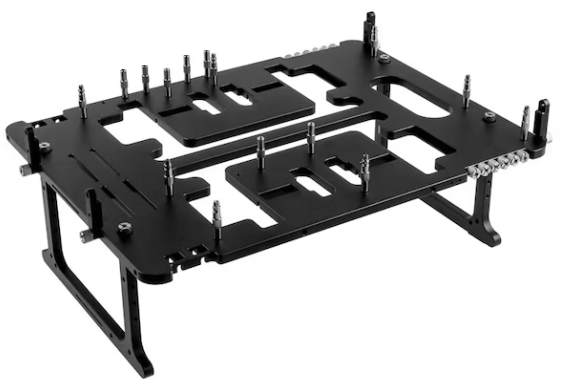
Please can I request the Streacom BC1