





vulcanneko96
Members
-
Joined
-
Last visited
-
When transferring files to disk,The remaining capacity of the disk is 2TB,Then the system starts reporting errors,Disk 29 Write error ,then Disk 29 read error ,System log files keep increasing,Then system failure。Transfer target disk become disabled,i rebuild it . Now it's happened again ,all disks spin down. the same error .Does anyone know what went wrong? tower-diagnostics-20240722-1100.zip
-
Suddenly,the web ui page shows 500 internal server error , but all the docker service and VMs running normally. Use console to login, it will return to type login user erverytime . How can i solve the issue , I'm worried about losing data after restarting。
.thumb.jpg.c4584ec6a69699720c8d623eda466dbb.jpg)

-
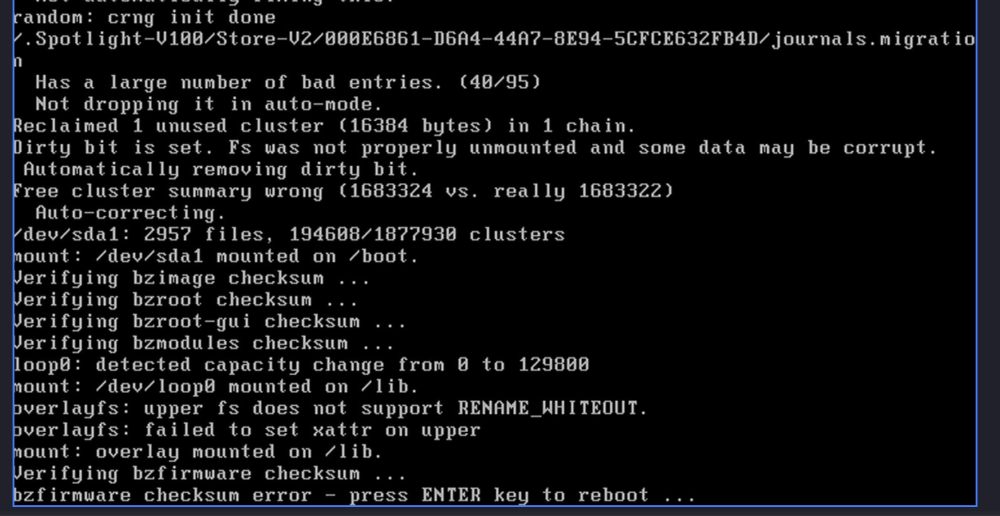
SOLVED After i change a new usb flash device to boot , again the error bz* checksum error. And i find everytime i start the server , the checksum error different, sometimes bzfirmware , sometimes bzroot, i use my computer to check sha256 on the flash device , the result is same as bz*.sha256. I guess the problem is happened when the server run the sha256 check . I test my memery find have error 16GB *2 . I change it form another computer . also 16GB*2, find memtest error again. untill i change to 8GB*2, Maybe my 6700k memery controler have some problem, now it can only control 16GB memery 。。。 I
-
I try it , then boot it i found VFS: cannot open root devise "(null)" or unknown-block(0,0): error -6 Please append a correct "root=" boot option; here are the available partitions: . I add root=sda1 in syslinux.cfg to solve it . now i find bzfirmware checksum error。。 I restarted again,now bzmodules checksum error.Is it possible that the USB flash drive is broken?
-
Since I needed to install some new hard drives, I restarted my server. Then i find boot failure with error "bzroot checksum errror ".First I try to download the backup on the unraid connect and copy to my usb driver , nothing happened ,error again . Then i try to download form unraid.net but only have 6.12.8. I try to copy the lastest version to boot it , but error with lzma error . So how can i solve this issue. The attached file is server diagnostics. Thanks tower-diagnostics-20240216-2158.zip
.jpg.b189b248c600b28f100b44277e297ae5.jpg)

