





Rahat Zaman
Members
-
Joined
-
Last visited
-
Sorry to explain it wrong. I was accessing shares. I actually used `/mnt/user/pool_name`.
-
I always used the user cache pools. That is `/mnt/user/pool_name` to another `/mnt/user/pool2_name`.
-
I have the Dynamix File Manager plugin installed. I just copied from that share to a new share in the disk using the file manager.
-
Okay, so I ended up moving all the data from that pool to the array and deleting the cache pool. But the problem now is most of my media files that were in the pool (moved to array) are corrupted. In that pool, I had about 11,175 mkv files, among which only 80 mkv files are healthy (in tdarr). I tried to open them and got errors in mpv. $ mpv Airlift\ \(2016\)\ Bluray-1080p.mkv user_input: user_input: stack traceback: user_input: [C]: at 0x5cabcfb522c0 user_input: [C]: at 0x5cabcfb529a0 user_input: Lua error: /home/insane/.config/mpv/scripts/user-input.lua:541: attempt to call field 'shared_script_property_observe' (a nil value) mpv_thumbnail_script_client_osc: mpv_thumbnail_script_client_osc: stack traceback: mpv_thumbnail_script_client_osc: .../.config/mpv/scripts/mpv_thumbnail_script_client_osc.lua:4232: in function 'visibility_mode' mpv_thumbnail_script_client_osc: .../.config/mpv/scripts/mpv_thumbnail_script_client_osc.lua:4236: in main chunk mpv_thumbnail_script_client_osc: [C]: at 0x5cabcfb522c0 mpv_thumbnail_script_client_osc: [C]: at 0x5cabcfb529a0 mpv_thumbnail_script_client_osc: Lua error: .../.config/mpv/scripts/mpv_thumbnail_script_client_osc.lua:3593: attempt to call field 'shared_script_property_set' (a nil value) mpv_thumbnail_script_server_2: Thumbnail worker registering timed out mpv_thumbnail_script_server_1: Thumbnail worker registering timed out cplayer: Failed to recognize file format. cplayer: Exiting... (Errors when loading file) So is there any way to recover these files? I did not keep any backups. My latest diags are attached. insane-homelab-diagnostics-20240718-1244.zip
-
Okay, I ran the balance. Here are the diags. Also, I have noticed that the share in that pool is Read-only. insane-homelab-diagnostics-20240704-0858.zip
-
insane-homelab-diagnostics-20240701-0831.zip
-
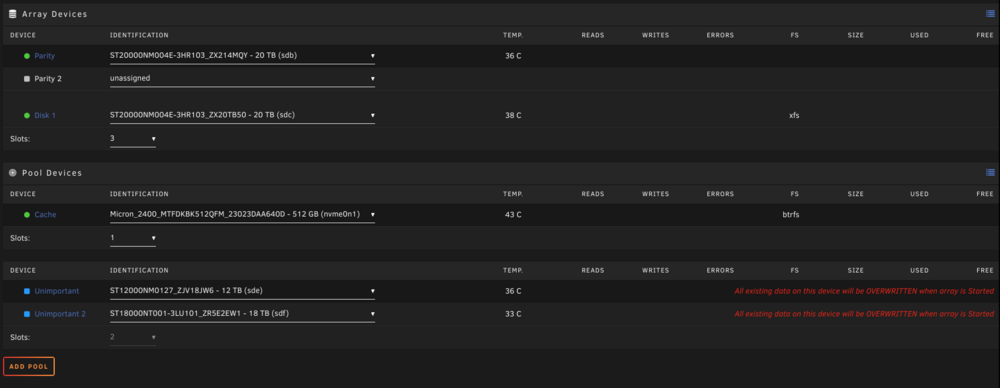
Awesome! Now, assigning the 2 disks in the right places, there is no red warning. Getting back to the initial goal, How do you suggest I should approach removing the 12TB disk from the pool?
-
Label: none uuid: ef9c4ff3-1b11-42c0-9ebf-2b21aa4eab75 Total devices 2 FS bytes used 9.81TiB devid 1 size 10.91TiB used 10.59TiB path /dev/sde1 devid 2 size 16.37TiB used 31.03GiB path /dev/sdf1 Label: none uuid: 8a2ed3b1-8c86-4d72-952e-62b4904eaa5a Total devices 1 FS bytes used 231.35GiB devid 1 size 476.94GiB used 283.02GiB path /dev/nvme0n1p1
-
Rahat Zaman changed their profile photo
-
root@insane-Homelab:~# fdisk -l /dev/sde Disk /dev/sde: 10.91 TiB, 12000138625024 bytes, 23437770752 sectors Disk model: ST12000NM0127 Units: sectors of 1 * 512 = 512 bytes Sector size (logical/physical): 512 bytes / 4096 bytes I/O size (minimum/optimal): 4096 bytes / 4096 bytes Disklabel type: gpt Disk identifier: 4C9C9298-B23E-D844-8355-66D6119E3FB2
-
root@insane-Homelab:~# echo "label: gpt" | sfdisk /dev/sde Checking that no-one is using this disk right now ... OK Disk /dev/sde: 10.91 TiB, 12000138625024 bytes, 23437770752 sectors Disk model: ST12000NM0127 Units: sectors of 1 * 512 = 512 bytes Sector size (logical/physical): 512 bytes / 4096 bytes I/O size (minimum/optimal): 4096 bytes / 4096 bytes >>> Script header accepted. >>> Done. Created a new GPT disklabel (GUID: 4C9C9298-B23E-D844-8355-66D6119E3FB2). New situation: Disklabel type: gpt Disk identifier: 4C9C9298-B23E-D844-8355-66D6119E3FB2 The partition table has been altered. Calling ioctl() to re-read partition table. Syncing disks. Then again I typed `sfdisk /dev/sde` followed by `64`: root@insane-Homelab:~# sfdisk /dev/sde Welcome to sfdisk (util-linux 2.38.1). Changes will remain in memory only, until you decide to write them. Be careful before using the write command. Checking that no-one is using this disk right now ... OK Disk /dev/sde: 10.91 TiB, 12000138625024 bytes, 23437770752 sectors Disk model: ST12000NM0127 Units: sectors of 1 * 512 = 512 bytes Sector size (logical/physical): 512 bytes / 4096 bytes I/O size (minimum/optimal): 4096 bytes / 4096 bytes Disklabel type: gpt Disk identifier: 4C9C9298-B23E-D844-8355-66D6119E3FB2 Old situation: Type 'help' to get more information. >>> 64 Created a new GPT disklabel (GUID: 59B4ACD5-2321-AF4B-8276-7DFB0F360490). Sector 64 already used. Failed to add #1 partition: Numerical result out of range /dev/sde1:
-
Output of `sfdisk /dev/sde` followed by `64`: Welcome to sfdisk (util-linux 2.38.1). Changes will remain in memory only, until you decide to write them. Be careful before using the write command. Checking that no-one is using this disk right now ... OK Disk /dev/sde: 10.91 TiB, 12000138625024 bytes, 23437770752 sectors Disk model: ST12000NM0127 Units: sectors of 1 * 512 = 512 bytes Sector size (logical/physical): 512 bytes / 4096 bytes I/O size (minimum/optimal): 4096 bytes / 4096 bytes sfdisk is going to create a new 'dos' disk label. Use 'label: <name>' before you define a first partition to override the default. Type 'help' to get more information. >>> 64 The size of this disk is 10.9 TiB (12000138625024 bytes). DOS partition table format cannot be used on drives for volumes larger than 2199023255040 bytes for 512-byte sectors. Use GUID partition table format (GPT). Created a new DOS disklabel with disk identifier 0xb574ec0d. Created a new partition 1 of type 'Linux' and of size 2 TiB. Partition #1 contains a btrfs signature. Do you want to remove the signature? [Y]es/[N]o:
-
Sorry, but I am not getting on which pool I should run this on. The image above is currently what I have with all the disks. "Unimportant" is the pool in question (the data is important though, so ignore the name). The old disk is the 12TB one. So I should run the sfdisk command on the old disk (sde). Output of `sfdisk /dev/sde`: Welcome to sfdisk (util-linux 2.38.1). Changes will remain in memory only, until you decide to write them. Be careful before using the write command. Checking that no-one is using this disk right now ... OK Disk /dev/sde: 10.91 TiB, 12000138625024 bytes, 23437770752 sectors Disk model: ST12000NM0127 Units: sectors of 1 * 512 = 512 bytes Sector size (logical/physical): 512 bytes / 4096 bytes I/O size (minimum/optimal): 4096 bytes / 4096 bytes sfdisk is going to create a new 'dos' disk label. Use 'label: <name>' before you define a first partition to override the default. Type 'help' to get more information. >>>
-
Running `sfdisk /dev/sdf`: Welcome to sfdisk (util-linux 2.38.1). Changes will remain in memory only, until you decide to write them. Be careful before using the write command. Checking that no-one is using this disk right now ... OK Disk /dev/sdf: 16.37 TiB, 18000207937536 bytes, 35156656128 sectors Disk model: ST18000NT001-3LU Units: sectors of 1 * 512 = 512 bytes Sector size (logical/physical): 512 bytes / 4096 bytes I/O size (minimum/optimal): 4096 bytes / 4096 bytes Disklabel type: gpt Disk identifier: 0BE62498-4ACD-4BDC-8C7D-D5C8CA5E109F Old situation: Device Start End Sectors Size Type /dev/sdf1 64 35156656094 35156656031 16.4T Linux filesystem Type 'help' to get more information. >>> 64 Created a new GPT disklabel (GUID: DF1C1DC0-E056-B545-91CA-A2A043C34DA3). Sector 64 already used. Failed to add #1 partition: Numerical result out of range /dev/sdf1:
-
warning, device 1 is missing warning, device 1 is missing warning, device 1 is missing Couldn't read chunk tree Label: none uuid: ef9c4ff3-1b11-42c0-9ebf-2b21aa4eab75 <-- This is the pool I want to restore Total devices 2 FS bytes used 9.81TiB devid 2 size 16.37TiB used 31.03GiB path /dev/sdf1 *** Some devices missing Label: none uuid: 8a2ed3b1-8c86-4d72-952e-62b4904eaa5a Total devices 1 FS bytes used 231.35GiB devid 1 size 476.94GiB used 283.02GiB path /dev/nvme0n1p1
-
I had a BTRFS cache pool with a 12TB disk with data. I installed a new 18TB disk and the goal is to replace the 12TB with new 18TB disk in the cache pool. My first plan was to add the new 18TB in the cache alongside the existing 12TB, move all data from 12TB to 18TB, and then remove 12TB from the cache. So I went ahead and did this: Changed slots from 1 to 2. Added the 18TB in the second slot in the pool. Started the array. The BTRFS rebalance started. While it was taking time, I searched online and found that to swap a BTRFS disk in cache, all I had to do is just change the 12TB to 18TB and the data will be moved to the new disk (this is probably wrong information, I still don't know). So I did the following: Canceled the on-going balance operation Stopped the array. Removed the 12TB from the first slot (the second slot is still the 18TB disk) Tried to start the array, but it said missing devices. Then I removed the second slot (18TB) and changed the number of slots to 1. But after that, whenever I add any of these 1 or 2 devices in any order, it's just not recognizing the full BTRFS partition. In console, `btrfs check /dev/sdf1` gives: Opening filesystem to check... warning, device 1 is missing warning, device 1 is missing warning, device 1 is missing bad tree block 27803648, bytenr mismatch, want=27803648, have=0 Couldn't read chunk tree ERROR: cannot open file system How do I recover from this? insane-homelab-diagnostics-20240701-0831.zip

