5L0TH
Members
-
Joined
-
Last visited
-
No problem, do you have any advice regarding this post? I'd like to avoid a 16hr parity check if possible.
-
Ok but why should I care that the file system of a failing drive is corrupted. I've already moved the data to the array and have a replacement drive ready to be installed. It is a single cache drive. When installing the new drive it will be freshly formatted and the state of the previous cache drive will be irrelevant?
-
Thank you for the clarification, though I'm still unsure what checking the file system of the failing drive will accomplish. New problem the Array won't stop, currently stuck showing this. root: mover: not running emhttpd: Sync filesystems... emhttpd: shcmd (10181630): sync emhttpd: shcmd (10181631): /usr/sbin/zfs unmount -a emhttpd: shcmd (10181632): umount /mnt/user0 emhttpd: shcmd (10181633): rmdir /mnt/user0 emhttpd: shcmd (10181634): umount /mnt/user root: umount: /mnt/user: target is busy. emhttpd: shcmd (10181634): exit status: 32 emhttpd: shcmd (10181635): rmdir /mnt/user root: rmdir: failed to remove '/mnt/user': Device or resource busy emhttpd: shcmd (10181635): exit status: 1 emhttpd: shcmd (10181637): rm -f /boot/config/plugins/dynamix/mover.cron emhttpd: shcmd (10181638): /usr/local/sbin/update_cron emhttpd: Retry unmounting user share(s)... emhttpd: shcmd (10181639): /usr/sbin/zfs unmount -a emhttpd: shcmd (10181640): umount /mnt/user root: umount: /mnt/user: target is busy. emhttpd: shcmd (10181640): exit status: 32 emhttpd: shcmd (10181641): rmdir /mnt/user root: rmdir: failed to remove '/mnt/user': Device or resource busy emhttpd: shcmd (10181641): exit status: 1 It seems like a move process from last night is stuck and seemingly can't be killed. root@HateMachine:~# mount | grep /mnt/user shfs on /mnt/user type fuse.shfs (rw,nosuid,nodev,noatime,user_id=0,group_id=0,default_permissions,allow_other) root@HateMachine:~# lsof | grep /mnt/user move 24088 root 4r DIR 0,41 4096 648799821318062208 /mnt/user root@HateMachine:~# ps -o etime= -p "24088" 18:29:59 root@HateMachine:~# kill 24088 root@HateMachine:~# kill -9 24088 Any advice or will I have to force a reboot? the mandatory parity check shouldn't be an issue?

-
Thanks for the reply, when you say pool do you mean the Array? or the single cache drive that I know is failing (device sdf). I'm not sure what checking the file system of a failing drive that I've already moved any data off of will accomplish.
-
Cheers for that. I had disabled docker but forgot about the VM service. Mover completed now and everything moved except a single file in my Plex metadata move: error: move, 380: Structure needs cleaning (117): lstat: /mnt/cache/appdata/plex/Library/Application Support/Plex Media Server/Media/localhost/5/7c3343f3fbc4be29973932a43615436bc80a3a3.bundle/Contents/GoP-0.xml I think I can live without this file however while checking the logs I found a few instances of messages like this: kernel: XFS (sdf1): Metadata corruption detected at xfs_dinode_verify+0xa0/0x732 [xfs], inode 0x1832d6c0 dinode kernel: XFS (sdf1): Unmount and run xfs_repair kernel: XFS (sdf1): First 128 bytes of corrupted metadata buffer: kernel: 00000000: 49 4e 81 a4 03 02 00 00 00 00 00 63 00 00 00 64 IN.........c...d kernel: 00000010: 00 00 00 01 00 00 00 00 00 00 00 00 00 00 00 00 ................ kernel: 00000020: 63 e4 53 e4 1d 26 ca 8b 63 e4 53 e4 1d 36 0c cd c.S..&..c.S..6.. kernel: 00000030: 63 e4 53 e4 1d 36 0c cd 00 00 00 00 00 00 9d 0f c.S..6.......... kernel: 00000040: 00 00 00 00 00 00 00 0a 00 00 00 00 00 00 00 01 ................ kernel: 00000050: 00 00 00 02 00 00 00 00 00 00 00 00 2c 3a ea c9 ............,:.. kernel: 00000060: ff ff ff ff bc c5 f1 53 00 00 00 00 00 00 00 07 .......S........ kernel: 00000070: 00 00 35 01 00 03 26 f2 00 00 00 00 00 00 00 00 ..5...&......... Only 1 instance shows up if I attempt to run mover again so I think this Is the corrupt Plex metadata file?
-
5L0TH changed their profile photo
-
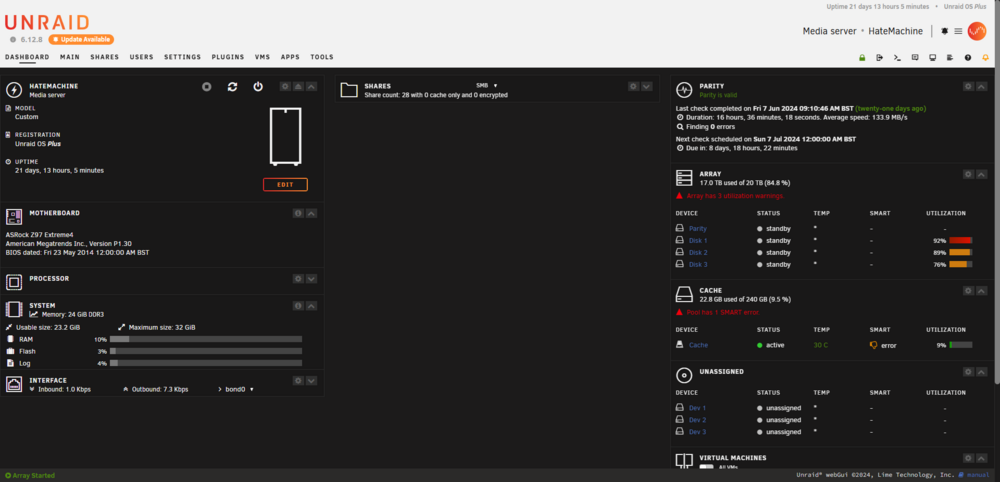
Hi everyone, Today my cache started to report that it's "FAILING NOW" so it's probably about time that I replaced it . I've quickly ordered a new SSD (Kingston A400 SSD) Luckily the past few days have been pretty light on any new data so if my understanding of SSD life cycles is correct the existing data on the drive should still be ok. I've stopped all my applications and scheduled scripts so no new data should be hitting the cache. I've also changed any shares set to prefer the cache to move from cache > array and kicked off the mover. This should effectively move everything from the cache to the array. My plan this weekend is to: Stop the array Remove the current cache drive from the cache section of the UI Power down the server Physically swap the old SSD for the new one Power on the server Add the new SSD to the cache section Start the array Revert share cache preference Run mover My questions to the forum are: Does the above check out? Any recommendations for when I'm setting up the new cache SSD? I setup the server a few years ago (2020) using an old gaming system (specs attached). I used pretty much all defaults (plain xfs). And I don't know if it's worth it (or even possible) to switch my cache drive to BTRFS or similar without altering my existing array setup. I see mentions of cache pools now, is that relevant? Should I pickup another SSD to make use of them? Apologies if this is already well covered on here (it probably is) and I should just rtfm (I probably should...) Thanks in advance SMART-report.txt