emjay
Members
-
Joined
-
Last visited
-
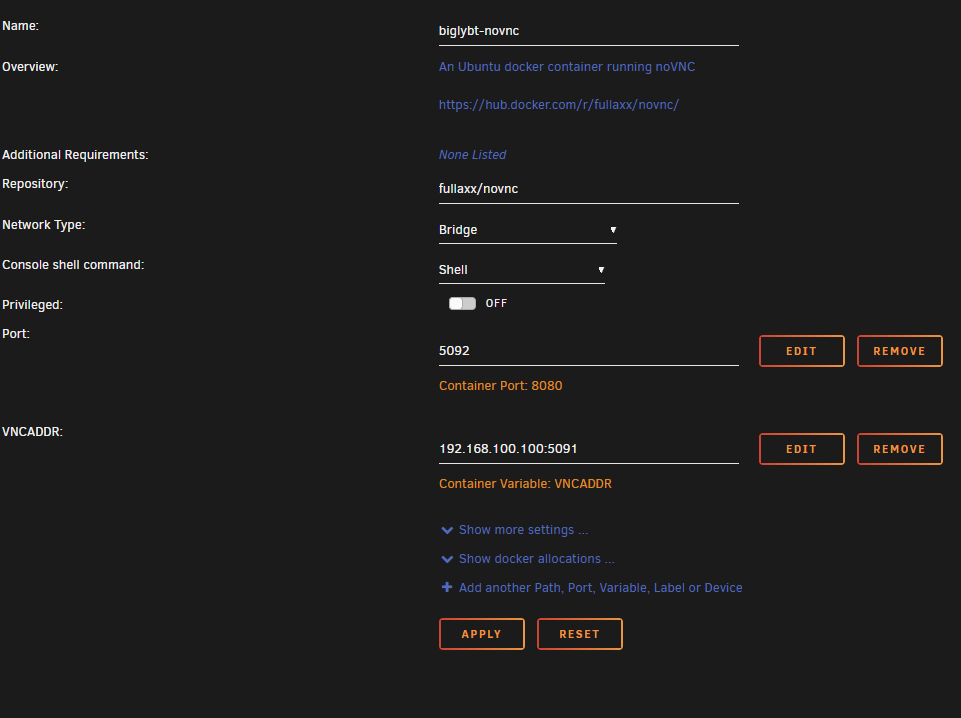
After porting my old windows server to unraid, I wanted to move a huge amount of still seeding torrents along with it onto my new unraid server. On windows they are all seeding in biglybt and I didn't find a quick and easy way to move them to any other torrent client yet. So I thought setting up a bigly docker is probably the easiest way to transfer and continue seeding them for now. So to get the VNC WebUI working, I added an extra novnc docker via dockerhub to access biglybt via vnc. For this I also used the container by Fullaxx: https://github.com/Fullaxx/novnc biglybt Container Port: 5091 > Host Port: 5091 WebUI: http://[IP]:[PORT:5092]/vnc.html?autoconnect=1&resize=remote novnc Container Port: 8080 > Host Port: 5092 Container Variable: VNCADDR > 192.168.100.100:5091 (replace with your server IP) That way you can click your biglybt container in the unraid UI and access it via the "WebUI" entry. Maybe this helps someone in the future.