





adamfl
Members
-
Joined
-
Last visited
-
I've got TSDProxy set up and that's playing nicely, but now I'm trying to get Traefik to play nice with Tailscale directly. I tried using Tailscale serve to redirect incoming traffic via Tailscale to a specific Traefik entrypoint so I wouldn't have to do like, portainer.mydomain.com:8443 instead of :443 to load the Tailscale route, but without Traefik in host mode it's just a PITA. I think I'll either land on just using the TDSProxy URLs in my homepage dashboard for non-shared apps and remove them from Traefik, or keep an ipAllowList and forwardAuth in front of their internet addressable URLs on my FQDN. I'm using NextDNS and split horizon DNS for publicly accessible apps currently, and only private DNS lookups for non-public apps.
-
I will check out TSDProxy. What I didn't like about the sidecar Tailscale container approach (though quite easy it seems) is the 1:1 relationship of the containers. I also was looking at some reddit threads where people were doing a sidecar only for Traefik or Caddy and then trying to serve both ts.net and their FQDN URLs all from the proxy. If you have any tips, happy to learn more!
-
Hello, I'm excited to try out the Tailscale container level compatibility in 7.0. I was doing some docker inspecting and reviewing the Uncast episode that demonstrated some of this. I was trying to replicate the implementation with my existing docker compose .yml files as this would allow me to continue to manage IaC without being locked in to the Unraid GUI. I've been facing some challenges however. One container failed to execute the entrypoint and stated it could not be found, perhaps due to a lack of a shell? (traefik/whoami) I did a more direct test with apprise-api side by side with the apprise plugin from the community store. It starts, installs Tailscale, I add the machine to the list of machines, but upon container restart it fails to move past that point and launch the actual application. 1) Is it expected I should be able to do this assuming the compose values are correct? I assume I'd have to hard code in things that are auto-populated in the dockerman version, such as the Tailscale webui values. 2) Assuming 1 is yes, can someone help me look at this? Here are some logs and compose info. For reference, I've tried both with and without my TZ/UID/PID environmental flags commented out. Thank you. 2025-01-13T21:42:28.658026353Z ======================= 2025-01-13T21:42:28.658045082Z 2025-01-13T21:42:28.658052166Z Executing Unraid Docker Hook for Tailscale 2025-01-13T21:42:28.658055752Z 2025-01-13T21:42:28.662799998Z Detecting Package Manager... 2025-01-13T21:42:28.663373501Z Detected Advanced Package Tool! 2025-01-13T21:42:28.663387540Z Installing packages... 2025-01-13T21:42:28.663392067Z Please wait... 2025-01-13T21:42:31.796819517Z Packages installed! 2025-01-13T21:42:31.796841812Z Tailscale not found, downloading... 2025-01-13T21:42:31.796844787Z Please wait... /tmp/tailscale/tail 100%[===================>] 28.57M 85.1MB/s in 0.3s 2025-01-13T21:42:33.024833968Z Download from Tailscale version 1.78.1 successful! 2025-01-13T21:42:33.481354719Z Installation Done! 2025-01-13T21:42:33.481378170Z Settings Tailscale state dir to: /.tailscale_state 2025-01-13T21:42:33.481398240Z Setting host name to "apprise" 2025-01-13T21:42:33.482520183Z Starting tailscaled with log file location: /var/log/tailscaled 2025-01-13T21:42:33.482581133Z Starting tailscale 2025-01-13T21:42:37.958552452Z Some peers are advertising routes but --accept-routes is false 2025-01-13T21:42:38.036568706Z WARNING: Tailscale Key will expire in 179 days. 2025-01-13T21:42:38.036591501Z Navigate to https://login.tailscale.com/admin/machines and 'Disable Key Expiry' for apprise 2025-01-13T21:42:38.036595714Z See: https://tailscale.com/kb/1028/key-expiry 2025-01-13T21:42:38.036600675Z Enabling Serve! See https://tailscale.com/kb/1312/serve 2025-01-13T21:42:38.041699865Z Available within your tailnet: 2025-01-13T21:42:38.041719067Z 2025-01-13T21:42:38.041722195Z https://apprise.mytailnethere.ts.net/ 2025-01-13T21:42:38.041724397Z |-- proxy http://localhost:8000 2025-01-13T21:42:38.041726813Z 2025-01-13T21:42:38.041729066Z Serve started and running in the background. 2025-01-13T21:42:38.060279684Z Starting container... 2025-01-13T21:42:38.060298082Z 2025-01-13T21:42:38.060301060Z ======================= 2025-01-13T21:42:38.060303343Z 2025-01-13T21:42:39.432244595Z ======================= 2025-01-13T21:42:39.432257776Z 2025-01-13T21:42:39.432260558Z Executing Unraid Docker Hook for Tailscale 2025-01-13T21:42:39.432262620Z 2025-01-13T21:42:39.433416112Z Tailscale found, continuing... 2025-01-13T21:42:39.433429799Z Settings Tailscale state dir to: /.tailscale_state 2025-01-13T21:42:39.433458431Z Setting host name to "apprise" 2025-01-13T21:42:39.434202121Z Starting tailscaled with log file location: /var/log/tailscaled 2025-01-13T21:42:39.434246604Z Starting tailscale 2025-01-13T21:42:41.870132753Z Some peers are advertising routes but --accept-routes is false 2025-01-13T21:42:41.960053499Z WARNING: Tailscale Key will expire in 179 days. 2025-01-13T21:42:41.960083986Z Navigate to https://login.tailscale.com/admin/machines and 'Disable Key Expiry' for apprise 2025-01-13T21:42:41.960088881Z See: https://tailscale.com/kb/1028/key-expiry 2025-01-13T21:42:41.960092263Z Enabling Serve! See https://tailscale.com/kb/1312/serve 2025-01-13T21:42:41.966385398Z Available within your tailnet: 2025-01-13T21:42:41.966416700Z 2025-01-13T21:42:41.966420417Z https://apprise.mytailnethere.ts.net/ 2025-01-13T21:42:41.966423352Z |-- proxy http://localhost:8000 2025-01-13T21:42:41.966426371Z 2025-01-13T21:42:41.966429264Z Serve started and running in the background. 2025-01-13T21:42:41.994140523Z Starting container... 2025-01-13T21:42:41.994168707Z 2025-01-13T21:42:41.994173447Z ======================= 2025-01-13T21:42:41.994177048Z services: apprise: image: caronc/apprise:latest container_name: apprise restart: unless-stopped profiles: ["all", "core", "notify"] networks: web-proxy: app-bridge: gluetun-bridge: ipv4_address: ${IPV4_ADDR_APPRISE} ports: - ${PORT_APPRISE:-8000}:8000 entrypoint: - /opt/unraid/tailscale cap_add: - NET_ADMIN devices: - /dev/net/tun volumes: - ${APPDATA_DIR}/apprise/config:/config - ${APPDATA_DIR}/apprise/plugin:/plugin - ${APPDATA_DIR}/apprise/attach:/attach - ${TAILSCALE_DIR}/apprise:/.tailscale_state - /usr/local/share/docker/tailscale_container_hook:/opt/unraid/tailscale environment: TZ: ${TZ} PUID: ${PUID} PGID: ${PGID} APPRISE_STATEFUL_MODE: simple APPRISE_WORKER_COUNT: 1 APPRISE_CONFIG_LOCK: no TAILSCALE_ALLOW_LAN_ACCESS: false TAILSCALE_USE_SSH: false TAILSCALE_USERSPACE_NETWORKING: false TAILSCALE_SERVE_PORT: 8000 TAILSCALE_HOSTNAME: apprise #TAILSCALE_FUNNEL: true # funnel mode TAILSCALE_STATE_DIR: /.tailscale_state labels: logging.promtail: true traefik.enable: true traefik.docker.network: ${PROXY_NETWORK} traefik.http.routers.apprise.entrypoints: https traefik.http.routers.apprise.rule: Host(`${SUBDOMAIN_APPRISE}.${DOMAINNAME}`) traefik.http.routers.apprise.middlewares: chain-private@file traefik.http.services.apprise.loadbalancer.server.port: 8000 net.unraid.docker.managed: composeman net.unraid.docker.webui: https://${SUBDOMAIN_APPRISE}.${DOMAINNAME} net.unraid.docker.icon: https://raw.githubusercontent.com/linuxserver/docker-templates/master/linuxserver.io/img/apprise-api-logo.png net.unraid.docker.tailscale.webui: https://apprise.mytailnethere.ts.net net.unraid.docker.tailscale.hostname: apprise homepage.instance.adam.group: Notifications homepage.instance.adam.name: Apprise CLI homepage.instance.adam.icon: apprise.png homepage.instance.adam.href: https://${SUBDOMAIN_APPRISE}.${DOMAINNAME} homepage.instance.adam.description: Apprise managed configurations GUI
-
There is not, unfortunately, it's listed as a bullet in the roadmap post.
-
I have 130+ containers running in docker via compose. I'm unable to save the configuration settings to set all of the containers to skip so I may only back up my USB. After the first 100 or so it starts throwing 429 errors and doesn't reflect changes upon saving. Is there an alternate way to disable the containers, else how can I backup my USB only with the plugin? I edited the config.json manually with the additional empty array entries, eg below, but they were removed from the file upon reloading the webui. "wizarr": { "skip": "yes", "group": "", "backupExtVolumes": "no", "updateContainer": "", "exclude": "", "skipBackup": "no", "verifyBackup": "", "ignoreBackupErrors": "" }, Thank you.
-
I'm seeing on 7.0.0-beta 3 that if I run a 'move now' from within a share page, eventually the logs of whatever is being moved stop showing up in the syslog. I can see the data is still happening and if I click move now again I get the 'mover already running' prompt, but I'm unclear why the existing job stops posting to the log. I have not tested this on the scheduled mover job or the main page move button. I'm not sure if anyone else has reported seeing this behavior, whether with or without the plugin installed. Is there any way to try and retrieve and reattach the job to the syslog somehow? Thanks.
-
Echoing this request, I'm managing these within compose myself with diun, watchtower, etc. Thank you for considering.
-
Hello, I was pleasantly surprised to see that, contrary to older posts which state that hardlinks are moved at the end of a a mover cycle, it seems to be that hardlinked files are moved immediately following the original inode being moved between array/pools. I'm not sure if this is a beta release feature (I'm on 7.0.0 beta 3), or something possibly I missed in the Mover Plugin thread - so apologies if it's actually that plugin and this post is in the wrong location. However, this seems awesome in that if I'm doing a multi-TB mover process and it's interrupted, I likely won't need to run jdupes on a massive data directory after the fact. Thanks! Does anyone have insight on when/how this is changed?
-
Hello, I'm trying to follow these steps below to mount both a mirrored pool and a raidz pool into Unraid that were created on TrueNAS Scale. It appears all of my partitions are already partition 1, but when I mount, I'm getting unmountable: no file system, whether I specify auto for the filesystem or zfs. I'm attaching diagnostics. Please let me know if anything jumps out as I'm tenatively excited to return to Unraid as my primary OS. Thank you very much. morty-diagnostics-20241009-1310.zip
-
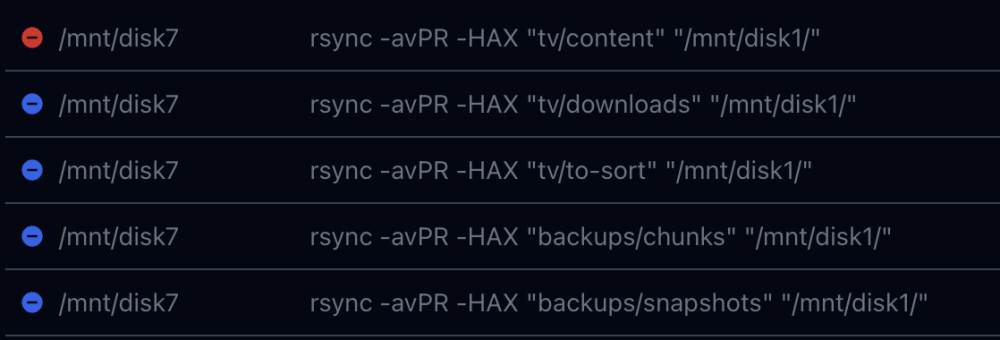
Was this ever resolved? If I move my data between disks manually, my hard links are fine because I am not intentionally splitting out the subfolders. rsync -aHAXvP --info=progress2 /mnt/disk7/ /mnt/disk3 However, trying something similar in Unbalanced splits all of the top level share folders into separate transfers, thus breaking hard links that all existing with disk7, for example, but are in separate subfolders (tv vs downloads). I'd like to opt out of the -R command and run these transfers at the /diskX folder level instead of one level down. Is that possible? Thank you.
-
Apropos of nothing (as far as I know), my Parity 2 disk had a big red X and was disabled a day or two ago. I ran the short, and the long SMART tests and both completed without error, so as far as I know the disk is okay? How can I reenable the disk? Attaching diagnostics. Not sure how to attach the SMART log. Thanks. Edit: Found this - https://docs.unraid.net/unraid-os/manual/storage-management/#rebuilding-a-drive-onto-itself Working through that now. rick-diagnostics-20240328-2043.zip
-
Just wanted to surface this up as I also prefer it to fdupes. Any chance we could get it added?
-
Hello, I raised a question about the survivability of NFS exported exclusive shares upon reboot here - https://forums.unraid.net/topic/158140-exclusive-mode-deactivating-on-reboot-wnfs-sharing/ NFSv3 appears to work just fine for exporting exclusive shares after the array has been started up. I was wondering why this is not officially supported or if it could be made to be supported at array start? Is there a known issue with this? The moderators in my prior thread recommended I tag @limetech Thank you.
-
I'll reach out in the NFS subforum. Thanks!
-
This logically makes sense. I'm not sure I understand *why* this is a limitation, then? There is no problem exporting a symlinked location via NFS?
