





adamfl
Members
-
Joined
-
Last visited
Everything posted by adamfl
-
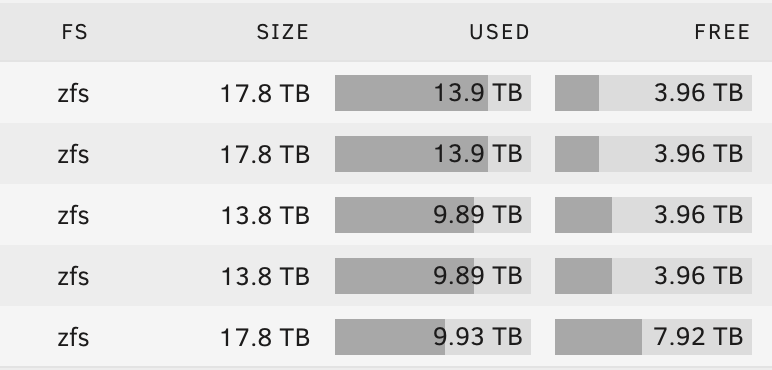
@JorgeB Wow thanks for reproducing, I didn't even catch the 1:2 ratio. Thanks for digging into this. The pattern is continuing as shown.
-
Thanks, I just did that. It almost seems like it is behaving as most free if it were ignoring the fifth disk, though, otherwise it doesn't really make sense to me. Here are the current levels. I just made the change and then back to high water. Is there some kind of advantaged percentage or calculation done where if I'm moving generally larger, multi-GB files, that high-water continues to try and make the other four disks be "equal" if they aren't within 0.05% or something similar? Maybe they keep going back and forth out of "equal" range?
-
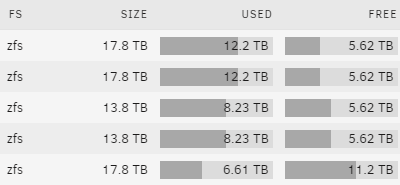
Understood. Does anything in the logs or config indicate why this is happening re: my long-running rsync task? At this point all of the first four disks are down to around 5.78 TB free. Thanks.
-
The share in question is the media share. Whenever I try to blank out the 'minimum free space' to 0, it replaces it with 1.4 TB as 'calculated free space value' so I'm not sure what to do about that. Edit: I dropped a bunch to 100GB in lieu of 0 even though appdata and the other system shares are set to 0, and that seemed to work. Thanks.
-
Attached, thanks! Note that I thought this was an issue due to some split level issues, but even after modifying all of the shares I was writing to or had written to to any level, it continued. rick-diagnostics-20240302-1330.zip
-
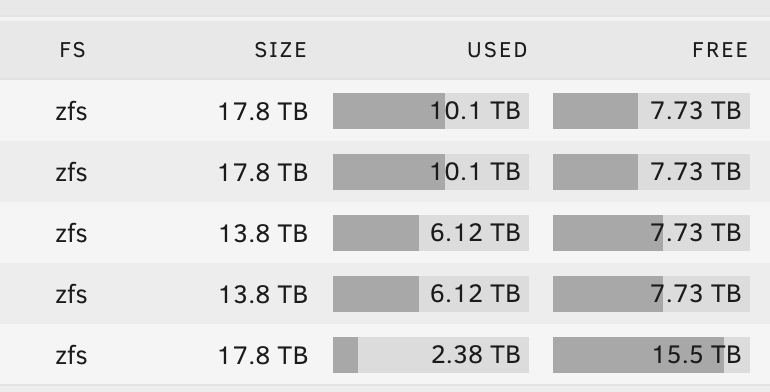
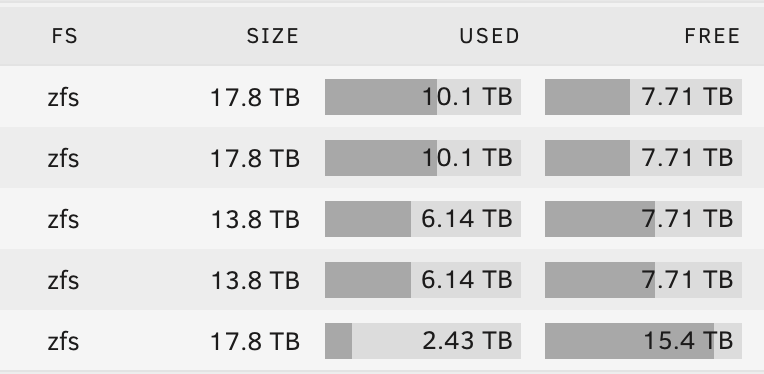
Hello all, I have 3x 18TB disks and 2x 14TB disks in use right now. I'm slowly filling them up with data from an external share. The first disk filled up to about halfway as per my high water settings I'm using for all shares, but now that my fifth disk is starting to feel I've noticed that some additional data is being written to one of the more full disks, let's say going from 8.5 TB available down to 8.48, then the other disks that were at 8.5 will also all go down to 8.48 or so, then finally data starts flowing back to the nearly empty disk. Wouldn't any new data for any share go directly to the nearly empty fifth disk if all of my shares are set to not exclude any drives? I'm trying to understand why high water doesn't seem to be totally followed. Thanks. Attached is an example. Yesterday, the top four disks were all over 8TB free and now they continue to go down. Even earlier this evening they were all around 7.9TB free. Here are screenshots from around 30 minutes apart.
-
I can passthrough with my HBAs, but I think the trick would be only passing through the drives I'm going to offline and degrade from the current array. Thanks again!
-
Thanks @JorgeB. I'll likely just wait then but am looking forward to it. When you say major release, would that be a point release, or Unraid 7? Unfortunately I don't have a spare case and such right now to keep TrueNAS powered on with Unraid elsewhere, unless I were to temporarily Virtualize Unraid on TrueNAS Scale. Is that something people do/recommend, or pretty much a bad idea? I'd likely be doing a hybrid zfs approach within the Unraid array for bitrot detection and lz4 compression. Thanks again.
-
Pretty much the topic. I'm looking to move from TrueNAS Scale by removing a few of my disks and putting my array in a degraded state, using those disks to populate the Unraid array, and start moving data over. Unfortunately, when I run a zpool import storage -f I get the following back: This pool uses the following feature(s) not supported by this system: com.klarasystems:vdev_zaps_v2 cannot import 'storage': unsupported version or feature I'm wondering if there's any recourse for this. I believe vdev_zaps_v2 was added to a more recent version of OpenZFS. Thank you.
