





tescher
Members
-
Joined
-
Last visited
Everything posted by tescher
-
oh Mann.... Wald und Bäume usw..... Danke!!!
-
Hi zusammen. Ich möchte Windows 11 (23H2) virtualisieren, aber Windoof meckert es könne nicht installiert werden... Hier mal die Eckdaten meiner VM-Settings: <?xml version='1.0' encoding='UTF-8'?> <domain type='kvm'> <name>Windows 11</name> <uuid>20df2086-ae35-2004-c729-99a957ed2173</uuid> <description>Win 11</description> <metadata> <vmtemplate xmlns="unraid" name="Windows 11" icon="windows11.png" os="windowstpm"/> </metadata> <memory unit='KiB'>8388608</memory> <currentMemory unit='KiB'>8388608</currentMemory> <memoryBacking> <nosharepages/> </memoryBacking> <vcpu placement='static'>1</vcpu> <cputune> <vcpupin vcpu='0' cpuset='0'/> </cputune> <os> <type arch='x86_64' machine='pc-q35-7.2'>hvm</type> <loader readonly='yes' type='pflash'>/usr/share/qemu/ovmf-x64/OVMF_CODE-pure-efi-tpm.fd</loader> <nvram>/etc/libvirt/qemu/nvram/20df2086-ae35-2004-c729-99a957ed2173_VARS-pure-efi-tpm.fd</nvram> </os> <features> <acpi/> <apic/> <hyperv mode='custom'> <relaxed state='on'/> <vapic state='on'/> <spinlocks state='on' retries='8191'/> <vendor_id state='on' value='none'/> </hyperv> </features> <cpu mode='host-passthrough' check='none' migratable='on'> <topology sockets='1' dies='1' cores='1' threads='1'/> <cache mode='passthrough'/> <feature policy='require' name='topoext'/> </cpu> <clock offset='localtime'> <timer name='hypervclock' present='yes'/> <timer name='hpet' present='no'/> </clock> <on_poweroff>destroy</on_poweroff> <on_reboot>restart</on_reboot> <on_crash>restart</on_crash> <devices> <emulator>/usr/local/sbin/qemu</emulator> <disk type='file' device='disk'> <driver name='qemu' type='raw' cache='writeback'/> <source file='/mnt/user/domains/Windows 11/vdisk1.img'/> <target dev='hdc' bus='virtio'/> <serial>vdisk1</serial> <boot order='1'/> <address type='pci' domain='0x0000' bus='0x05' slot='0x00' function='0x0'/> </disk> <disk type='file' device='cdrom'> <driver name='qemu' type='raw'/> <source file='/mnt/user/isos/Win11_23H2_German_x64.iso'/> <target dev='hda' bus='scsi'/> <readonly/> <boot order='2'/> <address type='drive' controller='0' bus='0' target='0' unit='0'/> </disk> <disk type='file' device='cdrom'> <driver name='qemu' type='raw'/> <source file='/mnt/user/isos/virtio-win-0.1.240.iso'/> <target dev='hdb' bus='scsi'/> <readonly/> <address type='drive' controller='0' bus='0' target='0' unit='1'/> </disk> <controller type='scsi' index='0' model='virtio-scsi'> <address type='pci' domain='0x0000' bus='0x03' slot='0x00' function='0x0'/> </controller> <controller type='pci' index='0' model='pcie-root'/> <controller type='pci' index='1' model='pcie-root-port'> <model name='pcie-root-port'/> <target chassis='1' port='0x10'/> <address type='pci' domain='0x0000' bus='0x00' slot='0x02' function='0x0' multifunction='on'/> </controller> <controller type='pci' index='2' model='pcie-root-port'> <model name='pcie-root-port'/> <target chassis='2' port='0x11'/> <address type='pci' domain='0x0000' bus='0x00' slot='0x02' function='0x1'/> </controller> <controller type='pci' index='3' model='pcie-root-port'> <model name='pcie-root-port'/> <target chassis='3' port='0x12'/> <address type='pci' domain='0x0000' bus='0x00' slot='0x02' function='0x2'/> </controller> <controller type='pci' index='4' model='pcie-root-port'> <model name='pcie-root-port'/> <target chassis='4' port='0x13'/> <address type='pci' domain='0x0000' bus='0x00' slot='0x02' function='0x3'/> </controller> <controller type='pci' index='5' model='pcie-root-port'> <model name='pcie-root-port'/> <target chassis='5' port='0x14'/> <address type='pci' domain='0x0000' bus='0x00' slot='0x02' function='0x4'/> </controller> <controller type='virtio-serial' index='0'> <address type='pci' domain='0x0000' bus='0x02' slot='0x00' function='0x0'/> </controller> <controller type='sata' index='0'> <address type='pci' domain='0x0000' bus='0x00' slot='0x1f' function='0x2'/> </controller> <controller type='usb' index='0' model='ich9-ehci1'> <address type='pci' domain='0x0000' bus='0x00' slot='0x07' function='0x7'/> </controller> <controller type='usb' index='0' model='ich9-uhci1'> <master startport='0'/> <address type='pci' domain='0x0000' bus='0x00' slot='0x07' function='0x0' multifunction='on'/> </controller> <controller type='usb' index='0' model='ich9-uhci2'> <master startport='2'/> <address type='pci' domain='0x0000' bus='0x00' slot='0x07' function='0x1'/> </controller> <controller type='usb' index='0' model='ich9-uhci3'> <master startport='4'/> <address type='pci' domain='0x0000' bus='0x00' slot='0x07' function='0x2'/> </controller> <interface type='bridge'> <mac address='52:54:00:89:49:65'/> <source bridge='br0'/> <model type='virtio-net'/> <address type='pci' domain='0x0000' bus='0x01' slot='0x00' function='0x0'/> </interface> <serial type='pty'> <target type='isa-serial' port='0'> <model name='isa-serial'/> </target> </serial> <console type='pty'> <target type='serial' port='0'/> </console> <channel type='unix'> <target type='virtio' name='org.qemu.guest_agent.0'/> <address type='virtio-serial' controller='0' bus='0' port='1'/> </channel> <input type='tablet' bus='usb'> <address type='usb' bus='0' port='1'/> </input> <input type='mouse' bus='ps2'/> <input type='keyboard' bus='ps2'/> <tpm model='tpm-tis'> <backend type='emulator' version='2.0' persistent_state='yes'/> </tpm> <graphics type='vnc' port='-1' autoport='yes' websocket='-1' listen='0.0.0.0' keymap='de'> <listen type='address' address='0.0.0.0'/> </graphics> <audio id='1' type='none'/> <video> <model type='qxl' ram='65536' vram='65536' vgamem='16384' heads='1' primary='yes'/> <address type='pci' domain='0x0000' bus='0x00' slot='0x01' function='0x0'/> </video> <memballoon model='virtio'> <address type='pci' domain='0x0000' bus='0x04' slot='0x00' function='0x0'/> </memballoon> </devices> </domain> Sieht zufällig jemand mein Problem? Danke & Gruß
-
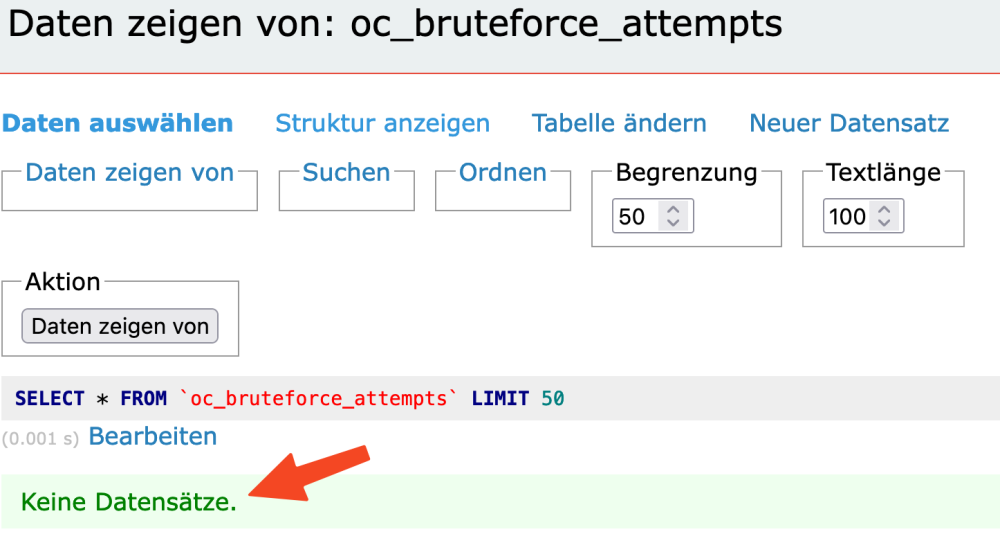
Hallo. In meinem Nextcloud-Setup bekomme ich immer mal folgenden Fehler. Aus der Bruteforce-Tabelle kann ich nichts löschen, da nichts drin ist. Das verwirrt mich etwas. Das Setup läuft mit Traefik, Nextcloud, MariaDB und REDIS - jeweils in eigenen Containern. Hat da jemand ggf. eine Idee?

-
Hi, ich möchte u. a. Wordpress und Nextcloud auf meinem Unraid laufen lassen. Evtl. auch noch mehr Apps, die sql-abhängig sind. Wie würdet ihr das handhaben? Einen MariaDB-Container mit mehreren Datenbanken drin, und ein Container pro App? Danke & Gruß
-
Alles gut. Das hat wohl noch gefehlt... Jetzt rennt's 🙂 - Dankeschön trotzdem
-
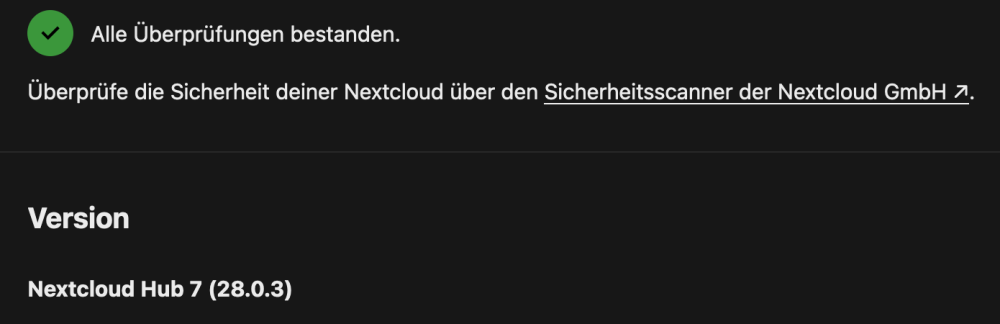
Hier die aktuellen docker run's... Nextcloud: docker run -d --name='Nextcloud' --net='traefik_proxy' -e TZ="Europe/Berlin" -e HOST_OS="Unraid" -e HOST_HOSTNAME="Tower" -e HOST_CONTAINERNAME="Nextcloud" -e 'NEXTCLOUD_URL'='cloud.domain.tld' -e 'REDIS_HOST'='Redis' -e 'REDIS_HOST_PASSWORD'='xxxxxxxx' -l net.unraid.docker.managed=dockerman -l net.unraid.docker.webui='https://cloud.domain.tld' -l net.unraid.docker.icon='https://raw.githubusercontent.com/maschhoff/docker/master/unraid%20xml/nextcloud_logo_square.png' -l 'traefik.enable'='true' -l 'traefik.http.routers.nextcloud.entrypoints'='websecure' -l 'traefik.http.routers.nextcloud.rule'='Host(`cloud.domain.tld`)' -l 'traefik.http.routers.nextcloud.tls'='true' -l 'traefik.http.routers.nextcloud.tls.certresolver'='default' -l 'traefik.http.routers.nextcloud.middlewares'='nextcloud-dav,secHeaders@file' -l 'traefik.http.services.nextcloud.loadbalancer.server.port'='80' -l 'traefik.http.middlewares.nextcloud-dav.replacepathregex.regex'='^/.well-known/ca(l|rd)dav' -l 'traefik.http.middlewares.nextcloud-dav.replacepathregex.replacement'='/remote.php/dav/' -v '/mnt/user/appdata/nextcloud/html':'/var/www/html':'rw' -v '/mnt/user/appdata/nextcloud/apps':'/var/www/html/custom_apps':'rw' -v '/mnt/user/appdata/nextcloud/config':'/var/www/html/config':'rw' -v '/mnt/user/appdata/nextcloud/data':'/var/www/html/data':'rw' -v '/mnt/user/appdata/redis-session.ini':'/usr/local/etc/php/conf.d/redis-session.ini':'rw' Redis: docker run -d --name='Redis' --net='traefik_proxy' -e TZ="Europe/Berlin" -e HOST_OS="Unraid" -e HOST_HOSTNAME="Tower" -e HOST_CONTAINERNAME="Redis" -l net.unraid.docker.managed=dockerman -l net.unraid.docker.icon='https://raw.githubusercontent.com/juusujanar/unraid-templates/master/img/Redis-logo.png' -p '6379:6379/tcp' -v '/mnt/user/appdata/redis-session.ini':'/usr/local/etc/php/conf.d/redis-session.ini':'rw' 'redis' redis-server --requirepass xxxxxxxx
-
root@Tower:~# docker exec Nextcloud ping 192.168.200.15 OCI runtime exec failed: exec failed: unable to start container process: exec: "ping": executable file not found in $PATH: unknown
-
Port 6379 bei Nextcloud rausgenommen - ohne Erfolg. Ping gibt's im Container nicht...
-
Nuja, ich dachte halt, weil ich schonmal ein ähnliches Problem hatte - aber sei's drum. Hilfe ist ja gerne willkommen. Da ich Unraid-Frischling bin, schließe ich auch einen Fehler meinerseits nicht aus. docker run redisk: docker run -d --name='Redis' --net='traefik_proxy' -e TZ="Europe/Berlin" -e HOST_OS="Unraid" -e HOST_HOSTNAME="Tower" -e HOST_CONTAINERNAME="Redis" -e 'REDIS_HOST_PASSWORD'='xxxxxxx' -l net.unraid.docker.managed=dockerman -l net.unraid.docker.icon='https://raw.githubusercontent.com/juusujanar/unraid-templates/master/img/Redis-logo.png' -p '6379:6379/tcp' -v '/mnt/user/appdata/redis-session.ini':'/usr/local/etc/php/conf.d/redis-session.ini':'rw' 'redis' docker run nextcloud: docker run -d --name='Nextcloud' --net='traefik_proxy' -e TZ="Europe/Berlin" -e HOST_OS="Unraid" -e HOST_HOSTNAME="Tower" -e HOST_CONTAINERNAME="Nextcloud" -e 'NEXTCLOUD_URL'='cloud.domain.tld' -e 'REDIS_HOST'='192.168.200.15' -e 'REDIS_HOST_PASSWORD'='xxxxxxxxx' -e 'REDIS_HOST_PORT'='6379' -l net.unraid.docker.managed=dockerman -l net.unraid.docker.webui='https://cloud.domain.tld' -l net.unraid.docker.icon='https://raw.githubusercontent.com/maschhoff/docker/master/unraid%20xml/nextcloud_logo_square.png' -l 'traefik.enable'='true' -l 'traefik.http.routers.nextcloud.entrypoints'='websecure' -l 'traefik.http.routers.nextcloud.rule'='Host(`cloud.domain.tld`)' -l 'traefik.http.routers.nextcloud.tls'='true' -l 'traefik.http.routers.nextcloud.tls.certresolver'='default' -l 'traefik.http.routers.nextcloud.middlewares'='nextcloud-dav,secHeaders@file' -l 'traefik.http.services.nextcloud.loadbalancer.server.port'='80' -l 'traefik.http.middlewares.nextcloud-dav.replacepathregex.regex'='^/.well-known/ca(l|rd)dav' -l 'traefik.http.middlewares.nextcloud-dav.replacepathregex.replacement'='/remote.php/dav/' -v '/mnt/user/appdata/nextcloud/html':'/var/www/html':'rw' -v '/mnt/user/appdata/nextcloud/apps':'/var/www/html/custom_apps':'rw' -v '/mnt/user/appdata/nextcloud/config':'/var/www/html/config':'rw' -v '/mnt/user/appdata/nextcloud/data':'/var/www/html/data':'rw' -v '/mnt/user/appdata/redis-session.ini':'/usr/local/etc/php/conf.d/redis-session.ini':'rw' --user 99:100 'nextcloud:latest' Mit diesem Setup komme ich von extern auf die Anmeldemaske, aber trotz richtigem Passwort nicht über den Login hinaus. Vielen Dank vorab. Tom
-
Hi, leider kann ich mich nach Aktivierung von REDIS nicht an meiner Nextcloud anmelden. Ich hab gerade keine Idee, wo ich ansetzen könnte. Es ist aber sicherlich ein bekanntes Problem. Ich hatte es mit einer früheren onPrem-Instanz schonmal. Aber zu lange her... Danke & Gruß
-
checke ich später mal - thx erstmal
-
mit yml läuft der auf 'nem anderen Host 1A. Eigentlich sollte ich mit https://domain.tld/dashboard/#/ auf 'ne GUI kommen, was mit dieser Config nicht funzt....
-
Unraid ist auf 8080 und 80443 umgelegt
-
Mahlzeit... da UNRAID noch ein Netzwerk-Display-Problem mit Docker-Compose hat, versuche ich Traefik aus dem App-Store zum Fliegen zu bekommen. Traefik wird als "lauffähig" angezeigt, ich komme jedoch nicht auf's Dashboard. Hier meine Config: docker run -d --name='traefik' --net='traefik_proxy' -e TZ="Europe/Berlin" -e HOST_OS="Unraid" -e HOST_HOSTNAME="Tower" -e HOST_CONTAINERNAME="traefik" -l net.unraid.docker.managed=dockerman -l net.unraid.docker.webui='http://traefik.xxxxx.cc/dashboard/#/' -l net.unraid.docker.icon='https://raw.githubusercontent.com/ibracorp/unraid-templates/master/icons/traefik.png' -l 'traefik.http.routers.api.rule'='Host(`traefik.xxxxx.cc`) && (PathPrefix(`/api`) || PathPrefix(`/dashboard`))"' -l 'traefik.http.routers.api.entryPoints'='websecure' -l 'traefik.http.routers.api.service'='api@internal' -l 'traefik.enable'='true' -l 'traefik.http.middlewares.auth.basicauth.users'='xxxxx:xxxxxxxxxxxxxxxxxxxxxxxxxxxxxxxxxxxxxxxxxxxxx' -l 'traefik.http.routers.traefik.middlewares'='auth@docker' -l 'traefik.http.routers.traefik.tls.certresolver'='default' -p '443:443/tcp' -p '80:80/tcp' -v '/mnt/user/appdata/traefik':'/etc/traefik':'rw' -v '/var/run/docker.sock':'/var/run/docker.sock':'rw' 'traefik:latest' Port 80 und 443 sind im Router offen. Hat noch jemand 'nen Tipp? Dankeschön
-
Is it possible to test this fix? I'm not totally perfect in Github, but it should be possible to swap a file maybe? Thanks
-
I'm using the docker-compose-plugin and have the following problem... Once a stack is using a network, the network will be displayed as the network-id and not as the network-name. Can I fix this?? Thanks a lot
-
Trotzdem dankeschön. Ich hab' auch nochmal im englischen Bereich geschrieben. mal sehen. Gruß
-
Hi all, I'm new to Unraid, but it' s a great product. My question is regarding docker. I have created a custom network with docker network create traefik_proxy I've installed my traefik as a yml (see below). Sadly in the GUI, the network ID is displayed, but not the network name. Can I fix this? this is my stack: --- version: '3.7' services: traefik: image: traefik:v2.11.0 container_name: traefik volumes: - /etc/localtime:/etc/localtime:ro - /etc/timezone:/etc/timezone:ro - /var/run/docker.sock:/var/run/docker.sock - ./config:/etc/traefik labels: - "traefik.enable=true" - "traefik.http.routers.traefik.rule=Host(`traefik.xxxxxxxxx.xx`) && (PathPrefix(`/api`) || PathPrefix(`/dashboard`))" - "traefik.http.routers.traefik.entrypoints=websecure" - "traefik.http.routers.traefik.tls.certresolver=default" - "traefik.http.routers.traefik.service=api@internal" - "traefik.http.routers.traefik.middlewares=auth@docker" - "traefik.http.middlewares.auth.basicauth.users=xxxxxxxxxxxxxxxxxxxxxxxxxxxxxxxxxxxxxxxx" networks: - traefik_proxy # - default ports: - "80:80" - "443:443" restart: always networks: traefik_proxy: name: traefik_proxy external: true


-
Hier mal die yml --- version: '3.7' services: traefik: image: traefik:v2.11.0 container_name: traefik volumes: - /etc/localtime:/etc/localtime:ro - /etc/timezone:/etc/timezone:ro - /var/run/docker.sock:/var/run/docker.sock - ./config:/etc/traefik labels: - "traefik.enable=true" - "traefik.http.routers.traefik.rule=Host(`traefik.domain.tld`) && (PathPrefix(`/api`) || PathPrefix(`/dashboard`))" - "traefik.http.routers.traefik.entrypoints=websecure" - "traefik.http.routers.traefik.tls.certresolver=default" - "traefik.http.routers.traefik.service=api@internal" - "traefik.http.routers.traefik.middlewares=auth@docker" - "traefik.http.middlewares.auth.basicauth.users=xxxxx:$$2y$$05$$C78Q8jK3QxxxxxxxxxxxxxxxxxxxYAPNMjzSgdovDd3v0xdDO" networks: - traefik_proxy ports: - "80:80" - "443:443" restart: always networks: traefik_proxy: external: true
-
schon richtig, das bezieht sich aber nur auf den Container und nicht auf's Netzwerk.
-
Hi, wenn ich einen Docker-Container starte (mit einer eigenes definierten yml-Datei), dann wird mir die Netzwerk-ID 886768e2ef4a1fed873a16f08f162d25c7601e37b9e5701491bdeca4f18d667f anstatt des Namen traefik_proxy angezeigt. Kann ich das irgendwie korrigieren? Vielen Dank & beste Grüße

-
So... Update.... Meine bisherige Ubuntu-Kiste hat 5x 4TB WD-RED im RAID-5 Die Unraid-Kiste hat 5x 4TB Seagate Iron Wolf. Das alte System bleibt erstmal wg. der Daten unangetastet. Die Daten kopiere ich, wenn Unraid fertig läuft. Das RAID habe ich im Unraid aufgelöst und die Platten direkt auf's Mobo gesteckt. Einen SATA hätte ich jetzt noch frei... Wie groß sollte denn der SSD-Cache sein?
-
So... ich hab jetzt mal UNRAID auf der Kiste gestartet... die volle Kapazität wurde erkannt RAID 5 (20TB, 16TB nutzbar). Aber offensichtlich kann UNRAID damit nichts anfangen, oder? Kann ich den LSI9261 in diesen "IT-Mode" setzen? Danke
-
Update... Die Amazone kam gerade und hat 3x Transcend 32GB USB 2.0 gebracht. Link Diese Sticks kann ich mit meinem Dongle auf dem M1 Macbook Pro mit dem Unraid-Tool (auch mit angepasster IP) einwandfrei schreiben.
-
Hoi, Mein Server hat sein System auf 'ner M.2, und das Datengrab auf 'nem RAID 5 mit 5x 4TB HDDs (LSI 9261 RAID Controller). Was sagt Unraid dazu? Ist damit die Basic Lizenz ausgelastet? Danke & Gruß







