




Skip to content
View in the app

A better way to browse. Learn more.

Unraid

A full-screen app on your home screen with push notifications, badges and more.

To install this app on iOS and iPadOS
  1. Tap the Share icon in Safari
  2. Scroll the menu and tap Add to Home Screen.
  3. Tap Add in the top-right corner.
To install this app on Android
  1. Tap the 3-dot menu (⋮) in the top-right corner of the browser.
  2. Tap Add to Home screen or Install app.
  3. Confirm by tapping Install.

tiobane

Members
  • Joined

  • Last visited

  1. Jeb das wars, macht Sinn, da hing mein Hirn... Lieben Dank für die schnelle Hilfe!
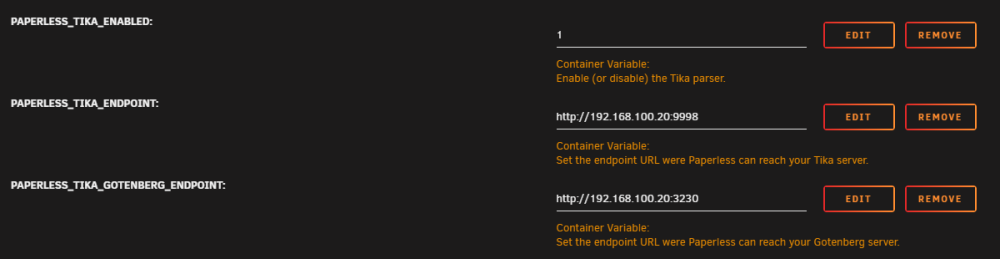
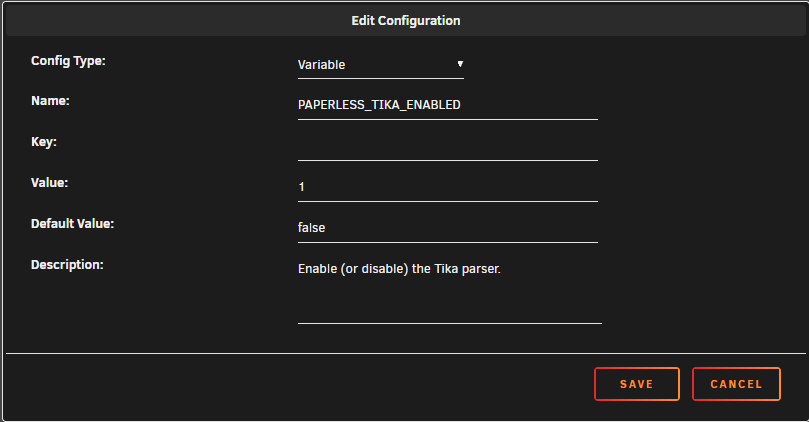
  2. Hallo, bin noch recht unerfahren und habe mir paperless-ngx eingerichtet. Läuft auch soweit, redis hat auch geklappt, habe auch tika und gotenberg am laufen, allerdings scheint paperless da nicht mit zu arbeiten: [2024-02-25 02:23:51,190] [WARNING] [paperless.management.consumer] Not consuming file /usr/src/paperless/consume/Kündigung Rentenversicherung.docx: Unknown file extension. Habe das mal soweit zum container hinzugefügt: Bei der boolean sieht es so aus: Container laufen auch: Wo liegt hier mein Fehler? Würde mich über Hilfe freuen 😃
Account

Navigation

Search

Search

Configure browser push notifications

Chrome (Android)
  1. Tap the lock icon next to the address bar.
  2. Tap Permissions → Notifications.
  3. Adjust your preference.
Chrome (Desktop)
  1. Click the padlock icon in the address bar.
  2. Select Site settings.
  3. Find Notifications and adjust your preference.
