





brad2388
Members
-
Joined
-
Last visited
-
Ok so if i wanted the files to go to the cache first id set the Primary storage to cache and the secondary to Array. Then have mover setup to move them say every 6 hrs? or every day? Im not using this daily. This is only for my NAS.
-
Does everything else look ok as well? As far as the cache drive and where stuff is stored?
-
unraid-diagnostics-20240227-2219.zipHa! sorry bout that!
-
Makes sense! I just ran it. Heres the latest log. unraid-syslog-20240228-0217.zip
-
So to fix this i need to unselect the secondary storage and set to none?
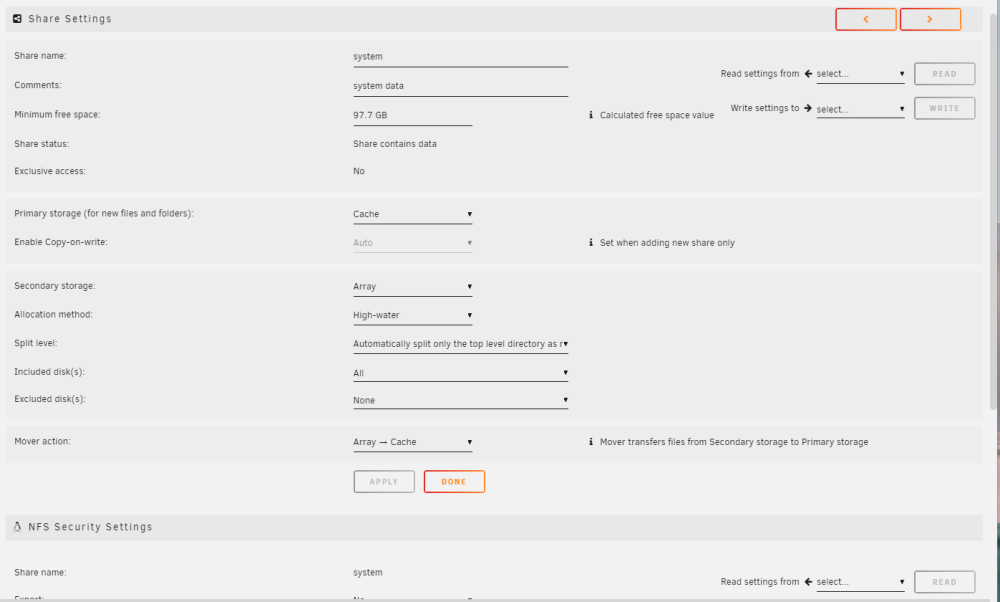
-
Sorry for being a newbie! I have a few docker containers running as well as a few shares. But im noticing the parity and the Disk 1 doesnt spin down. Im not sure i have unraid setup correctly to spin down and need some help. I have attached my diag file to maybe better help. Thanks unraid-diagnostics-20240227-1444.zip
