Hannes55
Members
-
Joined
-
Last visited
-
Thanx a very lot! Now it runs without Error-windows! I am very happy for this fast reaction and solution!
-
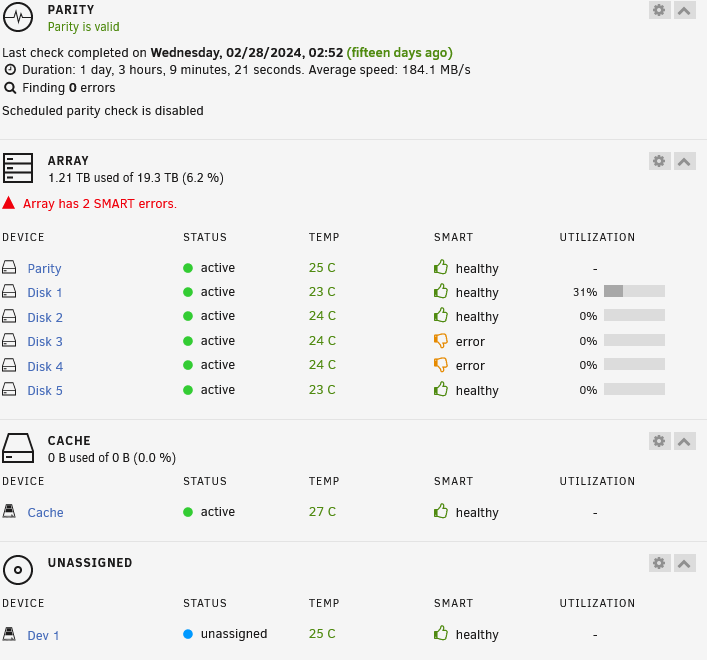
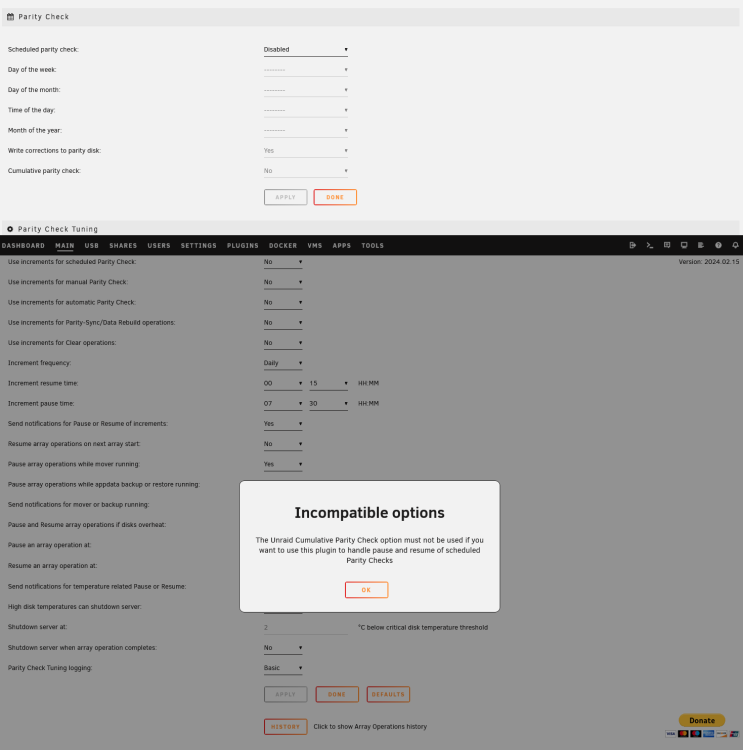
Hi at all, I am very new to Unraid and this Forum, so please forgive me if I have choosen the wrong thread. All runs well with the system but the time needed for parity-check ist very long in my opinion: a little more than 1 day and 3 hours. Therefore I tried to install the "Parity Check Tuning" to split the time of parity checking. Always when trying to start the "Schedule" from Main/Array Operation I got the Message "The Unraid Cumulative Parity Check option must not be used if you want to use this plugin to handle pause and resume of scheduled Parity Checks". So I disabled the "Standard" Parity check but always got the "Incompatible Options" when trying to fill in the options of the tool. My searches here and in Google were not successful. What did I wrong? Could anybody explain the situation and give a little help to get he parity checking run in parts? "Normally" the system sleeps from 1 to 7 o´clock in the night. Sorry for my bad English. And thanx in advance for your help! Hannes jobonas-diagnostics-20240314-1129.zip