





Flænz
Members
-
Joined
-
Last visited
-
Thanks for the help. I will close this thread now and read up on getting everything setup correctly and get notifications.
-
Finally! The array is stopped. I pulled everything apart, cleaned everything with a compressor to get all the old dust out, put it back together again but did not connect the 5-th disk. Somehow I got it started in safemode and now I can set the auto start to no. Thank you for help and your patients with me. I really appreciate it. I was able to add a new parity and it is rebuilding now and I have access to everything again. I will remove the old parity disk when the rebuild is complete. One more question though. If I add a new disk and assign it to disk 4 (the one not installed) will it then be rebuilt from the other disks?
-
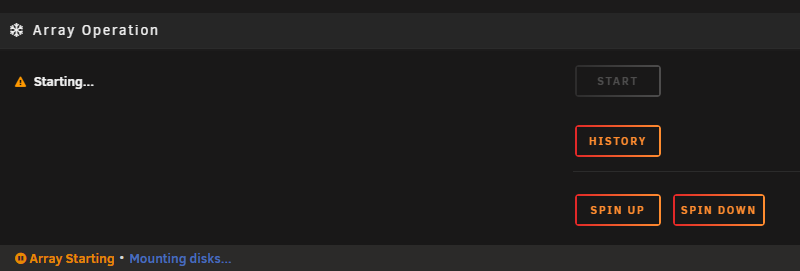
It seems that I cannot do anything as long as the array is "Starting"
-
Ok, then that must be done. I learn from this and in future pay much more attention. It's when things stop working you know what you have lost! It cannot be brought back from the historical devices? Can you describe to me what I have to do next I guess that I can disconnect "Disk 4" which is "not installed" and then use this slot to connect the new parity. I dont have vacant connection otherwise I have a new 4TB disk ready for parity replacement but I have not pluged it in yet
-
The "5th-drive" is actually in the istorical devices syslog.txt

-
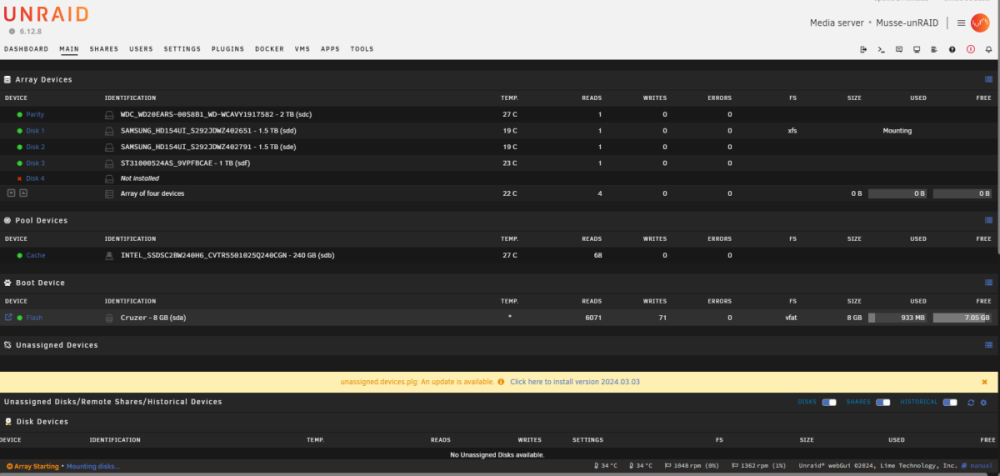
Some years back I did something because one of the disks failed, if i remember correctly. I cant quite remember what I did back then but I fear that the disk is gone and I might have tried to put a new(old) disk in as a replacement. I most likely did something wrong because looking inside the PC there is actually 5 disks connected which is kind of a surprise to me.
-
ok, I like that and thank you for all the help. It seems to me that somehow I cannot do anything as long as it's stuck in this "Array Starting * Mounting disks" Am I missing something?
-
I have tried from 2 different laptops running windows but I am denied access to edit directly in the disk.cfg. I can open the file in textpad but I can't save or overwrite the file. When I issue command "restart" in CLI nothing happens. Should I hard turn-off the server and put the flashdrive directly into the laptop and see if I can edit the disk.cfg file here?
-
Thanks for all the advice. It's 3 years ago I put the system together so in the meantime I have forgotten everything Right now I am just afraid to mees it up and then all the data is gone. Unraid seems a bit unresponsive at the moment. I try to apply no to autostart but the settings does not get saved and when I try to do restart it seems not to excequte the commands. Can I do something in the Terminal to stop the Array autostart and restart the Unraid server?
-
Is it ok to stat the replacement of the disks even they have the SMART errors and the array cannot start at the moment?
-
It's stll running the test and it has been on 90% since saturday noon. Maybe it is stuck. I have recieved new disks so I was thinking to simply just change the parity right away. Is it possible to restart and turn off the "auto mount" of the array and then start replacing the Parity and one of the other faulty disks without completing the SMART test? I would really like to get the server up and running again
-
It's stll running the test and I have already put in a order for new disks, they arrive on monday. I hope the test is ok and then I will start replacing the diske one by one
-
Is the SMART test likely to solve the issue or should I expect to do something else after the test? It's only 10% done so I expect that it will take quite some time to complete the test. Is there anything I can do in the meantime to help solving the issue? The log-file seems stuck in this loop; Mar 1 22:23:50 Musse-unRAID kernel: ata2: EH complete Mar 1 22:23:53 Musse-unRAID kernel: ata2.00: exception Emask 0x0 SAct 0x40000 SErr 0x0 action 0x0 Mar 1 22:23:53 Musse-unRAID kernel: ata2.00: irq_stat 0x40000008 Mar 1 22:23:53 Musse-unRAID kernel: ata2.00: failed command: READ FPDMA QUEUED Mar 1 22:23:53 Musse-unRAID kernel: ata2.00: cmd 60/c0:90:20:ed:66/00:00:57:00:00/40 tag 18 ncq dma 98304 in Mar 1 22:23:53 Musse-unRAID kernel: res 41/40:00:20:ed:66/00:00:57:00:00/40 Emask 0x409 (media error) <F> Mar 1 22:23:53 Musse-unRAID kernel: ata2.00: status: { DRDY ERR } Mar 1 22:23:53 Musse-unRAID kernel: ata2.00: error: { UNC } Mar 1 22:23:53 Musse-unRAID kernel: ata2.00: configured for UDMA/133 Mar 1 22:23:53 Musse-unRAID kernel: sd 2:0:0:0: [sdc] tag#18 UNKNOWN(0x2003) Result: hostbyte=0x00 driverbyte=DRIVER_OK cmd_age=2s Mar 1 22:23:53 Musse-unRAID kernel: sd 2:0:0:0: [sdc] tag#18 Sense Key : 0x3 [current] Mar 1 22:23:53 Musse-unRAID kernel: sd 2:0:0:0: [sdc] tag#18 ASC=0x11 ASCQ=0x4 Mar 1 22:23:53 Musse-unRAID kernel: sd 2:0:0:0: [sdc] tag#18 CDB: opcode=0x28 28 00 57 66 ed 20 00 00 c0 00 Mar 1 22:23:53 Musse-unRAID kernel: I/O error, dev sdc, sector 1466363168 op 0x0:(READ) flags 0x0 phys_seg 24 prio class 2 Mar 1 22:23:53 Musse-unRAID kernel: md: disk0 read error, sector=1466363104 Mar 1 22:23:53 Musse-unRAID kernel: md: disk0 read error, sector=1466363112 Mar 1 22:23:53 Musse-unRAID kernel: md: disk0 read error, sector=1466363120 Mar 1 22:23:53 Musse-unRAID kernel: md: disk0 read error, sector=1466363128 Mar 1 22:23:53 Musse-unRAID kernel: md: disk0 read error, sector=1466363136 Mar 1 22:23:53 Musse-unRAID kernel: md: disk0 read error, sector=1466363144 Mar 1 22:23:53 Musse-unRAID kernel: md: disk0 read error, sector=1466363152 Mar 1 22:23:53 Musse-unRAID kernel: md: disk0 read error, sector=1466363160 Mar 1 22:23:53 Musse-unRAID kernel: md: disk0 read error, sector=1466363168 Mar 1 22:23:53 Musse-unRAID kernel: md: disk0 read error, sector=1466363176 Mar 1 22:23:53 Musse-unRAID kernel: md: disk0 read error, sector=1466363184 Mar 1 22:23:53 Musse-unRAID kernel: md: disk0 read error, sector=1466363192 Mar 1 22:23:53 Musse-unRAID kernel: md: disk0 read error, sector=1466363200 Mar 1 22:23:53 Musse-unRAID kernel: md: disk0 read error, sector=1466363208 Mar 1 22:23:53 Musse-unRAID kernel: md: disk0 read error, sector=1466363216 Mar 1 22:23:53 Musse-unRAID kernel: md: disk0 read error, sector=1466363224 Mar 1 22:23:53 Musse-unRAID kernel: md: disk0 read error, sector=1466363232 Mar 1 22:23:53 Musse-unRAID kernel: md: disk0 read error, sector=1466363240 Mar 1 22:23:53 Musse-unRAID kernel: md: disk0 read error, sector=1466363248 Mar 1 22:23:53 Musse-unRAID kernel: md: disk0 read error, sector=1466363256 Mar 1 22:23:53 Musse-unRAID kernel: md: disk0 read error, sector=1466363264 Mar 1 22:23:53 Musse-unRAID kernel: md: disk0 read error, sector=1466363272 Mar 1 22:23:53 Musse-unRAID kernel: md: disk0 read error, sector=1466363280 Mar 1 22:23:53 Musse-unRAID kernel: md: disk0 read error, sector=1466363288 Mar 1 22:23:53 Musse-unRAID kernel: ata2: EH complete
-
I will take your advice and setup Notifications. When it's just running it's easy to forget about it. I have started a extended SMART self-test right now. Would it be time to get a new set of disks?
-
Hello I am hoping someone can help me get my system up and running again. After updating to 6.12.8 and restarting Unraid I see 3 disks having SMART errors and the mounting disks are stuck so the array is not comming online. I tried to turn off the system and check if some cables had come loose or other evedience of something physical wrong but I could not see anything out of the ordinary. I don't know where to start looking for a solution. I have seen in other posts that the diagnostic file is required so I managed to make one and attach (i hope) Also I dont know if my system had errors prior to the update as I am not monitoring it regulary. It's been running steadily for several years until today. I hope someone can see the issue and point me in the right direction. Thanks in advance musse-unraid-diagnostics-20240301-2126.zip

