Kristopher
Members
-
Joined
-
Last visited
Everything posted by Kristopher
-
Ok, so I was able to get ahold of someone at home and walked them through the removal of the .conf files for wireguard as well as the "autostart" file. Back up and running. Thanks for the insight, folks! Note to self, stop screwing around with stuff like that at work, haha. ME = DUMB.
-
What I mean to say is, I already have a WG VPN server and was just playing around with unRAID's. Fat-fingered an entry and caught it after I hit APPLY. So, basically, I want to remove / disable the unRAID VPN via modifying the flash, if possible.
-
Ok, so if I shutdown, pull the flash and nuke those, it should restore access? Or can I log in from the console (physically) and remove those files? Like I can't get to it from anything...
-
So, like a moron, I made a change remotely to my Wireguard VPN and now I'm locked out of access to my server. Is there a way to disable / delete the VPN via the configs on the flash drive? I feel like an idiot.
-
Brilliant. Thanks for the heads up
-
Apr 7 15:42:18 Angband nginx: 2024/04/07 15:42:18 [crit] 18140#18140: ngx_slab_alloc() failed: no memory Apr 7 15:42:18 Angband nginx: 2024/04/07 15:42:18 [error] 18140#18140: shpool alloc failed Apr 7 15:42:18 Angband nginx: 2024/04/07 15:42:18 [error] 18140#18140: nchan: Out of shared memory while allocating message of size 27711. Increase nchan_max_reserved_memory. Apr 7 15:42:18 Angband nginx: 2024/04/07 15:42:18 [error] 18140#18140: *954255 nchan: error publishing message (HTTP status code 500), client: unix:, server: , request: "POST /pub/devices?buffer_length=1 HTTP/1.1", host: "localhost" Apr 7 15:42:18 Angband nginx: 2024/04/07 15:42:18 [error] 18140#18140: MEMSTORE:00: can't create shared message for channel /devices Diagnostics attached. angband-diagnostics-20240409-1107.zip
-
My USB got blacklisted a long while ago, so I've been stuck on using 6.6.6. Seems like a good opportunity to do it up right with XFS and a new key etc.
-
So, if I buy a new license and key, do I have to do anything to the old disks? Remove the partitions? Or just assign them and format them XFS?
-
Oh yes, I think I may just be better off nuking and starting over with XFS.
-
I'll have to wait until I get home to do that.
-
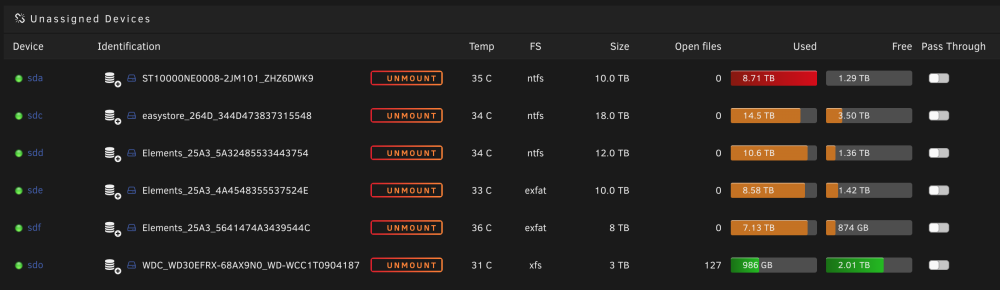
One of the drives showed in Unassigned now: ST4000DM004-2CV104_ZFN0W6JK. /dev/sdae
-
I had shut the array down, pulled the "erroring" drive (15) and put in a replacement, but it then told me "too many bad / missing disks" so I put the old one back in.
-
They don't appear in the unassigned area...
-
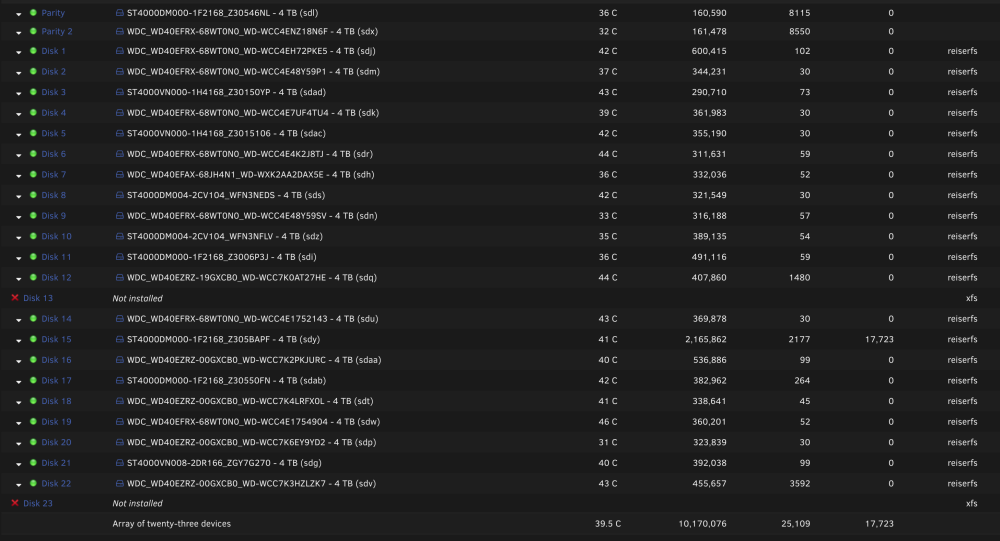
Ack, apologies, I forgot to attach the Diags. Here they are. I still have all the drives, the two are still "installed" and the thrid drive is the one with thousands of errors. If I try to replace that drive, it tells me "too many bad or missing disks". angband-diagnostics-20240307-0943.zip
-
So, I had a dual-parity setup and I had two drives die. At the same time my engine in one car went and the transmission in the other (fun times). I had to allocate the funds to the vehicles and was praying the other disks would hold up. Turns out, one more decided to flip out. Now I'm not sure what to do as I can't seem to "fix" things with three, poopy drives. Is all lost? Seeking some guru advice...