





thefraybeneath
Members
-
Joined
-
Last visited
-
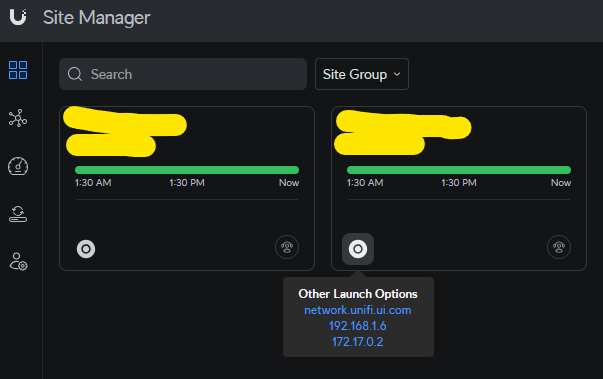
To rephrase, in https://unifi.ui.com/ the site IP is now wrong. The IP there, 192.168.1.6 is from my old Cloudkey, not 192.168.1.245 which is my Unraid server. The status of the site is connected, it sees it but has the wrong local IP. The one on the left is the one that has been there and the one on the right is from adding the site again last night. I can't find a setting to update the 192.168.1.6 address to 192.168.1.245 so that unifi.ui.com picks up the correct setting. Regarding the migration, I did it about a year ago. I can't remember if this has been broken the whole time or just a long time. It was a lower priority and I'm just now getting around to it. Yes I'm running the containers in bridge mode rather than a dedicated IP. I thought at one point that was recommended for this container but I haven't double checked that. The Cloudkey was down before I brought up the container as suggested. The old "site" for the Cloudkey was still in unifi.ui.com and showing as disconnected until I deleted it recently so the container didn't fully take over the identity of the Cloudkey site, unifi.ui.com saw them as separate and knew the Cloudkey was down but could tell that the container was up. From my notes when I did the migration, here are the steps I followed and my reference. Actual migration between controller steps Take a backup with 7 days of the cloud key controller Use the Override Inform Host feature to set all of the devices to the new controller's IP Shutdown the cloud key controller (see below) Start up the new controller and on initial config, upload the backup https://community.ui.com/questions/Migrate-all-devices-and-settings-from-Cloud-Key-Gen-2-to-Network-Console/fe8f469c-5650-4a65-b69e-11fe7d317c21 I did recently have to re-poke my Unifi Gateway with the correct inform address to get it adopted again. The container has recently been upgraded to 9.0.108-unraid As I said, it seems, I need to update a setting somewhere in the config to have the new local IP address so that when I add the site to unifi.ui.com it picks up the unraid server/container address. Hopefully that clears things up as far as what happened and what setting I'm trying to adjust. Thanks.
-
Hello, I migrated from the Cloudkey to the Controller in a container. On https://unifi.ui.com/ I had to add it as a new site and it shows it's online but the Launch Options show the local IP of the old controller. Even if I try adding it again, it still shows the old IP so I can't connect through the Site portal. I haven't been able to find something in the UI that lets me change the IP that the controller reports up to Site Manager and trying to ask Unifi GPT just told m how to change the subnet of all of my equipment. Thanks
