




Skip to content
View in the app

A better way to browse. Learn more.

Unraid

A full-screen app on your home screen with push notifications, badges and more.

To install this app on iOS and iPadOS
  1. Tap the Share icon in Safari
  2. Scroll the menu and tap Add to Home Screen.
  3. Tap Add in the top-right corner.
To install this app on Android
  1. Tap the 3-dot menu (⋮) in the top-right corner of the browser.
  2. Tap Add to Home screen or Install app.
  3. Confirm by tapping Install.

sunsi12138

Members
  • Joined

  • Last visited

  1. quickly stop autostart vm after starting array solved it!
  2. It might be that I share this boot flash disk as usb to my windows vm previously, and after starting vm, it was shared to vm But I dont know how to stop the vm from rebooting now
  3. I have a windows server 2022 vm Start array after shutdown Vms works But after that rebooting Vms cause no flash again here's the newest diagsunsinas-diagnostics-20240311-2258.zip
  4. thanks, here's the diagnostics sunsinas-diagnostics-20240311-2211.zip
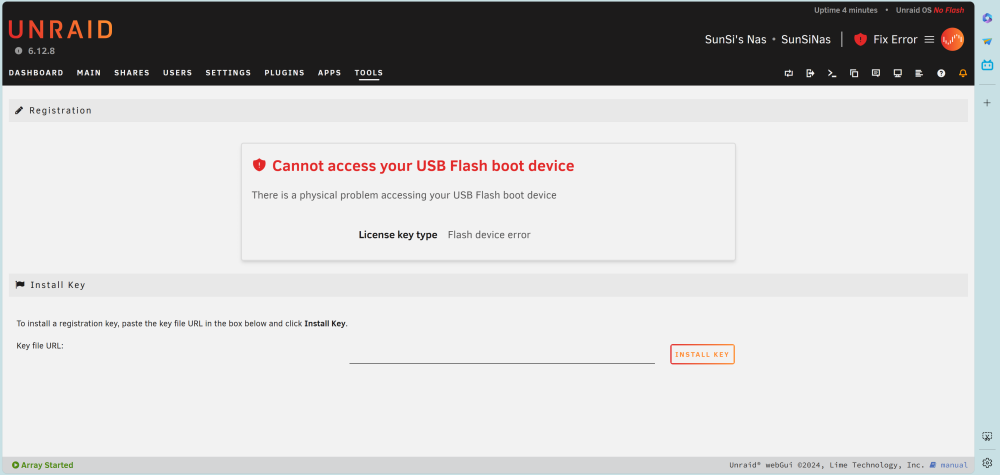
  5. After recovering my license, now every time I start the array will cause error "unraid Cannot access your USB Flash boot device ", unraid will detected no flash, but start in Maintenance mode wont show error, what should I do? please help me
Account

Navigation

Search

Search

Configure browser push notifications

Chrome (Android)
  1. Tap the lock icon next to the address bar.
  2. Tap Permissions → Notifications.
  3. Adjust your preference.
Chrome (Desktop)
  1. Click the padlock icon in the address bar.
  2. Select Site settings.
  3. Find Notifications and adjust your preference.