pugano
Members
-
Joined
-
Last visited
Everything posted by pugano
-
It does thank you for the claification. I noted in my other response I think its a configuration issue on my end with with my plex container. I am going to rip into that now and see if i missed anything. Thanks again for the support.
-
Thats part of the problem I have configured my plex to utilize the but its not talking to the gpu at all. If you are not seing issues here then I more than likly need to look at my plex configuration. I will start poking around. Thanks for clarifying that what I see is normal.
-
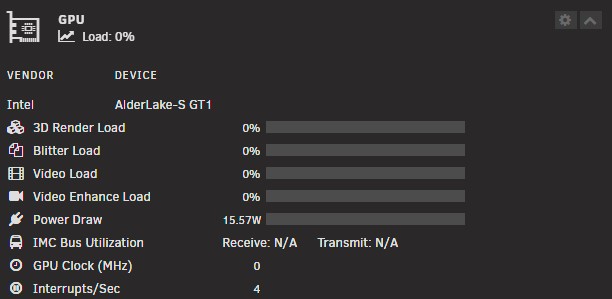
So, relatively new unraid user here. I have gone through almost 45 pages of this discussion, Google, reddit etc. not finding anything that helps. So i'll start with my setup. I5 13500, Gigabyte Aorus b760I Pro DDR4. 64 gig ram, 2 nvme drives as cache ZFS. 4 platter drives XFS. that's it. Bios is configured correctly all settings are as mentioned. When I run root@Unraid-NAS:~# lspci -nn | grep VGA 00:02.0 VGA compatible controller [0300]: Intel Corporation AlderLake-S GT1 [8086:4680] (rev 0c) When I run, intel_gpu_top I get the same thing I see everyone else getting. intel-gpu-top: Intel Alderlake_s (Gen12) @ /dev/dri/card0 - 0/ 0 MHz; 100% RC6; 0.00/13.94 W; 0 irqs/s ENGINES BUSY MI_SEMA MI_WAIT Render/3D 0.00% | | 0% 0% Blitter 0.00% | | 0% 0% Video 0.00% | | 0% 0% VideoEnhance 0.00% | | 0% 0 When I check my video settings in the dashboard I get this nothing in terms of IMC bus utilization. I had to set power draw to package to get anything out of it. So, I just feel lost and don't know what else I should be looking. root@Unraid-NAS:~# timeout -k .500 .400 intel_gpu_top -J -s 250 [ { "period": { "duration": 4.202526, "unit": "ms" }, "frequency": { "requested": 0.000000, "actual": 0.000000, "unit": "MHz" }, "interrupts": { "count": 0.000000, "unit": "irq/s" }, "rc6": { "value": 100.000000, "unit": "%" }, "power": { "GPU": 0.000000, "Package": 26.519811, "unit": "W" }, "engines": { "Render/3D": { "busy": 0.000000, "sema": 0.000000, "wait": 0.000000, "unit": "%" }, "Blitter": { "busy": 0.000000, "sema": 0.000000, "wait": 0.000000, "unit": "%" }, "Video": { "busy": 0.000000, "sema": 0.000000, "wait": 0.000000, "unit": "%" }, "VideoEnhance": { "busy": 0.000000, "sema": 0.000000, "wait": 0.000000, "unit": "%" } }, "clients": { } } { "period": { "duration": 253.728411, "unit": "ms" }, "frequency": { "requested": 0.000000, "actual": 0.000000, "unit": "MHz" }, "interrupts": { "count": 11.823666, "unit": "irq/s" }, "rc6": { "value": 100.000000, "unit": "%" }, "power": { "GPU": 0.003127, "Package": 15.094948, "unit": "W" }, "engines": { "Render/3D": { "busy": 0.000000, "sema": 0.000000, "wait": 0.000000, "unit": "%" }, "Blitter": { "busy": 0.000000, "sema": 0.000000, "wait": 0.000000, "unit": "%" }, "Video": { "busy": 0.000000, "sema": 0.000000, "wait": 0.000000, "unit": "%" }, "VideoEnhance": { "busy": 0.000000, "sema": 0.000000, "wait": 0.000000, "unit": "%" } }, "clients": { } I don't know what else to do or look at. So any help would be great. I know I'm missing something but I have zero idea what I'm missing. Thanks in advanced