





kadrek
Members
-
Joined
-
Last visited
-
Okay, thanks!
-
Good to know, ty! I was reading some of the other posts and it got me wondering, is clicking on a container and clicking stop not a graceful shutdown? Should I be opening the CLI and running "docker container stop/restart <containername>" for graceful restarts/shutdowns?
-
Good to know about the ports not showing as open, ty. I set the fixed IP field to blank and forwarded the ports to my unraid server IP and it works now. Not sure what was wrong with the forwarding to the fixed address. Just wondering, why should validate be left blank?
-
For some reason port forwarding to my server isn't working any more, we haven't used it in probably 3 months. I can connect to the server locally using the 192.168.201 address but people outside my network can't connect, online port checkers also say the ports are closed. When I first checked my port fording rule it was forwarding to 192.168.1.3, not sure why, but I changed it to .201 and it still wouldn't work. Any ideas what might be wrong? I don't know what else to check/test.
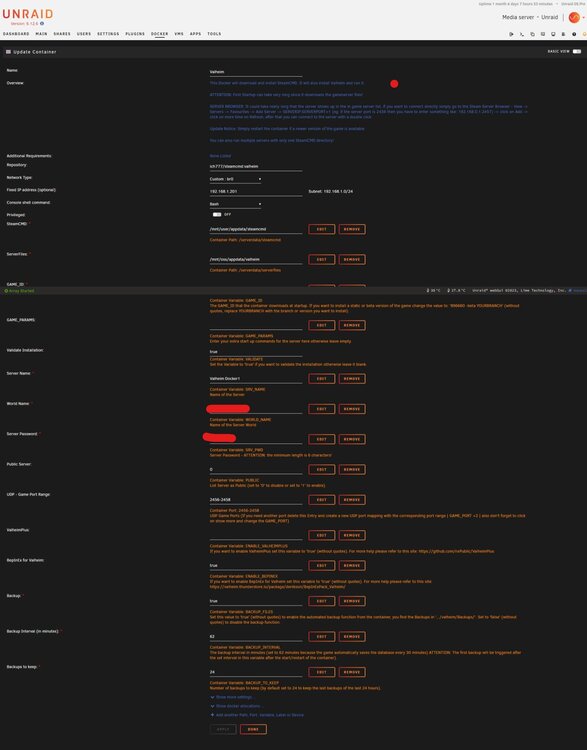
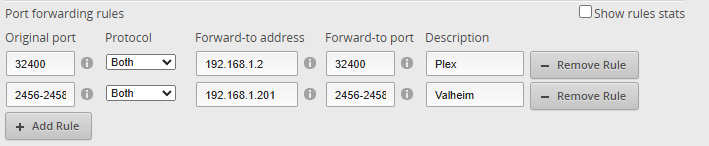
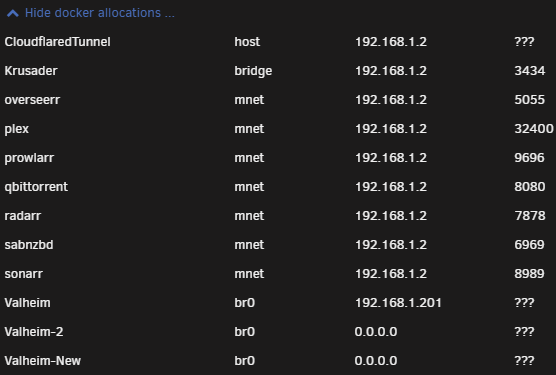
-
That was fast! It works, thanks! Just curious, I found the references to Thunderstore in the start_server.sh and was thinking about editing my start_server.sh with the new Thunderstore link. I noticed my start_server.sh is an extremely small file compared to the start_server.sh on GitHub and the world name and password are not what my server actually uses. Same with the start_server_bepinex.sh file. Which file is the server executing when it starts/which one does it read the world name/pw from?
-
Does the Valheim docker container need to be updated or something? I restarted my container and now I'm getting this when trying to start it. Made another container and it's doing the same thing. Edit: Yeah apparently Thunderstore updated their link structure this morning. @ich777 I believe references to https://valheim.thunderstore.io/api/experimental/package/denikson/BepInExPack_Valheim/ need to be replaced with https://thunderstore.io/api/experimental/package/denikson/BepInExPack_Valheim/, dropping the subdomain.



