




-
Ok after almost two days Parity Sync was successful! Thanks all for the assistance. At least now I have a better understanding of the file/disk config stuff.
-
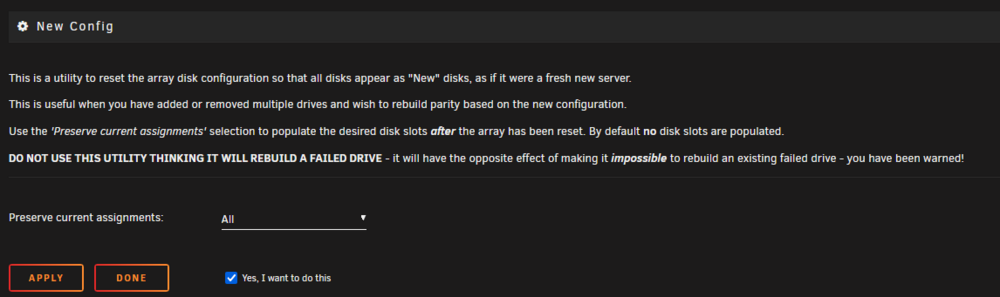
Ok great. New config created and Parity Sync kicked off.
-
Yep, I'll remove it and use it as some offline storage for non critical stuff. I don't trust it as part of the array! With the new config, will the order of disks matter? Obviously I will keep the existing parity drive as parity, my understanding of how the disks are labelled and handled (eg mnt/disk1 etc) is limited.
-
Re: "manually copying what you can to another disk." I have paused the Parity Sync and have started to copy the existing directories from disk 5 (6tb) onto disk 6 (20tb) with krusader. Once this is completed, my understanding is I will need to do the following: Stop the array, unassign both disk 5 and disk 6. Shutdown. Disconnect disk 5 (6tb) completely. Reboot Create a new config with the 20tb drive as disk 5, and start a parity sync.
-
Have paused the sync. Errors still appearing.
-
So I've stopped the array, shutdown completely. I suspected the cable from the HBA card do not like this adapter on drive, so I have replaced it with a right angled SATA cable into my motherboard directly. Then rebooted. I was able to mount the drive in UD and view directories and files. So I've retsarted the array and parity sync, but am still getting errors. I suspect this drive might be on its way out. For now have left parity sync running. ur-diagnostics-new-sata-cable-20250705-0952.zip

-
When I woke up this morning, so I've paused the sync for now. Diags attached. ur-diagnostics-20250705-0910.zip

-
Thank you! Will report back once its done fully. Only 0.1% in and assume these errors are nothing major?

-
Excellent, that appears to have worked and I can mount and view the directories ok in UD as Read Only. So I can unmount, reassign and kick off the parity sync now?
-
I suspect I will need to follow the Space Invaders tutorial below to fix the drive. Bit of a dense question, if I start the array in it's current state in 'Maintenance mode', nothing will be changed? https://www.youtube.com/watch?v=JVjB0ROdLBA
-
I 'unassigned' disk 5, then went to Unassigned Devices, settings, set as 'Read Only'. Then when I hit mount it errors out. Below is from the syslog. Jul 4 19:32:04 omnicorp kernel: XFS (sdc1): Corruption warning: Metadata has LSN (7:6) ahead of current LSN (1:0). Please unmount and run xfs_repair (>= v4.3) to resolve. Jul 4 19:32:04 omnicorp kernel: XFS (sdc1): log mount/recovery failed: error -22 Jul 4 19:32:04 omnicorp kernel: XFS (sdc1): log mount failed Jul 4 19:32:05 omnicorp unassigned.devices: Mount of 'sdc1' failed: 'mount: /mnt/disks/WD-WX21DA8DEZ28: wrong fs type, bad option, bad superblock on /dev/sdc1, missing codepage or helper program, or other error. dmesg(1) may have more information after failed mount system call.' Jul 4 19:32:05 omnicorp unassigned.devices: Partition 'WD-WX21DA8DEZ28' cannot be mounted.
-
Yes, disk 5 (aka 6tb) was the drive that had errors.
-
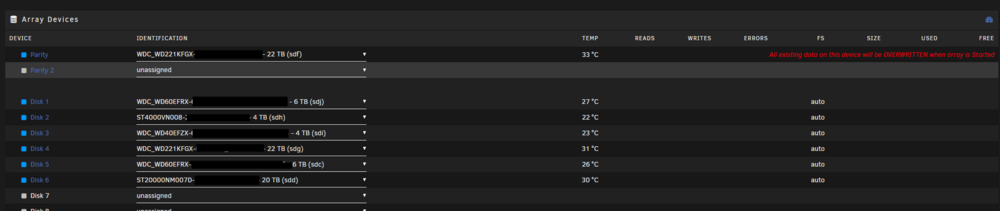
I clicked apply Then drives appear in order, however, it looks like it's suggesting the parity drive will be erased?

-
Yes please. What steps do I need to follow?
-
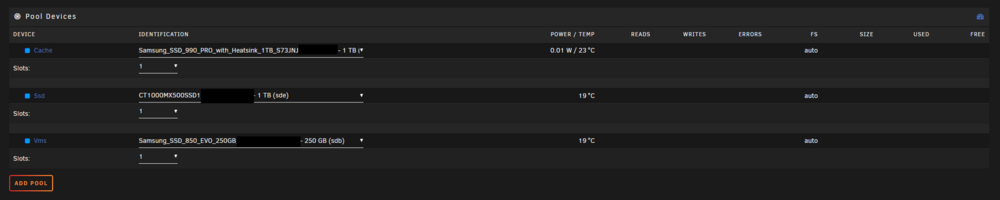
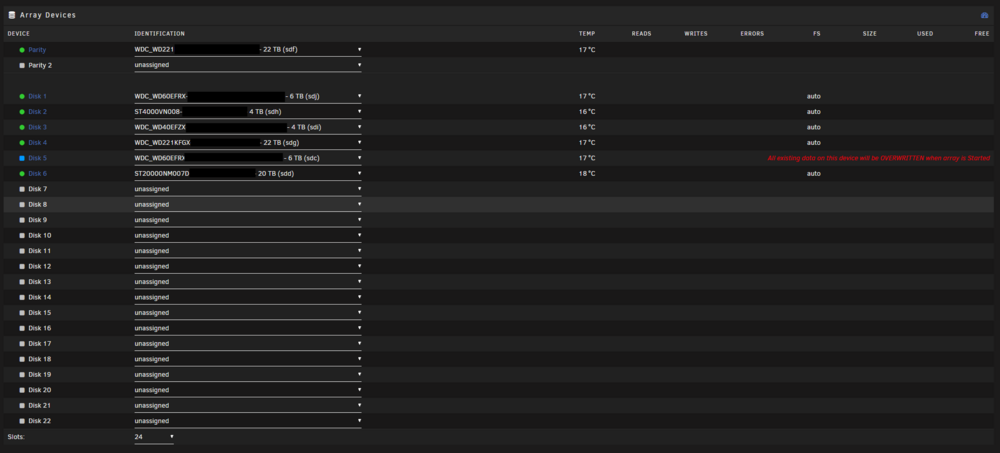
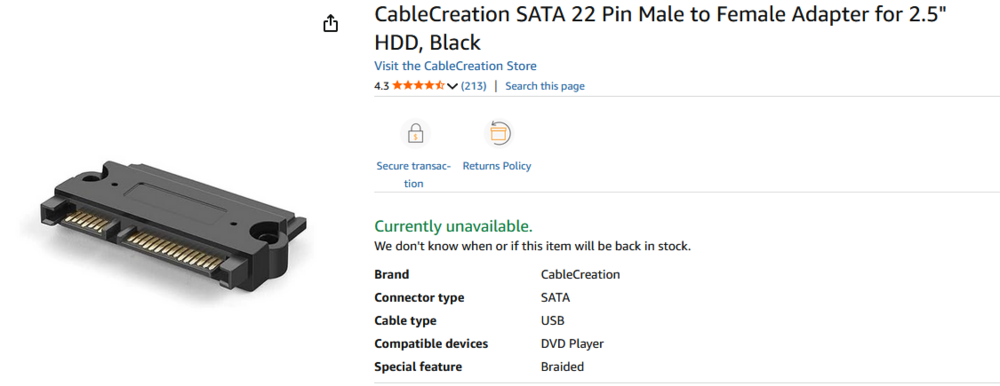
My 6tb drive (disk 5) has had increasing 'UDMA CRC error count' errors/warnings. I suspect this is due to the pins being damaged/stripped as I have an adapter on the drive, image attached. But it has been working ok. This changed when I changed the "Default spin down delay:" from none to 1 hour, as the next morning the drive was not detected. This also occurs during some reboots/power outages. In the meantime I had started to clear and format the 20tb drive (disk 6), I stopped the array placed it in maintaainence mode to re discover the 6tb drive. It did start a data rebuild, but failed pretty quick due to read errros. Instead of rebooting like I normally do to see if the disk would be again picked up, I went into mainatinence mode, removed the 6 tb drive, then tried to replace it with the 22tb drive in disk 6. However, I couldn't start the array to do incorrect config, it did try a rebuild and this is when I decided to create a new config. While waiting for my post to be approved, I got the usb drive and renamed 'super.dat' to super1.dat and then changed super.old into super.dat. As per the screenshot, it appears to have assigned the drives as they were, with "All existing data on this device will be OVERWRITTEN when array is Started" next to disk 5 (6tb) and the message "Start will start Parity-Sync and/or Data-Rebuild." near the start array prompt. I'm concerned the FS is picking up as 'auto'. NOTE: Diagnostics dump has been taken after I renamed super.old into super.dat and rebooted. I then powered the system down last night. Screens after booting this morning : ur-diagnostics-20250703-1939.zip


View in the app
A better way to browse. Learn more.



