





wes2406
Members
-
Joined
-
Last visited
Everything posted by wes2406
-
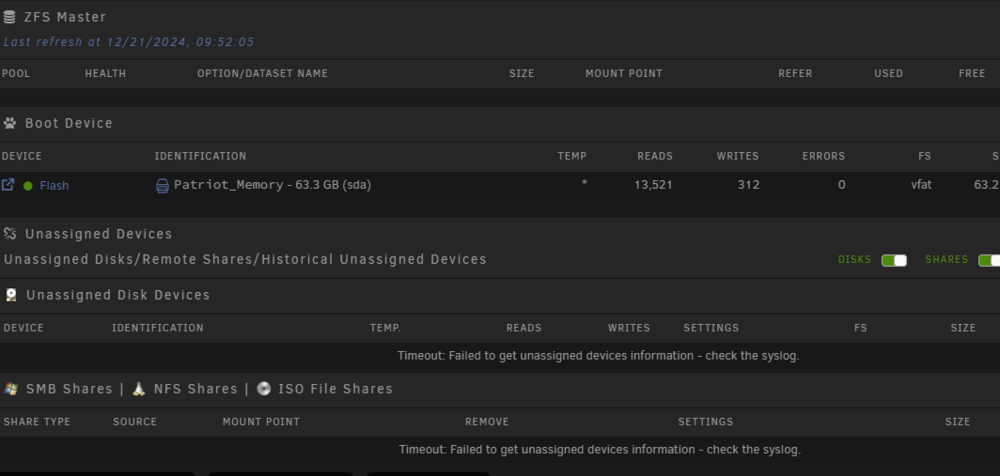
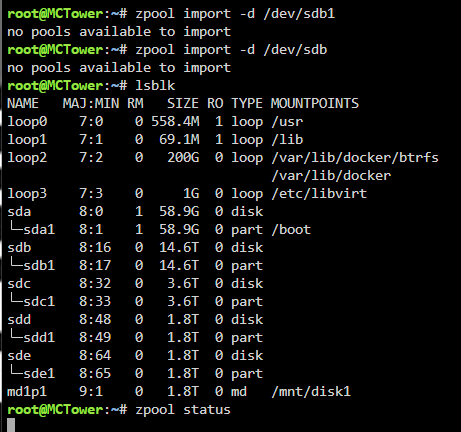
When trying to mount the drive will not find it. I have tried commands below. When i use the zpool command it freezes and kills the ui plugins for assigned and zfs. I have to reboot to get it to come back
-
@JorgeB So when i try to perform any zpool/zfs list command it does not list the pool or share. Not able to mount or import it. I did try to mount read only still not able to. zpool import -o readonly=on Plex
-
So i decided to upgrade to Beta 4 and looks like it partial worked with getting the array to start but one of the deivces will not mount. If i try to mount it crashed the Unassigned disks. syslog.txt

-
I upgraded my system to Unraid 7.0.0-rc.1 had issues with my array starting. It is stuck at starting. I have tried to downgrade the system but problem has carried over to down grade Beta 3. i can restart in safe mode and array will start. I have tried to check tail -f syslogs nothing there. i have checked the disk logs nothing, zfs list or zpool list commands just frozen. Rebooted system and gui still same thing. Any help would be greatly appreciated.
-
The RC 7.0.0 Beta 3 did fix my issue with the gpu. month ago.
-
So the vm i went in to add another vdisk to the vm. I shut down the vm and clicked edit settings and plus sign to add another vdisk and gave it the size and crashed. The vm disappeared from the vm tab. So i went to recreate the vm with added the vdisks back and setup just like the other with same gpu and vbios i used and i cannot get the gpu to pass through. I can boot the vm with vnc but as soon as i try to use the gpu it will not work. Here is the diagnostic logs. I belive this happened on 9/19 or early 9/20. I have a feeling the logs are gone or did not log. I am not sure i was on 6.12.10 and created the vm with xml settings following the Space Invaders video on YouTube by adding the mulit function and have been using for a very long time. I did upgrade to 7.0.0 Beta.2 for months and have no issues with it . I am trying to use Nvidia 1050TI. Let me know if you need more details or different logs. mctower-diagnostics-20240923-2007.zip
-
I upgraded and have been running 7.0.0-beta.2 for a while. My vm has been working fine with out any issues. I went to expand my vdisk and when i did it crashed the vm and template/settings were removed. i tried to create new settings and adding the existing vdisk and vm will boot in vnc mode. I tried to use the same vbios that i was using but now will not pass through the gpu. I am running Blue Iris in vm and need to pass the gpu through. Any support or advice would be greatly appreciated.

