





Egnerdata
Members
-
Joined
-
Last visited
-
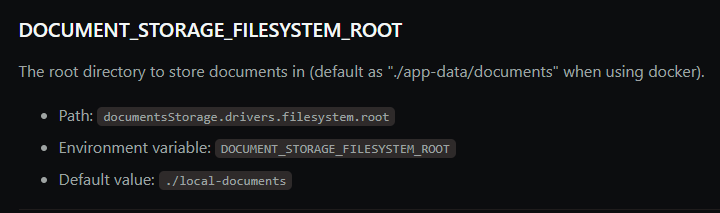
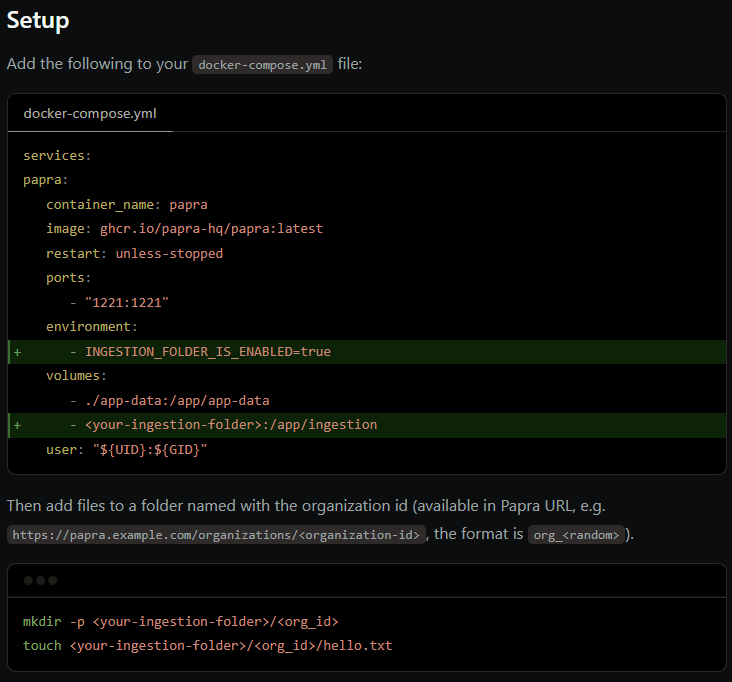
Thats good, then it works as expected. As this screen-shot shows it will create a documents folder automatically as mentioned earlier: This template for Unraid reflects the basic docker-compose install documented in Papra's docs. If you want the documents somewhere else you need to map the new location into the container and add the environment variable as described in the screenshot above. Here is the basics on how to set-up ingestion: I haven't tried this myself, but seems to be map another volume into container and add the environment variable.
-
Hi, thanks for pointing that out. Its awhile now since I made that template but I believe I took the screenshot and then realized later it will automatically create the folder structure it needs on its own with a documents folder inside the papra folder. It was tested properly before posting so I am quite sure I just forgot to update the screen-shot. Is it possible for you to confirm you get the documents folder inside the papra folder automatically? If not I will look more into it. *updated screenshot
-
Egnerdata changed their profile photo
-
Unraid Docker Template for PapraThis repository contains a custom Community Applications template for running Papra on Unraid. Unraid docker template Papra GitHub Template DetailsDocker Image: ghcr.io/papra-hq/papra:latest WebUI: http://[IP]:[PORT] Persistent Data: /mnt/user/appdata/papra Ports: 1221 (configurable) PUID / PGID: 99 / 100 (default, configurable) InstallationManual installationCopy the Papra.xml template into your Unraid templates-user folder: /boot/config/plugins/dockerMan/templates-user/ In the Unraid web UI, go to the Docker tab, click Add Container, and select Papra from the drop-down list. Adjust settings such as App Base URL, port, and storage paths if needed. Installation via Community Applications (recommended)Once/if the template is accepted into CA, you can install Papra directly from Community Applications. Screenshots NotesYou can use a local IP or a reverse proxy / domain name for the App Base URL. The template includes an icon and default configuration suitable for most setups. LicenseSee Papra’s repository for licensing information.
-
Thank you both! Its my own mistake for not reading up enough on this. Short plain answer for others who might have the same idea I had.. when using the array you have paritiy drive(s). SSD`s does not work well with that and should be avoided. New plan is to use the 2x Samsung SATA SSD`s as pool devices either mirrored or by themselves. Not decided yet. Use the 500 GB NVMe drive also as a pool device but working as a cache for 2x 2.5 inch 5400 RPM 1 TB wd spinning drives. Those should be low power usage and silent. I assume they will sleep most of the time apart from when the mover is working and if I access data on them. Got plenty of new drives like that from new customer laptop`s I have sold that got replaced with SSD`s a couple years back. This setup should give me the "full" Unraid experience to test out things in a reliable way and I expand on it as I see fit. Not sure if I should use ZFS or BTRFS on the pool devices though, I read in forums that some went back to BTRFS from ZFS after some issues. I also read some use ZFS on one drive in array to get access to snapshots. Any big mistakes in this setup or does this seem ok?
-
Hi everyone, I bought a license this spring before the sub. model was released and I am about to put it to use. I dont need loads of hd-space and I dont need insane speeds either. I plan to use 2.5gbit network. More important for me that its silent and dont use alot of energy to run. Its a ASRock N100 system with 32GB of memory. To start with I have 2x 1TB Samsung Sata SSD`s and 1x 500GB NVMe drive. It will be used for Home Assistant VM or run it in docker, other docker containers, some general storage and to learn more about Unraid. My question is.. Opt. 1 Should I use 1 SSD as parity, 1 SSD as pool drive and the 500GB as cache drive This would make it very flexible the way I understand things with Unraid so far and lets me add drives to the pool as I please with different sizes below 1TB ofc. I can also format the pool drive as ZFS and get access to snapshots or add another drive later for that. But is there any point of having a cache drive with this setup... the two things I can think of is less wear on the pool and parity drive + future proofing in case I add spinning drives later or is it other benefits of adding cache drive? Opt. 2 Should I use 1 SSD as parity and the other two as pool drives and skip the cache since they are all SSD`s? I am aware that I could run the 2 SSD`s in ZFS, but I dont feel like I need that and I lose alot of flexibility. Maybe there is another obvious setup I dont know about or didnt think of.. Any feedback on this would be great. Thank you. Unraid version would be latest release version.

