drosera
Members
-
Joined
-
Last visited
-
Somehow the instructions from https://docs.unraid.net/unraid-os/manual/shares/user-shares/#moving-files-from-the-array-to-a-pool-cache didn't work. I therefore stopped containers and VMs and rebuilt `docker.img` according to https://docs.unraid.net/unraid-os/manual/docker-management/#re-create-the-docker-image-file and rebuilt `libvirt.img` by following the instructions on
-
Thanks a lot. I had seen this page, but misunderstood it on first reading 😞. Rereading helped and the migration worked...except for the `system` share. Even after having stopped the Docker service manually, invoking the mover did not free `/mnt/disk1/system` and `/mnt/pool/system` is still empty. Would it be safe, to move the content manually in the console, followed by an immediate reboot? Or is there a better/official way to move the content? There is not very much content in this share: root@nas:~# tree /mnt/disk1/system/ /mnt/disk1/system/ ├── docker │ └── docker.img └── libvirt └── libvirt.img 3 directories, 2 files root@nas:~#
-
drosera changed their profile photo
-
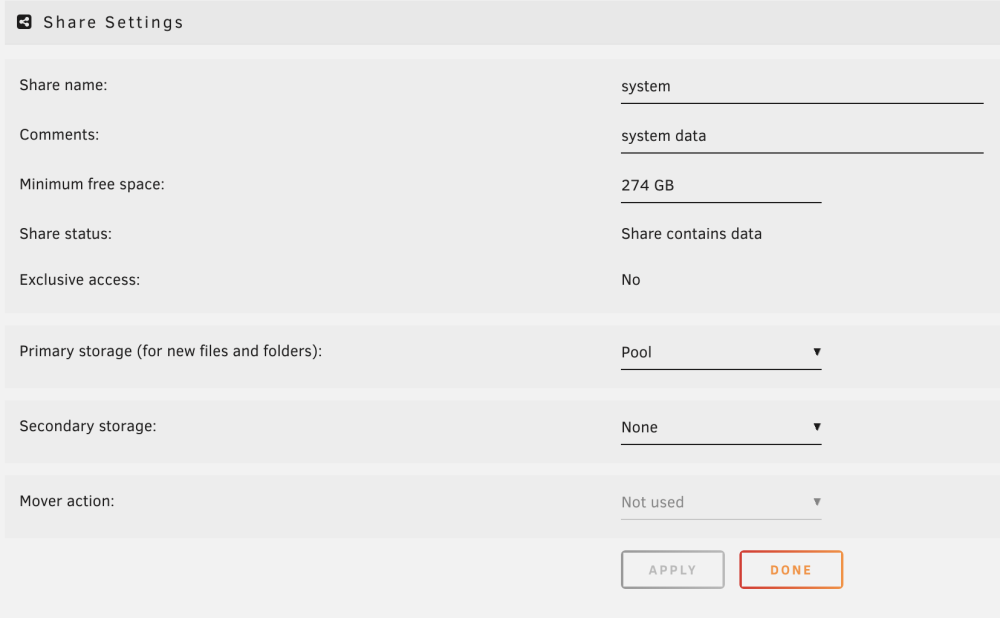
Hi, in my setup, I basically only use the pool ( 4 drives, raidz) to store data and shares, as the system only contains SSDs (trim!) and one NVMe (my "array"). My main data shares and the system shares "system", "appdata" and "domains" have been configured to be stored in the pool. Even though the settings look ok to me (see the "system" share as an example): These shares show a warning "Some or all files unprotected": and when I look in the filesystem, for some of these shares, there are no appropriate directories in the pool (`/mnt/pool`), but only in the array (`/mnt/disk1`): root@nas:~# ls /mnt/disk1/ appdata/ domains/ isos/ media/ system/ root@nas:~# ls /mnt/pool/ TM/ Videos/ appdata/ emby/ root@nas:~# "appdata" on the other hand appears in the pool and in the array: I am grateful for any hint on where I did the configuration wrong or why the dashboard is not consistent with the filesystem. The goal woule be, to move these shares completely to the pool and not use the array at all, unless for data, which is uncritical and can easily be replaced (ISO images ecc.)