Skip to content
View in the app

A better way to browse. Learn more.

Unraid

A full-screen app on your home screen with push notifications, badges and more.

To install this app on iOS and iPadOS
  1. Tap the Share icon in Safari
  2. Scroll the menu and tap Add to Home Screen.
  3. Tap Add in the top-right corner.
To install this app on Android
  1. Tap the 3-dot menu (⋮) in the top-right corner of the browser.
  2. Tap Add to Home screen or Install app.
  3. Confirm by tapping Install.

Biber

Members
  • Joined

  • Last visited

  1. Also erstmal vielen Dank. Ich habe jetzt alle Datenträger und den USB formatiert. Mit der USB Flash Creator-App erstelle ich jetzt einen leeren "unraid - Server". Melde mich wieder, wenn die "Paperless-ngx"-App neu installiert ist.
  2. es hat sich mit den Empfehlungen nichts geändert. - Browswerwechsel - "https...." - "docker exec -it paperless-ngx bash ... sh
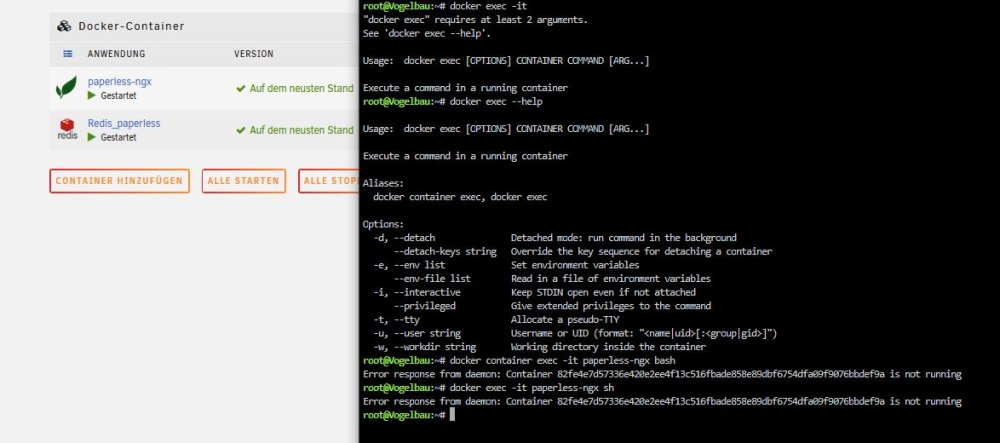
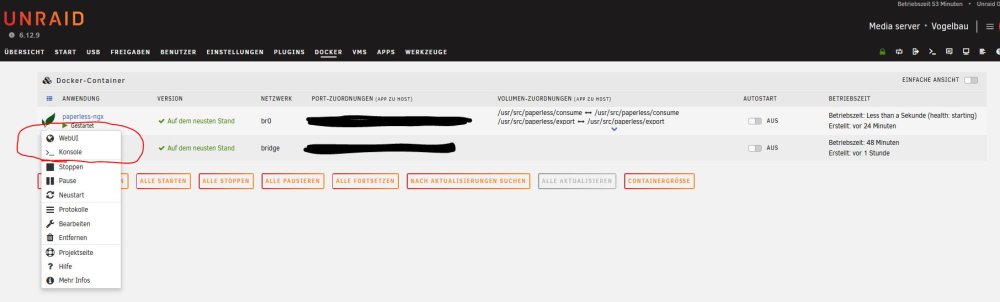
  3. Hallo, nachdem ich Paperless-ngx aufgesetzt habe (lief alles ohne Fehlermeldung) möchte ich die "python manage.py createsuperuser" im Logterminal eingeben. Das geht aber nicht. Das Browserfenster öffnet zwar "https//[IP-.....]/logterminal/paperless-ngx/", wird dann aber gleich wieder geschlossen. Stimmt meine Einrichtung nicht?
Account

Navigation

Search

Search

Configure browser push notifications

Chrome (Android)
  1. Tap the lock icon next to the address bar.
  2. Tap Permissions → Notifications.
  3. Adjust your preference.
Chrome (Desktop)
  1. Click the padlock icon in the address bar.
  2. Select Site settings.
  3. Find Notifications and adjust your preference.