YaSo
Members
-
Joined
-
Last visited
Everything posted by YaSo
-
Yep, copying from my 16tb to the 24tb now, with the 20tb parity left alone. Thanks.
-
(edit) When looking for information after posting, I found this video (https://youtu.be/NM5phUqZxyE?si=y0TeZHc7L5NEso3Y&t=242) where it describes the procedure as @Gragorg posted. However, I have a 20tb and a 16tb parity. Does it matter which Parity drive I swap? (aside from longer times to copy) Thanks! (EDIT again) I can't seem to be able to use the 20tb as data yet, have to keep it as parity along with the new 24tb, and move the 16tb parity drive to data. Copying, fingers crossed...
-
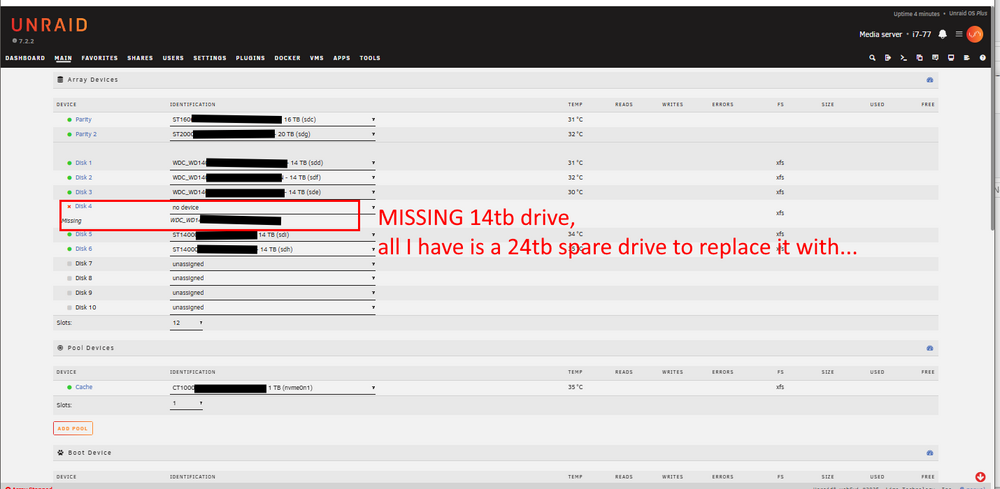
My server has 6x 14tb drives for data, and a 16tb and a 20tb drive for dual parity. I shucked and installed a 24tb drive that I WAS going to use as a new parity drive, and thenuse the 20tb for a 7th data drive. UNTIL one of my 6x 14tb drives went 'missing' after rebooting the server. Swapping cables around did not help. So, can I use my 24tb drive as a replacement for the missing (presumed dead) 14tb drive, to rebuild my server? If so, how do I do this? Thanks in advance!
-
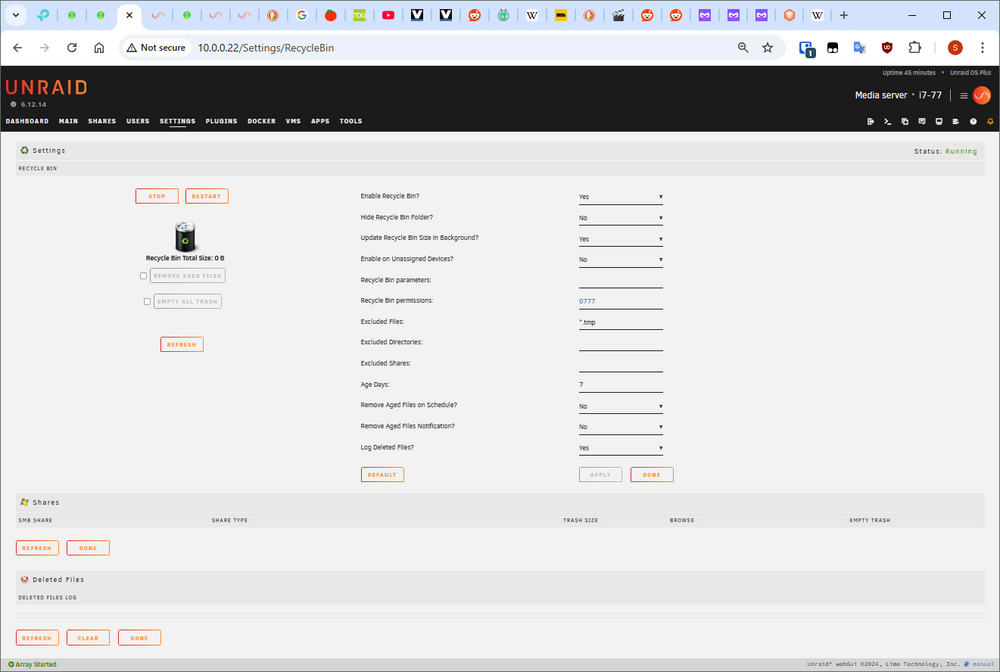
Thanks, I will look it up, though I have read differing things about how it is for advanced users, which I am definitely NOT one. If someone can get that working in Unraid (with an 'Unraid package'?) and post instructions for future novices, that would be great. On a side note, Ugh. I was going to use the Recycle Bin in Unraid -> Settings a long time ago, but when I didn't see my shares show up in the 'Shares' section after turning it on and clicking apply, I thought I did not have my shares set up properly and turned it off. I didn't realize that it only shows something in the 'Shares' section AFTER you have deleted something, not when just turning it on. I hope this bit of knowledge helps someone else coming from Windows who may miss that point.
-
Yeah, I'm an idiot for not testing it way back when I first set up the server. I thought that my shares would show up in the 'Shares' section of the Recycle Bin settings, like they show up in the normal 'Shares' page. When I didn't see my shares show up in Recycle Bin after turning it on, I thought I didn't set my shares up properly and could never figure out how to get them to show there, so i turned the Recycle Bin off. If I had tested it I would have seen that the 'Shares' section of Recycle Bin settings only populates AFTER you have deleted something, not just when you turn the feature on.
-
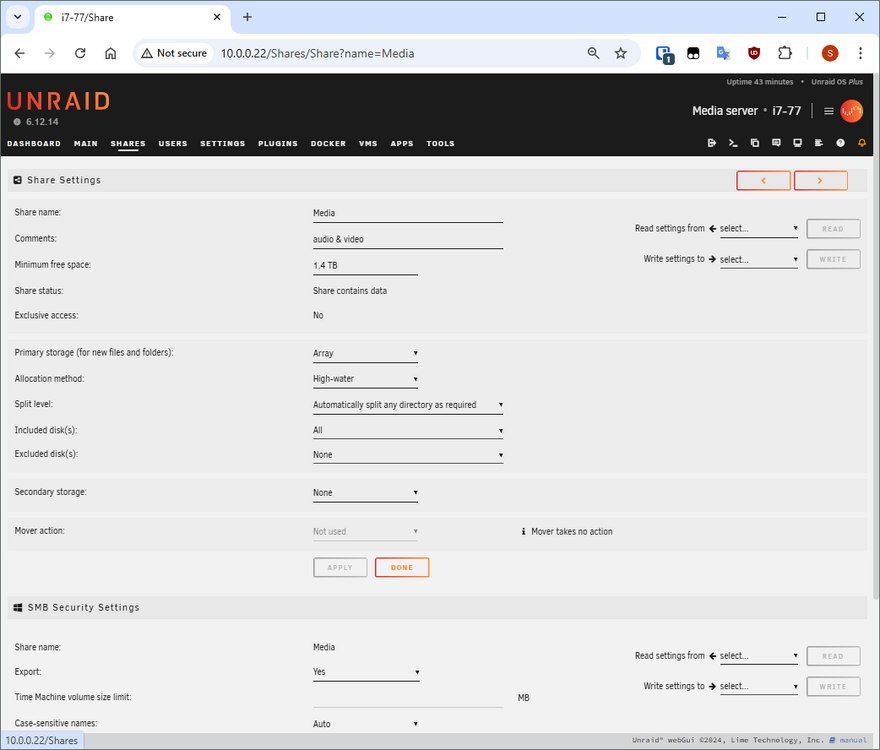
Howdy, not sure why, nothing shows up under 'smb shares' in settings. I can access the server (my 'media' share) from Windows Explorer, am I missing something? Thanks let me know if I should post screenshot of settings page(s).
-
Thanks
-
Howdy! While staying up late waiting for someone to come home, I accidently deleted about 150gb of assorted media I thought I copied to another folder. I shut down the array when I realized what I had done. I stupidly did the same thing a few months back. I think I got help from Discord since I didn't create any posts about deleted files. I was tired and panicky then, (and now too) and cannot remember the process I did to recover them then, except that it was 'complicated for a regular Windows user' (my quotes). But I was able to see the latest files that were deleted and recover them. I don't think it took too long to do, and I'm sure it was free solution. I 'THINK' I recovered them in place and then started the array and saw the recovered files in Windows Explorer. In my searches I found XFS Undelete from this post, XFS_Undelete , seems to be a better way to recover files. but I have no idea how to 'install Nerd Pack' and 'tcllib', which seems to be for advanced users, which i am definitely not one. One person I asked about this suggested I not try installing packages as a Linux novice. Does anyone know of a method that I could use with detailed instructions? If needed I have a spare flashdrive and a spare external drive with plenty of free space on it. Sorry if I'm in the wrong section, my 3rd rewrite before posting, thanks in advance!
-
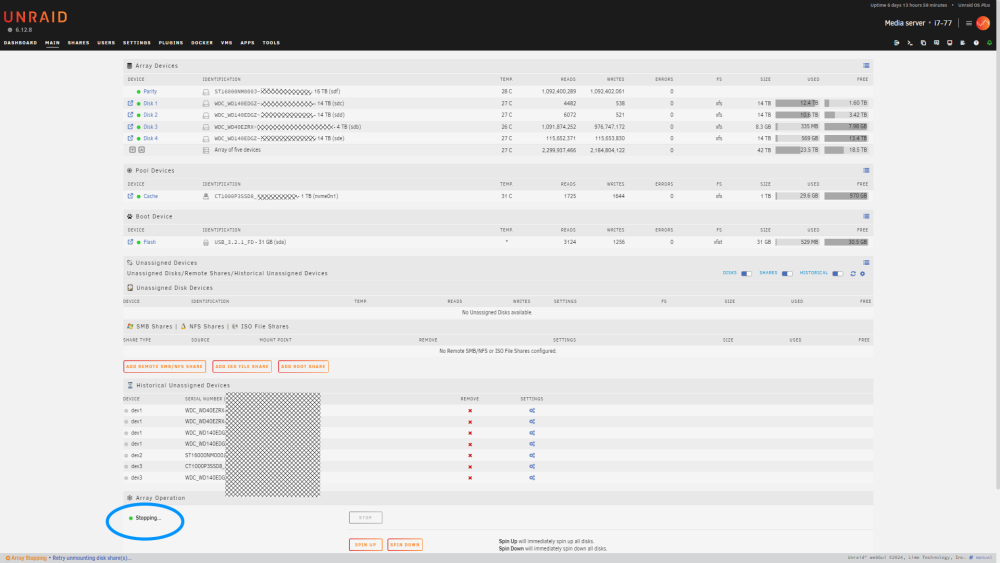
I am shrinking my array to remove a 4 TB drive. I am using the docs for Shrink Array (maintaining parity) after watching SpaceinvaderOne's youtube video on 'How to safely shrink an Uunraid array.) After the script had run, I clicked apply & done in the user scripts app, went to the main GUI page and scrolled down to stop the array, cliked over to the dashboard to see that the array 'play-stop button' showed that the array was stopped. Went to New Config and set it up per docs and video, went back to main page to take out the 4 TB drive and saw the array is still 'stopping' and the stop button is disabled. I waited 45 minutes, it still shows that the array is 'stopping'. Is long a wait to stop the array normal? (see the circled 'stopping' in lower right of page to see what I mean) EDIT: Still 'stopping...' after an hour and a half.
-
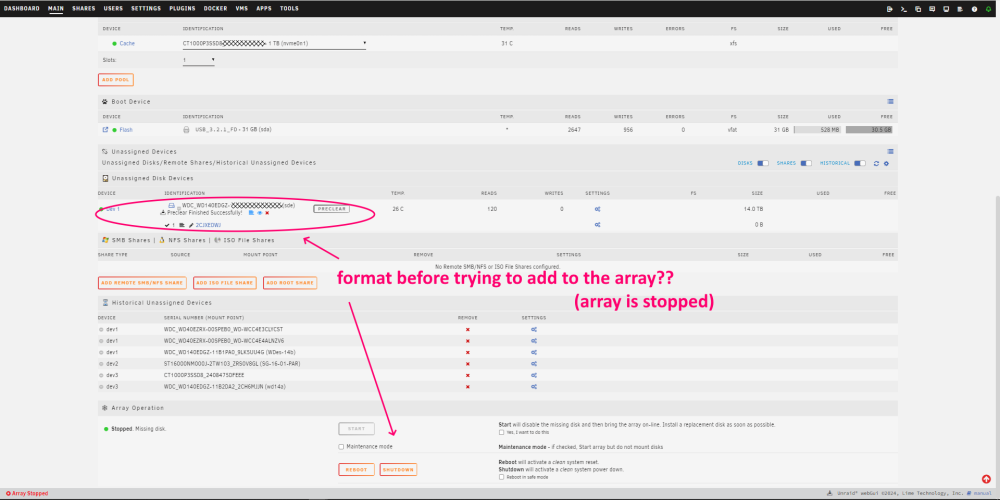
Was too tired from overnight shifts and lack of sleep in the daytime, got it now, thank you so much for your help @JorgeB & @itimpi. I mistakenly thought the format was done automatically or before I started the array for some reason, not that i should format after asdding it to the array and re-starting the array. Added it back in, started the array, saw the format option and the YES checkbox (edit - I thought I posted this two days ago, sorry for the delayed thanks
-
Array is stopped, one drive is in unassigned devices, the one I want, sorry but how do I format this drive? edit: I know I am missing something obvious...
-
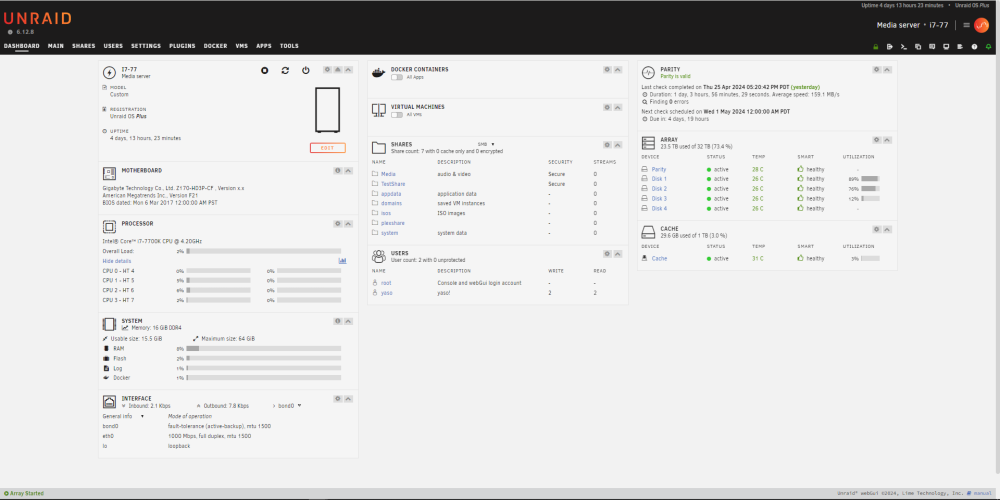
here's my dashboard for what it's worth
-
I didn't notice the format option to format after preclearing this 14 TB (with 0 errors), I may have missed it, but recall only seeing the option to 'preclear' it again. I will triple check format options in the future, though I thought it formats the drive when it adds it to the array? I only recall formatting the first drive. Again, I may have missed it, especially since I am going about a week or more between adding each next drive to the array. Should I run the parity check before touching the 'unmountable' 14 TB drive, or take it out of the array first? I don't want to screw anything up. OK, thanks for clarifying 'Historical'. The only drive that is in the list and not installed is the 'bad' 4TB drive. If I add any 'good' drives and not use them, I'll save them in Historical in case I want to use them again later.
-
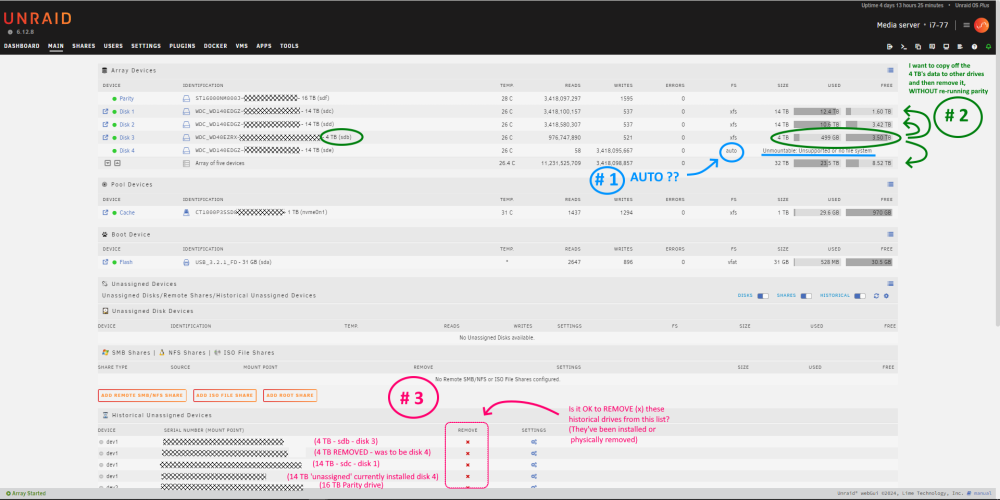
I've been copying data from USB drives (mostly 14 TBs) to the server then shucking and installing them one by one. I had two older 4 TB drives that I wanted to install while this was going on. The first 4 TB went through preclear with no problem and I installed it in the array. The second 4 TB took much, much longer to preclear, stopped the operation and tried to add it to the array as 'disk 4' to see what's up, but it appeared to be a bad drive so I took it back out of the array. Later when another 14 TB was copied off and passed preclear I wanted to add it to the array. Since I was adding it to the spot (disk 4) where the bad 4 TB drive was, I got parity error and had to wait to rebuild parity, even though no data was copied to the old 4 TB. I let the rebuild run for the past day or so, it is now completed. Now I come back to the system and see that the 14 TB is still listed as having 'auto' for the FS and is still unmountable. #1) what steps do I do to add my 14 TB drive so i don't end up having to run a parity rebuild again? #2) FYI, Once it's added, I will be copying data from the first 4 TB drive to the others, plan on using SpaceinvaderOne's YouTube video on 'shrinking an array' doing step 2 (copy off of the drive with unbalanced app while maintaining parity), and using the notes in the first comment to manually modify the script. #3) should I keep the historical drives in the list on the GUI main page? Any reason to keep them there, aside form knowing old drive serial numbers? Thanks in advance!
-
Thanks, had to run out before running the repair, which finished quickly. All SEEMS to be alright, videos in previously missing folders are all back and play on the PC just fine. (docs said the repair could take hours, it took only a minute or less.) Maybe a power outage caused the glitch? I saw the server was at the login screen one day when I came home from work a few days ago, wondered about it. We get power outages here every so often for a few seconds at a time, and I have my main PC and USB drives on a UPS. I'll have to plug the server into that too.
-
I don't know what the check uncovered, if anything. I didn't want to repair if I should take some other steps or other procedures resulting info from the check logs. Is there anything suspicious in the log I don't see before I run repair? Thx. (I probably should have titled this need help understanding 'check' results)
-
After seeing one of my two data drives listed as 'unavailable, no file system'. I shut down the server to check it later this morning. I'm going off of info from the Unraid docs for 'Checking a file system' for xfs drives. I restarted the server, saw no obvious errors, and started the array in maintenance mode, and ran the check file system status. I am not sure what I am looking for in the test log. Could someone look at this and tell me if I should try to repair or do any other operations? Thanks in advance! xfs_repair status: Phase 1 - find and verify superblock... Phase 2 - using internal log - zero log... ALERT: The filesystem has valuable metadata changes in a log which is being ignored because the -n option was used. Expect spurious inconsistencies which may be resolved by first mounting the filesystem to replay the log. - scan filesystem freespace and inode maps... sb_icount 3776, counted 28288 sb_ifree 52, counted 290 sb_fdblocks 3392758777, counted 1374641594 - found root inode chunk Phase 3 - for each AG... - scan (but don't clear) agi unlinked lists... - process known inodes and perform inode discovery... - agno = 0 - agno = 1 - agno = 2 - agno = 3 - agno = 4 - agno = 5 - agno = 6 - agno = 7 - agno = 8 - agno = 9 - agno = 10 - agno = 11 - agno = 12 - process newly discovered inodes... Phase 4 - check for duplicate blocks... - setting up duplicate extent list... - check for inodes claiming duplicate blocks... - agno = 0 - agno = 3 - agno = 7 - agno = 4 - agno = 5 - agno = 6 - agno = 1 - agno = 2 - agno = 8 - agno = 9 - agno = 10 - agno = 11 - agno = 12 No modify flag set, skipping phase 5 Phase 6 - check inode connectivity... - traversing filesystem ... - traversal finished ... - moving disconnected inodes to lost+found ... Phase 7 - verify link counts... No modify flag set, skipping filesystem flush and exiting.
-
I would also like to know how (if possible) to increase the failed attempts, or decrease the wait time, since I only know what SSH does from watching movies and TV.
-
Cool, I'll look up creating SMB shares later, it would be nice to manage my Unraid & Windows files from my laptop in the future. I still need to learn more about Unraid, (what are all of these dockers?) and learn more about getting PlexPass set up with accounts and other stuff. Thanks again for the info!
-
Thanks @jcofer555 , for the clarification, especially on the moving / copying thing, and on the capitals vs Capitals different files & folders thing with Linux. q4: Since I can see the Unraid server across my network from my Windows 10 pro PC, would dynamix or another Unraid file manager be able to see my Windows attched USB drives? Would it be 'better' (faster? safer) in some way to copy data across the local network from Windows USB drives TO the Unraid server FROM within an Unraid file manager, or is doing it from Windows Explorer more or less the same thing? Thanks in advance
-
Longtime Windows user trying to set up Unraid for future PlexPass server use. I am worried that my Windows file management practices will screw up my data with Unraid. (read below) I first set up Unraid (6.12.8) with a 14tb data drive that formatted with 'xfs' after pre-clear, and created a share called 'Media'. I created sub-folders called 'Movies', 'TV', 'Documentaries', etc. for future file copying use. I am manually copying data folders (videos & music) from my the first of several 12-14tb Win-10 connected USB drives to the 'Media' share. I am using Windows Explorer and copying in 200-500gb bunches. I am comparing file byte size in Windows Folder Properties between the two drives before copying the next bunch. When the first drive is copied over, it will be shucked and added to the server, and I'll continue until all drives are copied over. The main reason to set up a server in the first place was to stop having to split up my media across many drives and crazy folder names, like "TV-animated", "TV-Hour", "TV-Half-Hour", "Movies-Franchises-Sequels", Movies-before1970", "Music-Check-Tags", etc. I plan on consolidating / moving around / renaming the folder names after I have everything copied to the server in one 'share', but at first the server 'Media' share will have several TV, Movie and other media folders in it. I'm almost done copying the first drive and wanted to start setting up Plex to try out what I copied, about 12 TB of data out of a total 70 TB or so. when I got confused watching tutorials... Q1) I read that I should 'copy' and not 'move' files to Unraid because file names can be messed up when 'moving' files. I', not sure why 'moving' is bad but that's how I am copying files over. But is there an 'Unraid safe' file manager that won't let me accidently 'move' something that shouldn't not be moved but 'copied' instead? Q2) I can rename and capitalize file and folder names in Windows, but what do I watch out for when managing files and folders with Unraid? Q3) I ran home Plex on my older Windows PC, so I know a little about it. All of the Unraid - Plex tutorials I see mention creating a new 'share' for Plex. Is this right? Shouldn't I point Plex (binhex-plex or the official Plex app) to the existing Unraid 'Media' share, and then go into Plex GUI and there choose the sub-folders to use for Plex? Sorry for the long post, but I want to copy the data correctly before I get too far along and copy, shuck, pre-clear wipe and install them.
-
Thanks @itimpi for the clarification. When I get home from work I'll install the plugin and work from there, or maybe it'll be done 'parity-ing' by then, heh heh.
-
Is it alright to stop the array in mid 'parity work' and then use the Tuning plugin you mentioned? And do you know if it will do this parity check each time I add a drive? Also, is it alright to copy data to the data drive while the parity check is running? (It sounds like I can copy data while it's running, but I am posting then reading the link cuz I'm paranoid and scared of damaging the drives) thanks EDIT: I just read through the parity section in the link, I already understood how parity works in general, just not that it was going to run parity for so long even if the data drive was near empty, how long it would end up taking, or if I can stop it and use a plugin and then start the array again to use the tuning plugin. Thanks again in advance
-
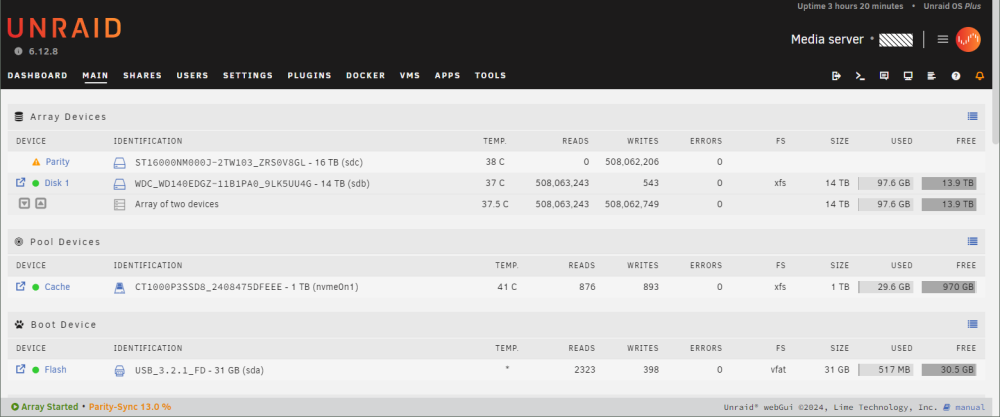
I am setting up a new home Unraid server. I ran preclear on my new 16tb parity drive and a year-old 14tb data drive. I formatted the new NVME SSD as XFS that I am using for cache. I started the array and saw the orange triangle for 'Parity is Invalid. After reading forum posts saying that it will go 'green' after it is done after the check is finished, I let it run. Going back to it after 2 hours, I see that the parity drive still 'orange triangle - invalid' and is reading a lot of data from the 14tb drive that has only 97mb of data on it after preclear. Both drives should be 'empty'. I was going to copy data over from other drives once I set up my shares to my Windows 10 pro PC where my USB NTFS data drives are plugged in. After each drive was copied to the server, I plan to shuck it and add it as an additional empty drive to the server and add more data until 5 data drives are added. Is 2+ hours to run parity on an 'empty' (almost empty) data drive normal? How long should the parity check take? Thanks in advance EDIT: I see that the data drive has 97 GIGS of data on it. I thought it would have been wiped when I ran preclear, it may be data left over from when I copied stuff off it it to my other USB drives in order to use shuck it and use it as my first Unraid data drive. I looked but did not see any way to format that drive before setting up the array, only to format the NVME SSD. The 16tb and the NVME drives were brand new and should not have any data on them.