





YaSo
Members
-
Joined
-
Last visited
Everything posted by YaSo
-
Got it, thanks for the reply.
-
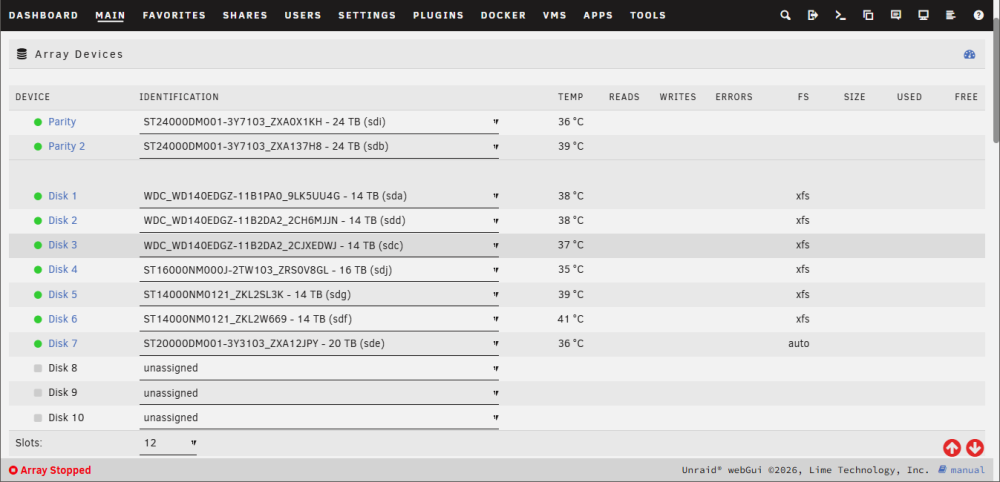
EDITED FOR CLEARER EXPLANATION My story: 2 weeks ago, my server had 2x 24tb parity drives, data drives were a 20tb, a 16tb, and a few 14tb drives. Then I had a power outage and server would not boot.("no OS found") I used an old backup from BEFORE I added the 2x 24tb parity drives and started the server. I didn't notice that the array started with the 2x 24tb parity drives unmounted, and it SET my 16tb and 20tb drive to parity, as they were a few months ago when I made my OS backup. Some data was overwritten to the 20tb. When I saw I was missing media, (seasons of a TV show, some recent movies) and tried to diagnose. I wasn't sure of position of the drives, set them backwards (parity 2, parity 1) then after troubleshooting, resetting the drive config to try to mount, then eventually doing a data recovery on the 20tb to recover 2tb of an85% filled data drive, I am now about to try to start the array to see what I ended up losing. TO DO -add a data drive that lost data that wouldn't mount, back into the array (I pulled some data off it, now it needs to be formatted xfs to match other drives in array) -set a parity drive, or drives, since they were at first unassigned, then I didn't know 1 & 2 order and started array with them backwards (2&1) and parity is not trusted. Checking steps: 1-Should I make a new config with the parity drives and the 'data drive to be cleared' unassigned? Consensus is that the parity data is hosed after trying to figure out what happened. What settings to use if I will be adding 'new' parity drives? 2-Then I should add the data drive without the parity drives, start the array and let it format it when prompted? (Unraid Docs- Arrays - Adding to an array without parity protection) 3-Then STOP the array, add one or two parity drives, and start the array and let it build parity? 4-How bad is it if I only add back in ONE of my two 24tb parity drives, for a max of 106tb of data? I am considering keeping one 24tb drive 'unassigned' in case another drive dies in the near future, then I have another drive ready to go. Thanks in advance (Added a screenshot of the layout of my drives, 20tb disk 7 needs to be cleared / formatted, and may only add one parity drive, other unassigned as a future replacement drive)
-
To close out this post, I ran UFS Explorer on the 20tb, and found about 2tb of random files (the drive was at around 80% full, so I lost about 14tb of random media) I copied the found files to a spare external drive, and am about start to get the server back up and running, clearing the 20tb for data, adding in the 16tb again with it's data, putting in the 2x 24tb drives as parity, and then try to see what media I am actually missing.
-
I stopped the xfs repair scan after running for 5 hours. Got some more help in Discord. Consensus is that I should not rely on the two 24tb parity drives to have data, I should use something like UFS Explorer to see if there is any data on the 16tb (which was able to go through xfs repair) and the 20tb (which is what I just stopped running xfs repair) Unless someone else has any other ideas, I ordered a new flash drive to install linux on and I'll try to run linux on a USB for the server to try XFS Explorer to see what if anything is recoverable from the drives. FWIW, I am adding a txt file with the output of the 16tb drive I just re-scanned. (the first time, the terminal process scrolled beyond the top of the window) Unraid-xfs repair disk 4 16tb 26'07-12.txt
-
Update, XFS repair is still running in terminal on disk 7, 2 hours later..., just scrolling ...............
-
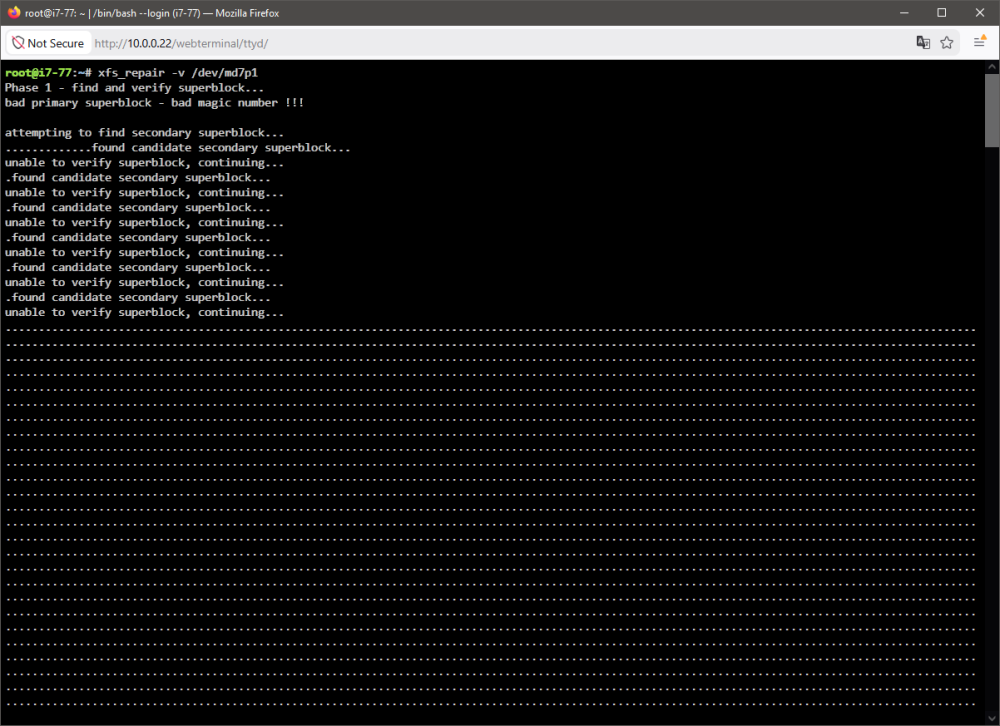
Thanks for the help, I ran that command on disk 4 (16tb) late last night, drive was showing as auto, now shows as xfs This morning I am running it on drive 7 (20tb) and terminal is scrolling . periods for almost half an hour, pushed my commands off the top of the terminal screen. I got a screenshot of it starting, and will post diagnostics (made while it's still running) i7-77-diagnostics-20260712-1120.zip
-
If there is any other info I can provide, please let me know. Disk 4 (16tb) and 7 (20tb) are listed as unmountable, not sure what steps i can take now, aside from formatting disk 4 and 7 and trying to see if the two parity drives can rebuild those two disks. EDIT: I was getting some (much appreciated) help in Discord, but it seems my situation is worse than what help could be given at the time.
-
Update, I was able to get diagnostics from unbootable USB drive, (I made a copy of files, just looked through them after restoring from backup, didn't know to look for anything a few days ago when crash happened) I got the correct drive assignments from the crashed USB files, the diagnostics were made after I swapped drives around. (Wish I found it earlier.) Disk 4 (16tb) and disk 7 (20tb) are unmountable. (I guess because old backup I used started the array with those as parity instead of data?) I have the server restarted in maintenance mode after speaking to someone in Unraid Discord, but I had to run out for a bit, waiting for steps to take next.
-
i7-77-diagnostics-20260711-0924.zip Diagnostics: After rebuilding OS flash drive with old backup from before I added larger (24tb) parity drives and made old parity drives data drives, then had a crash... -Then I made a new config and assigned the 24tb drives in what I think is the proper order as they were a week ago, and assigned two (16tb & 20tb) data drives in what I think was the proper slot order, (these were parity drives when I made my OS backup a long time ago).. -Then I started the array with 'Maintenance mode' and 'parity valid' checked... -Then stopped the array, took out the 16 & 20tb data drives from the 'slots', restarted array without maintenance mode, saved diagnostics attached above. EDIT, not the 5x 14tb drives were not moved physically or in Unraid setup since before I made my old backup Thanks in advance for looking at this. EDIT EDIT, I STOPPED the array after getting diagnostics so that Plex / other dockers and apps wouldn't write anything new to the array.
-
When I restart again with the 16tb & 20tb data drives unassigned to get diagnostics, I should NOT check the box for "maintenance mode"? (thanks in advance) Edit: restarted array without those two data drives, in 'normal' mode, and posted the diagnostics below.
-
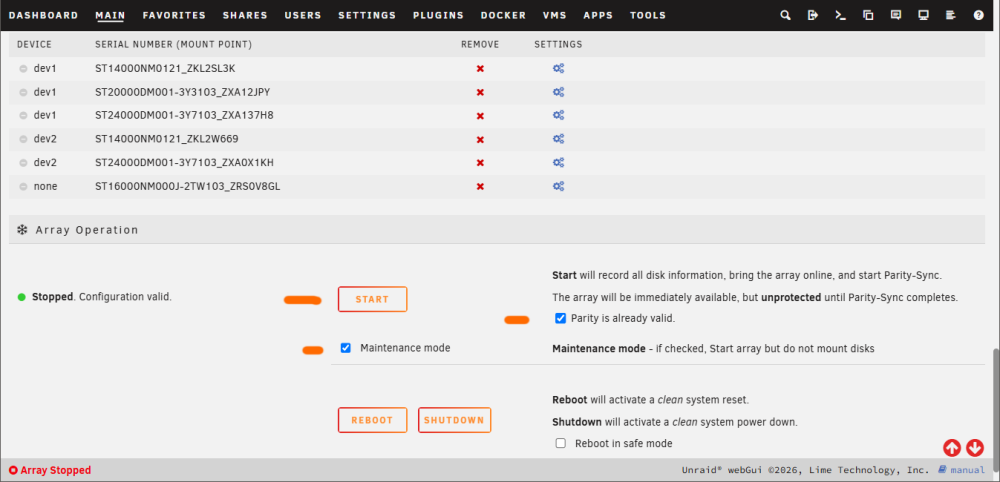
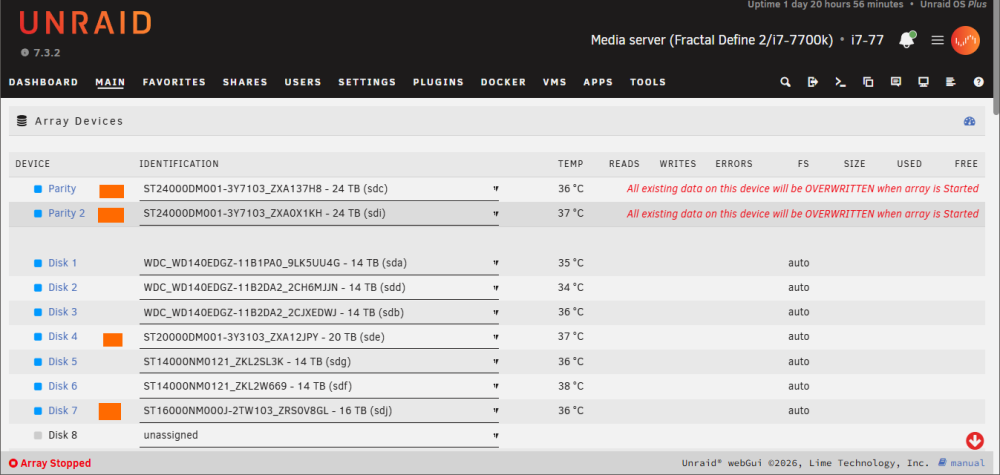
This is the layout I 'THINK" the system was before the crash. Screenshots are after the new config, with preserve data on all drives. I checked the boxes for "maintenance mode" and Parity is valid". So I should start and stop the array, then 'UNASSIGN" the two 'data' drives (16 & 20 that were wrongly put back as parity by the old backup OS) leaving the parity drives in place, then RESTART the array with those two drives out, and post diagnostics? (Sorry for delay in my posts)
-
ALSO, is there any way to add the two 24tb drives as parity, not knowing which was in slot 1 or 2, and start in safe mode to not screw stuff up, just to check if the order is correct?
-
Not sure, but here's a thought... I originally had 8 drives, (16+20tb parity drives, 5 good 14tb drives,and a dead 14tb drive) I added two new drives. two 24tbs. 1st 24tb was added in same case location as the dead 14tb drive (slot 4 in Unraid) and 2nd 24tb was added as an extra drive with new data and power cables. When I would have added the two 24tb drives as parity, would Unraid likely show the slot 4 drive as the first of the two available unassigned drives, and the new addition (9th) as the lower of the two options in the dropdown list when I was adding them? I can check drive serial number and go off of that
-
If I am right, between the 16tb, the 20tb, and the two newer 24tb drives, I could not have had anything but the two 24tb drives as parity, right? Largest size drives have to be parity, right?
-
Yes, but the 'old' Parity drives (from before the crash) were unassigned. The backup was from before I got the new, larger 24tb drives.
-
TLDR: Server crashed, OS USB corrupted, restored from old backup before I added new parity drives, when array was started, server put back wrong drives as parity (that were now data drives) and unmounted new parity drives. Is there any way to see if last week's 24tb parity drives can restore data to the 16tv & 20tb data drives that the OS thought were parity and (probably) messed up?
-
TLDR: Server crashed, OS USB corrupted, restored from old backup before I added new parity drives, when array was started, server put back wrong drives as parity (that were now data drives) and unmounted new parity drives I had a power outage 3 days ago and the OS USB drive got corrupted. My last backup was 10 months ago, BEFORE I got two new larger 24tb drives and made those parity, copying the parity data off the old 16tb & 20tb parrity drives, making the 16 & 20tb drives data drives. (I also had one data drive die after the backup was made, , slot 4 if that matters) When I recovered the OS from the backup and started the array, updated the OS and dockers. I nioticed some data was missing (some seasons of a show, some movies). Then I notices that the array made the 16tb and 20tb drives PARITY drives again, probably wiping any data on them. The two 24tb drives were listed as 'unassigned'. 1) Just checking that there was NO WAY I could have only set ONE of the 24tb drives as parity, with the 20tb as 2nd parity, and had the other 24tb as a data drive. (I definitely recall copying the 16tb parity data to a 24tb, just not sure if I did both 24's) 2) If both 24tb drives HAD TO BE parity drives, is there any way to set them as parity drives again, set the 16tb and 20tb drives as data again, and rebuild the array from the 24tb parity? FWIW, here's diagnostics from 2 days ago (soon after crash, 0708) and from today (0710) Thanks in advance. EDIT: The two 24's, and the 16tb and 20tb, all seem to be 'parity' when trying to add them as data drives and starting the array. i7-77-diagnostics-20260710-0842.zip i7-77-diagnostics-20260708-1054.zip
-
OK, I set up a share on the cache SSD. One thing, I can see the new share as a drive letter in WIndows, but unlike my Media share, I don't also see it under 'Network' in Windows Explorer. Afaik, the shares are setup the same way, any idea why Windows 'network' doesn't see it but I can see it as a drive letter?
-
Hmm, I thought the 'cache' drive was used by the Unraid OS automatically somehow, actually never really knew how it was used. So I can just create a 'download-temp' folder on the SSD and point my downloads there then? No need to partition anything? (I'm coming at this from a Windows user's mindset)
-
I have a 1tb NVME SSD installed and setup as a 'cache' drive. I'm not sure what it's cache-ing, but can I use it as a download drive? Maybe partition it 50/50 for 'cache-ing' and downloads? I would use it to download / seed before moving files to the main media array. I currently have a download folder on the 'media' array for downloads, which might spin up any of my many drives for downloads or seeding. Thanks in advance
-
It turns out it was just that my Mullvad VPN app didn't turn "Local Network Sharing" back ON when it updated. I thought the VPN may have done something, but couldn't recall what setting to check. (been slightly stressed out in the last few weeks, mostly lack of sleep.) My apologies for late reply, I wish I knew how to connect via SSH or Telnet, as I only really know Windows. Any places to get basic guides on SSH'ing to the server would be helpful below. Thanks for the replies.
-
I keep a separate Chrome window open on my Windows PC to access my Unraid server's WebGUI from time to time. I connected / checked it yesterday or the day before. (10.0.0.x/Dashboard) Today I can not connect to the WebGUI using my Windows desktop. I get a browser error, "This site can't be reached" "10.0.0.x refused to connect" "Check your Proxy or Firewall settings" -I can browse on the internet on the PC with Chrome normally, -I can access files in my media folders through Windows Explorer, -Plex docker is still running, I can stream media from Plex, -Krusader docker is still running in a separate browser window. -I restarted the Windows PC, still can't connect to WebGUI. -I run MullvadVPN on the Windows PC, been using it for about 2 months coming from another VPN service, if that means anything. I am looking for things to troubleshoot before I try restarting the server tomorrow. (I have to bring home a spare monitor from work to access the server directly, since my main desktop monitor is screwed into my desk's monitor arm) Thanks in advance
-
I get an error when moving the 20tb parity drive (smaller of my two) to a data slot, and adding the new 24tb as a new parity (along side my existing 24tb parity drive... "Array Operation Stopped. Invalid expansion. You may not add new disk(s) and also remove existing disk(s)." So DO I need to do a parity swap (copy from 20tb to new 24tb), or am I missing something, if I want to add the 24tb to the system in one step? (again, thanks for the help in advance)
-
Thanks, I wonder if I buy a third 'largest drive' (another 24tb), will Unraid let me use THAT as a data drive, since I can only have two parity drives...
-
In my Unraid server, I have a 24tb and a 20tb parity drive, and a 16tb and a few 14tb data drives. I just precleared a new 24tb drive, but when adding it to an available slot, I see the message at the bottom of message at the bottom of the 'main' page: Stopped. Disk in parity slot is not biggest. If this is a new array, move the largest disk into the parity slot. If you are adding a new disk or replacing a disabled disk, try Parity-Swap. Can I add my new 24tb drive as a 'data' drive, or do I have to make it a second parity drive and copy parity data from my 20tb to the new 24tb, and use the 20tb as data? Thanks in advance!


