stephondoestech
Members
-
Joined
-
Last visited
-
Hey everyone! Sorry life was lifeing, but I'm back now and just cut a new release for a couple of really annoying issues. Unraid Config Guardian - Change LogVersion 1.6.4 - Available November 9, 2026Credential Masking - FIXED- Templates are now masked too - Passwords and other secrets inside container-templates.zip are now replaced with MASKED. Before, they could slip through into your backup. - VPN containers covered - VPN_USER, SOCKS_USER, VPN_PASS and similar credentials (like the ones binhex-qbittorrentvpn uses) are now masked. - Smarter matching - Names like DB_PASS or RCON_PWD are caught, while harmless names like BYPASS_CACHE are left alone. - MASK_PASSWORDS=false now works everywhere - Scheduled backups now respect your setting, not just manual runs. Custom Masking - NEW FEATURE- MASK_EXTRA_KEYWORDS - Add your own comma-separated keywords to mask, for example rcon,webui_user. You'll find it under advanced settings in the Unraid template. Web Interface Fixes- No more fake containers - When the web UI can't reach Docker, it now shows the actual error instead of sample containers. You'll know right away if your socket or socket proxy is misconfigured. - Socket proxy friendly - Container details still load when the proxy blocks image access (IMAGES=0). Restore Improvements- Safer template restore - restore.sh no longer overwrites templates you already have. - Masked value warnings - restore.sh lists every template that has masked credentials, so you know which values to re-enter before you start those containers. - Compose placeholders - Masked variables in docker-compose.yml now show up as ${VAR} placeholders instead of being dropped completely. Documentation Improvements- README now explains what gets masked, how matching works, and what that means when you restore. What You Get NowEvery backup now includes: - container-templates.zip - Native Unraid XML templates, now with credentials masked - docker-compose.yml - Emergency fallback containers, with ${VAR} placeholders for secrets - unraid-config.json - Complete system configuration - changes.log - Shows what changed since last backup - restore.sh - Automated restoration script, now with masked-value warnings - Use request-first TemplateResponse for current Starlette For Existing UsersNo action needed for most of you. Masking stays on by default and now covers more. Heads up: if you restore from a masked backup, you'll need to re-enter those passwords. That's by design, and restore.sh will tell you which templates need attention. If you'd rather keep real values in your backups, set MASK_PASSWORDS=false and store the backups somewhere secure. If you saved any backups with an older version, they may still contain credentials in container-templates.zip. Consider deleting them or keeping them somewhere safe. --- Need help? Check the docs/troubleshooting.md or open an issue on GitHub. ---
-
Apologies for being so quiet everyone. Life was doing it's thing. I just move release notes to Github exclusively as folks are more likely to look there. Release v1.5.0 is live. I'm also now using codex in this project to assist me with feature development and troubleshooting. https://github.com/stephondoestech/unraid-config-guardian/releases/tag/v1.5.0 @MichaelD Let me look into that. I haven't seen that issue yet, but that doesn't mean it's not there. Before you stopped the container were there any errors you could see?
-
I just pushed a brute force fix because I'm losing it on this issue lol. It's not a perfect fix, but it's still better than running the container as root.
-
Hey folks! Back again with another update mostly focused on bug fixes. Unraid Config Guardian - Change LogVersion 1.3.0 - Available 09/28/2025 Summary Fixed Docker health check hardcoded socket path issue causing repeated container restarts Resolved permission errors preventing subsequent backups after first run Integrated change log functionality into web GUI to track configuration differences Fixed git pre-push hook syntax error Issues Fixed Health Check: Container was failing health checks due to hardcoded /var/run/docker.sock path Permission Errors: Subsequent backups failed with "Permission denied: '/boot/config/plugins/dockerMan/templates-user'" after first successful run Change Log Integration: create_change_log function was called but not properly integrated into web GUI Made Docker socket path configurable via DOCKER_SOCK_PATH environment variable Added fallback Docker client creation for custom socket paths Improved error messages with troubleshooting tips Added graceful handling of Docker connection failures during startup
-
WHELP...that was short lived. Thanks to user reporting and testing I was able to find a fix that revealed another issue with the cached data. Docker pipeline is building now to roll that out. Unraid Config Guardian - Change LogVersion 1.2.1 - Available 09/19/2025 Bug Fixes - Boot Info Caching: Boot drive information is now cached at container startup, eliminating repeated file system reads during backup operations - Template Refresh Optimization: Docker templates are automatically refreshed before each backup to ensure the most current container configurations are captured - Resource Management: Cached template files are now properly cleaned up after zip creation, preventing disk space - Timing Issue: Fixed entry file timing when users switch configurations prior to container loading
-
Hey everyone! Quick heads up I'm aware that the hostname and version are still not appearing correctly in addition to the templates zip not being generated. This is due to Unraid requiring root access to the boot drive to get this information. I'm in the middle of fix now that I should be able to roll out today, but please know I'm working hard to resolve this. The biggest challenge is balancing security vs functionality. I really don't want this running as root.
-
Hey folks! Sorry I've been quiet. Pesky real job was keeping me busy. So after reviewing a lot of the valuable feedback I received I wanted to focus on bringing forward the features that were most important to myself and others. I also realize that my vision for the service vs what it was providing varied so I took some time to refocus it to provide what I feel is significant value. I realize one can write a script, or use Unraid Connect, etc this is meant to just be another option that targets more of a disaster recovery scenario. This isn't meant to solve every backup issue, but it's just another tool in the toolbox. That said below you can find the change log for version 1.1.0. Thank you all for your support and I'll continue to improve this and learn as I go. Unraid Config Guardian - Change LogVersion 1.1.0 - Available 09/19/2025 Permission Issues - FIXED - PUID/PGID support now working correctly - Container properly switches to your specified user/group - No more "permission denied" errors when writing backups - Standard Unraid compatibility - Use PUID=99/PGID=100 for seamless integration Change Tracking - NEW FEATURE - See what changed between backups - New changes.log file shows exactly what was added, removed, or modified - Container monitoring - Track image updates, port changes, volume modifications - System change detection - Monitor Unraid version updates, disk additions, share changes - Web dashboard integration - Change summaries displayed in the interface Health Check Fixes - Netdata alerts resolved - Container no longer reports as "unhealthy" - Improved startup reliability - Better timing and error handling - Enhanced diagnostics - Clear health status reporting Documentation Improvements - Simplified README - Now focused on flash drive disaster recovery use case System Detection - Improved hostname/version detection - Better error handling and logging - Clear feedback - Shows exactly why detection succeeded or failed - Proper boot mount support - Works correctly when /boot is mounted What You Get Now Every backup now includes: - changes.log - NEW! Shows what changed since last backup - container-templates.zip - Native Unraid XML templates - docker-compose.yml - Emergency fallback containers - unraid-config.json - Complete system configuration - restore.sh - Automated restoration script For Existing Users No action needed! These are all improvements and new features. Your existing setup will continue working and gain the new features automatically. Want to see changes? Check /mnt/user/backups/unraid-docs/latest/changes.log after your next backup. Flash Drive Recovery Focus This tool is now clearly positioned as your disaster recovery solution for when your Unraid flash drive dies. Perfect for the community's most common emergency scenario. --- Need help? Check the docs/troubleshooting.md or open an issue on GitHub.
-
tcp should only be there once
-
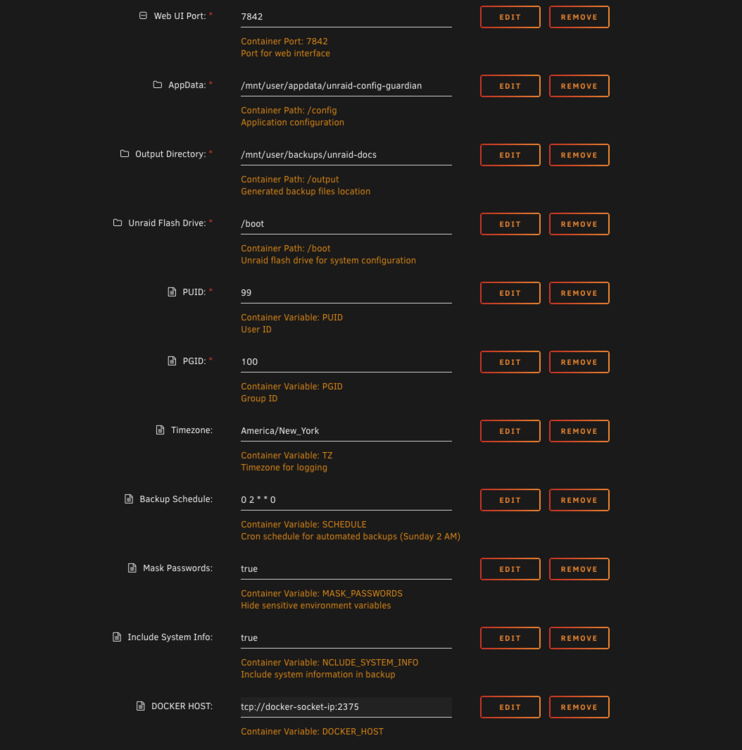
It means the container port needs to be updated to 7842. Click the remove button. At the bottom of the page there should be an option to add a path, port, etc. Click it and update the dropdown to port. You can name it whatever. The container and host port should be set to 7842. Unfortunately updating the template for things like this doesn't over ride existing installations so this has to be done manually to resolve the UI not loading.
-
Release 1.0.5 Summary Hey everyone! I'm going to start dropping release notes in the the forum thread to reduce the chance of a missed update. The latest version rolled out on 9/10/25 contains the following fixes: Directory PermissionsProblem: No permissions were being set on directory creation leading to access issues when updating. Solution: Set a check to ensure permissions are set to 755 so service user doesn't lose access on update. Version Synchronization Problem: src/version.py (1.0.4) was out of sync with git tags (up to v1.0.7), causing inconsistent releases. Solution: Updated Makefile release commands to automatically sync versions: make tag VERSION=v1.0.8 now updates src/version.py to 1.0.8 before creating the tag Added make release-minor and make release-major for semantic versioning All release commands now commit version changes, create tags, and push automatically Automated Code FormattingProblem: Manual formatting commits cluttering git history. Solution: Created pre-push git hook (.githooks/pre-push) that: Runs make format-fix automatically before any push Commits formatting changes with standardized message if needed Prevents linting failures in CI/CD Fixed Pre-commit HooksProblem: Pre-commit hooks weren't running due to conflicting hook path configuration. Solution: Removed custom core.hooksPath setting that was breaking pre-commit Fixed installation process in make install-dev and make install-hooks Resolved line length violation in src/unraid_config_guardian.py:44 All pre-commit hooks now pass successfully
-
I made a change in 1.0.4 to update the internal port to match the webUI port so the Unraid template wouldn’t error on their side. That’s why your UI isn’t loading. I posted an update earlier in the forum, but if you were jumping from 1.0.3 to 1.0.5 it's possible it was missed.
-
I was able to find the issue and opened a ticket for it here. https://github.com/stephondoestech/unraid-config-guardian/issues/14 I'm wrapping up testing the fix now. If someone would be willing to set their permissions to 755 report the results to me that would speed things up since I can only reproduce it artificially.
-
Good catch! Just updated this in the templates now.
-
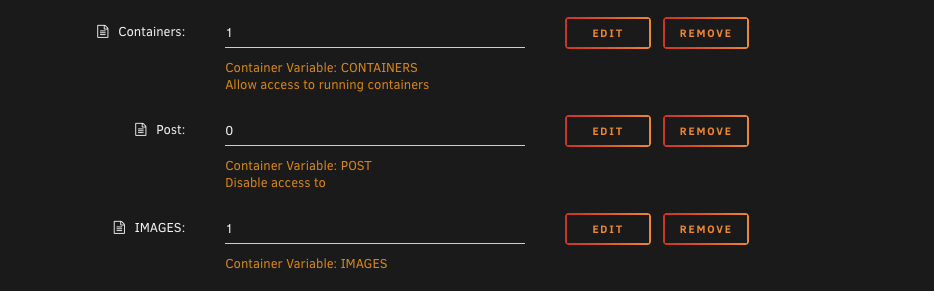
Hey @ExXxtr3me did you add the IMGAES variable to the dockersocket container with a value of 1? If you didn't that's why you're getting that error.
-
Quick update everyone! I'm still working through all the feedback (damn my pesky day job) and am actively working on making the implementation better. I just pushed version 1.0.4 out to production which does require a manual template update. In hindsight this should've been a minor version bump so I do apologize for that. In order to have the container not run as root I've implemented the use of docker socket proxy. For this to work you MUST install the dockersocket container from the Apps page. You will need to add a variable to it called IMAGES and set the value to 1. In the UnraidConfigGuardian container you'll want to remove the docker host path and instead add a variable called DOCKER_HOST and set it to the address of your dockersocket container. This will allow the service to run as a non privileged user while still getting the information it needs for the system. You will also want to update the PUID and PGID to 99 and 100 respectively. Lastly the container port needs to be updated to 7842as the previous value was causing an issue in the template validator. Thank you again everyone for the continued feedback. I'm excited to keep working on this project and making it more useful with each update.