





jppm89
Members
-
Joined
-
Last visited
-
To give feedback on this one. Looks like it's solved, with the @JorgeB suggestion - format the disks to remove the type 2 protection. Array is up and running, parity is running now, 0 errors. Thanks!
-
Doing that - thanks JorgeB. I will give feedback as soon as it is finished. Btw, shouldn't formatting through the UI have removed the protection?
-
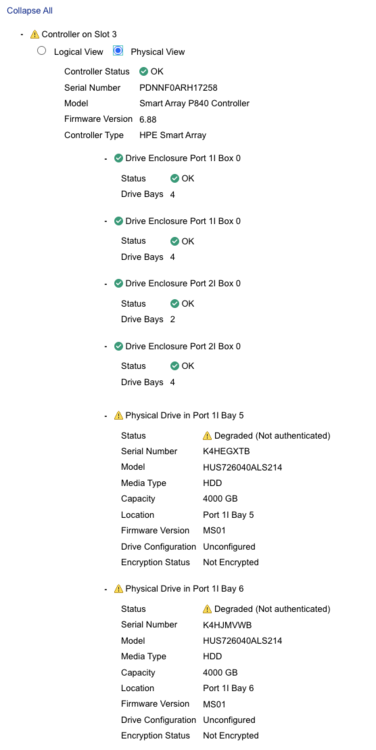
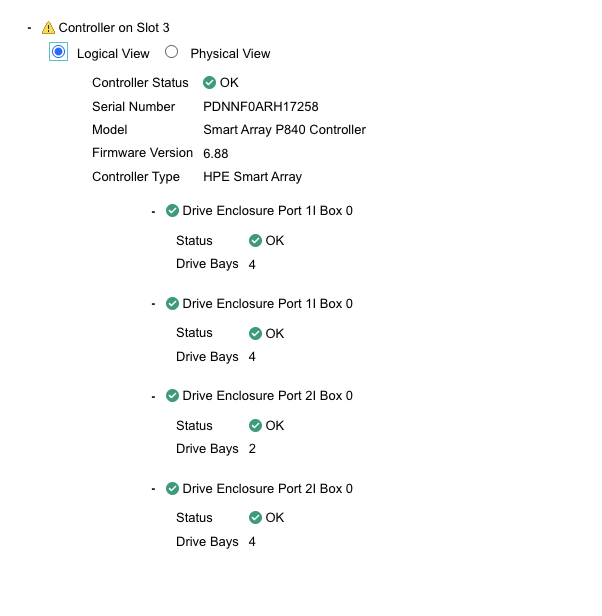
Yes, I have no disks in Logical View, only in Physical View.
-
The option appear, I ask unraid to format it but still the same, with the same error in the image.
-
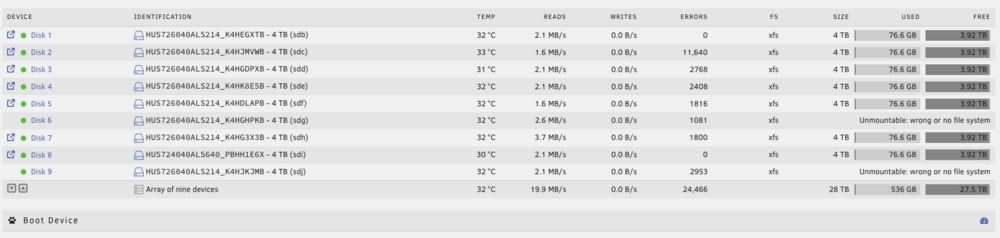
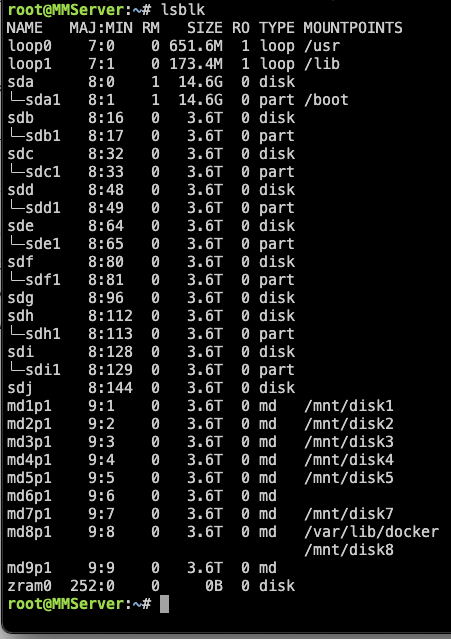
During my tests, I recreated the array, so I'm adding here what you requested but also the new diagnostics.zip. Also, check the image with the disk errors that I described, and the other one with lsblk. mmserver-diagnostics-20260130-0035.zip
-
So, I will try to explain step by step what I needed to do. Enable HBA mode in server Start to create the array on unraid (adding two disks to the parity) It requested me to format the disk after added them to the array that I created. After formatting, some of the disks were added successfully to the array, but other ones were showing the "unmountable: wrong or no filesystem" message. After many tries, I just restart the array and didn't add any parity disks, but the problem persists. Then, with the array stopped, I ran the commands to fix the disks, as I mentioned before (run it for all the disks). I started the array again, and it asked me to format the disks again. Formatted the disks, and the disks were successfully added to the array When I run the check, I see all these errors (huge number) and the speed is really slow. Not sure if it's fully clear what I tried to do and all the steps :) About the Smart Array P840, I tested two - the same problem :(
-
Yes - i try to use webui to do that. When creating the array, it ask me to format the disks, and I formatted. What happened was that the disk show an error saying "unmountable: wrong or no filesystem". That's why I needed to do it manually. I just formatted it manually and the disk appeared. I needed to do it for all the disks. But still have the same problem when reading or writing to the disk with a lot of errors. Also, btw, to add more information - I tested in a different server, with the exact same configuration (but different disks), and still have the same issue.
-
Added diagnostics zip file. mmserver-diagnostics-20260129-2058.zip
-
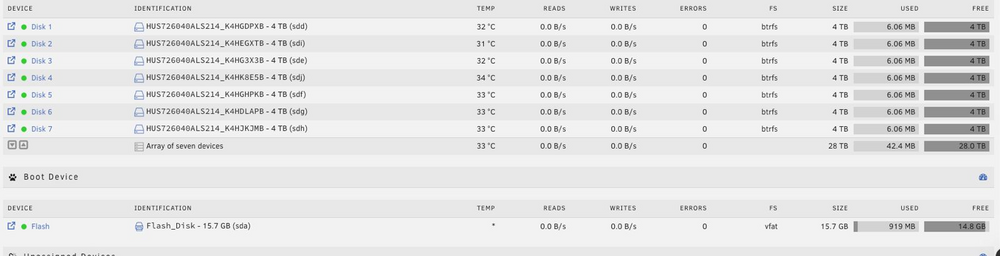
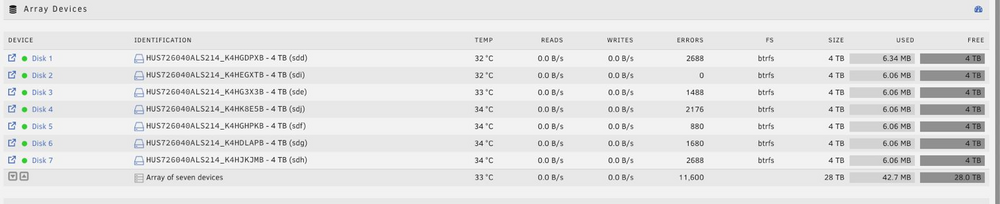
Hi all, I don't know if this is the correct space to ask for help, but ... let's try it. I'm configuring a new server to have Unraid, a HP ProLiant DL380 Gen9 (with Smart Array P840 Controller). Currently, I'm having some issues with creating and having an array working. First think first - I already have the server in HBA mode. Then, I added the disks to the array, and I see two of them with "unmountable: wrong or no filesystem" message. Was not easy to fix, but running the following commands, I was able to fix it: sgdisk --zap-all /dev/sdh dd if=/dev/zero of=/dev/sdh bs=1M count=100 dd if=/dev/zero of=/dev/sdh bs=1M seek=$(($(blockdev --getsz /dev/sdh) / 2048 - 100)) count=100 Image 1 added here proves that the array started with no problems. However, as soon as I start the check of the disks, I have a lot of errors, as image 2 shows (these numbers are just after 10 seconds of having the check running). Any idea of what I'm missing or kind of problems and solutions that I have? Thanks in advance.
-
Hi all, Since this morning, I've been receiving the following error, randomly, when trying to access the UnRaid server. Does not matter if I'm using the IP or tower.local to access it. Also, in the meantime, sometimes the error changes, and I receive a "this URI does not exist". Has anyone already had this problem and can give me a better understanding of what it can be? Thanks
-
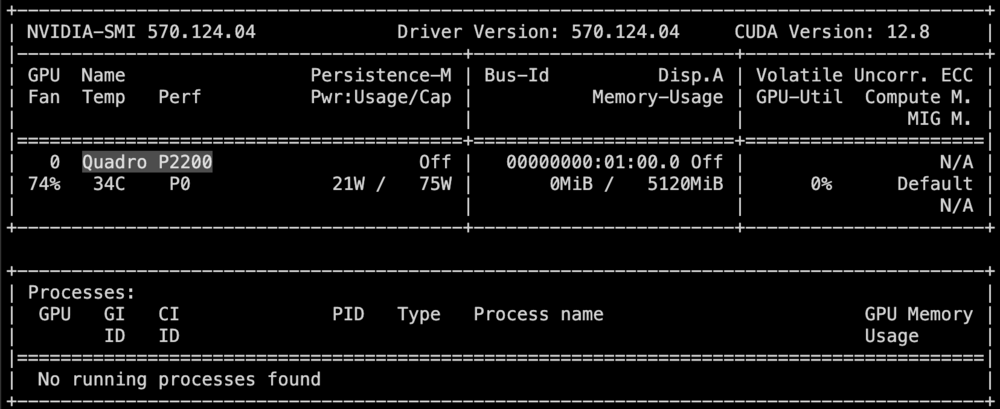
Hi all, I updated my unraid from version 6.x.x to 7.0.1 and now I'm facing an issue with my graphics card. Currently even with lower temperatures (35º), the fan is always running above 70%. I don't understand what is causing that and how I can solve it. Any ideas? Currently I've a Nvidia Driver plugin installed, and the graphic card is a Quadro P2200. Thanks in advance.
-
Looks like it solved the problem. Tried it again in the same USB port after a new reboot and everything is working now. Any reason for this to have happened? How to avoid it in the future? Make sense to start thinking on a new USB Flash?
-
jppm89 joined the community
-
Hi all, Since yesterday, I'm having some problems with my USB Flash Drive. Yesterday I received a notification on Unraid, saying that the USB Flash Drive is corrupted or not connected to the server. Today, to try to fix it, I remove it and put it again in computer. Now, the error is different and it says "missing key file". When try to fix it (click on "fix it" on Unraid) I've the following message: Problem here: I can't access the USB Flash Boot device. When using terminal, the /boot directory is empty. What's the best option to fix it? Can I try to restart the server, or I will lost the access to it?



