codemasterb
Members
-
Joined
-
Last visited
-
Update: ok so i found the issue! it seams that the server i was running this on (i have 2 unraid servers) the processor wasn't compatible for this 7 days to die container to run! i managed to research the 71 illegal instruction and found it linked to incompatible processor. after finding this out i installed it on my other server which has a 6 core amd CPU and it runs just fine! so if anyone else has similar issues then check your CPU. AMD Athlon™ 64 X2 Dual Core 4200+ @ 2200 MHz (incompatible for 7days to die docker container) my next issue is running mods on the server as currently its refusing to see that they are even there! it loads the 4 pre installed ones but none that i add myself.
-
Update: i have looked into the docker container and it looks like its constantly restarting, the uptime gets to about 20/30s then restarts. im looking at the log for it and im getting this /opt/scripts/start-server.sh: line 184: 71 Illegal instruction ${SERVER_DIR}/7DaysToDieServer.x86_64 -configfile=${SERVERCONFIG} -nographics -batchmode ${GAME_PARAMS} ---No optional script found, continuing--- any ideas? from this im assuming the server isnt even starting at all.
-
So i have been going round in circle's trying to get this up and running. its the 7days2die container from ich777. i have followed this guide i found, https://7dac.net/a-guide-on-how-to-install-ich777s-container-docker-on-an-unraid-server/ everything is setup, XML config file has been edited, ports opened etc. i currently have it in bridge mode but have also tried giving it its own ip but still cannot connect. i have tried different port ranges as some have said that worked but not for me! when i search for the server in the game it shows nothing found, when i try and direct connect manually to ip it just says could not retrieve server config. the only thing i have noticed is when starting the container and its running my server CPU usage is just over half so i know its doing something! i have read that some said it can take time to show up in the server list on the game, but surely if i direct connect it should still work right? would appreciate any help with this as my whole family love this game and would be awesome and convenient to have this setup and working thanks in advance guys
-
Update: New SATA card arrived and installed all drives now formatted and working! thanks for all your help guys. This is the card i bought if it helps anyone else out with similar problems! 10Gtek PCIe SATA Card 6 Port with 6 SATA Cables and Low Profile Bracket, 6Gbps SATA3.0 Controller PCI Express Expansion Card, X4, Support 6 SATA 3.0
-
Just a quick update, the BTRFS has finished and now both drives working fine. i have had a look about what sata cards work with unraid and found one others have had success with so will be ordering that and then connecting these 2 drives in my array to see if that solves the issue
-
Thanks for the info, i have now canceled it and clicked the option convert to single and click balance again.
-
Ok makes sense, as far as Raid1 goes no i didn't, all i did was add the drive to the pool for extra storage assuming it would just increase the existing pool size.
-
Ive also noticed that this figure has dropped from 5.6Tb and continues to go down? i can still access all the files on the share and none are missing.

-
I have noticed that the first 2 digits currently 39 down from over 40 is moving down slowly, says relocating block group.. could take a wile! mediaserver-diagnostics-20240411-1821.zip
-
Currently still going with the BTRFS operation! unable to do anything atm. how long does this actually take? one disk is 8TB and the new one 6TB been all night and all day!
-
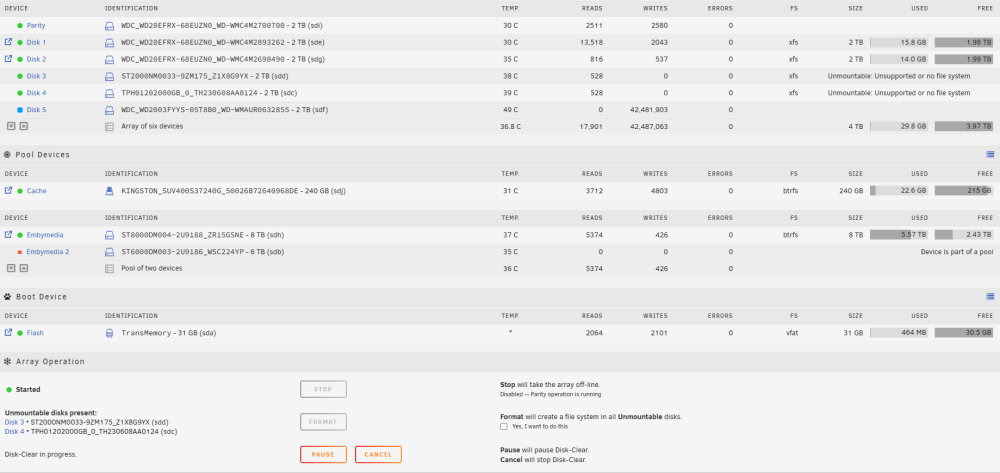
So i checked the SATA cables both power and data and all seated fine. i did notice that i had these 3 new drives connected to a PCI SATA extension card (my motherboard only has 6 ports) so i swapped out the cache drive SATA data cable with the one from the new 6TB (embymedia2) drive which previously had a red X and would not format or mount. so this drive was now connected to the motherboard as apposed to the PC extension card. rebooted and this drive is now working currently a BTRSF operation is running (im assuming its sorting out the drive to work with the existing?) the other drives disk 3 and 4 which still display unmountable are connected to the PCI extension card so i guess this is my problem? the card could be faulty on certain ports possibly? if the case i will get a replacement, are there any you guys recommend, i would literately need it for these 2 extra drives as i do not plan to add any more. thanks in advance
-
Ok i will check this ago and report back with new diagnostics
-
There you go 👍 mediaserver-diagnostics-20240410-1917.zip
-
Please Please Help! i setup unraid recently and its been running fine, i added 3 more drives to the array and one extra to an existing pool. the array has cleared both drives and currently doing the 3rd (i added this in after) for some reason none of the drives will mount? not even the separate drive i added to an existing pool i have also clicked the format option several times (with the check box) and it just re appears (going round in circles!) any ideas? these are all brand new hard drives, i have tested them in my computer before hand and all work fine.