





Taleoo
Members
-
Joined
-
Last visited
-
I still have one spot on my MB since i removed disks, i'll put Disk4 on it and see for a little while. If there's no problems in a few days i'll deduce that the controller is the one with issues else it'll be power/connection i guess Thanks a bunch for your answers !
-
There you go : tower-diagnostics-20241207-2322.zip Thanks a bunch ^^
-
Well, it errored too in the end : Should i change my ASM1064 card?

-
The rebuild was successful and the smart test successful on disk 4 (the one i put on the ASM1064). I have no idea for the life of me what happened, it'll do for now. Thanks for the answers !
-
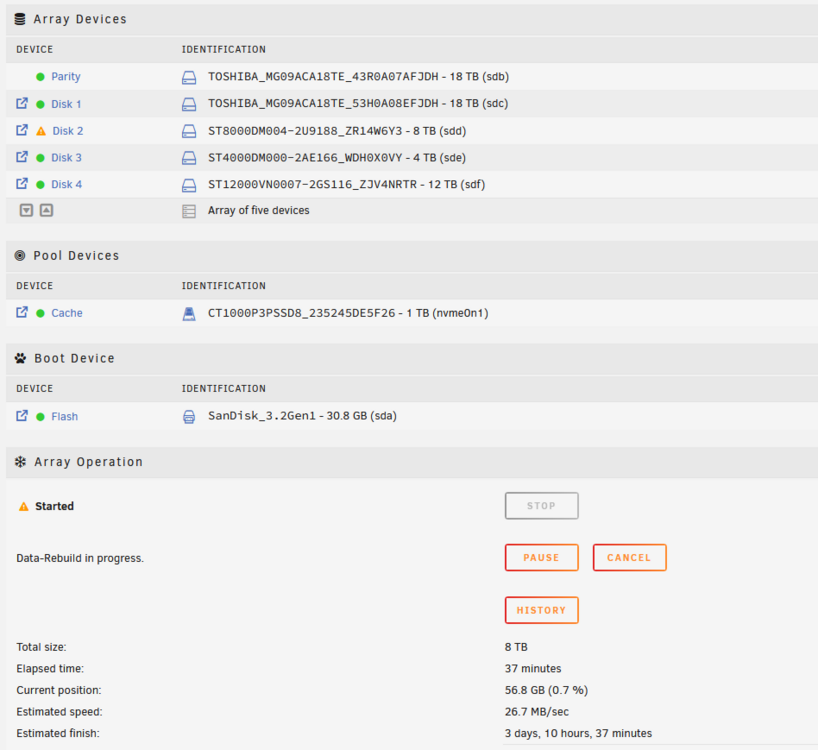
Thanks for the answer ! I swapped disk 4 and 2 cables (Disk 2 was the one with issues) Data Rebuild seems to be going fine. Now that Disk4 is on the ASM1064 card i'll see if it fails or not. Will update when i'm sure there is no issue. Are there any incompatibilities between sata card chipset and certain disks?
-
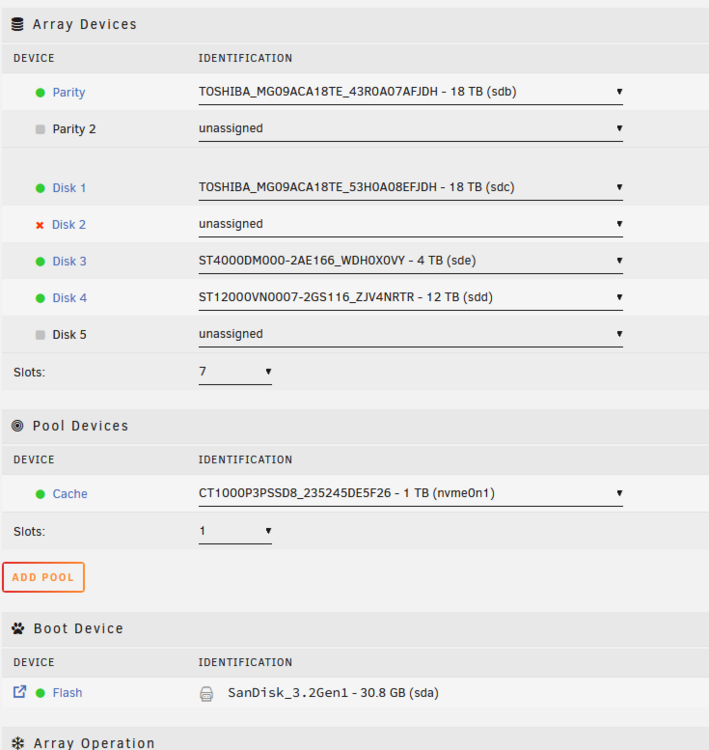
Hello ! I had problem with the second disk of my array randomly disconnecting and getting errors. So i sought to replace it. Got an 8Tb disk to replace the old 4Tb. Problem is that the drive (as the old one was) is connected to my ASM1064 card and seems to randomly disconnect. The device not detected there The device detected in system devices When chosing the card i checked the forums and it should be supported. Could you please help me? Here is my diagnostics file : tower-diagnostics-20241201-1037.zip Thanks a bunch ! PS : that's the card i bought : https://www.amazon.fr/dp/B08NXTF7BM

-
Yeah i checked and i don't have bifurcation, so one PCIeX16 > NVME and one PCIeX8 > SATA then. Thanks for the answers !
-
Okay so it's better to get a SATA card with one of the recommended controllers on my PCIEx4 slot and a PCIEx16 card for an NVME slot? Thanks EDIT : Maybe something like that PCIe-NVME paired with a JMB585 card like this : JMB585 card NVME ?
-
Hello guys ! I built my setup recently on a ASRock H310CM-DVS with an i5 8400T. The MB doesn't have any NVME support and i wanted to add a cache drive to my setup so i bought this while following the recommended controller: https://www.cdiscount.com/informatique/composants-informatiques/carte-d-extension-pcie3-0-x4-a-2-ports-m-2-b-key-c/f-1071311-sod4714229560738.html (Asmedia 1164). Problem is it's compatible with NVME B_key and not regular M. I got a Crucial P3 plus for cache and i also need at least 2 additional SATA ports for my drives. Do you have a recommendation, i'll return the card i bought. Thanks !



