





Kriz
Members
-
Joined
-
Last visited
-
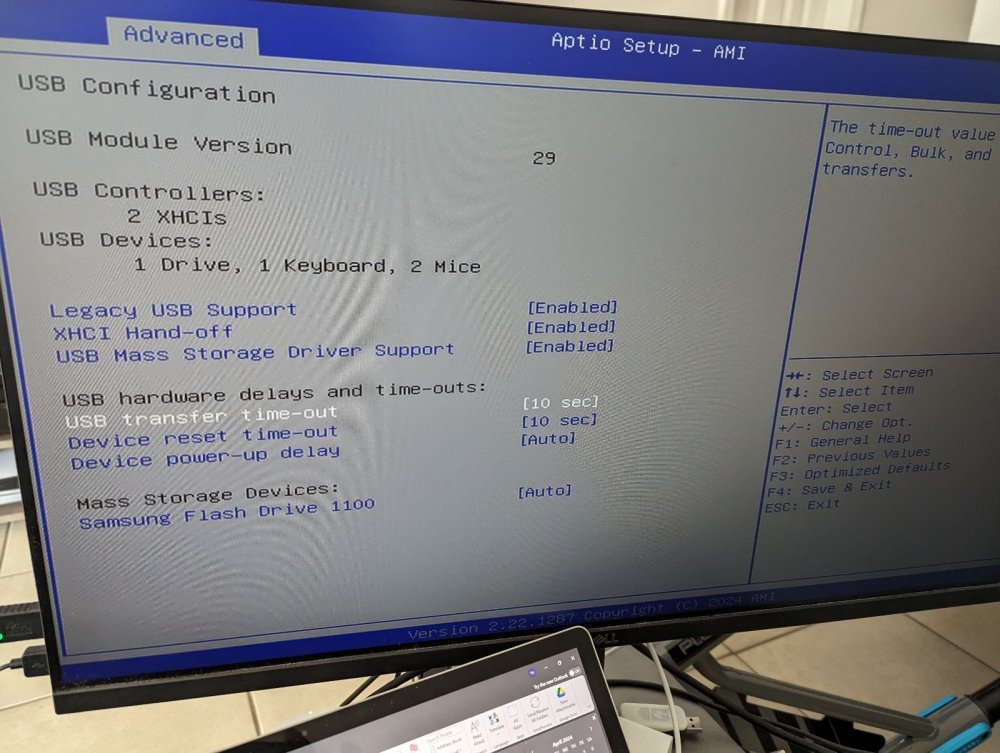
Hi All, Thank you so much for your help and suggestions. I played around with THE BIOS settings as you all recommended and it turns out the culprit was the Bios setting "USB transfer time out.". By default, it was 20 seconds but I changed it to 10 seconds and somehow I am able to access the Webgui now.... I can't believe it was that little change that made the impact and was the source of my problem and headache. For my information, does anyone know what this usb transfer time out means and why it was the source of my trouble? In any event, much appreciative to you for taking the time looking at issues and trying to help and thank you for pointing me in the right direction!
-
Hi Frank1940, My current build set up is the following: Mini ITX with 6 SATA ports Intel i3 N305 Topton Mobo (AliExpress) 32 GB Crucial DDR5 750W Modular PSU 1TB M.2 SSD for cache Essentially, its similar to this one here on AMZ, however, I purchased mines from AliExpress: CWWk i3-N305 six-Bay NAS Monster Board/4 Network 2.5G/6 SATA3.0/2 M.2 NVMe/115X Radiator ITX Board Type Motherboard (NAS Board-N100) https://www.amazon.com/i3-N305-six-Bay-Radiator-Motherboard-Board-N100/dp/B0CPDZS9HH/ref=asc_df_B0CPDZS9HH/?tag=hyprod-20&linkCode=df0&hvadid=689176365774&hvpos=&hvnetw=g&hvrand=2635961832029078602&hvpone=&hvptwo=&hvqmt=&hvdev=c&hvdvcmdl=&hvlocint=&hvlocphy=9031090&hvtargid=pla-2337047081687&mcid=b357dae5a9f836d783a8c4db95100542&gad_source=1&gclid=Cj0KCQjwlZixBhCoARIsAIC745DS6ASSHSpfftGdRcXFxGZVvZ-7G9vuLWRm397kqSwsESgn1mLtCfMaAuKgEALw_wcB&th=1 It should be similar to the YouTuber "NasCompare" build as I modelled my server after his own server build. Would value any input you or anyone have on my first build. Hope this is helpful
-
Hello all, The unusual part is while performing a process of elimination, I used the same bootable USB drive in a different and older Dell windows computer and I was able to access the WEBGUI page. Additionally, I am able to access the webGUI without it being hooked up to the ethernet/wifi. So this tells me that the Intel i3 N305 server that I am building is the issue. It doesn't seem to be a networking issue, nor a USB issue, but something in my N305 itself. I have attached the diagnostic that works. Is there an easy way to compare the working diagnostic (Dell computer) with the unworking diagnostic of my N305 server? Ultimately, I want to install Unraid on the N305. dell-tower-diagnostics-20240422-1215.zip
-
I created a bootable drive using two additional USB drives (32GB Memorex and 64GB Sandisk) and unfortunately, neither of them is able to help me connect to the WebGUI. Both diagnostic files are attached but I also wasn't able to find anything that stood out from the previous diagnostic file. I will take the suggestion to play around with the BIOS to see if the USB power delivery is enabled in the "S5 state, or something similar" Thank you for the continued suggestions to help me resolve this issue. sandisk-tower-diagnostics-20240422-1201.zip memorex-tower-diagnostics-20240422-1215.zip
-
Hi Frank1940, The USB boot drive is currently plugged into a USB2, but this is good information to know in the future. When I ran the command "ls -al /boot" I got the following response: drwx------ 10 root root 32768 Dec 31 1969 ./ drwxr-xr-x 20 root root 420 Apr 21 21:59 ../ drwx------ 3 root root 32768 Apr 21 14:30 .Spotlight-V100/ drwx------ 3 root root 32768 Apr 21 14:40 .TemporaryItems/ drwx------ 3 root root 32768 Apr 21 14:50 .Trashes/ -rw------- 1 root root 4096 Apr 21 14:33 ._license.txt drwx------ 3 root root 32768 Apr 21 13:24 EFI/ drwx------ 2 root root 32768 Apr 21 13:24 System\ Volume\ Information/ -rw------- 1 root root 355307520 Apr 21 06:24 bzfirmware -rw------- 1 root root 65 Apr 21 06:24 bzfirmware.sha256 -rw------- 1 root root 6553856 Apr 21 06:24 bzimage -rw------- 1 root root 65 Apr 21 06:24 bzimage.sha256 -rw------- 1 root root 66482176 Apr 21 06:24 bzmodules -rw------- 1 root root 65 Apr 21 06:24 bzmodules.sha256 -rw------- 1 root root 30842456 Apr 21 06:24 bzroot -rw------- 1 root root 1132 Apr 21 06:24 bzroot-gui -rw------- 1 root root 65 Apr 21 06:24 bzroot-gui.sha256 -rw------- 1 root root 65 Apr 21 06:24 bzroot.sha256 -rw------- 1 root root 3944 Apr 21 13:24 changes.txt drwx------ 10 root root 32768 Apr 21 22:01 config/ -r-------- 1 root root 122308 Apr 21 13:24 ldlinux.c32 -r-------- 1 root root 69632 Apr 21 13:24 ldlinux.sys -rw------- 1 root root 7972 Apr 21 13:24 license.txt drwx------ 2 root root 32768 Apr 21 21:59 logs/ -rw------- 1 root root 1760 Apr 21 13:24 make_bootable.bat -rw------- 1 root root 3291 Apr 21 13:24 make_bootable_linux -rw------- 1 root root 2428 Apr 21 13:24 make_bootable_mac -rw------- 1 root root 145408 Apr 21 13:24 memtest drwx------ 2 root root 32768 Apr 21 13:24 syslinux/
-
In using the recommended command, "root@BMM-Unraid:/boot/config# /etc/rc.d/rc.nginx status" it comes back with: bash: root@BMM-Unraid:/boot/config#: No such file or directory On the second suggestion regarding deleting the network.cfg file, I did that and Unraid seemed to have remade that file, however, I wasn't able to keep up with the sizeable and swift moving commands to locate the DHCP ID address.... amateur question, but Is there a way for me to scroll up in the terminal box to be able to scan through all the commands?
-
Hello bmartino1, When you stated "the web page management never loaded," are you referring to the webGUI itself? What is the web page management? When using the suggested command "ntpdate pool.ntp.org," it responds with the following: Ntpdate[2477]: the NTP socket is in use, exiting Additionally, with the second suggested command of "emhttpd status" it doesnt have any response to the command. It essentially returned back null. In regards to the CMOS clock, when I go into the BIOS, I do see that the clock is about 15 hours ahead of my timezone, however, the BIOS doesn't give me the option to adjust the clock/date. Just for reference if relevant, I am using an Intel i3 N305 (topton) motherboard.
-
Yup. Tried that IP address as well as Tower.local. Unfortunately, no luck.
-
Hi Frank, Thank you for the instructive guidance. See attached for the diagnostic file that was created Hopefully something stands out in the log Chris tower-diagnostics-20240421-1438.zip
-
Update #1: I ran the diagnostics through Terminal and it stated the following: unraid /tmp/servers.conf.txt no such file or directory Thereafter, it created the diagnostic zip file in the /boot/logs directory.
-
Kriz joined the community
-
Hello, I installed Unraid for the very first time and seemed to be going well until I booted into unraid Webgui but unable to connect to the webgui page to begin the registration / installation part. The odd part is I can access other websites except for the webgui itself. My ip4v is set. Br0 shows the ip address Eth0 shows no ip address despite a ethernet hooked up to the server. Perhaps because my modem + router is set to bridge mode. When performing the initial Bootable drive, I selected the Installation version that was the latest stable one + DHCP (instead of static) Anyone have any suggestions as to what the problem might be? Thank you

