



Skip to content
View in the app

A better way to browse. Learn more.

Unraid

A full-screen app on your home screen with push notifications, badges and more.

To install this app on iOS and iPadOS
  1. Tap the Share icon in Safari
  2. Scroll the menu and tap Add to Home Screen.
  3. Tap Add in the top-right corner.
To install this app on Android
  1. Tap the 3-dot menu (⋮) in the top-right corner of the browser.
  2. Tap Add to Home screen or Install app.
  3. Confirm by tapping Install.

mx4k

Members
  • Joined

  • Last visited

  1. Vielen Dank erstmal, das hilft mir sehr! Also so? 1. Schnelle SSD 2. Langsamere SSD
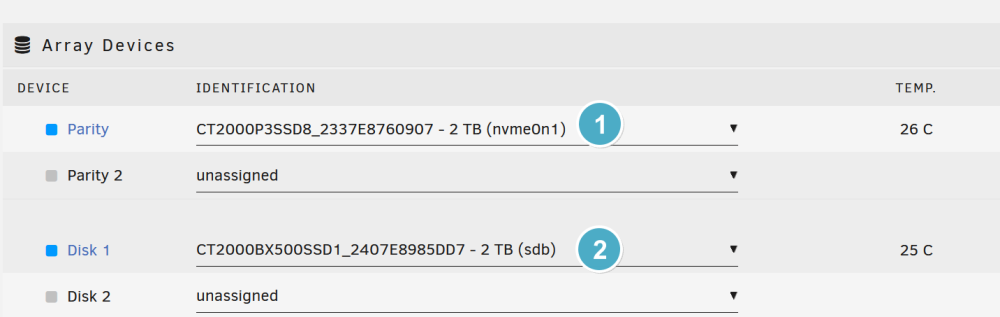
  2. mx4k joined the community
  3. Hallo zusammen, ich habe Hardware kostenlos erhalten und wollte meine Unraid-Lizenz endlich nutzen. Die Hardware beinhaltet zwei 2TB SSDs. Da ich ein absoluter Unraid-Anfäger bin, wollte ich fragen, wie ich am besten die Haupt-Konfiguration vornehmen soll. Ziel ist es eine möglichst hohe Datensicherheit zu haben (vor Ausfall). Die Menge des Speichers ist nicht so wichtig. Vielen Dank vorab!

Account

Navigation

Search

Search

Configure browser push notifications

Chrome (Android)
  1. Tap the lock icon next to the address bar.
  2. Tap Permissions → Notifications.
  3. Adjust your preference.
Chrome (Desktop)
  1. Click the padlock icon in the address bar.
  2. Select Site settings.
  3. Find Notifications and adjust your preference.