therm
Members
-
Joined
-
Last visited
-
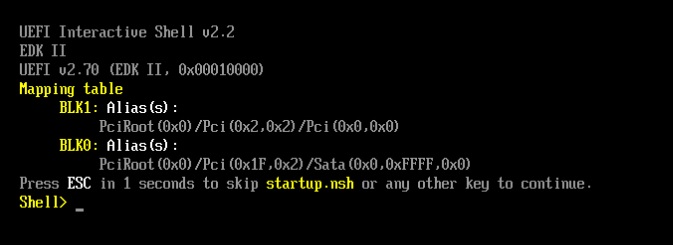
<disk type='file' device='disk'> <driver name='qemu' type='raw' cache='writeback'/> <source file='/mnt/user/domains/Box/vdisk1.img' index='2'/> <backingStore/> <target dev='hdc' bus='virtio'/> <serial>vdisk1</serial> <boot order='2'/> <alias name='virtio-disk2'/> <address type='pci' domain='0x0000' bus='0x03' slot='0x00' function='0x0'/> </disk> <disk type='file' device='cdrom'> <driver name='qemu' type='raw'/> <source file='/mnt/user/isos/ubuntu-23.10.1-desktop-amd64.iso' index='1'/> <backingStore/> <target dev='hda' bus='sata'/> <readonly/> <boot order='1'/> <alias name='sata0-0-0'/> <address type='drive' controller='0' bus='0' target='0' unit='0'/> VNC still boots to blinky shell. Thanks for trying to help.
-
I'm getting the same result when installing W7, W10, Ubuntu desktop 23.10, Ubuntu server 23.10. I've attempted to change the boot orders in Unraid, patched to the latest release, specified the VHD storage location, Change boot order in the UEFI/shell. Change from OVMP to Seabios etc. etc. On other Server OS like WS2019, ESXi and KVM on Ubuntu which I've been able to use basic configs and get a VM running in less than 2 mins. Unraid is really really frustrating. I feel like I've missed something really basic. I've followed numerous YT videos like this one https://www.youtube.com/watch?v=5iR9Cn0t22E copied the wizard/setup exactly. Always boots to UEFI, and have NEVER actually booted from the virtual CDROM under any configuration. I'm really hoping one of y'all found the right button to click and can come back to this forum post in 2023 and SAVE THE DAY! Th Unraid Ubuntu config file.odt Unraid Ubuntu log file.odt