fips1976
Members
-
Joined
-
Last visited
-
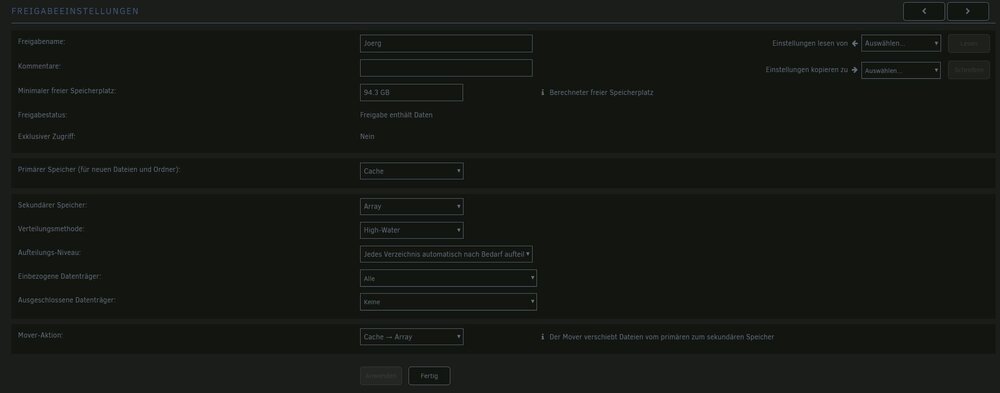
...ich glaube, ich weiß, woran es liegt... Wenn ich in Paperless auf "Dokumente" gehe, weckt er die Platten auf. Wahrscheinlich deshalb, weil die Dokumente bereits auf das Array verschoben wurden?! (der Mover lief jedenfalls letzte Nacht...) Kann man das ggfs. mit "CacheDirectories" oder einem anderen Plugin verhindern? (FALLS es das Problem sein sollte...)
-
Guten Morgen, hatte ich so konfiguriert... So schauts bei mir aus:
-
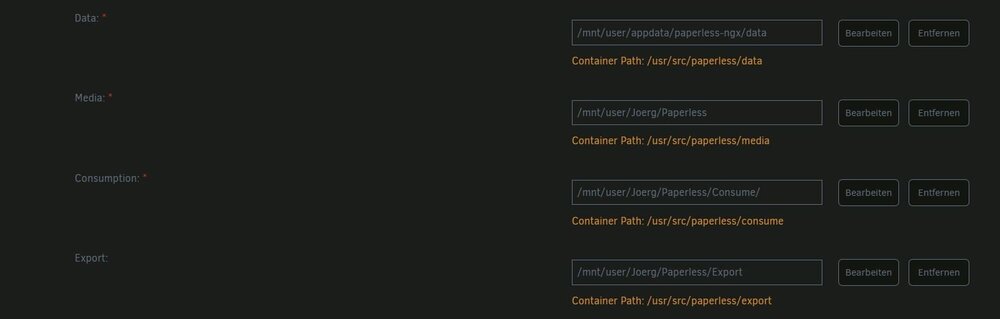
Hallo zusammen, ich habe mir heute Paperless NGX eingerichtet. Leider wachen bei Hochladen eines Dokuments in Paperless sowohl die Daten- als auch die Paritätsplatte auf. Ich habe einen Cache-Pool mit zwei nvme SSD je 1TB als ZFS im Modus "spiegeln" am laufen. Was muss ich bei Docker konfigurieren, damit Paperless die Dokumente erstmal in den Cache schreibt? So schaut meine Konfiguration aus: