




Skip to content
View in the app

A better way to browse. Learn more.

Unraid

A full-screen app on your home screen with push notifications, badges and more.

To install this app on iOS and iPadOS
  1. Tap the Share icon in Safari
  2. Scroll the menu and tap Add to Home Screen.
  3. Tap Add in the top-right corner.
To install this app on Android
  1. Tap the 3-dot menu (⋮) in the top-right corner of the browser.
  2. Tap Add to Home screen or Install app.
  3. Confirm by tapping Install.

picaroon

Members
  • Joined

  • Last visited

  1. Yup, having the exact same issue...
  2. New version released today which solved the described issue. However I gave up and give Duplicati a try since Backblaze doesn't recognize the mapped docker folder to be processed for the backup.
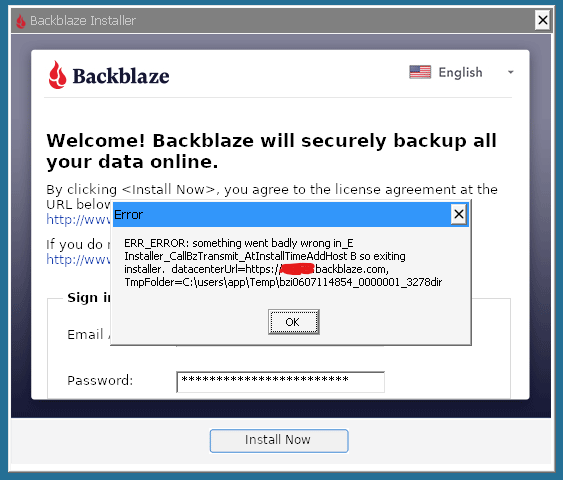
  3. Since yesterday I'm trying to install the Backblaze Personal Backup docker, however it ends with an error after signing in with a Backblaze account (trial). Already tried different versions, but no difference. Log: [app ] wine: failed to open "/config/wine/drive_c/Program Files (x86)/Backblaze/bzbui.exe": c0000135 After pressing 'Ok' it just stops. Anyone else experiencing the same issue?
Account

Navigation

Search

Search

Configure browser push notifications

Chrome (Android)
  1. Tap the lock icon next to the address bar.
  2. Tap Permissions → Notifications.
  3. Adjust your preference.
Chrome (Desktop)
  1. Click the padlock icon in the address bar.
  2. Select Site settings.
  3. Find Notifications and adjust your preference.