





Simon_939
Members
-
Joined
-
Last visited
-
Vielen Dank für die schnelle und gute Hilfe! Nach dem Check versuche ich einen Neustart, wenn das funktioniert markiere ich den vorangegangenen Post als Lösung. Viele Grüße Simon
-
@JorgeB Thank you for your input. Because of the result: Phase 1 - find and verify superblock... - reporting progress in intervals of 15 minutes Phase 2 - using internal log - zero log... ERROR: The filesystem has valuable metadata changes in a log which needs to be replayed. Mount the filesystem to replay the log, and unmount it before re-running xfs_repair. If you are unable to mount the filesystem, then use the -L option to destroy the log and attempt a repair. Note that destroying the log may cause corruption -- please attempt a mount of the filesystem before doing this. I've followed this post: And now the array started and I'm running a parity Check.
-
@ich777 vielen Dank, werde ich heute Nachmittag testen! Beim Netzteil sehe ich keine Auffälligkeiten, zumindest startet alles und ich bemerke auch keine Schwankungen/Aussetzer...
-
Hallo @ich777, C-States im BIOS prüfe ich heute Nachmittag. Im Safe Mode kann ich das Array ohne eingebundene Platten starten. Aus den Meldungen ergibt sich leider keine neue Erkenntnis. Docker und VM habe ich via WebUi auch deaktiviert (gleiches Ergebnis).
-
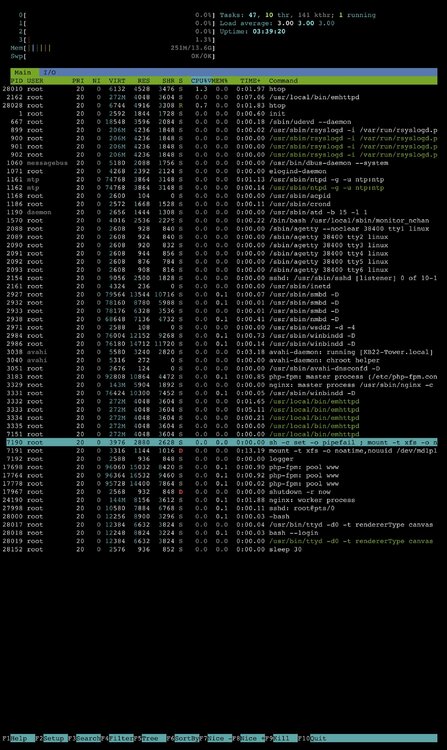
@Archonw der via webui angestoßene reboot „geistert“ da noch rum… (habe ich vor ca 3h angestoßen)
-
Der Server läuft, allerdings mit dem Hinweis unten links „Array startet“ und unter Freigaben ist nichts. Via Terminal mit kommt eine leere disk1. Docker startet nicht, da das Array nicht läuft. (VM startet auch nicht mit Verweis auf das nicht laufende Array). wenn ich via WebUI oder ssh rebooten will passiert leider auch nichts. Im Log erscheint dann, dass der reboot ausgeführt wird. Im Webui lässt sich aber zumindest noch alles anklicken etc. …
-
Hallo zusammen, mein System läuft eigentlich problemlos, bis es vor 2 Wochen nach einem Stromausfall zu Problemen kam. Das Array hatte den Status "mounting" und dabei blieb es mehrere Tage. Ich habe einen Neustart via Website versucht (erfolglos) und dann einen Hardreboot direkt am Gehäuse ausgeführt. Das Ergebnis bleibt gleich. Ich finde leider nichts im Systemlog (habe aber leider auch nur kaum Erfahrung...) Vielleicht kann hier jmd. etwas aus den Logs lesen... Ich habe ca. 10 Docker-Container und eine VM. Viele Grüße Simon tower-diagnostics-20240521-1812.zip

