





Pulk
Members
-
Joined
-
Last visited
Everything posted by Pulk
-
Great advice! That will be my next project, thank you for being so helpful in getting this set up. I really do greatly appreciate it
-
I just got it to work by changing my SSL/TLS Encryption Mode from "Flexible" to "Full". I am now able to go to https://emby.domain.url and access my emby server. Thank you so much for all your help.
-
I just went to my Cloudflare settings and Always Use HTTPS was already disabled
-
Okay, I've uninstalled the duckdns container and installed the cloudflare-ddns container from Oznu. My CNAME is just emby, container name is binhex-emby, and I've set the HTTPS port to 443 in emby network settings. Still the same behavior with not redirecting properly. Trying from another browser I can see the error is too many HTTP redirects, maybe this can help point to what's wrong?
-
I've attached screenshots of the emby.subdomain.conf and default.conf files below. I've not downloaded the cloudflare ddns app, is it necessary? In my emby dashboard it lists the local LAN as http://<Emby Container IP>:8096 and remote WAN as https://emby.domain.url. I tried both http and https when trying to connect to WAN and both gave the same result of failing to redirect (eg: http://emby.domain.url and https://emby.domain.url both report the webpage failed to redirect properly).
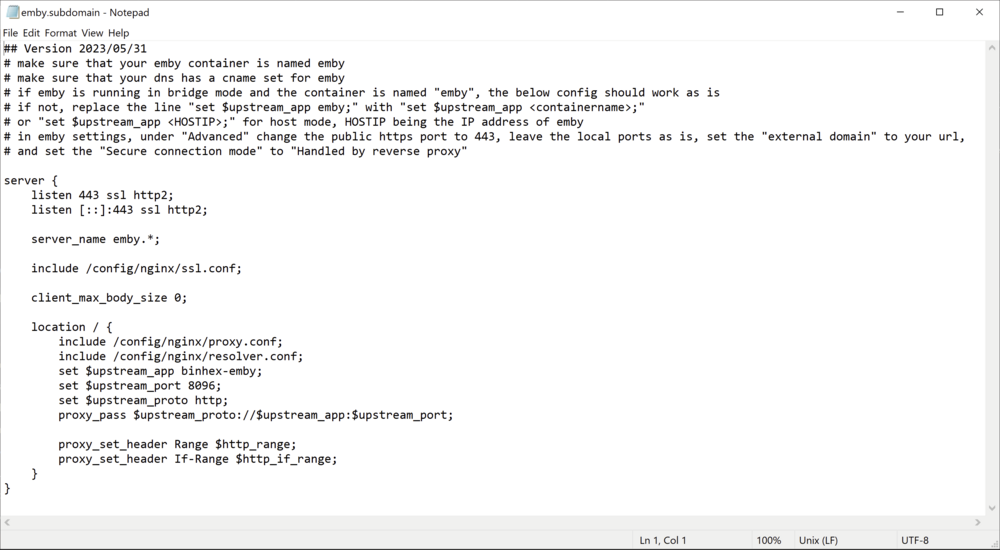
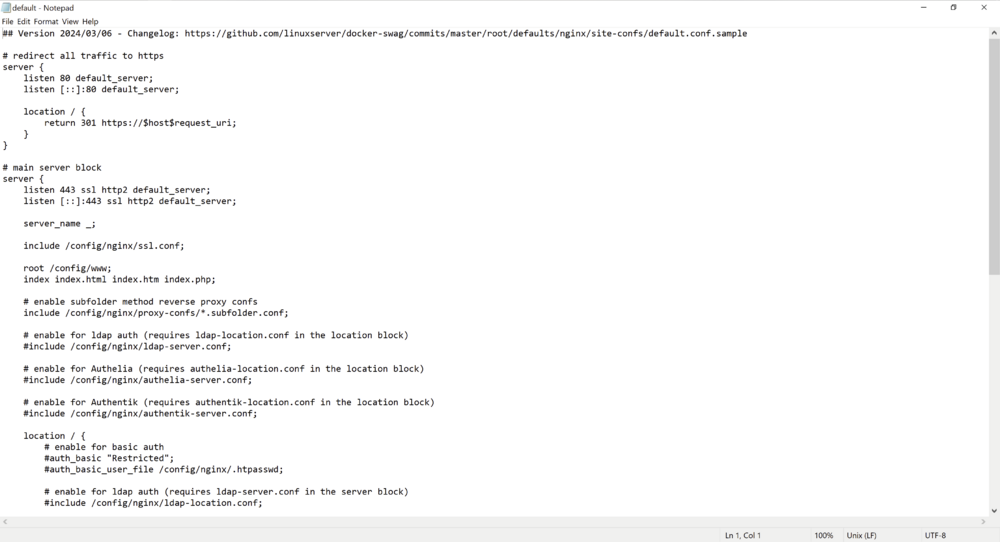
-
Okay I've made pretty good progress in the last day. I was wary about my ports not reporting as opened, so I dug a little into that. I noticed there are 3 separate IP addresses I needed to be aware of. My Public IP from my ISP, my Internet IP from my router, and my local IP of my UnRAID machine. I went into my gateway and set ports 80 and 443 of the Public IP to ports 80 and 443 of my Internet IP. Then I went into my router and confirmed ports 80 and 443 of my Internet IP were being sent to ports 9090 and 9443 of my local IP. After checking on yougetsignal.com I can see that <Public IP> ports 80 and 443 are now both being reported as open. I was also wary of duckDNS, so I purchased a domain through cloudflare and made sure to set the CNAME filter for emby.domain.url, and an A filter to my Public IP. I edited the emby network settings and the nginx proxy .conf file, but am still having trouble. SWAG seems to be working fine at the moment, I am just running into trouble connecting to emby now. I continued with the guide and set all the proper emby settings but now run into connection issues. When I go to my browser, I can navigate to <Public IP>:80 and <Public IP>:443 and see the SWAG landing page. However, if I navigate to emby.domain.url, I am met with an error saying the page isn't redirecting properly.
-
Update 2: With SWAG saying "server ready", I decided to try and continue with the guide I linked, but now I get stuck at Step 7. For Step 4, I already had the binhex version of the Emby container installed. For Step 5, I configured the emby.subdomain.conf file as instructed: Set server_name to "embyunraidtest.*" Set $upstream_app to "binhex-emby" Saved as .conf Restarted the SWAG container after saving For Step 6, I also configured the network settings as described: Set Public HTTPS port number to "443" Set external domain to "embyunraidtest.duckdns.org" Set Secure connection mode to "handled by reverse proxy" Disabled automatic port mapping Saved settings Restarted the Emby container I get stuck at Step 7 where we test the remote connection. When I go to "https://embyunraidtest.duckdns.org" I get a timeout error when trying to connect. I feel like I am almost there, but missing a crucial step. I appreciate the help so far
-
Update: I was able to get SWAG to say "server ready" by changing the following settings under the SWAG container: URL = embyunraidtest.duckdns.org validation = dns subdomains = wildcard dnsplugin = duckdns I can't work on it for the rest of the day, but SWAG seems to now be working. Is there a way to confirm this?
-
I just noticed that my public IP address is different than the internet IP address listed on my router's admin page. Could this also be impacting something? Router Internet IP: 192.168.x.x Public IP from whatismyipaddress.com: 69.113.x.x
-
So I contacted my ISP and got the following info: CGNAT is NOT used, my ISP just assigns IPs dynamically. Ports blocked include: 25, 80, 8080, 135-139, 445, 1043, 6588, 1080, and 3128 I confirmed that my gateway is configured to be in Bridge Mode Any ideas on what else I can do?
-
Correct on the no 4/5G internet. I just tried rebooting my router and that did not fix the issue. I am going to reach out to my ISP to see if they are blocking the ports.
-
I have a gateway in bridge mode connected to my AX1800 router, which my UnRAID machine is connected directly to. Is that what you mean?
-
Admittedly I know very little about routers and networking. I've not configured anything beyond what the guide has said to, so only whatever is in the SWAG docker container and router port-forward settings. I visited the website you listed and input my external IP address with ports 80 and 443 - both are closed. I tried swapping the external and internal ports such that external ports are 80 and 443, and the internal are 9090 and 9443, but that hasn't fixed it either. Could it be some router setting that I am unaware of?
-
as the title says, I need some help getting SWAG working so I can give access to my emby server to my friends and family. I've been trying to follow this guide and am getting stuck at step 3 after installing SWAG: For step 1, I set up a domain through duckdns.org (unraidembytest.duckdns.org) and installed the duckdns docker container. For step 2, I have my own docker network that all my containers are mapped to. For step 3, I set the following for the SWAG docker container and the port forwarding in my router (TP-Link AX1800): SWAG Docker Container: Set HTTP port to 9090 from 80 (8080 was already in use) Set HTTPS port to 9443 from 443 Set URL to "duckdns.org" Set subdomain to "embyunraidtest" Set my email Set only_subdomains to "true" Swag80 Port Forward: Set UnRAID IP address Set external port to 9090 Set internal port to 80 Swag443 Port Forward: Set UnRAID IP address Set external port to 9443 Set internal port to 443 When following the guide, I save the router settings then apply the changes to the SWAG container. After looking at the logs, I get the following error message: I'm really not sure how to fix this. I've tried swapping the internal and external ports in my router settings, uninstalling and reinstalling SWAG, and trying different domains through duckdns. I would really appreciate any UnRAID Jedi Masters helping me with this problem. Thanks!


