





TurboPotato
Members
-
Joined
-
Last visited
Everything posted by TurboPotato
-
oh so you meant the 0:1 and 0:0. but isn't that just pure definition by the unraid OS? i can format those new drives without a problem and use them as JBOD... i've thought about this the whole morning and not being able to use USB enclosures dramatically increases now my expenses for this NAS. i run on a thin client for low power consumption but since USB is not genererally supported and the thin client does not expose eSATA or SATA i am.... fckd.
-
That is a bummer. but i still don't get why it worked with the first enclosure in the first place. The 12TB drives are identical, as well as the old 18TB ones. Whats new is, that the new 18TB ones get assigned the same ID as the old 18TBs.
-
As per the GUI interface, the serial numbers are different for the Harddrives: new ones: old ones (18 TB) or did you mean the same serial number for the USB enclosure itself?
-
I wanted to add another disk to my array as well as add a parity disk. not necessarly all at once. but i cannot get neither to work. Basically when i want to add another disk to the array (slot 5), the screen refreshes and jumps back to "unassigned". True for both new HDs in the system (sdb, sda). When i try to add one of these to parity, it will remove my slot 1 disk and i won't be able to re-add it to the array, while pushing my slot 1 disk to be a parity drive. the new ones will not slot in as partiy. i tried several reboots, i tried "new config" with preserve assignements. Did not help. logs are attached. many thanks in advance! powehi-diagnostics-20250209-0022.zip
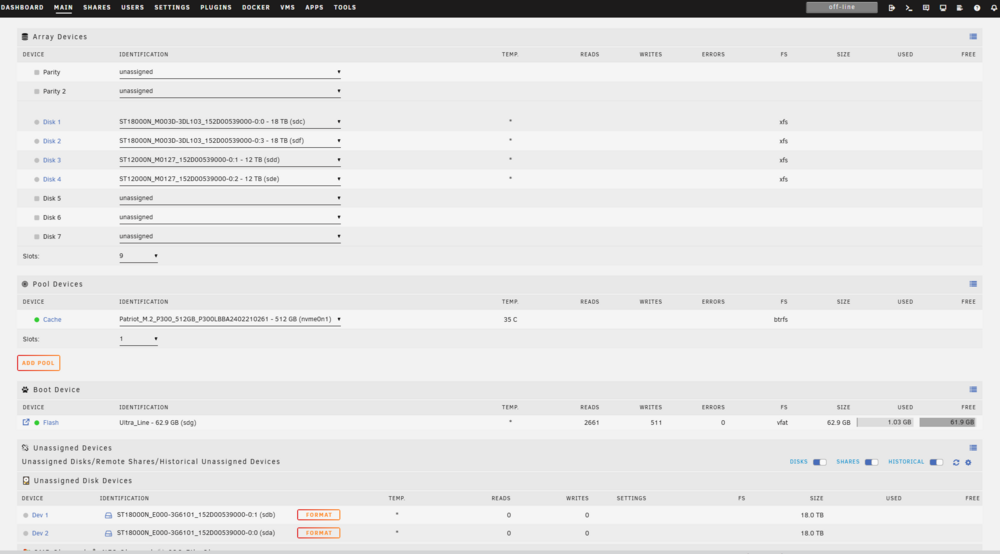
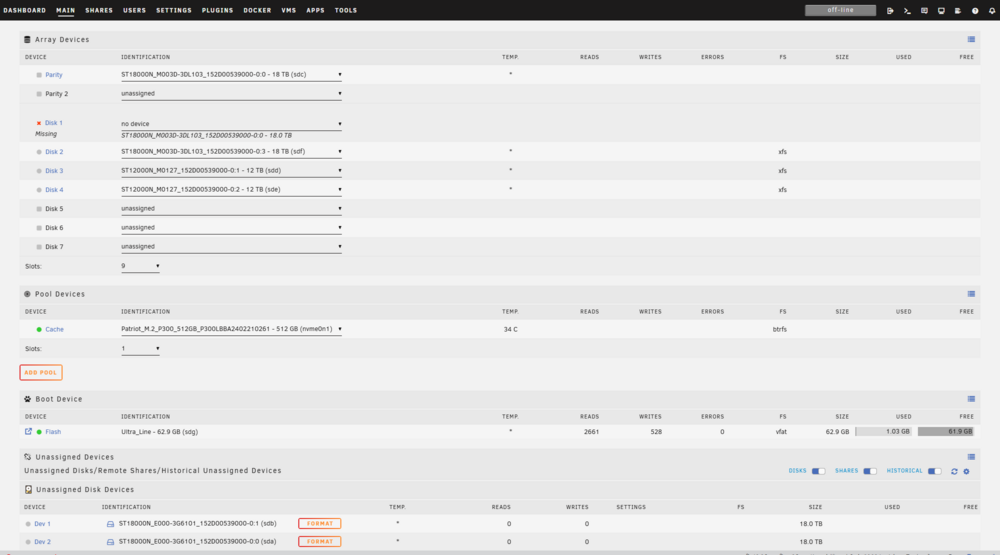
-
hi guys, i am new to unraid. i am running 6.12.10 on a legacy basic licence. A month ago i setup my unraid server with 2x18 TB drives, and one cache SSD. today i wanted to add another 2x12 TB drives. No parity so far, all drives are external storage via an USB3 icybox enclosure. Haven't had an issue so far. As for migration, i setup 2 SMB shares and mounted those. nothing special. now, when i tried to add both 2x12 TB at once, the main dashboard would say "too many drives or wrong drives" or something like that. It would not even show unassigned drives, but only "historically unassigned drives". i tried to use the tools->new config, but it did not help. no way of starting the array, or having any normal operation. so just to be clear, i thourghouly checked for other errors: both new HDs were working on my windows machine, no smart issues, etc. the whole enclosure was working under windwos too. i checked each slot of the enclosure, mixed up the harddrives. it boils down to this, that 3 HDs were too many for my unraid server apparently. so i took a long shot and removed one SMD share (which wasn't even mounted throughout the whole process). that did the trick. the 4th drive was finally found and the UI looked like it should: just unassigned drives which then could be assigned to the array. i kinda feel like this has to do with my basic licence, since it can only hold 6 "drives" in total. 2x18 TB + 1 cache + 2 SMB shares are 5. adding another drive, one of the 12 TB is 6 "drives" in total. now the 7th was apparently one too many. But SMB mounts should not classify as drives, or do they?! powehi-diagnostics-20240728-0021.zip

