





RevoNovo
Members
-
Joined
-
Last visited
Everything posted by RevoNovo
-
Thank you so much it works. perfekt this tip saves me so much time Danke an alle für die schnelle Hilfe
-
die sollten alle zfs haben
-
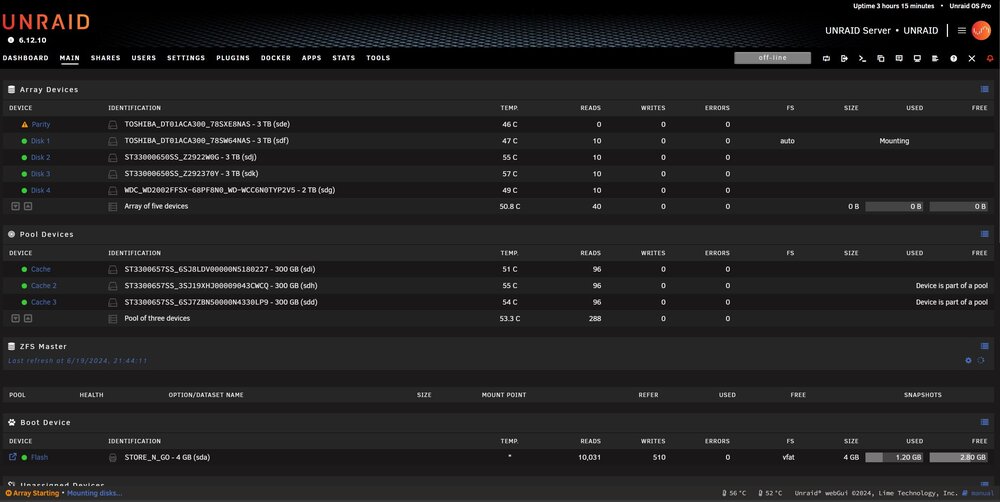
beim Download der diagnostics bleibt er leider bei /usr/sbin/zpool status 2>/dev/null|todos >>'/unraid-diagnostics-20240619-1959/system/zfs-info.txt' hängen sonst hätte ich sie mit angehangen. Hier wenigstens ein screenshot
-
Hey danke für deine Antwort bin noch neu im Thema Unraid sorry. Habe das Log gefunden im log ist mount: /mnt/disk1: wrong fs type, bad option, bad superblock on /dev/md1p1, missing codepage or helper program, or other error. als fehler hinterlegt. Das fs steht auf auto?! syslog.txt
-
Hallo, ich habe nach einem Stromausfall das Problem das mein Array nicht mehr startet. bei Disk 1 steht nur Mounting und und weiter geht er nicht. Hat da jemand einen Tipp für mich was ich machen kann. Habe new config schon probiert hat aber nichts gebracht. Grüße Sven
