





qal1h
Members
-
Joined
-
Last visited
-
Currently I have /mnt/user/data/media/movies as my Host Path 2 in Plex docker. However it should be /mnt/user/data/media/ to allow for other types of media. In a rush I didnt think it through. Is there a way to avoid Plex having to re-generate all the meta data for every movie if I change the path to the correct one?
-
So I - as a precaution - changed the share from high water to fill up, automatic split to manual: do not split, unselected all disks (so all disks) and then did the transfer and this time the expected behaviour occurred! All files are still on their respective disks. Now I have changed the share to "most free" and expect moving forward for files to go to the new 12tb drive.
-
I have about 5tb on disk 1 - it was fill up method when share was just movies. Disk2 has another 4tb again movies share. I want to re-oraganise and keep all files on the disk they already are on.
-
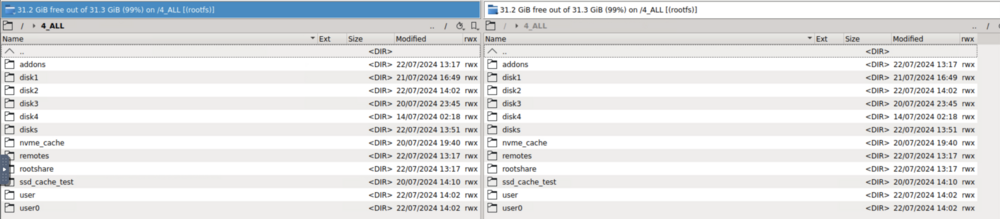
This is the Krusader container setup And source -> destination So i'm not sure what happened but the following is what I did: - Opened 4_ALL > disk1 > movies - on the left panel - Opened 4_ALL > disk 1 > data > media > movies - on the right panel - Selected all folders and said "move to other panel" - it instantly transferred it as expected.

-
Using Krusader - the transfer was instant - but smaller files from some folders were transferred to disk 2 with the same folder name. I think because the data share was set to high water. So now I've got single folders in single disks. No more split across disks. I'm not confident that doing the bulk transfer of same disk files to same disk and different folder, wont have adverse affects again. All I want to do is just put them in a sub folder. Do I remove the share completely and do folder organisation and then set a share to be those folders? Or do I set the share to not do high water and no to split directories. I'm not sure if moving files between same-disk folders still applies share rules to the transfer - so for example high water will split things even though i'm doing disk to disk transfer in Krusader.
-
I think I understand, thanks. I've just transferred from disk to disk (movies(disk1) -> data/media/movies(diskt1)) and about a third of folders have been split between disk 1 and disk 2. Could it be because I had the data share to high water and automatic split? I am going to manually transfer all files and sub folder files into disk 1 now. But just wanted to know if thats why they went in two differnet disks.
-
My only concern is, if I move between shares, it may end up transferring files between disks. And I'd rather not have unneccessary writes. I'd rather keep each disk's files on its own disk - which might not happen if I am only concerned with moves between shares?
-
Great! Right now however, there is no data folder inside the share on disk 2. So this is the situation right now: (I have a share called movies on disk 1 and disk 2 which I want to move). I have created a share called data The data share currently has media/movies folder, but the share folders (data/media/movies) currently resides on disk 1 and not on disk 2 Do I create a data/media/movies folder manually in disk 2 and move the movies from movies/ to the said manually created folder?
-
Presumably Unraid "takes care" of the which disks they go to by way of that shares' settings? For example if you had set the share up to go to disk 4 and disk6 with fill up method, that is what the terminal, lets say rsync, transfer would do?
-
I started my unraid server by doing the following: Added 6tb x2 to the array Create a share called movies and primary storage as array and fill up method Transferred about 1000 movies to those drives - both drives almost full Since then i've added a third drive, 12tb. I want to move my movies share to a data share. Like described by TrashGuides. Question is how is it best to move the movies share into data across these 3 drives? Do I: Create a share called data (primary storage array, included disks: disk1, disk2, disk3) - doing this has created a data folder inside disk1 only Create subfolder inside the share media/movies Create, manually, folders data/media/movies inside disk2, disk3 move disk1/movies to disk1/data/media/movies move disk2/movies to disk1/data/media/movies Create empty folder inside disk3/data/media/movies Just concerned with breaking something, I know you shouldnt move files between shares and disks - but this is a share already with movies on distinct disks I want to move to a new share which should be on the same distinct disks.
-
I have a 4TB MX500 and StableBit Scanner is complaining about it not being healthy or something - its a storage drive on my gaming pc - i'll have a look later on it. Got it last year.
-
I asked chatgt Yes, your plan for using two sets of cache pools in Unraid should work practically, though there are some considerations to keep in mind. 1. NVMe Cache Pool Drives: - WD SN750 (1TB, Gen 3) - WD SN770 (1TB, Gen 4) Usage: - Appdata - Docker - VMs Considerations: - RAID 1 Performance: When combining these two NVMe drives in a RAID 1 configuration, Unraid will default to the speed of the slower drive for reads and writes. In this case, the performance will be limited by the Gen 3 WD SN750. - Compatibility: Both drives will work together in a RAID 1 pool without issues, as Unraid does not require both drives to be of the same generation or speed. The capacity will be equal to the size of the smallest drive (1TB in this case). - Practical Performance: Despite the SN770 being a Gen 4 drive, its benefits won't be fully utilized in this RAID 1 setup due to the SN750 limiting the overall speed. However, the SN770 should still work without problems. 2. SATA SSD Cache Pool Drives: - ADATA 960GB SSD - Samsung 850 Pro 1TB SSD Usage: - Downloads Considerations: - RAID 1 Performance: Similar to the NVMe setup, the RAID 1 pool will operate at the speed of the slower drive. Here, the difference in capacity is minimal (960GB vs 1TB), and performance will be dictated by the slower SSD. - Compatibility: These drives will also work together in a RAID 1 configuration. The usable capacity of the RAID 1 pool will be equal to the size of the smallest drive (960GB in this case). Practical Considerations - Redundancy and Performance: RAID 1 provides redundancy but not a performance boost for write operations. Read operations can benefit if Unraid can read from both drives simultaneously. - Management and Maintenance: Managing multiple cache pools in Unraid is straightforward but requires proper configuration. Ensure that your appdata, Docker, and VM configurations point to the correct cache pool. - Drive Wear Leveling: Different SSDs may have varying wear-leveling mechanisms and endurance ratings. Monitor the health of your SSDs regularly, especially since they're used for intensive tasks like appdata, Docker, VMs, and downloads. Conclusion Your setup is unconventional but should work fine in practice. Using different generations and types of SSDs in separate cache pools in Unraid will provide the redundancy and capacity you need for your specific use cases. Just be aware that the overall performance will be governed by the slower drives in each RAID 1 setup.
-
Amazing thank you, works perfectly as expected. One thing I find weird is the detatch command ctrl+b then d - I suppose it stops you from doing it accidentally!
-
Brill! So can you run multiple instances? Like multiple tmux new -s transfer1 and tmux new -s transfer2 and detach from both and re-attach to each one? The reattach command seems to have no other arguments to attach to something else, so presumably just 1.
-
I'm a software developer so quite familiar with the command line but on Mac. Didnt know there was a difference but now I do! On rsync actually and the Unraid terminal - glad you brought it up (was going to start another thread) - BUT - basically yesterday I must have been timedout of my session to Unraid and thought the rysnc would continue running in the background but it had stopped when I was logged out. So is that what tmux will help resolve or will it just allow you to continue where it left off?

