





MrSaiclops
Members
-
Joined
-
Last visited
-
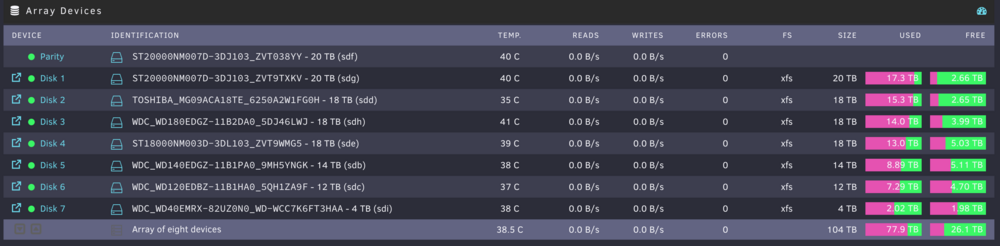
The new SAS cable seems to have solved things. Thanks for helping me out! Event: Parity Check Tuning Subject: [HIGHCOUNCIL] Parity Sync/Data Rebuild finished (0 errors) Description: Elapsed Time 1 day, 18 hr, 35 min, 30 sec, Runtime 1 day, 16 hr, 47 min, 8 sec, Increments 3, Average Speed 136.2 MB/s Importance: normal I'll try clearing the old Disk 4 and test for errors. If it was a false positive then I'll fully reintroduce for some added headspace!
-
I know they are prone to overheating, so I’ve mounted a fan to it which others have said handles everything fine, although my new place lacks central air so it may be hotter, still. Would unraid report this issue to me? Don’t want to chase after an issue if it’s not real. thanks again for all of your help!
-
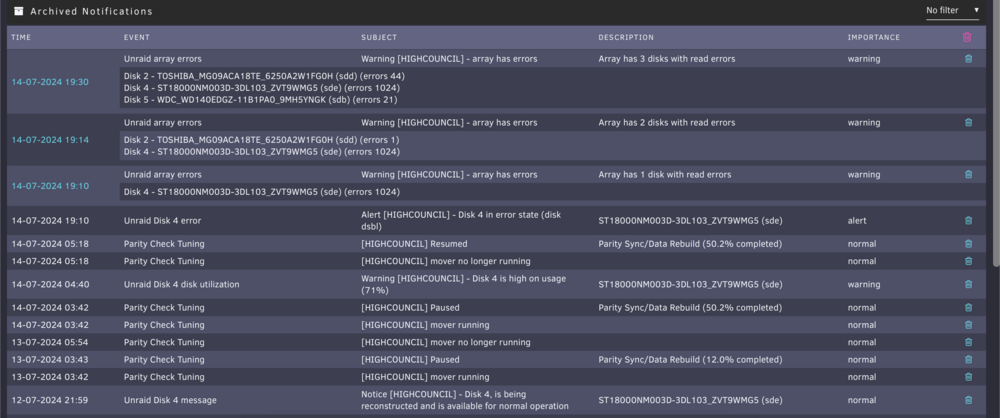
Got to ~70% and then encountered errors again. I have the alternate SAS cable, should I shut down the array and try swapping it out? Diagnostics attached highcouncil-diagnostics-20240714-1934.zip
-
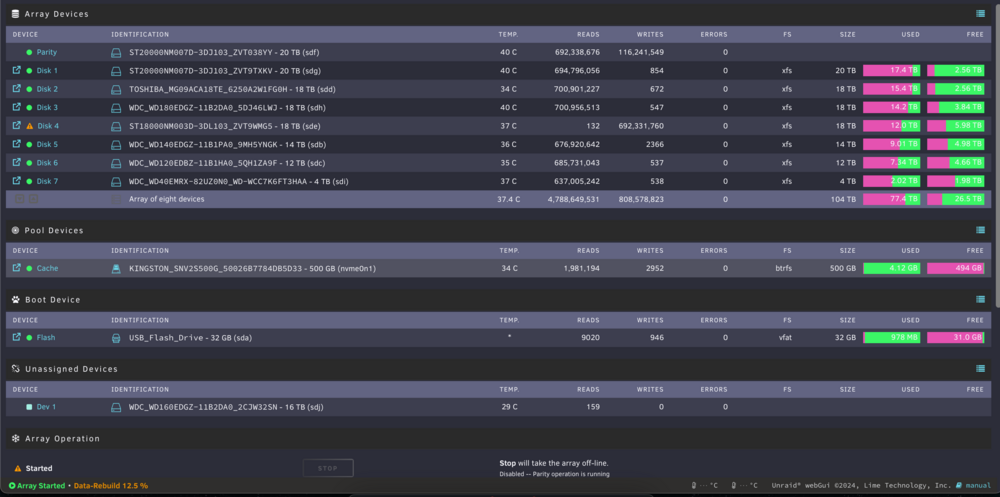
Here are some from this morning. If it's still not correct then I'm not sure. highcouncil-diagnostics-20240713-0610.zip
-
Alright, here it is with the old disk 4 plugged in as well. Should I stop the array and attempt to rebuild with the new drive? highcouncil-diagnostics-20240712-0759.zip
-
Will rebooting restart the read-check?I don't have a slot to plug back in the old Disk 4, is there a way to grab historic SMART results from a drive that's no longer plugged in? highcouncil-diagnostics-20240712-0759.zipOkay, I've purchased a replacement to the cable which may have been damaged while I reconfigured components? It should arrive tomorrow. The current status is an incredibly slow read-check Total size: 20 TB Elapsed time: 10 hours, 12 minutes Current position: 17.0 TB (84.8 %) Estimated speed: 15.0 MB/sec Estimated finish: 2 days, 8 hours, 27 minutes Read errors corrected: 216897320 Here's the output of a command I saw requested in another thread about slow read-checks: root@HighCouncil:~# sar -dp 5 5 Error: File /etc/sensors.d/sensors.conf, line 9: Undeclared bus id referenced Error: File /etc/sensors.d/sensors.conf, line 15: Undeclared bus id referenced Error: File /etc/sensors.d/sensors.conf, line 17: Undeclared bus id referenced sensors_init: Can't parse bus name Linux 6.1.79-Unraid (HighCouncil) 07/12/2024 _x86_64_ (12 CPU) 07:22:11 AM tps rkB/s wkB/s dkB/s areq-sz aqu-sz await %util DEV 07:22:16 AM 0.00 0.00 0.00 0.00 0.00 0.00 0.00 0.00 loop0 07:22:16 AM 0.00 0.00 0.00 0.00 0.00 0.00 0.00 0.00 loop1 07:22:16 AM 0.00 0.00 0.00 0.00 0.00 0.00 0.00 0.00 loop2 07:22:16 AM 0.00 0.00 0.00 0.00 0.00 0.00 0.00 0.00 sda 07:22:16 AM 0.00 0.00 0.00 0.00 0.00 0.00 0.00 0.00 nvme0n1 07:22:16 AM 0.00 0.00 0.00 0.00 0.00 0.00 0.00 0.00 sdb 07:22:16 AM 0.00 0.00 0.00 0.00 0.00 0.00 0.00 0.00 sdc 07:22:16 AM 463.20 116172.80 0.00 0.00 250.80 0.10 0.21 23.60 sdd 07:22:16 AM 0.00 0.00 0.00 0.00 0.00 0.00 0.00 0.00 sde 07:22:16 AM 463.20 116172.80 0.00 0.00 250.80 0.52 1.12 29.78 sdf 07:22:16 AM 463.00 116172.80 0.00 0.00 250.91 0.62 1.34 30.30 sdg 07:22:16 AM 463.20 116172.80 0.00 0.00 250.80 16.34 35.27 99.98 sdh 07:22:16 AM 0.00 0.00 0.00 0.00 0.00 0.00 0.00 0.00 sdi 07:22:16 AM tps rkB/s wkB/s dkB/s areq-sz aqu-sz await %util DEV 07:22:21 AM 0.00 0.00 0.00 0.00 0.00 0.00 0.00 0.00 loop0 07:22:21 AM 0.00 0.00 0.00 0.00 0.00 0.00 0.00 0.00 loop1 07:22:21 AM 0.00 0.00 0.00 0.00 0.00 0.00 0.00 0.00 loop2 07:22:21 AM 0.00 0.00 0.00 0.00 0.00 0.00 0.00 0.00 sda 07:22:21 AM 0.00 0.00 0.00 0.00 0.00 0.00 0.00 0.00 nvme0n1 07:22:21 AM 0.00 0.00 0.00 0.00 0.00 0.00 0.00 0.00 sdb 07:22:21 AM 0.00 0.00 0.00 0.00 0.00 0.00 0.00 0.00 sdc 07:22:21 AM 457.40 114585.60 0.00 0.00 250.52 0.10 0.22 22.82 sdd 07:22:21 AM 0.00 0.00 0.00 0.00 0.00 0.00 0.00 0.00 sde 07:22:21 AM 457.00 114432.00 0.00 0.00 250.40 0.45 0.99 28.44 sdf 07:22:21 AM 455.80 114432.00 0.00 0.00 251.06 0.49 1.07 29.02 sdg 07:22:21 AM 457.60 114585.60 0.00 0.00 250.41 16.32 35.66 100.00 sdh 07:22:21 AM 0.00 0.00 0.00 0.00 0.00 0.00 0.00 0.00 sdi 07:22:21 AM tps rkB/s wkB/s dkB/s areq-sz aqu-sz await %util DEV 07:22:26 AM 0.00 0.00 0.00 0.00 0.00 0.00 0.00 0.00 loop0 07:22:26 AM 0.00 0.00 0.00 0.00 0.00 0.00 0.00 0.00 loop1 07:22:26 AM 0.00 0.00 0.00 0.00 0.00 0.00 0.00 0.00 loop2 07:22:26 AM 0.00 0.00 0.00 0.00 0.00 0.00 0.00 0.00 sda 07:22:26 AM 0.00 0.00 0.00 0.00 0.00 0.00 0.00 0.00 nvme0n1 07:22:26 AM 0.00 0.00 0.00 0.00 0.00 0.00 0.00 0.00 sdb 07:22:26 AM 0.00 0.00 0.00 0.00 0.00 0.00 0.00 0.00 sdc 07:22:26 AM 108.38 27132.93 0.00 0.00 250.34 0.02 0.21 5.71 sdd 07:22:26 AM 0.00 0.00 0.00 0.00 0.00 0.00 0.00 0.00 sde 07:22:26 AM 112.18 28103.79 0.00 0.00 250.53 0.10 0.93 7.07 sdf 07:22:26 AM 112.18 28103.79 0.00 0.00 250.53 0.11 1.01 7.19 sdg 07:22:26 AM 114.77 28768.06 0.00 0.00 250.66 3.98 34.66 24.37 sdh 07:22:26 AM 0.00 0.00 0.00 0.00 0.00 0.00 0.00 0.00 sdi 07:22:26 AM tps rkB/s wkB/s dkB/s areq-sz aqu-sz await %util DEV 07:22:31 AM 0.00 0.00 0.00 0.00 0.00 0.00 0.00 0.00 loop0 07:22:31 AM 0.00 0.00 0.00 0.00 0.00 0.00 0.00 0.00 loop1 07:22:31 AM 0.00 0.00 0.00 0.00 0.00 0.00 0.00 0.00 loop2 07:22:31 AM 0.00 0.00 0.00 0.00 0.00 0.00 0.00 0.00 sda 07:22:31 AM 0.00 0.00 0.00 0.00 0.00 0.00 0.00 0.00 nvme0n1 07:22:31 AM 0.00 0.00 0.00 0.00 0.00 0.00 0.00 0.00 sdb 07:22:31 AM 0.00 0.00 0.00 0.00 0.00 0.00 0.00 0.00 sdc 07:22:31 AM 0.00 0.00 0.00 0.00 0.00 0.00 0.00 0.00 sdd 07:22:31 AM 0.00 0.00 0.00 0.00 0.00 0.00 0.00 0.00 sde 07:22:31 AM 0.00 0.00 0.00 0.00 0.00 0.00 0.00 0.00 sdf 07:22:31 AM 0.00 0.00 0.00 0.00 0.00 0.00 0.00 0.00 sdg 07:22:31 AM 0.00 0.00 0.00 0.00 0.00 0.00 0.00 0.00 sdh 07:22:31 AM 0.00 0.00 0.00 0.00 0.00 0.00 0.00 0.00 sdi 07:22:31 AM tps rkB/s wkB/s dkB/s areq-sz aqu-sz await %util DEV 07:22:36 AM 0.00 0.00 0.00 0.00 0.00 0.00 0.00 0.00 loop0 07:22:36 AM 0.00 0.00 0.00 0.00 0.00 0.00 0.00 0.00 loop1 07:22:36 AM 0.00 0.00 0.00 0.00 0.00 0.00 0.00 0.00 loop2 07:22:36 AM 0.00 0.00 0.00 0.00 0.00 0.00 0.00 0.00 sda 07:22:36 AM 0.00 0.00 0.00 0.00 0.00 0.00 0.00 0.00 nvme0n1 07:22:36 AM 0.00 0.00 0.00 0.00 0.00 0.00 0.00 0.00 sdb 07:22:36 AM 0.00 0.00 0.00 0.00 0.00 0.00 0.00 0.00 sdc 07:22:36 AM 0.00 0.00 0.00 0.00 0.00 0.00 0.00 0.00 sdd 07:22:36 AM 0.00 0.00 0.00 0.00 0.00 0.00 0.00 0.00 sde 07:22:36 AM 0.00 0.00 0.00 0.00 0.00 0.00 0.00 0.00 sdf 07:22:36 AM 0.00 0.00 0.00 0.00 0.00 0.00 0.00 0.00 sdg 07:22:36 AM 0.00 0.00 0.00 0.00 0.00 0.00 0.00 0.00 sdh 07:22:36 AM 0.00 0.00 0.00 0.00 0.00 0.00 0.00 0.00 sdi Average: tps rkB/s wkB/s dkB/s areq-sz aqu-sz await %util DEV Average: 0.00 0.00 0.00 0.00 0.00 0.00 0.00 0.00 loop0 Average: 0.00 0.00 0.00 0.00 0.00 0.00 0.00 0.00 loop1 Average: 0.00 0.00 0.00 0.00 0.00 0.00 0.00 0.00 loop2 Average: 0.00 0.00 0.00 0.00 0.00 0.00 0.00 0.00 sda Average: 0.00 0.00 0.00 0.00 0.00 0.00 0.00 0.00 nvme0n1 Average: 0.00 0.00 0.00 0.00 0.00 0.00 0.00 0.00 sdb Average: 0.00 0.00 0.00 0.00 0.00 0.00 0.00 0.00 sdc Average: 205.76 51568.49 0.00 0.00 250.63 0.04 0.21 10.42 sdd Average: 0.00 0.00 0.00 0.00 0.00 0.00 0.00 0.00 sde Average: 206.44 51732.27 0.00 0.00 250.60 0.21 1.04 13.05 sdf Average: 206.16 51732.27 0.00 0.00 250.94 0.24 1.19 13.30 sdg Average: 207.08 51896.04 0.00 0.00 250.61 7.33 35.37 44.86 sdh Average: 0.00 0.00 0.00 0.00 0.00 0.00 0.00 0.00 sdi root@HighCouncil:~# I appreciate the guidance. Do you think the original disk 4 (WDC_WD160EDGZ-11B2DA0_2CJW32SN) may still be functional and was just trippin' because of the SAS cable?MrSaiclops changed their profile photoI've attached the diagnostics. I moved states and have had some significant issues with all of my hardware since. The NAS was running just fine for about 15 days when suddenly I got the following email: Event: Unraid Disk 4 error Subject: Alert [HIGHCOUNCIL] - Disk 4 in error state (disk dsbl) Description: WDC_WD160EDGZ-11B2DA0_2CJW32SN (sde) Importance: alert One day later Disk 4 has gone fully offline with this message: Event: Unraid Disk 4 SMART health [199] Subject: Warning [HIGHCOUNCIL] - udma crc error count is 12887 Description: WDC_WD160EDGZ-11B2DA0_2CJW32SN (sde) Importance: warning I tried to reconstruct (hoping it was not too far gone and that instead some sort bit flipping occurred during the move (I'm not a scientist), then all the others disks started yelling at me: Event: Unraid array errors Subject: Warning [HIGHCOUNCIL] - array has errors Description: Array has 3 disks with read errors Importance: warning Disk 2 - TOSHIBA_MG09ACA18TE_6250A2W1FG0H (sdd) (errors 1182331) Disk 5 - WDC_WD140EDGZ-11B1PA0_9MH5YNGK (sdc) (errors 1098564) Disk 6 - WDC_WD120EDBZ-11B1HA0_5QH1ZA9F (sdb) (errors 1141679) Then a moment later it seemed fine Event: Unraid array errors Subject: Notice [HIGHCOUNCIL] - array turned good Description: Array has 0 disks with read errors Importance: normal But that was obviously a false positive because it quickly turned back around: Event: Unraid Disk 4 SMART health [199] Subject: Warning [HIGHCOUNCIL] - udma crc error count is 13091 Description: WDC_WD160EDGZ-11B2DA0_2CJW32SN (sde) Importance: warning I decided to replace Disk 4 since it was the first to cry wolf, but I'm not sure that was the actual problem because here we are again: 7/9/24 Event: Unraid Disk 4 message Subject: Notice [HIGHCOUNCIL] - Disk 4, is being reconstructed and is available for normal operation Description: ST18000NM003D-3DL103_ZVT9WMG5 (sde) Importance: normal 7/11/24 Event: Unraid Disk 4 error Subject: Alert [HIGHCOUNCIL] - Disk 4 in error state (disk dsbl) Description: ST18000NM003D-3DL103_ZVT9WMG5 (sde) Importance: alert Event: Unraid array errors Subject: Warning [HIGHCOUNCIL] - array has errors Description: Array has 4 disks with read errors Importance: warning Disk 2 - TOSHIBA_MG09ACA18TE_6250A2W1FG0H (sdd) (errors 7245) Disk 4 - ST18000NM003D-3DL103_ZVT9WMG5 (sde) (errors 1040) Disk 5 - WDC_WD140EDGZ-11B1PA0_9MH5YNGK (sdb) (errors 1645) Disk 6 - WDC_WD120EDBZ-11B1HA0_5QH1ZA9F (sdc) (errors 1227) Is the cable for my HBA bad? Or did the TOSHIBA_MG09ACA18TE_6250A2W1FG0H go bad simultaneously with Disk 4 and cause problems? Right now it's completing a read-check on the 20 TB parity drive and moving at a rate of 29.5 MB/s (it raced up to 80% and has been moving at a snails pace since.) highcouncil-diagnostics-20240711-1805.zip





