DooShadok
Members
-
Joined
-
Last visited
Everything posted by DooShadok
-
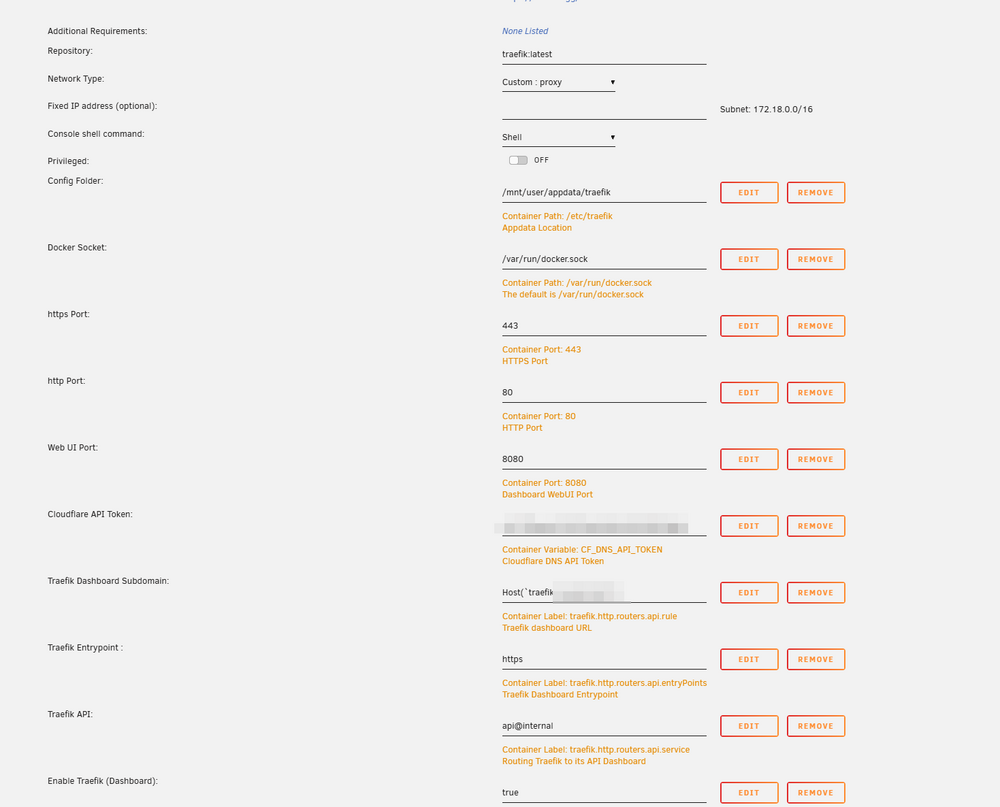
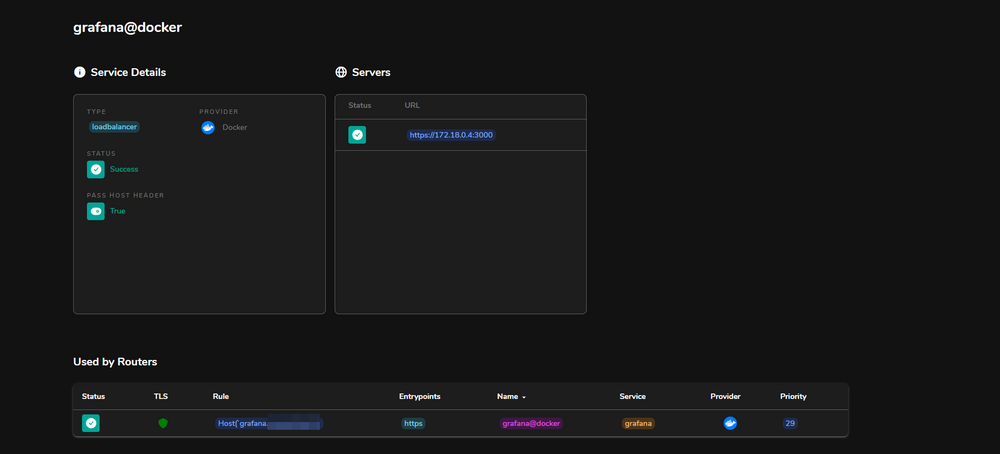
Hello everyone, I'm new to Unraid, and i installed a bunch of apps. I want them to be behind a reverse proxy for many reasons. I setup traefik and cloudflare tunnel (for external exposition). The problem i have is the following : I can reach from the external with a routing in cloudflare let's say grafana.mydomain.com, but it won't go through Traefik for some reasons. This is my config bellow, let me know if you have any questions, i appreciate any help ! Thanks ! traefik.yml global: checkNewVersion: true sendAnonymousUsage: false serversTransport: insecureSkipVerify: true entryPoints: # Not used in apps, but redirect everything from HTTP to HTTPS http: address: :80 forwardedHeaders: trustedIPs: &trustedIps # Start of Clouflare public IP list for HTTP requests, remove this if you don't use it - 173.245.48.0/20 - 103.21.244.0/22 - 103.22.200.0/22 - 103.31.4.0/22 - 141.101.64.0/18 - 108.162.192.0/18 - 190.93.240.0/20 - 188.114.96.0/20 - 197.234.240.0/22 - 198.41.128.0/17 - 162.158.0.0/15 - 104.16.0.0/13 - 104.24.0.0/14 - 172.64.0.0/13 - 131.0.72.0/22 - 2400:cb00::/32 - 2606:4700::/32 - 2803:f800::/32 - 2405:b500::/32 - 2405:8100::/32 - 2a06:98c0::/29 - 2c0f:f248::/32 # End of Cloudlare public IP list http: redirections: entryPoint: to: https scheme: https # HTTPS endpoint, with domain wildcard https: address: :443 forwardedHeaders: # Reuse list of Cloudflare Trusted IP's above for HTTPS requests trustedIPs: *trustedIps http: tls: # Generate a wildcard domain certificate certResolver: letsencrypt domains: - main: mydomain.com sans: - '*.mydomain.com' middlewares: - securityHeaders@file providers: providersThrottleDuration: 2s # File provider for connecting things that are outside of docker / defining middleware file: filename: /etc/traefik/fileConfig.yml watch: true # Docker provider for connecting all apps that are inside of the docker network docker: watch: true network: proxy # Add Your Docker Network Name Here # Default host rule to containername.domain.example defaultRule: "Host(`{{ lower (trimPrefix `/` .Name )}}.mydomain.com`)" # Replace with your domain #swarmModeRefreshSeconds: 15s #comment out or remove this line if using traefik v3 exposedByDefault: false useBindPortIP: true endpoint: "unix:///var/run/docker.sock" #endpoint: "tcp://dockersocket:2375" # Uncomment if you are using docker socket proxy # Enable traefik ui api: dashboard: true insecure: true # Log level INFO|DEBUG|ERROR log: level: ERROR # Use letsencrypt to generate ssl serficiates certificatesResolvers: letsencrypt: acme: email: [email protected] storage: /etc/traefik/acme.json dnsChallenge: provider: cloudflare # Used to make sure the dns challenge is propagated to the rights dns servers resolvers: - "1.1.1.1:53" - "1.0.0.1:53" accessLog: filePath: "/etc/traefik/access.log" fileConfig.yml http: ## MIDDLEWARES ## middlewares: # Only Allow Local networks local-ipwhitelist: ipWhiteList: sourceRange: - 127.0.0.1/32 # localhost - 192.168.1.1/24 # LAN Subnet - 172.10.0.1/24 #proxy lan # Security headers securityHeaders: headers: customResponseHeaders: X-Robots-Tag: "none,noarchive,nosnippet,notranslate,noimageindex" X-Forwarded-Proto: "https" server: "" customRequestHeaders: X-Forwarded-Proto: "https" sslProxyHeaders: X-Forwarded-Proto: "https" referrerPolicy: "same-origin" hostsProxyHeaders: - "X-Forwarded-Host" contentTypeNosniff: true browserXssFilter: true forceSTSHeader: true stsIncludeSubdomains: true stsSeconds: 63072000 stsPreload: true # Only use secure ciphers - https://ssl-config.mozilla.org/#server=traefik&version=2.6.0&config=intermediate&guideline=5.6 tls: options: default: minVersion: VersionTLS12 cipherSuites: - TLS_ECDHE_ECDSA_WITH_AES_128_GCM_SHA256 - TLS_ECDHE_RSA_WITH_AES_128_GCM_SHA256 - TLS_ECDHE_ECDSA_WITH_AES_256_GCM_SHA384 - TLS_ECDHE_RSA_WITH_AES_256_GCM_SHA384 - TLS_ECDHE_ECDSA_WITH_CHACHA20_POLY1305 - TLS_ECDHE_RSA_WITH_CHACHA20_POLY1305 Docker config : Traefik dashboard showing grafana service: