





Mh0
Members
-
Joined
-
Last visited
-
That's an excellent question - I will double check and confirm. If I had done that, then of course the data on the media would now be toast of course. BTW, I have one more follow up on the counsel against using UnRAID with USB - given that I did not know this (or at least it was not abundantly clear to me when I started getting in to unraid) - does the same counsel hold against the following connections: * eSATA? (Already supported by my existing bay) * USB-C? (Asking for my education) * Thunderbolt? (Asking for my education)
-
So I tried to do this, and was greeted with an unpleasant surprise, my main media drive (Disk 1) is being reported as "unmountable". What is the recommended procedure for recovery here - given that there is almost nothing else on the other two disks? a. Should I wait for the parity to build, or is that pointless now? b. What recovery avenues should I pursue? c. Is there a recovery path from within unraid, or should I mount the disk on an external Linux OS and try to search for xfs salvaging tools?

-
Just to be sure, New Config does not necessarily imply the data will be wiped? "New Config" can be expected to expose the data already on the devices being used, right?
-
Yes I am indeed! Does that cause this sort of behaviour?
-
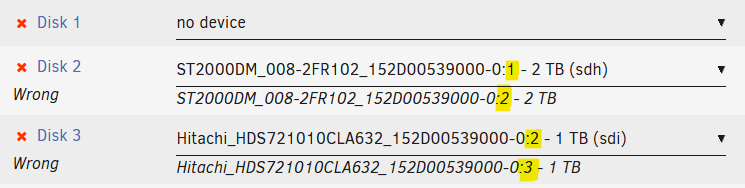
I went out of town and came back to find one of my disks was in an error state. I took a diagnostic log at this stage, but I couldn't tell why the disk failed from the log (attached). I thought the system needed to go through a "data shuffle dance" (Stop/Unassign/Start-in-Maintenance-Mode/Stop/Re-assign/Start) - but to my surprise, I found the disk/device IDs had changed on me, in the form of the very last "suffix" - screenshot of the ID change below: I have two questions: a. Why did this suffix change? b. What can I do now to re-start the array? Is there a way to solemnly promise to unraid that these are the exact same devices inspite of this (involuntary) name change that I didn't even trigger? I have a strong suspicion/hope that a reboot may set that last :suffix back to it's original value, but I don't want to do that yet, as I'd rather understand why this happened first, as well as because I don't want to lose any possible diagnostic logs that may still exist on the system. Note: The drives are attached via a media-sonic bay over a USB connection - is it possible the system is randomly attributing these suffixes to devices in the bay? maadi-diagnostics-20240908-1748.zip
-
Update: I couldn't restore the drive to healthy state given that the drive was reported as "disabled" - until I learned that I have to: a/ stop the array b/ unassign the disk c/ start the array in maintenance mode d/ stop the array again e/ re-assign previous drive to same slot as before, and finally f/ start the array again - it is now re-building data on the re-enabled drive. After this is done, I hope I can back it up, then reconfigure from scratch.
-
You have explained many things to me - thank you! Including: * That I can't change disk positions at will, and * I will eventually take the SSD out of this array (that was clearly a mistake). For the record though, I typically do not have issues with USB disconnections - just when I switch the slot on the bay on/off - for example - here is the very same Hitachi HDD showing up with a different ID when I had changed its slot on the bay. Why is it being identified with a different id? Is this an artifact of the bay changing the disk id or something else? Also are you saying that using a disk bay is okay, just connect it via an eSATA port instead of USB? Lastly, if I need to rebuild this config, can I take a back up of the stuff that was on it from the individual volumes (since I can't easily get the array back up in it's original config again)? Thanks!

-
Updates: Since the post above, I managed to get over the initial problem with an emulated disk somehow The system was green momentarily, before I re-enabled slot 2 in the bay again Curiously now it is reporting that the disk in Slot #1 is Disabled. After getting in to this error state again - I did the following: Enabled the disabled slot in my Mediasonic bay (4 Bay Dock for 2.5" / 3.5" SATA HDD / SSD - USB 3.0 & eSATA) - just by pressing the slot's on/off button Booted the system afresh Re-configured the disks in the exact right configuration they were in the last time it was all green: Parity ST16000N_E000-3UN101_152D00539000-0:0 - 16 TB (sdb) Disk 1 ST16000N_E000-3UN101_152D00539000-0:2 - 16 TB (sdd) Disk 2 Hitachi_HDS721010CLA632_152D00539000-0:1 - 1 TB (sdc) Disk 3 SSD512GBS800_9806A234501707 - 512 GB (sdf) It refused to start in this condition because "Too many disks in wrong or missing state" I captured a diagnostic bundle: 20240727-1339 I disabled the slot in the bay that includes a disk that is not even part of the config listed above, and waited for the disks to get recognized. I then found out that I could start the disk array again - in the exact same configuration above After starting it, I captured this diag bundle: 20240727-1342 My problems are the following: I don't know why disabling slot 2 in the bay has this effect on starting the array. Why does UnRAID care about an additional disk that appears if it I am not asking for it to be part of the array config? Why doesn't it allow the array to start with the SAME disk layout that it allows later when slot #2 is disabled? I would love to be able to resolve this mystery. Invariably when I do this, the system state is corrupted, and I end up having to re-build parity for a disk - which takes ~25 hours or so, except... ... Right now, I don't even have the option to re-build parity as it tells me that Disk 1 is "Disabled, Content emulated", and spinning it up doesn't seem to fix the issue. I hope the diag bundle submission is proper (I assumed that attaching to this, next post in this very thread is the right thing to do) CrazyMediaSonicBay-diagnostics-20240727-1342.zip CrazyMediaSonicBay-diagnostics-20240727-1339.zip
-
Mh0 joined the community
-
I have a problem trying to replace a broken HDD in my array, given a quirk in my bay configuration - here are the details: My array is configured using a 4 slot disk bay. I made a mistake of configuring the array with slot #2 in "disabled" mode initially, as it happened to be empty at the time. now that I am trying to re-enable it, Unraid is telling me that that the disk in slot #3 is "wrong" - possibly because it's ID has changed now that slot enabling slot #2 has taken it's place. Given that my system is already emulating one of it's disks that has failed, is there anyway I can ask Unraid to continue correctly identifying the disk in slot #3 even after I have enabled slot #2?

