





pablominue
Members
-
Joined
-
Last visited
-
Finally managed to solve it. Seems like there was some files 'hardcoded' into the /mnt/user/appdata that were not allowing Unraid to create the user shares for some reason. The solution was: 1. Reboot the server 2. Before starting the array, checking the directories, and seeing my python environment stuck there I decided to delete it: root@Tower:/mnt/user# ls appdata/ root@Tower:/mnt/user# ls appdata python_env/ root@Tower:/mnt/user# ls appdata/python_env Python-3.11.9/ Python-3.11.9.tgz root@Tower:/mnt/user# rm -rf /mnt/user/* 3. Reboot again 4. Start the array Thanks @trurl, @itimpi and @JorgeB for your answers!! ❤️
-
Thanks for your answer @trurl, sorry it was what it said next to the 'check' button after it was completed. I just ran the tools -> New Permissions script to try to solve this: The thing is that I don't see the /mnt/user mounted at all: root@Tower:~# mount -l | grep /mnt rootfs on /mnt type rootfs (rw,size=8083536k,nr_inodes=2020884,inode64) tmpfs on /mnt/disks type tmpfs (rw,relatime,size=1024k,inode64) tmpfs on /mnt/remotes type tmpfs (rw,relatime,size=1024k,inode64) tmpfs on /mnt/addons type tmpfs (rw,relatime,size=1024k,inode64) tmpfs on /mnt/rootshare type tmpfs (rw,relatime,size=1024k,inode64) /dev/md1p1 on /mnt/disk1 type xfs (rw,noatime,nouuid,attr2,inode64,logbufs=8,logbsize=32k,noquota) /dev/md2p1 on /mnt/disk2 type xfs (rw,noatime,nouuid,attr2,inode64,logbufs=8,logbsize=32k,noquota) /dev/md3p1 on /mnt/disk3 type xfs (rw,noatime,nouuid,attr2,inode64,logbufs=8,logbsize=32k,noquota) /dev/md4p1 on /mnt/disk4 type xfs (rw,noatime,nouuid,attr2,inode64,logbufs=8,logbsize=32k,noquota) /dev/md5p1 on /mnt/disk5 type xfs (rw,noatime,nouuid,attr2,inode64,logbufs=8,logbsize=32k,noquota) /dev/nvme0n1p1 on /mnt/cache type btrfs (rw,noatime,ssd,discard=async,space_cache=v2,subvolid=5,subvol=/) However it indeed contains stuff: root@Tower:~# tree /mnt/user/data /mnt/user/data ├── media └── torrents Any suggestions? Is there a way I delete and recreate the shares from the disks?
-
Also, every time I try to stop the array I get this: Mar 11 07:13:53 Tower emhttpd: shcmd (441): /usr/sbin/zfs unmount -a Mar 11 07:13:53 Tower emhttpd: shcmd (442): umount /mnt/user Mar 11 07:13:53 Tower root: umount: /mnt/user: not mounted. Mar 11 07:13:53 Tower emhttpd: shcmd (442): exit status: 32 Mar 11 07:13:53 Tower emhttpd: shcmd (443): rmdir /mnt/user Mar 11 07:13:53 Tower root: rmdir: failed to remove '/mnt/user': Directory not empty Mar 11 07:13:53 Tower emhttpd: shcmd (443): exit status: 1 Mar 11 07:13:53 Tower emhttpd: shcmd (445): rm -f /boot/config/plugins/dynamix/mover.cron Mar 11 07:13:53 Tower emhttpd: shcmd (446): /usr/local/sbin/update_cron Mar 11 07:13:53 Tower emhttpd: Retry unmounting user share(s)... And get's stuck there retrying... Should I delete the entire /mnt/user directory? That is what the script looks like it is trying to do
-
xfs_repair status: Phase 1 - find and verify superblock... Phase 2 - using internal log - zero log... - scan filesystem freespace and inode maps... - found root inode chunk Phase 3 - for each AG... - scan (but don't clear) agi unlinked lists... - process known inodes and perform inode discovery... - agno = 0 - agno = 1 - agno = 2 - agno = 3 - process newly discovered inodes... Phase 4 - check for duplicate blocks... - setting up duplicate extent list... - check for inodes claiming duplicate blocks... - agno = 0 - agno = 3 - agno = 1 - agno = 2 No modify flag set, skipping phase 5 Phase 6 - check inode connectivity... - traversing filesystem ... - traversal finished ... - moving disconnected inodes to lost+found ... Phase 7 - verify link counts... No modify flag set, skipping filesystem flush and exiting. No file system corruption detected. All five disks show this, so it seems it is correct. Any other idea on why this might be happening? Or other way to solve this, idk if restoring from parity will work? I'm really desperate, I can't use my server for anything without all the data
-
Thanks @itimpi! Will try that now. However it is not that the shares don't appear, they do appear when I start docker but they contain like a couple of directories and that's that, however checking the data under the disks the data is there (see post below). I'll do the file system check for all 5 disks and I will come back with the results, thanks!
-
Hi, update here. I tried doing some change (I sleected all disks indiviudally instead of putting all on the global shares) and started the array (had to reboot it as it was stuck). data user share is still empty but it is inside the disks. root@Tower:~# ls -lh /mnt/disk*/data/media /mnt/disk1/data/media: total 8.0K drwxrwxrwx 2 root root 10 Jul 23 2024 ebooks/ drwxrwxrwx 92 root root 4.0K Mar 7 13:17 movies/ drwxrwxrwx 2 root root 10 Jul 23 2024 music/ drwxrwxrwx 11 root root 235 Mar 1 06:50 tv/ /mnt/disk2/data/media: total 4.0K drwxrwxrwx 43 root root 4.0K Feb 14 09:13 movies/ drwxrwxrwx 5 root root 58 Jan 16 11:38 tv/ /mnt/disk3/data/media: total 4.0K drwxrwxrwx 40 root root 4.0K Feb 8 09:03 movies/ drwxrwxrwx 8 root root 119 Jan 16 11:38 tv/ /mnt/disk4/data/media: total 4.0K drwxrwxrwx 37 root root 4.0K Mar 7 13:17 movies/ drwxrwxrwx 7 root root 189 Jan 16 11:38 tv/ /mnt/disk5/data/media: total 0 drwxrwxrwx 7 root root 128 Feb 8 09:03 movies/ drwxrwxrwx 3 root root 19 Feb 7 09:30 tv/ I still have the 'disks shares' on Auto, if I put 'no', might that it bring the user shares back? I don't want to loose the data that is under mnt/disk*/user Also, I'm quite noob with linux and all, but chatting with ChatGPT it mentioned I should have some file rc.shfs, but I don't seem to find it: root@Tower:~# ls /etc/rc.d/ rc.0@ rc.apcupsd* rc.crond* rc.inetd* rc.local_shutdown* rc.ntpd* rc.setterm* rc.4* rc.atd* rc.diskinfo@ rc.ip_forward* rc.loop* rc.openldap rc.smartd rc.4.local* rc.avahidaemon* rc.dnsmasq rc.kadmind rc.mcelog* rc.php-fpm* rc.sshd* rc.6* rc.avahidnsconfd* rc.docker* rc.keymap* rc.messagebus* rc.rpc* rc.sysstat rc.K* rc.bind rc.elogind* rc.kpropd rc.modules* rc.rsyslogd* rc.sysvinit* rc.M* rc.cgconfig rc.font rc.krb5kdc rc.modules.local* rc.runlog rc.tailscale@ rc.S* rc.cgred rc.inet1* rc.library.source rc.mysqld rc.samba* rc.udev* rc.S.cont* rc.cgroup2unraid* rc.inet1.conf rc.libvirt* rc.nfsd* rc.saslauthd rc.wireguard* rc.acpid* rc.cpufreq* rc.inet2* rc.local* rc.nginx* rc.serial* rc.wsdd2* neither here: root@Tower:~# ls /usr/local/sbin/shfs /bin/ls: cannot access '/usr/local/sbin/shfs': No such file or directory root@Tower:~# ls -lh /usr/local/sbin/ total 58K -rwxr-xr-x 1 root root 9.3K Feb 18 09:45 create_network_ini* lrwxrwxrwx 1 root root 53 Nov 15 2023 diagnostics -> /usr/local/emhttp/plugins/dynamix/scripts/diagnostics* lrwxrwxrwx 1 root root 47 Nov 15 2023 emcmd -> /usr/local/emhttp/plugins/dynamix/scripts/emcmd* -rwxr-xr-x 1 root root 1.5K May 30 2024 emhttp* -rwxr-xr-x 1 root root 2.9K Oct 28 15:33 emhttp_event* -rwxr-xr-x 1 root root 552 Nov 15 2023 in_use* lrwxrwxrwx 1 root root 18 Nov 15 2023 inet -> /etc/rc.d/rc.inet1* lrwxrwxrwx 1 root root 65 Nov 15 2023 language -> /usr/local/emhttp/plugins/dynamix.plugin.manager/scripts/language* drwx------ 4 root root 120 Mar 11 06:27 led/ -rwxr-xr-x 1 root root 172 Nov 15 2023 mdcmd* lrwxrwxrwx 1 root root 61 Mar 11 06:27 mkmbr.sh -> /usr/local/emhttp/plugins/unassigned.devices/scripts/mkmbr.sh* -rwxr-xr-x 1 root root 2.0K Jan 8 2024 monitor_nchan* -rwxr-xr-x 1 root root 3.9K Nov 15 2023 mount_image* -rwxrwxrwx 1 root root 4.6K Feb 5 16:17 mover* lrwxrwxrwx 1 root root 50 Nov 15 2023 newperms -> /usr/local/emhttp/plugins/dynamix/scripts/newperms* lrwxrwxrwx 1 root root 63 Nov 15 2023 plugin -> /usr/local/emhttp/plugins/dynamix.plugin.manager/scripts/plugin* -rwxr-xr-x 1 root root 177 Nov 15 2023 powerdown* -rwxr-xr-x 1 root root 1.3K Nov 15 2023 publish* -rwxr-xr-x 1 root root 312 Apr 9 2024 qemu* lrwxrwxrwx 1 root root 66 Mar 11 06:27 rc.unassigned -> /usr/local/emhttp/plugins/unassigned.devices/scripts/rc.unassigned* drwx------ 2 root root 60 Mar 11 06:27 reset/ lrwxrwxrwx 1 root root 18 Nov 15 2023 samba -> /etc/rc.d/rc.samba* -rwxr-xr-x 1 root root 731 Nov 15 2023 sdspin* -rwxr-xr-x 1 root root 1.3K Nov 15 2023 set_ncq* -rwxr-xr-x 1 root root 1.3K Nov 15 2023 smartctl_type* lrwxrwxrwx 1 root root 49 Mar 11 06:27 tailscale -> /usr/local/emhttp/plugins/tailscale/bin/tailscale* lrwxrwxrwx 1 root root 50 Mar 11 06:27 tailscaled -> /usr/local/emhttp/plugins/tailscale/bin/tailscaled* -rwxr-xr-x 1 root root 125 Nov 15 2023 ttyd-exec* lrwxrwxrwx 1 root root 67 Mar 11 06:27 ud_diagnostics -> /usr/local/emhttp/plugins/unassigned.devices/scripts/ud_diagnostics* -rwxr-xr-x 1 root root 433 Nov 15 2023 update_cron* -rwxr-xr-x 1 root root 1.4K Jun 20 2024 upgrade* -rwxr-xr-x 1 root root 2.1K Nov 15 2023 use_ssl* -rwxr-xr-x 1 root root 1.4K Nov 15 2023 vfio-pci* -rwxr-xr-x 1 root root 6.3K Nov 15 2023 vfio-pci-bind.sh* -rwxr-xr-x 1 root root 116 Apr 9 2024 virtiofsd* -rwxr-xr-x 1 root root 11K Nov 15 2023 zenstates* Might this be the cause of the issue? If so, how could I fix this?
-
yeah sorry, that is what I meant
-
thanks @trurl, will do. Apparently now the array is stuck on stopping while trying to umount: root@Tower:~# tail /var/log/syslog Mar 11 06:18:02 Tower emhttpd: shcmd (2242): /usr/sbin/zfs unmount -a Mar 11 06:18:02 Tower emhttpd: shcmd (2243): umount /mnt/user Mar 11 06:18:02 Tower root: umount: /mnt/user: not mounted. Mar 11 06:18:02 Tower emhttpd: shcmd (2243): exit status: 32 Mar 11 06:18:02 Tower emhttpd: shcmd (2244): rmdir /mnt/user Mar 11 06:18:02 Tower root: rmdir: failed to remove '/mnt/user': Directory not empty Mar 11 06:18:02 Tower emhttpd: shcmd (2244): exit status: 1 Mar 11 06:18:02 Tower emhttpd: shcmd (2246): rm -f /boot/config/plugins/dynamix/mover.cron Mar 11 06:18:02 Tower emhttpd: shcmd (2247): /usr/local/sbin/update_cron Mar 11 06:18:02 Tower emhttpd: Retry unmounting user share(s)... Anything I could do here?
-
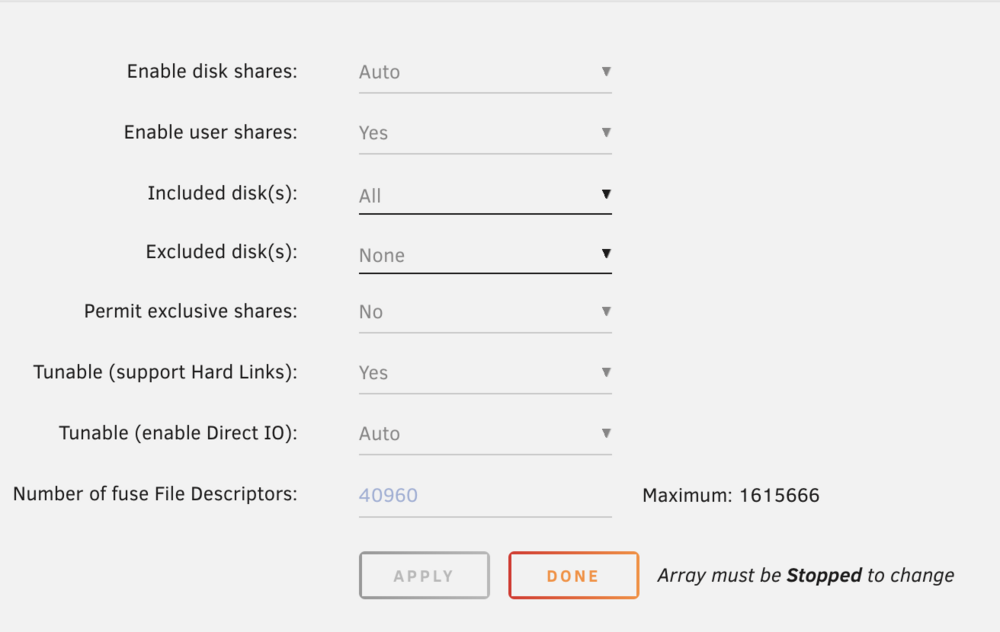
Hi @itimpi, thanks for your answer. User shares were enabled. I'm stopping the array to make some change (idk, maybe set enable disk shares directly to yes). Notice that when stopping the array this pops up: Which makes me think there are some issues with the mounted shares. Stopping the array is taking long, I'll post the results of this once it is done. Also, I found a lot of lines like this on the syslogs, which seems has something to do with all this? error: malloc_share_locations, 7193: Operation not supported (95): getxattr: /mnt/user/data

-
@JorgeB thanks for your reply. My issue is that even though the data is on the disks, it is not being mounted on the user share apparently. Attaching the diagnostics here tower-diagnostics-20250311-1308.zip
-
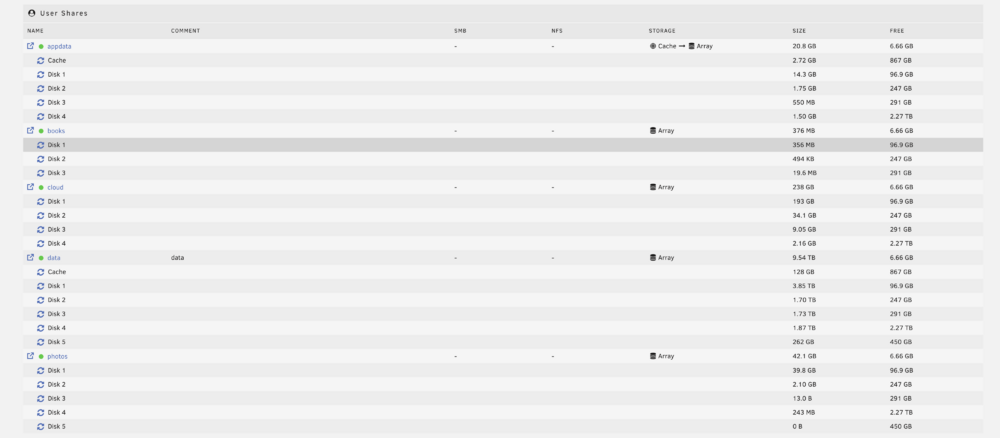
Hi there! I'm having trouble and I can't seem to figure it out. Last night the power went down and the server obviously shuttted down. Once the outage went off, I started the server and found this weird error: (I'm using unraid 7.0.0) I have my data user share (/mnt/user/data), and 5 disks containing the data. The thing is, for some reason the contents of my user share are in the disks shares but not on my user shares... which is what my docker containers use. In case this can provide more context: root@Tower:/mnt# ls -lh total 20K drwxrwxrwt 2 nobody users 40 Mar 11 04:05 addons/ drwxrwxrwx 1 nobody users 22 Feb 14 09:54 cache/ drwxrwxrwx 9 nobody users 131 Oct 12 03:38 disk1/ drwxrwxrwx 7 nobody users 73 Oct 12 07:13 disk2/ drwxrwxrwx 7 nobody users 73 Oct 31 10:58 disk3/ drwxrwxrwx 6 nobody users 80 Feb 15 02:27 disk4/ drwxrwxrwx 8 nobody users 4.0K Mar 10 00:40 disk5/ drwxrwxrwt 2 nobody users 40 Mar 11 04:05 disks/ drwxrwxrwt 2 nobody users 40 Mar 11 04:05 remotes/ drwxrwxrwt 2 nobody users 40 Mar 11 04:05 rootshare/ drwxr-xr-x 7 root root 140 Mar 11 04:07 user/ root@Tower:/mnt# ls -lh user/data/ total 0 drwxr-xr-x 2 root root 40 Mar 11 04:06 media/ drwxr-xr-x 2 root root 40 Mar 11 04:07 torrents/ root@Tower:/mnt# ls -lh disk*/data disk1/data: total 0 drwxrwxrwx 6 root root 77 Jul 16 2024 media/ drwxr-xr-x 2 root root 33 Jan 4 15:47 optimus-plex/ drwxrwxrwx 8 root root 228 Mar 9 22:51 torrents/ drwxrwxrwx 5 root root 59 Jul 16 2024 usenet/ disk2/data: total 4.0K drwxrwxrwx 4 root root 30 Jul 16 2024 media/ drwxrwxrwx 19 root root 4.0K Feb 19 00:00 torrents/ disk3/data: total 4.0K drwxrwxrwx 4 root root 30 Jul 16 2024 media/ drwxr-xr-x 2 root root 6 Jan 4 15:47 optimus-plex/ drwxrwxrwx 11 root root 4.0K Mar 1 04:44 torrents/ disk4/data: total 4.0K drwxrwxrwx 4 root root 42 Jul 16 2024 media/ drwxrwxrwx 7 root root 4.0K Mar 10 13:33 torrents/ disk5/data: total 0 drwxrwxrwx 4 root root 30 Jul 16 2024 media/ I even tried to manually umount the user share and found this: root@Tower:/mnt# umount /mnt/user umount: /mnt/user: not mounted. root@Tower:/mnt# umount /mnt/user/data umount: /mnt/user/data: not mounted. Is that normal? Could someone help me figure out what is going on?

-
Hi there! I've created a small community app for Plex Media management (file conversion). I thought it might be useful for other users, @Squid please let me know if this could be added to community apps! :) https://github.com/pablominue/pablominue-repository/blob/main/optimus-plex https://github.com/pablominue/optimus-plex
-
Hola! Soy nuevo en la comunidad, no sabia muy bien donde postear esto. empecé a usar unraid hace poco. He montado el sistema con Traefik como reverse proxy, Cloudflare tunnels y estoy intentando poner authentik. El problema es que he seguido los pasos de la Guia de ibracorp pero estoy teniendo problemas. He publicado en reddit pero no he recibido soluciones aun. Alguien podria echarme una mano?


