AceEsCloud
Members
-
Joined
-
Last visited
-
User scrips just allows a script to run during any defined event. I changed my startup script to; mkdir -p /mnt/disks/dropbox rclone mount dropbox: /mnt/disks/dropbox --allow-other & User scrips runs the above script when the array is started, and also runs the below script when the array is stopped; fusermount -u /mnt/disks/dropbox Changing the directory from "/mnt/users/dropbox" to "/mnt/disks/dropbox appears to have fixed the problem. thanks for the help!

-
So would I no longer use user scripts to mount rclone? Sorry new to this, don't fully understand why I need unassigned devices or even what I am really doing here....
-
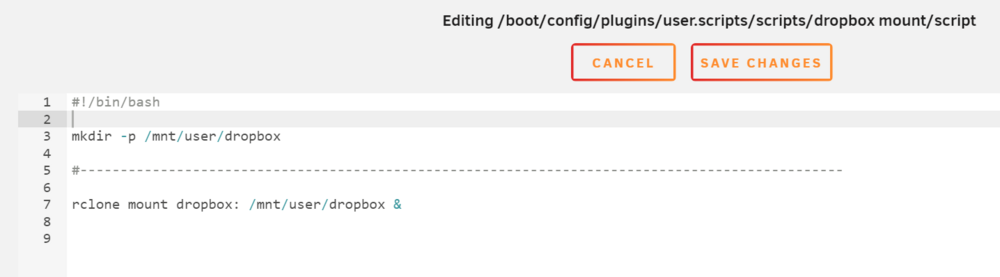
Hello, very new to unraid here. I just recently setup rclone to sync dropbox. I had a really fun time allowing dockers to see my dropbox folder. Rclone is setup as a plugin and is running on the host. I use a mount scrip that runs every time the array starts; mkdir -p /mnt/user/dropbox rclone mount dropbox: /mnt/user/dropbox --allow-other & When I added --allow-other it did allow my docker apps to see my dropbox folder. I also created an unmount script that runs when I stop the array; fusermount -u /mnt/user/dropbox All seemed to be working great for the past week. Then, I noticed today that my log is spitting out an error every 2 seconds or so and I don't have any idea what its all about; Aug 10 19:44:43 Tower emhttpd: error: malloc_share_locations, 7199: Operation not supported (95): getxattr: /mnt/user/dropbox Aug 10 19:44:44 Tower emhttpd: error: malloc_share_locations, 7199: Operation not supported (95): getxattr: /mnt/user/dropbox Aug 10 19:44:45 Tower emhttpd: error: malloc_share_locations, 7199: Operation not supported (95): getxattr: /mnt/user/dropbox Aug 10 19:44:46 Tower emhttpd: error: malloc_share_locations, 7199: Operation not supported (95): getxattr: /mnt/user/dropbox Everything seems to still be working but this is still driving me crazy. If anyone has any advice on what this log is telling me and/or how to fix it, please share. thanks -Andrew
-
So I got it working. I added --allow-other to my array startup script (listed below). This also did not fix it but I went back to my container settings for deluge and changed the Console shell command to "shell". I did this on a lucky guess because I could see the files in the sh terminal. I wish I fully understood the difference here but it is now working. mkdir -p /mnt/user/dropbox #----------------------------------------------------------------------------------------------- rclone mount dropbox: /mnt/user/dropbox --allow-other &

-
I do not have that option

-
thanks for the help but the --uid / gid flags are not found, I am trying to find out if there is a way to add these flags. That post does help with me understanding the issue a bit more though (if I am moving in the right direction). The more and more I look at it the more I believe it is a file permissions issue. they state that the rclone plugin maybe running on root so I would assume this would change file permissions. I'll keep searching...
-
Sorry, I don't fully understand your post but am willing to try. I cannot find the "safe new permission tool". I can find a "new permissions tool" but want to confirm that is the same thing. Also, I don't understand the flags --uid 99 --gid 99. Would this be ran with my dropbox mount script? Sorry, entry-medium level user here rclone mount dropbox: /mnt/user/dropbox & --uid 99 --gid 99
-
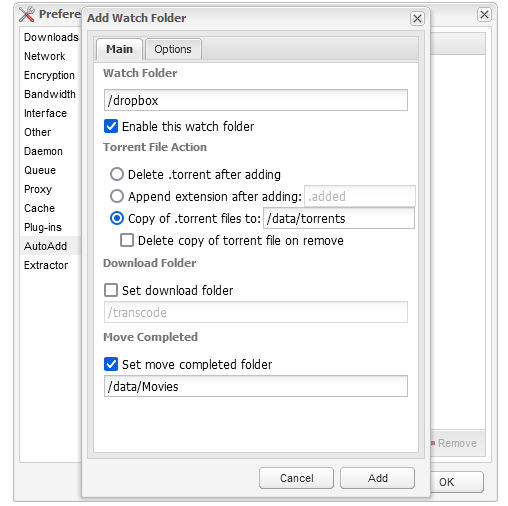
So I tried something else only for testing purposes and it did allow me to better understand what is going on but I still don't have a solution for fixing it.. I changed my docker share to reflect a folder that rclone is not syncing to (/mnt/user/dropbox/). I set the container path the reflect "/dropbox"; I then went into deluge and added the watch folder "/dropbox". When I click add it works as it is supposed to and adds the watch folder. This means that I am correctly setting up the docker (I am getting no error that path does not exist). I then go back to the user scripts plugin that I am using and change the script. I set it to point the rclone dropbox to mount to the file system under /mnt/user/dropbox (same directory that I originally set in deluge that worked). I run the script in the background and confirm via terminal that dropbox is working (it does). I then go back in deluge and remove the directory "/dropbox" (which is linked to /mnt/user/dropbox) and try to re add it again. I add it using the SAME EXACT DIRECTORY that I did previously. I get the error "path does not exist". This proves to me that rclone is changing something to the directory that prevents deluge from using / seeing it.

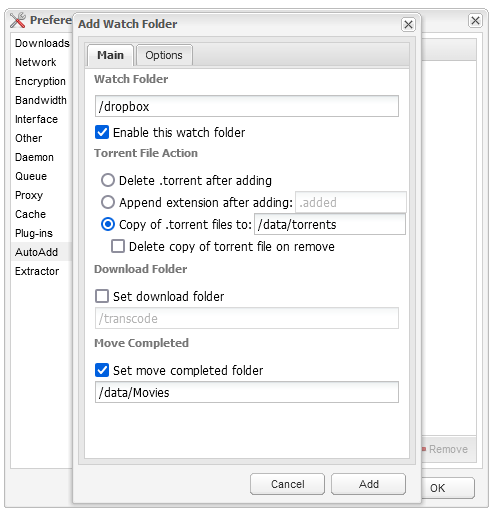
-
I'm wondering if rclone is causing security issues and/or changing folder properties but my understanding of this falls a bit short. Example, I moved my rclone sync folder to exist within my plex library shares just because I KNOW that my docker has access to this folder (mnt/user/plexmedia). When I try to setup the "autoadd" feature in deluge I get an error saying I don't have write permissions to this folder instead of "path does not exist". I can read/write to the plex library just fine and the folders I am using in rclone are further down in the directory. This hints to me that rclone may be changing the folder properties?
-
Same result;
-
No I haven't, I don't know how to do that nor know what it is. Reading up on it now.
-
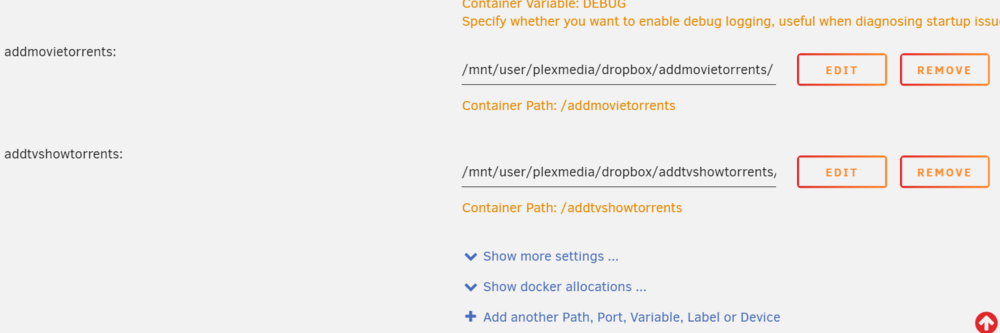
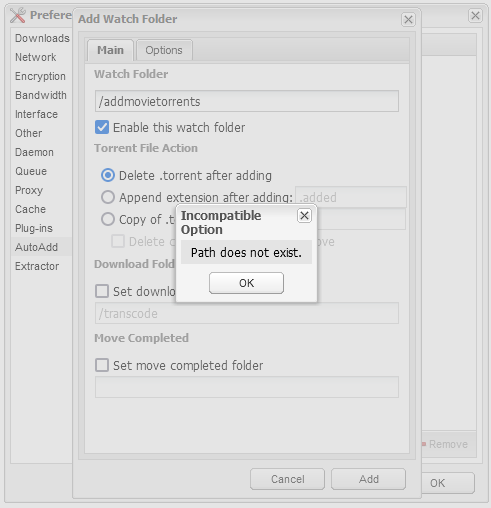
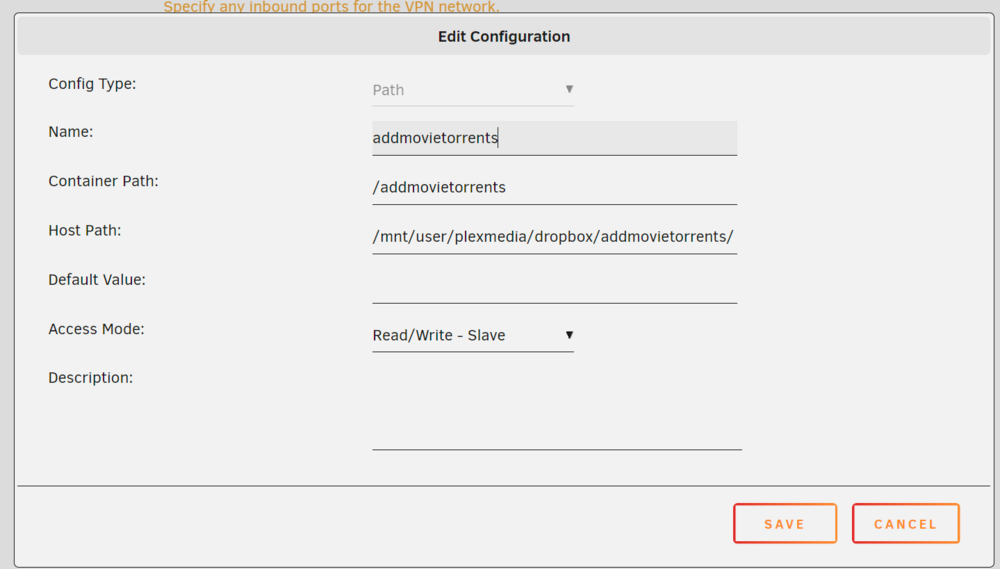
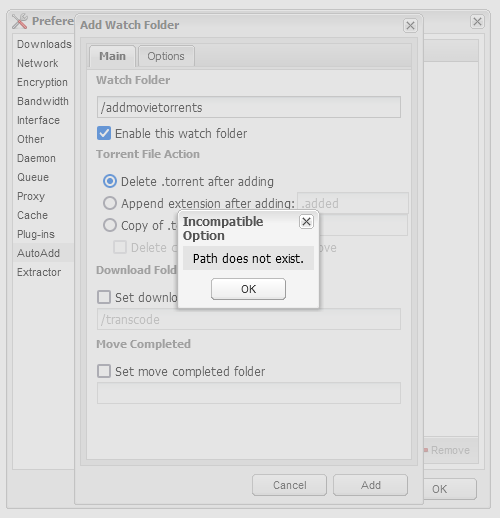
Hello, I am trying to setup deluge to watch folders that sync with dropbox. This will allow me to add torrents from my phone when I am mobile and my server will process them. Anyways, I have rclone all setup properly and dropbox syncing. I have added the folder paths to the deluge docker container. The issue is when I use the "AutoAdd" plugin inside of deluge the specific folder "addmovietorrents" does not exist. What is frustrating is that when I view the folder contents from a terminal (within the docker) it does exist. I have tried a combination of things including moving my rclone setup to a folder that already exists within deluge (this reports a read / write error instead of path does not exist). I don't understand why I can add almost every other folder without issue except any folder that rclone is syncing with. Any help is appreciated. See screenshots. docker folder setup docker output on creation deluge yelling at me docker terminal showing that the folder path does exist