





dessias
Members
-
Joined
-
Last visited
Everything posted by dessias
-
Huh. Im kind of surprised I set it up that way 🤣 Oh well. Given that I can just mount and rsync directly, I suppose I will just go that route then. Thanks!
-
EXT4. There was an MD array on some of the disks (my boot drives were in a RAID 1 array) but this is not one of those disks. Interestingly, I can mount them via the terminal and rsync the data off just fine, so it seems like the underlying OS recognizes it just fine.
-
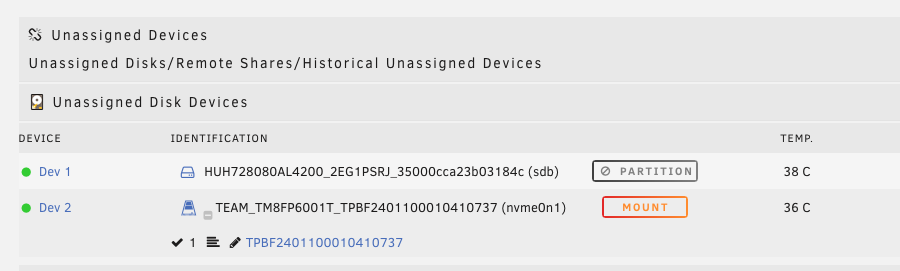
Hi all, Bit of an unraid newbie here... I have a old ubuntu-based NAS/media server that suffered several hardware failures, so I am migrating it to a new machine. I am trying to base that machine on unraid because I dont have as much time for tinkering as I used to. First step is to migrate the data from this old machine over to the new machine. I need to re-use the drives (all formatted ext4) and since the old machine is dead, can't just copy from one working server to another. My plan was to do this by using Unassigned Devices to mount the drives from the old box one at a time, rsync the old data to the new unraid share, then reformat that old drive, add it to the share, and repeat until all drives were added. I installed Unassigned Devices (and the Plus addon), added my first old drive to the box, booted, and see the drive in the unassigned devices section. However, I cannot mount it--I just see a greyed out "partition" button where the mount button would be. Ideas on how to proceed here? I cannot pre-clear these drives as they have all of the needed data on them, so not sure where to go from here. Disk log info is below: Aug 16 14:43:08 Coruscant kernel: sd 1:0:0:0: [sdb] 1953506646 4096-byte logical blocks: (8.00 TB/7.28 TiB) Aug 16 14:43:08 Coruscant kernel: sd 1:0:0:0: [sdb] Write Protect is off Aug 16 14:43:08 Coruscant kernel: sd 1:0:0:0: [sdb] Mode Sense: f7 00 10 08 Aug 16 14:43:08 Coruscant kernel: sd 1:0:0:0: [sdb] Write cache: enabled, read cache: enabled, supports DPO and FUA Aug 16 14:43:08 Coruscant kernel: sd 1:0:0:0: [sdb] Attached SCSI disk Aug 16 14:43:27 Coruscant emhttpd: HUH728080AL4200_2EG1PSRJ_35000cca23b03184c (sdb) 4096 1953506646 Aug 16 14:43:27 Coruscant emhttpd: read SMART /dev/sdb Aug 16 14:46:53 Coruscant emhttpd: HUH728080AL4200_2EG1PSRJ_35000cca23b03184c (sdb) 4096 1953506646 Aug 16 14:46:55 Coruscant emhttpd: read SMART /dev/sdb
-
Super helpful--I really appreciate the guidance! I watched a couple of the Spaceinvader One tutorials, and think I am going to do as you suggest--a large media pool plus an SSD as a scratch/unpack/docker/app data pool. It occurs to me that I do have an old box here that I could do some tinkering on without my actual data drives, which seems like a good idea. Ill give that a try so that I can get familiar with unraid before migrating everything over. Really appreciate the help, it has been great to help me understand what I need to be looking for here!
-
Good point about setting it up "standard" for unraid and then copying over appdata and config files. As you note, I can adjust all the container paths so it should be fairly straightforward. You are absolutely right that the right way to do this would be to stand up the unraid server in parallel and then copy everything over. Unfortunately I don't have that option--the original system is dead and given its age, I don't think its worth spending any more money or time troubleshooting it, nor do I have any other machines I could get this up and running on without more time and effort than its worth. Hindsight being 20/20, I should have had a better plan to migrate and done this proactively 🤦♂️ I really appreciate the help! Think I am going to give unraid a try once the replacement hardware gets here, hopefully this will make getting up and running faster and make future maintenance of the box (particularly dead drives or other failed hardware) much easier.
-
Thanks! About what I thought re: copying over the data. I have dual parity drives in my current setup so presumably I could use one of those as the first empty drive, start copying over, and then when done designate two of the 8GB drives as parity. Any thoughts on the docker questions?
-
Hi all! I have a long-running media server (built in 2015!) that I use for file storage, an Emby server, plus related media download and management apps--Sonarr, Radarr, sabnzbd, etc. This server is based on Ubuntu 18.04, and I have been using Snapraid + MergerFS to pool an assortment of odd drives I've accumulated over the years, with all of the software in docker containers controlled by docker-compose. Recently, the motherboard died and I am going to rebuild the machine. I don't have as much time for tinkering on these sorts of projects as I once did, so unraid is super appealing vs doing all of this manually. That said, I am hoping that I can rebuild this without having to start all of the config and such from scratch. To that end, I have a few questions I am hoping someone can help with before I get too far down this path: As noted, I have a bunch of differently sized drives--currently 4x 8TB drives (two were being used as parity drives), plus a 4TB and 3 3TB drives. All of these are formatted EXT4. MergerFS provided the pooling for these drives, so in the absence of MergerFS, they all look like individual drives with misc files on them. Does unraid also support pooling dissimilar drives such as this? Or am I going to have to have similar sized drives to pool them? Is there a way to migrate the data on these drives to a new unraid server? I would greatly prefer not to loose the data on them (or have to re-download, which would take forever). All of the user applications were previously in docker containers. Some of them, such as the emby server, have a great deal of data I would prefer not to loose (specifically thinking of my emby media database and played/unplayed/date added metadata). Is there a way to install these apps via docker in unraid and keep this metadata? Presumably I could install via unraid and then just copy my appdata files from the old drives to the new location in unraid? Can I migrate the docker containers wholesale, or do I need to install via unraid first? I know that unraid has its own docker orchestration software--is this similar to docker-compose? Is any of the config text-editable? I appreciate the help!
