





Blazer8108
Members
-
Joined
-
Last visited
Everything posted by Blazer8108
-
Thanks, I'll dig around and see if I can't figure out the automation steps. I really appreciate your help, especially because it was me just not RTFM carefully enough. The amount of time I wasted on that...
-
You are indeed correct. Apparently, I missed this bit in the documentation... https://docs.unraid.net/unraid-os/manual/security/data-encryption "Once you have set up encryption then it will be necessary to provide the encryption key when starting the array. " That's going to be pretty annoying... Thanks for the assist!
-
Seriously? That wasn't my experience before copying data. Before I could reboot and I could just click start and it would mount the drives.
-
This is what it looks like at boot. I've now moved all data from a location it's been rsyncd to, to a location the gui file mover has moved it to, I also attempted exporting tank manually, this also didn't work. REDACTED
-
box is not currently using any ZFS encryption. Initially I tried ZFS send/receive since it's nearly 4 times as fast as rsync, but this copies an entire snapshot of the dataset. This means the dataset will be encrypted with the same key as the source wherever it's copied to. Since this was problematic and completely broke my keyfile, I reformatted box and used rsync to prevent any ZFS encryption on box. box now only uses LUKS encryption as rsync is copying unlocked cleartext files. The tank ZFS pool is ZFS encrypted as it was created in TrueNAS scale and is my backup that I'm trying to restore to box. Once I move all the data to the unraid ZFS pool named box and I'm happy with it, I'll format tank and rebuild that using LUKS encryption as well. Regardless, since tank was created in TrueNAS scale, the ZFS pool was generated with a small swap partition in partition 1 so UNRAID GUI won't even recognize it. Instead I use cli to manually import, unlock, and mount it while I'm trying to restore data. That being said, I could see how UNRAID may wan tto attempt to remount tank after a reboot, so once my move jobs are done, I'll try zpool export tank and reboot to see if that does anything. Since I'm in the middle of jobs being run this is what it looks like when I boot and it's noting a missing key. This is what my main looks like at the moment. I'll post what it looks like after a reboot as well once my jobs finish. REDACTED Here is the diagnostic. REDACTED
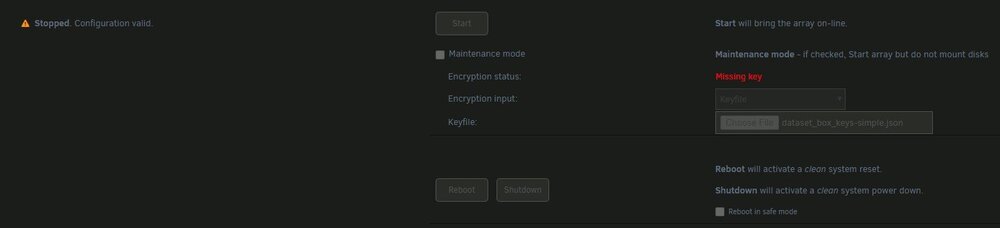
-
Hi there, I'm new to Unraid. I'm trying to migrate to unraid using encrypted ZFS on 7.0.0-beta 2. I know it's beta, but I was hoping I'd be able to migrate my zfs from truenas, this was not the case. So I backed up my data and wiped my ZFS pool and started from scratch generating a new encrypted ZFS pool named box in the unraid GUI. The first a problem was when I migrated data using zfs send. The data transfer completed successfully at something lik 800MB/s on average. In that case it carried encryption over from the old ZFS pool, I recognize there could be some issues here and may require some manual zfs load-key commands until data is transfered to an unencrypted dataset. Unfortunately, after rebooting it reported keyfile missing. Even using a known good keyfile it wouldn't unlock. I then formatted just to try to keep things simple again and setup using the same keyfile. rebooting allowed it to auto unlock again without any issue. This time I used rsync to migrate data, this is about 200 MB/s unfortunately, but it was successful. Unfortunately, I'm again getting the same keyfile missing error. This time I can unlock it with the known good keyfile. I even tried changing the keyfile and it completed successfully. Then I rebooted and it again said keyfile missing. I know the USB is good, and the port is fine as well. The problem seems to start when I transfer data from a non-unraid zfs pool to my unraid zfs pool. Is there a known issue where copying data from a pool not part of unraid gui to one that is part of unraid gui? Am I doing something stupid here? tank is a ZFS pool that I manually import and unlock using zpool import tank zfs load-key -r tank zfs mount -R tank rsync command rsync -aHRP --no-compress /tank/folder/source /mnt/box/folder/destination box is the encrypted zfs pool that was created using the unraid gui. I'm currently working on moving all my Data using the gui from a directory created from rsync to a directory created by the gui. Then I'll delete Shares that contained rsync directories to see if that makes any difference. I don't have high hopes for this, but worth trying I guess. The destination folder does not exist and is generated by rsync. I wouldn't imagine that should be an issue, but maybe? In case it's worth noting here is my hardware: Dell R720XD Intel Xeon CPU E5-2670 0 @ 2.60GHz (2 of them) Usable Memory: 126 GiB ECC (ZFS cache set to max at 64GB.) Dual PSU my box pool is a Netapp disk shelf Using 2 PSUs. This contains 24x 4TB SAS drives attached using an LSI SAS2008 Falcon. Boot USB is a Kingston Technology Company Inc. Flash drive (from microcenter). Technically this is a USB 3.0 drive, I don't have any 2.0 drives at the moment. It is plugged into a usb 2.0 port. I have tested multiple ports and the drive itself isn't very old and has always worked just fine. Regardless I've ordered a few SD cards I can load into the SD port of the server, we'll see if I can't move to that instead and free up a USB port, that should also verify it's not the usb drive.
