





RealFiskelord
Members
-
Joined
-
Last visited
-
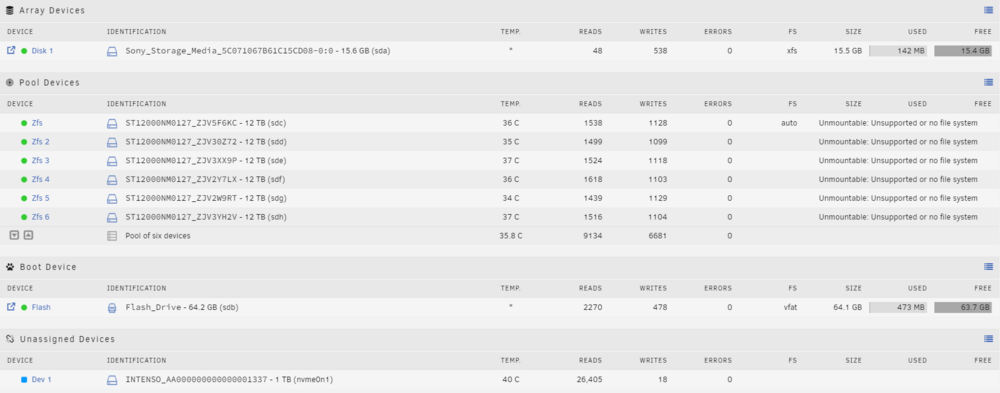
Well, scratch that, im an idiot - i understood what you meant, and after adding the cache to the pool, everything fired right up! Thank you so much for your help!
-
Thank you for the reply! I am not sure what you mean by "cache vdev", this configuration has worked for a few months before i thought i was smart and upgraded to the beta... Anyhow, here is the full configuration, for reference: This is the output of the command you requested, and the output is the same with the array started or stopped: root@FiskeTower:~# zpool status -LP no pools available
-
Hello everyone. I have an issue with my zfs array after upgrading to the beta of unraid 7, then downgrading because i couldnt get the array stable, and in the end, it wouldnt mount at all. Unfortunately, the same error persists after downgrading, removing the zfs pool and recreating it. It will, at least the UI thinks, mount the array, but no shares will be exported. If i go into the console and run "zpool import", i get my array, and everything seems fine (to me, at least). This is the output: root@FiskeTower:~# zpool import pool: zfs id: 2262570952607866990 state: ONLINE action: The pool can be imported using its name or numeric identifier. config: zfs ONLINE raidz1-0 ONLINE sdc1 ONLINE sdd1 ONLINE sde1 ONLINE sdf1 ONLINE sdg1 ONLINE sdh1 ONLINE cache nvme0n1 I can import the array manually, and read my data and shares, but not via the UI, and thus nothing seems to work. I have attached a diagnostics file created after starting the array. This is what the UI looks like after starting: Please tell me if you need other information, thanks in advance for your help! fisketower-diagnostics-20240824-1106.zip



