





ChirpyTurnip
Members
-
Joined
-
Last visited
Everything posted by ChirpyTurnip
-
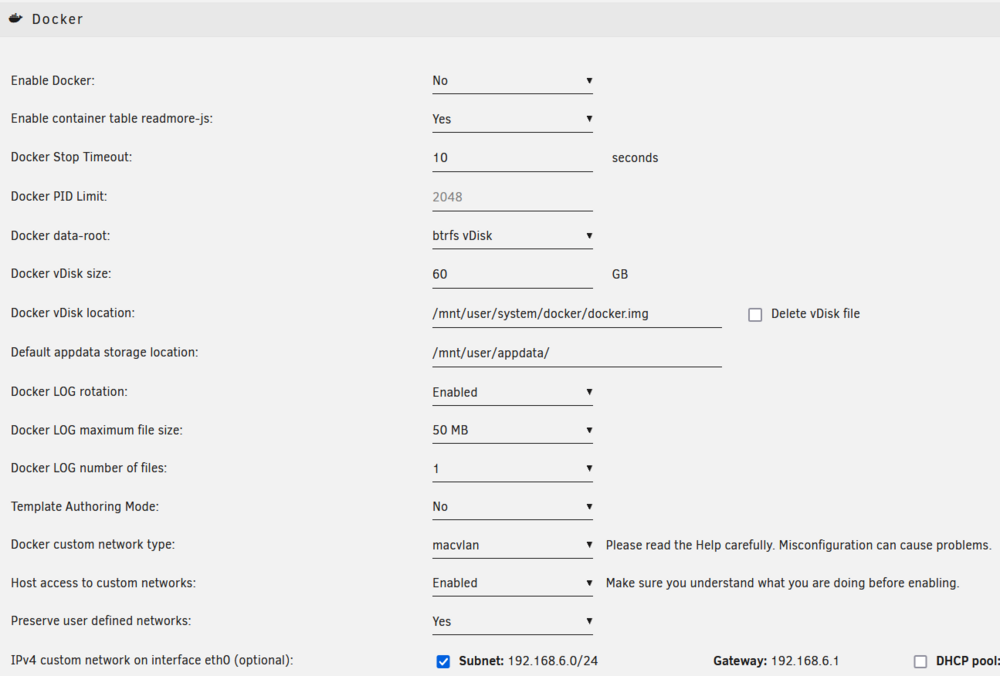
The parity check is still running - now at nearly 86%. Logs are squeaky clean. Power supply is delayed...so won't be here until Friday at the earliest as they're shipping it with one of the worst companies we have...so not likely to be here Friday....live in hope, but sigh. Yes, on Unraid prefer to stay with the 'template' approach, if only because I want this thing to be an appliance. The more I tinker the harder it becomes, especially if I break it after a numbers of months (or longer) and cannot remember the hacks. I have that in other places already (like Home Assistant) so need to concentrate my pain in certain areas and pay for an off-the-shelf solution in others (Unraid)...though not going well at present clearly! In terms of docker storage I just used all the defaults: Mine doesn't show the Docker version.... Was there anything wrong with how I map volumes to docker containers? Cheers!
-
It's a puzzle allright! But, it has to be docker something I think. The network was a place to begin, but probably not the cause.... With docker running, but with all containers stopped, it is currently 57% of the way through the parity check. I would have expected a crash by now, but we will let it finish this time. Assuming there is no crash then it will not be the HBA - if it can complete the whole check and no skip a beat then there is no cause to suspect it.... It is also worth noting that appdata runs on a ZFS m.2 pool - so it isn't on the array, and it isn't on the HBA. So that is pretty much ruled out as well. I could destroy all dockers and start from scratch but it is a lot of work to set them all up....and since there is no (easy) docker-compose and most dockers (like the Arr stack) don't seem to have a simple export/import configuration option.... though presumably I can find the config files in the appdata folder.... In terms of docker: Weird network stuff? Unlikely, should be able to handle lots of dockers either bridged or hosted on own IPs, should be able to handle lots of traffic. External devices - 2x coral.ai for Frigate. There are 'reports' of these causing problems but logs and root causes are not well documented. Options: - Run docker with no Frigate - Run docker with Frigate and use CPU detection only - Run docker with Frigate and coral.ai (one instance) - Run docker with Frigate and coral.ai (different USB bus USB2 vs USB3) Accessing data on the array via dockers...maybe I'm doing this completely wrong. - I typically make the container path and the host path the same, that way I don't need to define different paths/aliases for each. - For SABnzbd (for example) both are set to /mnt/user/www_downloads/complete/usenet/ for completed downloads. All containers are similarly configured. - Could badly configured container read/writes to the system make Unraid unhappy? Presumably....is my approach OK? Can still put everythign back to SATA, but if parity check works then this is probably moot. Computer parts will all be here today except for power supply - apparently they never had the quantity they claimed, so need to wait until tomorrow for that (all going well). And that concludes the lunch break (mostly). 🙂
-
It died again (like there was any doubt). Moving the HBA from the PCIeX16 to a PCIeX4 slowed it down, but it still crashes. So the card is still vaguely suspect, but the PCI slots are in the clear. Using Tips and Tweaks I've disabled Flow Control / Offload on the NIC....just in case it creates a problem - not likely but another thing ticked off. Currently running a parity check with docker running but all dockers down. After so many crashes I might need to let this one run all the way through. We will see if it crashes again... I just wish I could figure out the common point causing Unraid to crash....docker doesn't seem to skip a beat as everythign just keeps running...but Unraid is crippled such that it cannot even reboot or halt the hardware. We've been looking hard at the network but we've changed that all around (twice) and we played musical chairs with the interfaces and nothing is making a difference. It could simply be that we are digging in the wrong place...maybe it's something else? coral.ai USB adapters (I have two) interfering with Unraid USB? Not likely as Unraid shoul b in RAM I think? a storage-level thing maybe? 3x M.2 NVME ZFS pool (for cache) somehow freaking out during an array parity check? a weird driver / config thing? My computer parts have started arriving, but the power supply and the HDD haven't shipped yet....so that's sub optimal. Another random question, since I'm staring at the screen so long....should appdata be on the array on in the ZFS pool? I'm detecting a lot of writes to the cache as containers are still logging all the time....sometime the most stupid stuff and it's not always possible to disable that. My ZFS pool will not wear out nearly as quickly if I reserve it for file transfers and not docker files.....they're 2 months old (give or take) and have written 20TB on the 2TB drives (so x10 of a x600 duty cycle --> 10 years at this rate assuming that's constant and not getting worse as I pile on load). In other news: Unraid 7 RC1 is out.....so that's nice....
-
I've created the new maclan: root@Svalbard:~# docker network ls NETWORK ID NAME DRIVER SCOPE 990ae97238ca bridge bridge local a3edf9925e01 eth0 macvlan local dd759eb996bd host host local c1b3265776ec none null local db038511e832 vpn_macvlan macvlan local root@Svalbard:~# docker network inspect vpn_macvlan [ { "Name": "vpn_macvlan", "Id": "db038511e8325595f363325c550c376a1cd8fb453b4faeb9ff661d5fdb6dbdc8", "Created": "2024-12-03T17:01:16.423589416+13:00", "Scope": "local", "Driver": "macvlan", "EnableIPv6": false, "IPAM": { "Driver": "default", "Options": {}, "Config": [ { "Subnet": "192.168.60.0/24", "IPRange": "192.168.60.3/27", "Gateway": "192.168.60.1" } ] }, "Internal": false, "Attachable": false, "Ingress": false, "ConfigFrom": { "Network": "" }, "ConfigOnly": false, "Containers": {}, "Options": { "parent": "vpnbr0" }, "Labels": {} } ] I cannot assign a container (i.e. Gluetun) to 192.168.60.1 as this is reserved for the "gateway". Even if I leave the gateway off the macvlan creation command the .1 is automatically reserved. I can do this: Extra Parameters: --network=vpn_macvlan --ip=192.168.60.5 But this means that there is now a conflict been the subnet's default gateway (.1) and the gateway we actually need the containers to use (being the .5 now assigned to Gluetun). It is (I believe) possible to get containers to do this but for that it's a case of running form the command line or hacking a docker-compose file... It also didn't seem to work having both the extra parameters for the vpn lan and the default "use eth0" settings....and somewhere in the middle there I got a truly hard crash and Unraid dropped off the network completely and needed a hard reboot to bring it back. Which in turn proved that the vpnbr0 Bridge Interface doesn't survive reboot as you suspected, which stopped Gluetun and friends from loading which probably saved me from a crash loop. Anyway, after much playing around I'm finding myself stuck as I'm unable to attach the Gluetun container to both Eth0 and vpn_maclan. So....where did I land? For now it seems the thing I tried a few days ago is actually working (now that I've done it properly) and it is about as simple as it is possible to be: There is no bridge (at all) GluetunVPN is on eth0 @ 192.168.6.50 Arr's are bonded with --net=container:GluetunVPN Arr's are configured to talk to each other via 192.168.6.50:abcd when abcd is the port for each service. Arr's *can* talk to each other, and can ping *anything* on the 192.168.6.0/24 network (which makes sense as that's their segment via GluetunVPN) Arr's *cannot* ping outside the local subnet (e.g. 192.168.1.10) but they *can* ping on the Internet (e.g. 1.1.1.1) - so they have www access while still being "semi" isolated. If I check my tracking on a torrent site the reported IP address matches the VPN address provided by Gluetun / NordVPN. So, peanut-brain-me says - it is working, it is all talking to each other, there's no bridge stuff and custom scripts. So it will not get any less complex than it is now.... Did it crash? Hell yes. Of course it crashed. 😭 Rebooting now so that it all comes up completely clean as obviously there was still some bridge building and breaking in this run. Do I expect it to break again? Yes. But we need to be sure. And it is not likely to take long to see if it burns..... After that - start looking at the HBA slot and possibly replacing it with a SATA card. But that will become a job for tomorrow I expect...
-
Just got home and starting on this now.... Is there a reason why the new isolated LAN needs a parent (i.e. vpnbr0)? Can it not just exist in complete isolation - traffic should never leave it except via Gluetun on .1...and it in turn is just sitting on the external eth0 on 192.168.6.50....
-
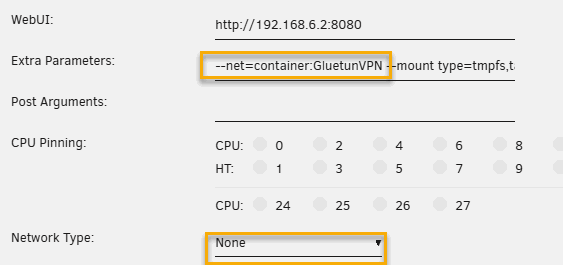
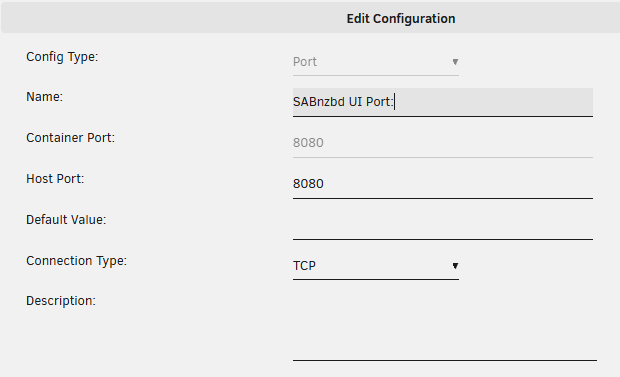
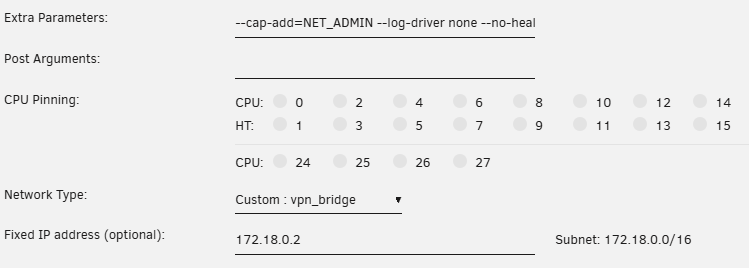
Woah! Talk about a maximum effort reply! I'm on my lunch break so can't do much, but I can start to respond. On the requested docker network inspect vpn_bridge command here is the output: root@Svalbard:~# docker network inspect vpn_bridge [ { "Name": "vpn_bridge", "Id": "926fdbc61565a19b0b243daa011e73acd811882afd8029733b84c74b0959bb04", "Created": "2024-12-01T18:29:05.828317635+13:00", "Scope": "local", "Driver": "bridge", "EnableIPv6": false, "IPAM": { "Driver": "default", "Options": {}, "Config": [ { "Subnet": "172.18.0.0/16", "Gateway": "172.18.0.1" } ] }, "Internal": false, "Attachable": false, "Ingress": false, "ConfigFrom": { "Network": "" }, "ConfigOnly": false, "Containers": { "af99a9fafdb41e43f04e1d5d91de8b4e3296fd0d28f92afa9a524eec1ddf4f7c": { "Name": "GluetunVPN", "EndpointID": "cdfdd65fd756d96848f44d21db7aedee231211f65a81d04f3200635180c7493a", "MacAddress": "02:42:ac:12:00:02", "IPv4Address": "172.18.0.2/16", "IPv6Address": "" } }, "Options": {}, "Labels": {} } ] The arr dockers are configured like this: So Network Type = None, and the extra parameters to bind it to Gluetun. The WebUI url is the Unraid Host (which is on the vpn_bridge which in trun hangs off Eth0. For this particular docker the UI is on 8080/TCP and that is exposed in the Gluetun docker config like so: Which drills down to this: All the dockers behind Gluetun are set up this way. As for GlueTun itself, also a simple config (notwithstanding all the VPN bits): I will have a play with the network reconfiguration when I get home. I have no doubt that Gluetun will work fine sitting on Eth0 with it's own address (which will be in the 192.168.6.0/24 space for me). I can create an internals virtual network on a different range (your proposed .6 I can't use as that's real for me, but I can make it something else like .60 or go for a 172.x.x.x subnet). I think most of what you wrote makes sense, except that I suspect I will need to make Gluetun the .1 address, or update the subnet gateway to be .100 (based on your addressing) so that the individual dockers know where to go to get off the subnet (with your numbering there's no real gateway at .1) I have had the proposed Eth0 with no bridge network before (see back here from a couple of days ago). The problem there was that the arr stack couldn't talk amongst themselves (which they need) so adding a separate network for them should solve that problem.... This means there's possibly another design - if they are all slaved off Gluetun for their external connection, then their internal connection will only be just for them (i.e. it doesn't need to include Gluetun at all, doesn't include a gateway as there's nowhere to go). So much tinkering.... 🙂

-
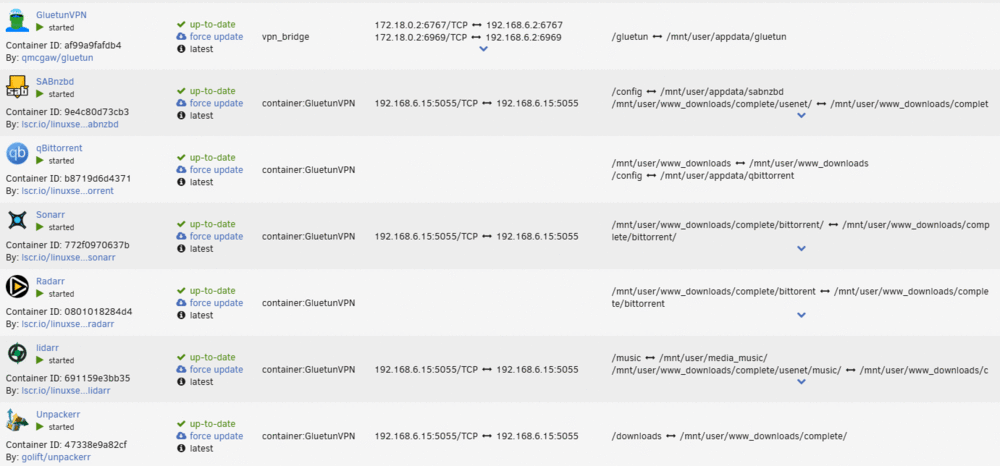
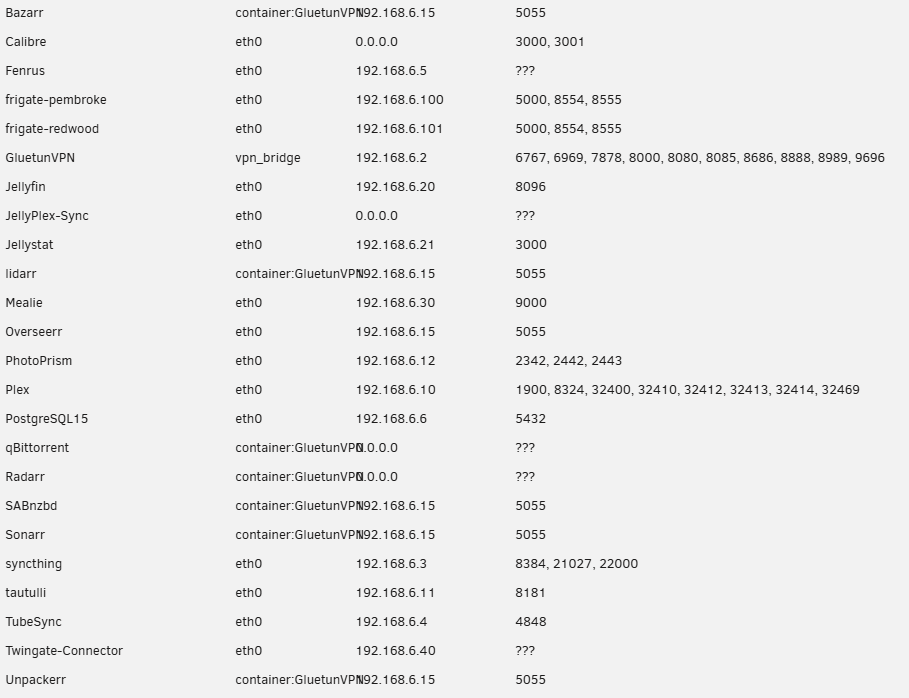
I'm pretty sure it is all docker related...without docker running it will stay up for 24 hours with no errors, with it running a crash is bound to happen. So my docker -ls result is this: NETWORK ID NAME DRIVER SCOPE 990ae97238ca bridge bridge local a3edf9925e01 eth0 macvlan local dd759eb996bd host host local c1b3265776ec none null local 926fdbc61565 vpn_bridge bridge local My Gluetun is assigned the VPN bridge, but none of my other *arr dockers are (which you imply they should be). They are currently bonded to the Gluetun docker using "--net=container:GluetunVPN". The UI for docker allocations does should some weirdness as often the arr dockers will 'report' that they are connected/mapped to another docker's details: They are **ALL** configured the same yet some (e.g. Sonarr) show blank mappings, while others (e.g. qBittorent) show mappings for 192.168.6.15:5055/TCP which actually belongs to another container (Overseerr on eth0). When the system starts, or Gluetun is changed and the containers rebuild, they all come up as blank, but over time many collect a random mapping - normally that of the last container restarted or rebuilt and they always get the same. This same behaviour is reported here, so I think a bug, but not related - though worth noting they too have a similar gluetun setup. As for the log, the 'random' network messages look to be correlated with dockers being turned on and off, or rebuilt....after that it doesn't seem to happen. For example you can see a bunch of this after 00:00 when AppDataBackup runs....I've attached the syslog for you so you can the full log for several days. I don't see it happening before a crash unless it happened to be doing legitimate start/stop activities. The full list of mappings is this: Containers are either running against Gluetun, then Gluetun is on the vpn_bridge, and everything else is set to run like this against the eth0 interface so everything has it's own IP address: I can re-map all the arr dockers to connect to the VPN_Bridge, but then how do I force their traffic out via Gluetun? If they are on the bridge they are free to access the internet without going through the VPN (just like Gluetun itself). Hopefully that sheds a little more light....I don't think the network is complicated necessarily....but something is definitely breaking something somewhere. Otherwise feel free to suggest an alternate arrangements to trial... I have a second hardware platform coming - as soon as the part arrive (over the next week) I will assemble it and then I will have a second machine to test on which might help as I can replicate (more or less) the set up and see if it breaks.... It's expensive but if I price my time trying to get to the bottom of this there's a huge cost there too... Other random things left to try: Move the HBA card to another slot (there are some reports of crashing if in a PCIeX16 slot (I've tried running as X16 and X8/X8 - both crash, but I have a PCIeX4 slot I can try) Remove the HBA and run off SATA and a SATA expansion card (slow but old school) Probably pointless, but again this eliminate other potential sources of error - if the crashing still happens then the slot and HBA are both off the hook as far as guilt. So far though I'm still looking at docker....the longest period of stable operation so far has been with docker not running - so one way or another it has to be there somewhere. syslog-192.168.6.2.log

-
It be a pain alright! But every abject failure also reveals the nature of the beast....I'm now even more sure that it is docker problem of some description as with docker off we have no issues (after a reasonable period time anyway) while when we placing the docker network under load causes the crash.... Now I should be specific here - running the Frigate dockers which are on all the time causes no problem as they ran the whole time....but this afternoon when I got home I added some work to Sonarr and Radarr and the system got to work...within literal minutes we got a crash. So if not Gluetun and friends it might be a loading thing - too much in parallel and it dies. Answer to your questions: No, I don't have mover tuning plugin Yes, I do have parity check tuning plugin (more on that below) The NIC thing is a pain, but I figured out a way to eliminate that as a cause as I decided to disable the RTL8125 onboard LAN chip in the BIOS, reinstall the Intel I210 card (just 1Gb/s sadly), and am now running on that - doing so *completely* removes any flakey 2.5Gb/s and RTL8*** issues from the equation. I have the workload back on, and the parity check running again....and now we wait.....but.....we crashed again...sigh. Plus side - it's not the NICs and not the drivers (unless everything is super buggy). Had a couple more random attempt to try different things - for example no IT87 drivers in case of conflict, but then to be fair we already know that in safe mode it can crash...which always points back at docker. On the parity tuning plugin (and the Fix Common Problems plugin) I've noticed that they both show up frequently just before a crash....sometimes a few minutes, sometimes sooner...or in the case of FCP always immediately before the crash. This could be coincidence as they are there in the logs a lot anyway...but it is a tiny bit suspicious: Nov 30 09:51:34 Svalbard Parity Check Tuning: Automatic Correcting Parity-Check detected Nov 30 09:57:00 Svalbard root: Fix Common Problems Version 2024.11.12 Nov 30 10:15:32 Svalbard kernel: ------------[ cut here ]------------ Nov 30 10:15:32 Svalbard kernel: kernel BUG at drivers/md/unraid.c:1617! Nov 30 10:15:32 Svalbard kernel: invalid opcode: 0000 [#1] PREEMPT SMP NOPTI Nov 30 10:15:32 Svalbard kernel: CPU: 12 PID: 12150 Comm: unraidd0 Tainted: P Nov 30 17:51:30 Svalbard Parity Check Tuning: WARNING: marker file found for both automatic and manual check P Nov 30 17:51:30 Svalbard Parity Check Tuning: Manual Correcting Parity-Check detected Nov 30 17:52:06 Svalbard kernel: veth2c113da: renamed from eth0 Nov 30 17:52:07 Svalbard kernel: eth0: renamed from vethab1d7b1 Nov 30 17:52:07 Svalbard kernel: python3[3182]: segfault at 4fd5d018 ip 0000000000529470 sp 00007ffcb7d20120 error 4 in python3.9[41f000+288000] likely on CPU 12 (core 24, socket 0) Nov 30 17:52:07 Svalbard kernel: Code: 24 f0 4c 89 47 08 48 81 fe 32 0d 4b 00 0f 85 4d ff ff ff e9 4d ff ff ff f6 82 ab 00 00 00 20 75 19 4c 8b 52 68 4d 85 d2 74 10 <49> 83 7a 18 00 74 09 58 5d 41 5c e9 80 c0 09 00 48 8b 52 18 48 8b Nov 30 17:52:09 Svalbard kernel: veth50bbc37: renamed from eth0 Nov 30 17:52:09 Svalbard kernel: eth0: renamed from veth17f069d Nov 30 17:52:12 Svalbard kernel: vethab1d7b1: renamed from eth0 Nov 30 17:52:12 Svalbard kernel: eth0: renamed from veth1ef0dd0 Nov 30 17:52:18 Svalbard kernel: veth1ef0dd0: renamed from eth0 Nov 30 17:52:18 Svalbard kernel: eth0: renamed from veth8d2e830 Nov 30 17:52:19 Svalbard kernel: traps: python3[6280] general protection fault ip:538bd0 sp:7fff126871f0 error:0 in python3.9[41f000+288000] Nov 30 17:52:24 Svalbard kernel: veth8d2e830: renamed from eth0 Nov 30 17:52:25 Svalbard kernel: eth0: renamed from vethca43526 Nov 30 17:52:29 Svalbard kernel: vethca43526: renamed from eth0 Nov 30 17:52:29 Svalbard kernel: usb 2-9.1: reset SuperSpeed USB device number 8 using xhci_hcd Nov 30 17:52:29 Svalbard kernel: usb 2-9.1: LPM exit latency is zeroed, disabling LPM. Nov 30 17:52:31 Svalbard kernel: eth0: renamed from veth98feb48 Nov 30 17:52:49 Svalbard kernel: usb 2-9.2: reset SuperSpeed USB device number 7 using xhci_hcd Nov 30 17:52:49 Svalbard kernel: usb 2-9.2: LPM exit latency is zeroed, disabling LPM. Nov 30 18:00:00 Svalbard root: Fix Common Problems Version 2024.11.29 Nov 30 18:26:53 Svalbard kernel: ------------[ cut here ]------------ Nov 30 18:26:53 Svalbard kernel: kernel BUG at drivers/md/unraid.c:1617! Nov 30 18:26:53 Svalbard kernel: invalid opcode: 0000 [#1] PREEMPT SMP NOPTI Nov 30 18:26:53 Svalbard kernel: CPU: 14 PID: 12109 Comm: unraidd0 Tainted: P O 6.1.118-Unraid #1 Dec 2 19:27:05 Svalbard sSMTP[16086]: Sent mail for [email protected] (221 2.0.0 Bye) uid=0 username=root outbytes=749 Dec 2 19:31:00 Svalbard root: Fix Common Problems Version 2024.11.29 Dec 2 19:34:40 Svalbard Parity Check Tuning: Manual Correcting Parity-Check detected Dec 2 19:34:41 Svalbard Parity Check Tuning: Manual Correcting Parity-Check: Manually resumed Dec 2 19:36:33 Svalbard kernel: ------------[ cut here ]------------ Dec 2 19:36:33 Svalbard kernel: kernel BUG at drivers/md/unraid.c:1617! Dec 2 19:36:33 Svalbard kernel: invalid opcode: 0000 [#1] PREEMPT SMP NOPTI Dec 2 19:36:33 Svalbard kernel: CPU: 14 PID: 12068 Comm: unraidd0 Tainted: P O 6.1.118-Unraid #1 Dec 2 20:06:30 Svalbard unassigned.devices: Using Gateway '192.168.6.1' for Remote Shares. Dec 2 20:06:30 Svalbard unassigned.devices: Waiting 5 secs before mounting Remote Shares... Dec 2 20:15:00 Svalbard root: Fix Common Problems Version 2024.11.29 Dec 2 20:17:44 Svalbard Parity Check Tuning: Automatic Correcting Parity-Check detected Dec 2 20:17:56 Svalbard kernel: ------------[ cut here ]------------ Dec 2 20:17:56 Svalbard kernel: kernel BUG at drivers/md/unraid.c:1617! Dec 2 20:17:56 Svalbard kernel: invalid opcode: 0000 [#1] PREEMPT SMP NOPTI Dec 2 20:17:56 Svalbard kernel: CPU: 24 PID: 12078 Comm: unraidd0 Tainted: P O 6.1.118-Unraid #1 For now I've also uninstalled the parity tuning plugin...just because it eliminates another potential source. Next chance I get I will probably re-instate the onboard NIC (since this isn't the cause), and I may try to move the Gluetun stack to a different NIC to get it off the main interface. Not sure how to do that exactly but I'll probably figure it out. Failing that I may just delete the Gluetun container and leave the arr's on the normal network and see if I still get a crash or not. I also need to read up on the file integrity plugin - looks like I need to set it up, but I'm nearly out of time (I've been reminded I have a family). So tired of this....it's mad....but I really appreciate your help! 🤓 svalbard-diagnostics-20241202-1946.zip
-
Alas alas and much woe....at 57.7% it died again... Dec 2 12:44:13 Svalbard kernel: ------------[ cut here ]------------ Dec 2 12:44:13 Svalbard kernel: kernel BUG at drivers/md/unraid.c:1617! Dec 2 12:44:13 Svalbard kernel: invalid opcode: 0000 [#1] PREEMPT SMP NOPTI Dec 2 12:44:13 Svalbard kernel: CPU: 14 PID: 11985 Comm: unraidd0 Tainted: P O 6.1.118-Unraid #1 Dec 2 12:44:13 Svalbard kernel: Hardware name: Gigabyte Technology Co., Ltd. Z790M AORUS ELITE AX/Z790M AORUS ELITE AX, BIOS F10 09/27/2024 Dec 2 12:44:13 Svalbard kernel: RIP: 0010:unraidd+0x1051/0x1140 [md_mod] Dec 2 12:44:13 Svalbard kernel: Code: 00 83 3d 83 50 00 00 03 7e 16 41 8b 56 98 89 e9 48 c7 c7 21 23 4e a0 48 8b 73 20 e8 23 96 38 e1 41 f6 86 69 ff ff ff 02 75 02 <0f> 0b 48 8b 43 20 49 03 47 10 41 c7 46 b0 00 10 00 00 49 8b 56 10 Dec 2 12:44:13 Svalbard kernel: RSP: 0018:ffffc90000bc7df0 EFLAGS: 00010246 Dec 2 12:44:13 Svalbard kernel: RAX: 0000000000000000 RBX: ffff888149586090 RCX: 0000000000000000 Dec 2 12:44:13 Svalbard kernel: RDX: 0000000000000000 RSI: ffffffff829f1720 RDI: ffff88810168ce38 Dec 2 12:44:13 Svalbard kernel: RBP: 0000000000000000 R08: 0000000000000000 R09: 0000000000000000 Dec 2 12:44:13 Svalbard kernel: R10: 0000000000000000 R11: 0000000000000000 R12: ffff88813980b108 Dec 2 12:44:13 Svalbard kernel: R13: ffff8881495861d8 R14: ffff888149586250 R15: ffff88814aebd218 Dec 2 12:44:13 Svalbard kernel: FS: 0000000000000000(0000) GS:ffff88907f380000(0000) knlGS:0000000000000000 Dec 2 12:44:13 Svalbard kernel: CS: 0010 DS: 0000 ES: 0000 CR0: 0000000080050033 Dec 2 12:44:13 Svalbard kernel: CR2: 0000154ff45911e0 CR3: 000000022de42000 CR4: 0000000000750ee0 Dec 2 12:44:13 Svalbard kernel: PKRU: 55555554 Dec 2 12:44:13 Svalbard kernel: Call Trace: Dec 2 12:44:13 Svalbard kernel: <TASK> Dec 2 12:44:13 Svalbard kernel: ? __die_body+0x1a/0x5c Dec 2 12:44:13 Svalbard kernel: ? die+0x30/0x49 Dec 2 12:44:13 Svalbard kernel: ? do_trap+0x7b/0xfe Dec 2 12:44:13 Svalbard kernel: ? unraidd+0x1051/0x1140 [md_mod] Dec 2 12:44:13 Svalbard kernel: ? unraidd+0x1051/0x1140 [md_mod] Dec 2 12:44:13 Svalbard kernel: ? do_error_trap+0x6e/0x98 Dec 2 12:44:13 Svalbard kernel: ? unraidd+0x1051/0x1140 [md_mod] Dec 2 12:44:13 Svalbard kernel: ? exc_invalid_op+0x4c/0x60 Dec 2 12:44:13 Svalbard kernel: ? unraidd+0x1051/0x1140 [md_mod] Dec 2 12:44:13 Svalbard kernel: ? asm_exc_invalid_op+0x16/0x20 Dec 2 12:44:13 Svalbard kernel: ? unraidd+0x1051/0x1140 [md_mod] Dec 2 12:44:13 Svalbard kernel: md_thread+0xf4/0x122 [md_mod] Dec 2 12:44:13 Svalbard kernel: ? _raw_spin_rq_lock_irqsave+0x20/0x20 Dec 2 12:44:13 Svalbard kernel: ? signal_pending+0x1d/0x1d [md_mod] Dec 2 12:44:13 Svalbard kernel: kthread+0xe4/0xef Dec 2 12:44:13 Svalbard kernel: ? kthread_complete_and_exit+0x1b/0x1b Dec 2 12:44:13 Svalbard kernel: ret_from_fork+0x1f/0x30 Dec 2 12:44:13 Svalbard kernel: </TASK> Dec 2 12:44:13 Svalbard kernel: Modules linked in: xt_CHECKSUM ipt_REJECT nf_reject_ipv4 ip6table_mangle ip6table_nat iptable_mangle vhost_net vhost vhost_iotlb wireguard curve25519_x86_64 libcurve25519_generic libchacha20poly1305 chacha_x86_64 poly1305_x86_64 ip6_udp_tunnel udp_tunnel libchacha tun nft_compat nf_tables veth xt_nat xt_tcpudp xt_conntrack xt_MASQUERADE nf_conntrack_netlink nfnetlink xfrm_user xfrm_algo iptable_nat nf_nat nf_conntrack nf_defrag_ipv6 nf_defrag_ipv4 xt_addrtype br_netfilter bridge stp llc xfs md_mod tcp_diag inet_diag it87(O) hwmon_vid ip6table_filter ip6_tables iptable_filter ip_tables x_tables efivarfs macvtap macvlan tap zfs(PO) i915 intel_rapl_msr intel_rapl_common x86_pkg_temp_thermal intel_powerclamp zunicode(PO) zzstd(O) coretemp iosf_mbi drm_buddy i2c_algo_bit kvm_intel ttm zlua(O) drm_display_helper zavl(PO) drm_kms_helper icp(PO) btusb btrtl btbcm kvm btintel bluetooth drm crct10dif_pclmul crc32_pclmul crc32c_intel ghash_clmulni_intel sha512_ssse3 sha256_ssse3 Dec 2 12:44:13 Svalbard kernel: sha1_ssse3 zcommon(PO) aesni_intel znvpair(PO) crypto_simd spl(O) cryptd ecdh_generic mei_hdcp mei_pxp gigabyte_wmi wmi_bmof rapl ecc mpt3sas intel_cstate i2c_i801 intel_gtt nvme agpgart intel_uncore i2c_smbus mei_me r8169 ahci i2c_core nvme_core mei raid_class realtek libahci scsi_transport_sas syscopyarea sysfillrect sysimgblt fb_sys_fops thermal fan tpm_crb video tpm_tis tpm_tis_core wmi tpm backlight intel_pmc_core acpi_tad acpi_pad button unix Dec 2 12:44:13 Svalbard kernel: ---[ end trace 0000000000000000 ]--- Dec 2 12:44:13 Svalbard kernel: RIP: 0010:unraidd+0x1051/0x1140 [md_mod] Dec 2 12:44:13 Svalbard kernel: Code: 00 83 3d 83 50 00 00 03 7e 16 41 8b 56 98 89 e9 48 c7 c7 21 23 4e a0 48 8b 73 20 e8 23 96 38 e1 41 f6 86 69 ff ff ff 02 75 02 <0f> 0b 48 8b 43 20 49 03 47 10 41 c7 46 b0 00 10 00 00 49 8b 56 10 Dec 2 12:44:13 Svalbard kernel: RSP: 0018:ffffc90000bc7df0 EFLAGS: 00010246 Dec 2 12:44:13 Svalbard kernel: RAX: 0000000000000000 RBX: ffff888149586090 RCX: 0000000000000000 Dec 2 12:44:13 Svalbard kernel: RDX: 0000000000000000 RSI: ffffffff829f1720 RDI: ffff88810168ce38 Dec 2 12:44:13 Svalbard kernel: RBP: 0000000000000000 R08: 0000000000000000 R09: 0000000000000000 Dec 2 12:44:13 Svalbard kernel: R10: 0000000000000000 R11: 0000000000000000 R12: ffff88813980b108 Dec 2 12:44:13 Svalbard kernel: R13: ffff8881495861d8 R14: ffff888149586250 R15: ffff88814aebd218 Dec 2 12:44:13 Svalbard kernel: FS: 0000000000000000(0000) GS:ffff88907f380000(0000) knlGS:0000000000000000 Dec 2 12:44:13 Svalbard kernel: CS: 0010 DS: 0000 ES: 0000 CR0: 0000000080050033 Dec 2 12:44:13 Svalbard kernel: CR2: 0000154ff45911e0 CR3: 000000022de42000 CR4: 0000000000750ee0 Dec 2 12:44:13 Svalbard kernel: PKRU: 55555554 Dec 2 12:44:13 Svalbard kernel: ------------[ cut here ]------------ Dec 2 12:44:13 Svalbard kernel: WARNING: CPU: 14 PID: 11985 at kernel/exit.c:816 do_exit+0x87/0x923 Dec 2 12:44:13 Svalbard kernel: Modules linked in: xt_CHECKSUM ipt_REJECT nf_reject_ipv4 ip6table_mangle ip6table_nat iptable_mangle vhost_net vhost vhost_iotlb wireguard curve25519_x86_64 libcurve25519_generic libchacha20poly1305 chacha_x86_64 poly1305_x86_64 ip6_udp_tunnel udp_tunnel libchacha tun nft_compat nf_tables veth xt_nat xt_tcpudp xt_conntrack xt_MASQUERADE nf_conntrack_netlink nfnetlink xfrm_user xfrm_algo iptable_nat nf_nat nf_conntrack nf_defrag_ipv6 nf_defrag_ipv4 xt_addrtype br_netfilter bridge stp llc xfs md_mod tcp_diag inet_diag it87(O) hwmon_vid ip6table_filter ip6_tables iptable_filter ip_tables x_tables efivarfs macvtap macvlan tap zfs(PO) i915 intel_rapl_msr intel_rapl_common x86_pkg_temp_thermal intel_powerclamp zunicode(PO) zzstd(O) coretemp iosf_mbi drm_buddy i2c_algo_bit kvm_intel ttm zlua(O) drm_display_helper zavl(PO) drm_kms_helper icp(PO) btusb btrtl btbcm kvm btintel bluetooth drm crct10dif_pclmul crc32_pclmul crc32c_intel ghash_clmulni_intel sha512_ssse3 sha256_ssse3 Dec 2 12:44:13 Svalbard kernel: sha1_ssse3 zcommon(PO) aesni_intel znvpair(PO) crypto_simd spl(O) cryptd ecdh_generic mei_hdcp mei_pxp gigabyte_wmi wmi_bmof rapl ecc mpt3sas intel_cstate i2c_i801 intel_gtt nvme agpgart intel_uncore i2c_smbus mei_me r8169 ahci i2c_core nvme_core mei raid_class realtek libahci scsi_transport_sas syscopyarea sysfillrect sysimgblt fb_sys_fops thermal fan tpm_crb video tpm_tis tpm_tis_core wmi tpm backlight intel_pmc_core acpi_tad acpi_pad button unix Dec 2 12:44:13 Svalbard kernel: CPU: 14 PID: 11985 Comm: unraidd0 Tainted: P D O 6.1.118-Unraid #1 Dec 2 12:44:13 Svalbard kernel: Hardware name: Gigabyte Technology Co., Ltd. Z790M AORUS ELITE AX/Z790M AORUS ELITE AX, BIOS F10 09/27/2024 Dec 2 12:44:13 Svalbard kernel: RIP: 0010:do_exit+0x87/0x923 Dec 2 12:44:13 Svalbard kernel: Code: 24 74 04 75 13 b8 01 00 00 00 41 89 6c 24 60 48 c1 e0 22 49 89 44 24 70 4c 89 ef e8 1f 47 81 00 48 83 bb b0 07 00 00 00 74 02 <0f> 0b 48 8b bb d8 06 00 00 e8 21 46 81 00 48 8b 83 d0 06 00 00 83 Dec 2 12:44:13 Svalbard kernel: RSP: 0018:ffffc90000bc7ee0 EFLAGS: 00010286 Dec 2 12:44:13 Svalbard kernel: RAX: 0000000080000000 RBX: ffff8881048d3000 RCX: 0000000000000000 Dec 2 12:44:13 Svalbard kernel: RDX: 0000000000000001 RSI: 0000000000002710 RDI: 00000000ffffffff Dec 2 12:44:13 Svalbard kernel: RBP: 000000000000000b R08: 0000000000000000 R09: ffffffff829583f0 Dec 2 12:44:13 Svalbard kernel: R10: 00003fffffffffff R11: ffff8890bf7bb176 R12: ffff8881058aa400 Dec 2 12:44:13 Svalbard kernel: R13: ffff8881048dca40 R14: 0000000000000002 R15: ffffffff820b440d Dec 2 12:44:13 Svalbard kernel: FS: 0000000000000000(0000) GS:ffff88907f380000(0000) knlGS:0000000000000000 Dec 2 12:44:13 Svalbard kernel: CS: 0010 DS: 0000 ES: 0000 CR0: 0000000080050033 Dec 2 12:44:13 Svalbard kernel: CR2: 0000154ff45911e0 CR3: 000000022de42000 CR4: 0000000000750ee0 Dec 2 12:44:13 Svalbard kernel: PKRU: 55555554 Dec 2 12:44:13 Svalbard kernel: Call Trace: Dec 2 12:44:13 Svalbard kernel: <TASK> Dec 2 12:44:13 Svalbard kernel: ? __warn+0xab/0x122 Dec 2 12:44:13 Svalbard kernel: ? report_bug+0x109/0x17e Dec 2 12:44:13 Svalbard kernel: ? do_exit+0x87/0x923 Dec 2 12:44:13 Svalbard kernel: ? handle_bug+0x41/0x6f Dec 2 12:44:13 Svalbard kernel: ? exc_invalid_op+0x13/0x60 Dec 2 12:44:13 Svalbard kernel: ? asm_exc_invalid_op+0x16/0x20 Dec 2 12:44:13 Svalbard kernel: ? do_exit+0x87/0x923 Dec 2 12:44:13 Svalbard kernel: make_task_dead+0x11c/0x11c Dec 2 12:44:13 Svalbard kernel: rewind_stack_and_make_dead+0x17/0x17 Dec 2 12:44:13 Svalbard kernel: RIP: 0000:0x0 Dec 2 12:44:13 Svalbard kernel: Code: Unable to access opcode bytes at 0xffffffffffffffd6. Dec 2 12:44:13 Svalbard kernel: RSP: 0000:0000000000000000 EFLAGS: 00000000 ORIG_RAX: 0000000000000000 Dec 2 12:44:13 Svalbard kernel: RAX: 0000000000000000 RBX: 0000000000000000 RCX: 0000000000000000 Dec 2 12:44:13 Svalbard kernel: RDX: 0000000000000000 RSI: 0000000000000000 RDI: 0000000000000000 Dec 2 12:44:13 Svalbard kernel: RBP: 0000000000000000 R08: 0000000000000000 R09: 0000000000000000 Dec 2 12:44:13 Svalbard kernel: R10: 0000000000000000 R11: 0000000000000000 R12: 0000000000000000 Dec 2 12:44:13 Svalbard kernel: R13: 0000000000000000 R14: 0000000000000000 R15: 0000000000000000 Dec 2 12:44:13 Svalbard kernel: </TASK> Dec 2 12:44:13 Svalbard kernel: ---[ end trace 0000000000000000 ]--- I'm out of ideas......how about you? Fresh diagnostics attached for your enjoyment. svalbard-diagnostics-20241202-1452.zip
-
Good to know! So far 52% of the way through the parity check, no problems so far....logs are clean. Definitely heading in the right direction now I think!
-
OK. Added the vpn_bridge using the command you provided. Set GluetunVPN to a fixed IP address and made sure everything else can hook into it....so now this is all going. I haven't added the command to allow GluetunVPN access to the local LAN (it doesn't need access) and it still reaches the Internet just fine. Going to reboot now so we come up clean and the parity check will get kicked off again... Fingers crossed. If nothing else it hasn't died yet, so that's positive in that if nothing else we're not worse off! Have to think positive...that way you're less disappointed when it all catches fire again... 🙂
-
Hmmmm.....I remember why there needs to be a custom network.....it's because the arr dockers need to talk to each other....sigh.....
-
OK....those were some serious steps to work through! Tried to swap out the USB key, no joy. Got stuck in a "you must license this box or else loop" so no option to run a trail license for a bit to see how it would go. I check the old key under windows, there were no problems, and the key is only a few months old...so I'm picking probably fine....after 45 minutes of mucking around I gave up. (Also the help page on the Unraid website is out of date - the terms and screenshots no longer match). With docker on rand the rm command to purge the DB Stopped docker, rebooted, turned off all the networking stuff (it then defaulted to macvlan all by itself which I didn't expect), deleted the image. Added the containers again (and clean out the ones I no longer need). Set each container to Custom: Eth0 + an IP address. Rinse and repeat over and over. That actually worked like a charm, so very pleased with that as it's not something I've had to do before. Add GlueTun back, *also* gave that a local IP, the same as all the other dockers. Started it, it connects to VPN like it always did. Added the arr apps, set them all to use "no network" and use "--net=container:GluetunVPN" instead. So interestingly, at that point everything just worked - that is with GluetunVPN up I could get SABNZBD to test server connections, with GluetunVPN stopped those tests failed. So I could get to SABNZBD and it could get out. If I snag a torrent the tracker reports the same address as that reported by GluetunVPN - so it is routing the qBitorrent traffic through the VPN.... This means that I did *NOT* need to do any of the other networking steps....note however that in the GlueTunVPN docker config I have mapped the ports to the connected dockers so that GluetunVPN will pass traffic to the slaved containers.... I can always go and mess with the network again - but I'm leaning towards leaning well enough alone, because more tinkering may make things worse....and I've already got problems. So everything is up, everything is working....and now we wait for a crash.....I'm going to kick off the parity check....that's bound to raise the stakes.... Here we go....
-
@bmartino1 - I almost missed you there! I saw something flash up just as it took me to the next page so I went back and looked and there you were! I guess macVLAN might be worth a go then...if nothing else it is broken anyway so making it worse is unlikely. Here is my current list: NETWORK ID NAME DRIVER SCOPE 5d933692e462 br0 ipvlan local d1d8b728a0af bridge bridge local 4f8e4e9cff75 host host local 030024dbe919 none null local 1d649d9c9840 vpn_bridge bridge local All default except for the vpn_bridge network that I need to bond my *arr's to GluTun. And the vpn_bridge looks like this: [ { "Name": "vpn_bridge", "Id": "1d649d9c98407eae0684f545004bb1811f4e3a695152301859c00c1828c6fce1", "Created": "2024-09-07T13:35:56.052832342+12:00", "Scope": "local", "Driver": "bridge", "EnableIPv6": false, "IPAM": { "Driver": "default", "Options": {}, "Config": [ { "Subnet": "172.18.0.0/16", "Gateway": "172.18.0.1" } ] }, "Internal": false, "Attachable": false, "Ingress": false, "ConfigFrom": { "Network": "" }, "ConfigOnly": false, "Containers": {}, "Options": {}, "Labels": {} } ] The individual dockers are then bonded to GlueTun with "--net=container:GluetunVPN" and GlueTun itself is connected to the vpn-bridge. Only vaguely remember the ins and outs....I followed a guide as it was my first time. For starters I have now deleted the vpn_bridge network and put GlueTun on the 'normal' bridge. Everythign still seems to be working (so now I wonder what the custom network was for). BUT The really weird thing is that GlueTun starts by itself as soon as Docker is started eventhough it is *NOT* set to start automatically....that doesn't seem right!
-
So....docker on.....everything disabled except for two dockers....ten minutes later: Dec 1 15:01:41 Svalbard kernel: ------------[ cut here ]------------ Dec 1 15:01:41 Svalbard kernel: kernel BUG at drivers/md/unraid.c:1617! Dec 1 15:01:41 Svalbard kernel: invalid opcode: 0000 [#1] PREEMPT SMP NOPTI Dec 1 15:01:41 Svalbard kernel: CPU: 12 PID: 12166 Comm: unraidd0 Tainted: P O 6.1.118-Unraid #1 Dec 1 15:01:41 Svalbard kernel: Hardware name: Gigabyte Technology Co., Ltd. Z790M AORUS ELITE AX/Z790M AORUS ELITE AX, BIOS F10 09/27/2024 Dec 1 15:01:41 Svalbard kernel: RIP: 0010:unraidd+0x1051/0x1140 [md_mod] Dec 1 15:01:41 Svalbard kernel: Code: 00 83 3d 83 50 00 00 03 7e 16 41 8b 56 98 89 e9 48 c7 c7 21 23 4d a0 48 8b 73 20 e8 23 96 39 e1 41 f6 86 69 ff ff ff 02 75 02 <0f> 0b 48 8b 43 20 49 03 47 10 41 c7 46 b0 00 10 00 00 49 8b 56 10 Dec 1 15:01:41 Svalbard kernel: RSP: 0018:ffffc9000b157df0 EFLAGS: 00010246 Dec 1 15:01:41 Svalbard kernel: RAX: 0000000000000000 RBX: ffff88815b424268 RCX: 0000000000000000 Dec 1 15:01:41 Svalbard kernel: RDX: 0000000000000000 RSI: ffffffff829f1720 RDI: ffff88810540aa38 Dec 1 15:01:41 Svalbard kernel: RBP: 0000000000000001 R08: 0000000000000000 R09: 0000000000000000 Dec 1 15:01:41 Svalbard kernel: R10: 0000000000000000 R11: 0000000000000000 R12: ffff888148a5b110 Dec 1 15:01:41 Svalbard kernel: R13: ffff88815b424460 R14: ffff88815b4244d8 R15: ffff88815694d2d8 Dec 1 15:01:41 Svalbard kernel: FS: 0000000000000000(0000) GS:ffff88907f300000(0000) knlGS:0000000000000000 Dec 1 15:01:41 Svalbard kernel: CS: 0010 DS: 0000 ES: 0000 CR0: 0000000080050033 Dec 1 15:01:41 Svalbard kernel: CR2: 000014ffe3390000 CR3: 000000000420a000 CR4: 0000000000750ee0 Dec 1 15:01:41 Svalbard kernel: PKRU: 55555554 Dec 1 15:01:41 Svalbard kernel: Call Trace: Dec 1 15:01:41 Svalbard kernel: <TASK> Dec 1 15:01:41 Svalbard kernel: ? __die_body+0x1a/0x5c Dec 1 15:01:41 Svalbard kernel: ? die+0x30/0x49 Dec 1 15:01:41 Svalbard kernel: ? do_trap+0x7b/0xfe Dec 1 15:01:41 Svalbard kernel: ? unraidd+0x1051/0x1140 [md_mod] Dec 1 15:01:41 Svalbard kernel: ? unraidd+0x1051/0x1140 [md_mod] Dec 1 15:01:41 Svalbard kernel: ? do_error_trap+0x6e/0x98 Dec 1 15:01:41 Svalbard kernel: ? unraidd+0x1051/0x1140 [md_mod] Dec 1 15:01:41 Svalbard kernel: ? exc_invalid_op+0x4c/0x60 Dec 1 15:01:41 Svalbard kernel: ? unraidd+0x1051/0x1140 [md_mod] Dec 1 15:01:41 Svalbard kernel: ? asm_exc_invalid_op+0x16/0x20 Dec 1 15:01:41 Svalbard kernel: ? unraidd+0x1051/0x1140 [md_mod] Dec 1 15:01:41 Svalbard kernel: md_thread+0xf4/0x122 [md_mod] Dec 1 15:01:41 Svalbard kernel: ? _raw_spin_rq_lock_irqsave+0x20/0x20 Dec 1 15:01:41 Svalbard kernel: ? signal_pending+0x1d/0x1d [md_mod] Dec 1 15:01:41 Svalbard kernel: kthread+0xe4/0xef Dec 1 15:01:41 Svalbard kernel: ? kthread_complete_and_exit+0x1b/0x1b Dec 1 15:01:41 Svalbard kernel: ret_from_fork+0x1f/0x30 Dec 1 15:01:41 Svalbard kernel: </TASK> Dec 1 15:01:41 Svalbard kernel: Modules linked in: ipvlan wireguard curve25519_x86_64 libcurve25519_generic libchacha20poly1305 chacha_x86_64 poly1305_x86_64 ip6_udp_tunnel udp_tunnel libchacha tun nft_compat nf_tables xt_nat xt_tcpudp veth xt_conntrack xt_MASQUERADE nf_conntrack_netlink nfnetlink xfrm_user xfrm_algo iptable_nat nf_nat nf_conntrack nf_defrag_ipv6 nf_defrag_ipv4 xt_addrtype br_netfilter macvtap macvlan tap cdc_ncm cdc_ether usbnet mii xfs md_mod tcp_diag inet_diag it87(O) hwmon_vid ip6table_filter ip6_tables iptable_filter ip_tables x_tables efivarfs bridge stp llc bonding tls r8169 realtek zfs(PO) intel_rapl_msr intel_rapl_common zunicode(PO) i915 zzstd(O) x86_pkg_temp_thermal intel_powerclamp coretemp kvm_intel zlua(O) iosf_mbi drm_buddy i2c_algo_bit ttm zavl(PO) icp(PO) kvm drm_display_helper crct10dif_pclmul crc32_pclmul crc32c_intel zcommon(PO) ghash_clmulni_intel btusb drm_kms_helper sha512_ssse3 btrtl btbcm sha256_ssse3 znvpair(PO) btintel sha1_ssse3 aesni_intel bluetooth spl(O) Dec 1 15:01:41 Svalbard kernel: crypto_simd drm cryptd rapl ecdh_generic mei_hdcp mei_pxp gigabyte_wmi wmi_bmof intel_cstate ecc nvme intel_gtt mpt3sas agpgart intel_uncore i2c_i801 mei_me i2c_smbus ahci nvme_core i2c_core mei raid_class libahci scsi_transport_sas syscopyarea sysfillrect sysimgblt fb_sys_fops thermal fan video tpm_crb tpm_tis tpm_tis_core wmi tpm backlight intel_pmc_core acpi_tad acpi_pad button unix [last unloaded: realtek] Dec 1 15:01:41 Svalbard kernel: ---[ end trace 0000000000000000 ]--- Dec 1 15:01:41 Svalbard kernel: RIP: 0010:unraidd+0x1051/0x1140 [md_mod] Dec 1 15:01:41 Svalbard kernel: Code: 00 83 3d 83 50 00 00 03 7e 16 41 8b 56 98 89 e9 48 c7 c7 21 23 4d a0 48 8b 73 20 e8 23 96 39 e1 41 f6 86 69 ff ff ff 02 75 02 <0f> 0b 48 8b 43 20 49 03 47 10 41 c7 46 b0 00 10 00 00 49 8b 56 10 Dec 1 15:01:41 Svalbard kernel: RSP: 0018:ffffc9000b157df0 EFLAGS: 00010246 Dec 1 15:01:41 Svalbard kernel: RAX: 0000000000000000 RBX: ffff88815b424268 RCX: 0000000000000000 Dec 1 15:01:41 Svalbard kernel: RDX: 0000000000000000 RSI: ffffffff829f1720 RDI: ffff88810540aa38 Dec 1 15:01:41 Svalbard kernel: RBP: 0000000000000001 R08: 0000000000000000 R09: 0000000000000000 Dec 1 15:01:41 Svalbard kernel: R10: 0000000000000000 R11: 0000000000000000 R12: ffff888148a5b110 Dec 1 15:01:41 Svalbard kernel: R13: ffff88815b424460 R14: ffff88815b4244d8 R15: ffff88815694d2d8 Dec 1 15:01:41 Svalbard kernel: FS: 0000000000000000(0000) GS:ffff88907f300000(0000) knlGS:0000000000000000 Dec 1 15:01:41 Svalbard kernel: CS: 0010 DS: 0000 ES: 0000 CR0: 0000000080050033 Dec 1 15:01:41 Svalbard kernel: CR2: 000014ffe3390000 CR3: 00000001a19ca000 CR4: 0000000000750ee0 Dec 1 15:01:41 Svalbard kernel: PKRU: 55555554 Dec 1 15:01:41 Svalbard kernel: ------------[ cut here ]------------ Dec 1 15:01:41 Svalbard kernel: WARNING: CPU: 12 PID: 12166 at kernel/exit.c:816 do_exit+0x87/0x923 Dec 1 15:01:41 Svalbard kernel: Modules linked in: ipvlan wireguard curve25519_x86_64 libcurve25519_generic libchacha20poly1305 chacha_x86_64 poly1305_x86_64 ip6_udp_tunnel udp_tunnel libchacha tun nft_compat nf_tables xt_nat xt_tcpudp veth xt_conntrack xt_MASQUERADE nf_conntrack_netlink nfnetlink xfrm_user xfrm_algo iptable_nat nf_nat nf_conntrack nf_defrag_ipv6 nf_defrag_ipv4 xt_addrtype br_netfilter macvtap macvlan tap cdc_ncm cdc_ether usbnet mii xfs md_mod tcp_diag inet_diag it87(O) hwmon_vid ip6table_filter ip6_tables iptable_filter ip_tables x_tables efivarfs bridge stp llc bonding tls r8169 realtek zfs(PO) intel_rapl_msr intel_rapl_common zunicode(PO) i915 zzstd(O) x86_pkg_temp_thermal intel_powerclamp coretemp kvm_intel zlua(O) iosf_mbi drm_buddy i2c_algo_bit ttm zavl(PO) icp(PO) kvm drm_display_helper crct10dif_pclmul crc32_pclmul crc32c_intel zcommon(PO) ghash_clmulni_intel btusb drm_kms_helper sha512_ssse3 btrtl btbcm sha256_ssse3 znvpair(PO) btintel sha1_ssse3 aesni_intel bluetooth spl(O) Dec 1 15:01:41 Svalbard kernel: crypto_simd drm cryptd rapl ecdh_generic mei_hdcp mei_pxp gigabyte_wmi wmi_bmof intel_cstate ecc nvme intel_gtt mpt3sas agpgart intel_uncore i2c_i801 mei_me i2c_smbus ahci nvme_core i2c_core mei raid_class libahci scsi_transport_sas syscopyarea sysfillrect sysimgblt fb_sys_fops thermal fan video tpm_crb tpm_tis tpm_tis_core wmi tpm backlight intel_pmc_core acpi_tad acpi_pad button unix [last unloaded: realtek] Dec 1 15:01:41 Svalbard kernel: CPU: 12 PID: 12166 Comm: unraidd0 Tainted: P D O 6.1.118-Unraid #1 Dec 1 15:01:41 Svalbard kernel: Hardware name: Gigabyte Technology Co., Ltd. Z790M AORUS ELITE AX/Z790M AORUS ELITE AX, BIOS F10 09/27/2024 Dec 1 15:01:41 Svalbard kernel: RIP: 0010:do_exit+0x87/0x923 Dec 1 15:01:41 Svalbard kernel: Code: 24 74 04 75 13 b8 01 00 00 00 41 89 6c 24 60 48 c1 e0 22 49 89 44 24 70 4c 89 ef e8 1f 47 81 00 48 83 bb b0 07 00 00 00 74 02 <0f> 0b 48 8b bb d8 06 00 00 e8 21 46 81 00 48 8b 83 d0 06 00 00 83 Dec 1 15:01:41 Svalbard kernel: RSP: 0018:ffffc9000b157ee0 EFLAGS: 00010286 Dec 1 15:01:41 Svalbard kernel: RAX: 0000000000000000 RBX: ffff888140cb2000 RCX: 0000000000000000 Dec 1 15:01:41 Svalbard kernel: RDX: 0000000000000001 RSI: 0000000000002710 RDI: 00000000ffffffff Dec 1 15:01:41 Svalbard kernel: RBP: 000000000000000b R08: 0000000000000000 R09: ffffffff829583f0 Dec 1 15:01:41 Svalbard kernel: R10: 00003fffffffffff R11: ffff8890bf7bb3be R12: ffff888108550c00 Dec 1 15:01:41 Svalbard kernel: R13: ffff888155350840 R14: 0000000000000002 R15: ffffffff820b440d Dec 1 15:01:41 Svalbard kernel: FS: 0000000000000000(0000) GS:ffff88907f300000(0000) knlGS:0000000000000000 Dec 1 15:01:41 Svalbard kernel: CS: 0010 DS: 0000 ES: 0000 CR0: 0000000080050033 Dec 1 15:01:41 Svalbard kernel: CR2: 000014ffe3390000 CR3: 00000001a19ca000 CR4: 0000000000750ee0 Dec 1 15:01:41 Svalbard kernel: PKRU: 55555554 Dec 1 15:01:41 Svalbard kernel: Call Trace: Dec 1 15:01:41 Svalbard kernel: <TASK> Dec 1 15:01:41 Svalbard kernel: ? __warn+0xab/0x122 Dec 1 15:01:41 Svalbard kernel: ? report_bug+0x109/0x17e Dec 1 15:01:41 Svalbard kernel: ? do_exit+0x87/0x923 Dec 1 15:01:41 Svalbard kernel: ? handle_bug+0x41/0x6f Dec 1 15:01:41 Svalbard kernel: ? exc_invalid_op+0x13/0x60 Dec 1 15:01:41 Svalbard kernel: ? asm_exc_invalid_op+0x16/0x20 Dec 1 15:01:41 Svalbard kernel: ? do_exit+0x87/0x923 Dec 1 15:01:41 Svalbard kernel: make_task_dead+0x11c/0x11c Dec 1 15:01:41 Svalbard kernel: rewind_stack_and_make_dead+0x17/0x17 Dec 1 15:01:41 Svalbard kernel: RIP: 0000:0x0 Dec 1 15:01:41 Svalbard kernel: Code: Unable to access opcode bytes at 0xffffffffffffffd6. Dec 1 15:01:41 Svalbard kernel: RSP: 0000:0000000000000000 EFLAGS: 00000000 ORIG_RAX: 0000000000000000 Dec 1 15:01:41 Svalbard kernel: RAX: 0000000000000000 RBX: 0000000000000000 RCX: 0000000000000000 Dec 1 15:01:41 Svalbard kernel: RDX: 0000000000000000 RSI: 0000000000000000 RDI: 0000000000000000 Dec 1 15:01:41 Svalbard kernel: RBP: 0000000000000000 R08: 0000000000000000 R09: 0000000000000000 Dec 1 15:01:41 Svalbard kernel: R10: 0000000000000000 R11: 0000000000000000 R12: 0000000000000000 Dec 1 15:01:41 Svalbard kernel: R13: 0000000000000000 R14: 0000000000000000 R15: 0000000000000000 Dec 1 15:01:41 Svalbard kernel: </TASK> Dec 1 15:01:41 Svalbard kernel: ---[ end trace 0000000000000000 ]--- So...what has changed? Still no extra network, all I did was enable docker and spin up two instances....admittedly two copies of the same docker image (2x Frigate). But nothing else....
-
it is a gift that keeps on giving! Here's what I know for sure now (more or less): It's not the RAM, passes memtest, behaves the same if running on individual sticks or both. Probability of both stick being faulty but also passing memtest is very low. Memory pressure is also unlikely - there 64GB, so RAM to burn....I have plans for this in the future, but not yet...so not constrained. It's not specific to the NIC or NIC driver - I've tried with both RTL8125 PCIe, I210 PCIe, and AX88179A USB-Ethernet adapters. Fails every time, which I think rules a PCIe thing (because USB also failed) and a driver thing (they all failed). It could be a weird combination issue, but again pretty unlikely. It's also not the plugins - booting in safe mode with no plugins and it still dies. Now it gets interesting.....it looks like I can run in non-safe mode (with plugins) but with no additional network card and docker DISABLED. So far it has been up rebuilding parity for >18 hours....normally within 3 hours it has crashed...so we are close to a record (here's hoping!) So maybe Docker is where I should be looking? I am running ipVLAN, so there should be no macVLAN dramas. That's the first item ticked off. I was running 802.1 VLANs across the second adapter, I've disabled that, but it made no difference....still crashed My dockers fall into three config types: - My *arr dockers are all linked to a GlueTun instance that connects to NordVPN. There might be a user-defined network behind that...my memory is vague - Two dockers are connected directly into another LAN via the second adapter (bridged, they have their own IP addresses) - The others are all bridged as well, everything has it's own IP address My next steps are: Restart docker without an extra NIC and with the extra NIC config removed. - Some dockers will complain, I'll move them to br0, bit of a pain, but nothing some firewall changes can't fix. - If it doesn't crash then we know it is a docker multiple-networks thing. If it does crash then I will need to look at stopping everything and working through docker by docker. - I'll probably start by unpicking GlueTun...it seems to me this is most likely thing to cause problems than other standalone dockers. Thoughts?
-
So after going backwards and forwards with Gigabyte for a while it appears that there is nothing wrong with my use of the PCI slots or the M.2 slots - it should all just work. With no NIC in the extra slot I had no errors for about three days (or at least no fatal errors). With the use of a USB NIC I got 24 hours of stable operation (or at least no fatal errors). With a new NIC in the slot (an Intel 210 chipset) I got almost 19 hours of stable operation...but now I have got an error! Nov 28 10:41:19 Svalbard kernel: WARNING: CPU: 12 PID: 25398 at fs/dcache.c:430 retain_dentry+0x52/0xa5 Nov 28 10:41:19 Svalbard kernel: Modules linked in: xt_CHECKSUM ipt_REJECT nf_reject_ipv4 ip6table_mangle ip6table_nat iptable_mangle vhost_net vhost vhost_iotlb tap ipvlan wireguard curve25519_x86_64 libcurve25519_generic libchacha20poly1305 chacha_x86_64 poly1305_x86_64 ip6_udp_tunnel udp_tunnel libchacha tun nft_compat nf_tables xt_nat xt_tcpudp veth xt_conntrack xt_MASQUERADE nf_conntrack_netlink nfnetlink xfrm_user xfrm_algo iptable_nat nf_nat nf_conntrack nf_defrag_ipv6 nf_defrag_ipv4 xt_addrtype br_netfilter xfs md_mod tcp_diag inet_diag it87(O) hwmon_vid ip6table_filter ip6_tables iptable_filter ip_tables x_tables efivarfs 8021q garp mrp bridge stp llc bonding tls igb r8169 realtek zfs(PO) i915 zunicode(PO) zzstd(O) intel_rapl_msr intel_rapl_common x86_pkg_temp_thermal intel_powerclamp coretemp kvm_intel zlua(O) iosf_mbi drm_buddy kvm ttm zavl(PO) icp(PO) btusb drm_display_helper btrtl btbcm btintel drm_kms_helper crct10dif_pclmul crc32_pclmul crc32c_intel bluetooth ghash_clmulni_intel sha512_ssse3 Nov 28 10:41:19 Svalbard kernel: drm sha256_ssse3 sha1_ssse3 aesni_intel ecdh_generic ecc crypto_simd cryptd zcommon(PO) i2c_i801 intel_gtt rapl znvpair(PO) intel_cstate spl(O) mei_hdcp mei_pxp gigabyte_wmi wmi_bmof mpt3sas intel_uncore nvme agpgart i2c_algo_bit i2c_smbus mei_me nvme_core i2c_core ahci mei raid_class libahci scsi_transport_sas syscopyarea sysfillrect sysimgblt fb_sys_fops thermal fan tpm_crb video tpm_tis tpm_tis_core wmi tpm backlight intel_pmc_core acpi_tad acpi_pad button unix [last unloaded: igb] Nov 28 10:41:19 Svalbard kernel: CPU: 12 PID: 25398 Comm: lsof Tainted: P O 6.1.106-Unraid #1 Nov 28 10:41:19 Svalbard kernel: Hardware name: Gigabyte Technology Co., Ltd. Z790M AORUS ELITE AX/Z790M AORUS ELITE AX, BIOS F10 09/27/2024 Nov 28 10:41:19 Svalbard kernel: RIP: 0010:retain_dentry+0x52/0xa5 Nov 28 10:41:19 Svalbard kernel: Code: 74 18 eb e9 48 8b 43 60 48 89 df 48 8b 40 20 ff d0 0f 1f 00 85 c0 74 e4 eb d3 ff 4b 5c 0f ba e0 13 72 49 a9 00 04 08 00 74 02 <0f> 0b 0d 00 00 08 00 89 03 65 48 ff 05 b7 fb dc 7e f7 03 00 00 70 Nov 28 10:41:19 Svalbard kernel: RSP: 0018:ffffc900518ebd98 EFLAGS: 00010206 Nov 28 10:41:19 Svalbard kernel: RAX: 0000000000600c00 RBX: ffff888119253080 RCX: 0000000000000064 Nov 28 10:41:19 Svalbard kernel: RDX: 0000000000000001 RSI: 0000000000000001 RDI: ffff888119253080 Nov 28 10:41:19 Svalbard kernel: RBP: ffffc900518ebe65 R08: 000000000bbc5130 R09: 000000000000000a Nov 28 10:41:19 Svalbard kernel: R10: 0000000000000000 R11: 0000000000000000 R12: 0000000000000003 Nov 28 10:41:19 Svalbard kernel: R13: ffffffff812b089e R14: ffff888119253080 R15: ffff888119253080 Nov 28 10:41:19 Svalbard kernel: FS: 0000149a3d71fe00(0000) GS:ffff88907f700000(0000) knlGS:0000000000000000 Nov 28 10:41:19 Svalbard kernel: CS: 0010 DS: 0000 ES: 0000 CR0: 0000000080050033 Nov 28 10:41:19 Svalbard kernel: CR2: 0000149615b52000 CR3: 0000000533e1c004 CR4: 0000000000770ee0 Nov 28 10:41:19 Svalbard kernel: PKRU: 55555554 Nov 28 10:41:19 Svalbard kernel: Call Trace: Nov 28 10:41:19 Svalbard kernel: <TASK> Nov 28 10:41:19 Svalbard kernel: ? __warn+0xab/0x122 Nov 28 10:41:19 Svalbard kernel: ? report_bug+0x109/0x17e Nov 28 10:41:19 Svalbard kernel: ? retain_dentry+0x52/0xa5 Nov 28 10:41:19 Svalbard kernel: ? handle_bug+0x41/0x6f Nov 28 10:41:19 Svalbard kernel: ? exc_invalid_op+0x13/0x60 Nov 28 10:41:19 Svalbard kernel: ? asm_exc_invalid_op+0x16/0x20 Nov 28 10:41:19 Svalbard kernel: ? tid_fd_update_inode+0x4d/0x4d Nov 28 10:41:19 Svalbard kernel: ? retain_dentry+0x52/0xa5 Nov 28 10:41:19 Svalbard kernel: dput+0x41/0x17b Nov 28 10:41:19 Svalbard kernel: proc_fill_cache+0x110/0x156 Nov 28 10:41:19 Svalbard kernel: ? compat_filldir+0x17a/0x17a Nov 28 10:41:19 Svalbard kernel: proc_readfd_common+0x16b/0x1bc Nov 28 10:41:19 Svalbard kernel: ? tid_fd_update_inode+0x4d/0x4d Nov 28 10:41:19 Svalbard kernel: iterate_dir+0x94/0x149 Nov 28 10:41:19 Svalbard kernel: __do_sys_getdents64+0x6b/0xd8 Nov 28 10:41:19 Svalbard kernel: ? compat_filldir+0x17a/0x17a Nov 28 10:41:19 Svalbard kernel: do_syscall_64+0x65/0x7b Nov 28 10:41:19 Svalbard kernel: entry_SYSCALL_64_after_hwframe+0x6e/0xd8 Nov 28 10:41:19 Svalbard kernel: RIP: 0033:0x149a3d97f283 Nov 28 10:41:19 Svalbard kernel: Code: 89 df e8 20 05 fb ff 48 83 c4 08 48 89 e8 5b 5d c3 66 0f 1f 44 00 00 b8 ff ff ff 7f 48 39 c2 48 0f 47 d0 b8 d9 00 00 00 0f 05 <48> 3d 00 f0 ff ff 77 05 c3 0f 1f 40 00 48 8b 15 61 0b 11 00 f7 d8 Nov 28 10:41:19 Svalbard kernel: RSP: 002b:00007ffdea84a808 EFLAGS: 00000293 ORIG_RAX: 00000000000000d9 Nov 28 10:41:19 Svalbard kernel: RAX: ffffffffffffffda RBX: 00000000004c5650 RCX: 0000149a3d97f283 Nov 28 10:41:19 Svalbard kernel: RDX: 0000000000008000 RSI: 00000000004c5680 RDI: 0000000000000004 Nov 28 10:41:19 Svalbard kernel: RBP: 00000000004c5654 R08: 0000149a3da91310 R09: 0000149a3da91310 Nov 28 10:41:19 Svalbard kernel: R10: 0000000000000000 R11: 0000000000000293 R12: ffffffffffffff88 Nov 28 10:41:19 Svalbard kernel: R13: 0000000000000002 R14: 0000000000433dd0 R15: 0000149a3db12000 Nov 28 10:41:19 Svalbard kernel: </TASK> Nov 28 10:41:19 Svalbard kernel: ---[ end trace 0000000000000000 ]--- Nov 28 10:41:20 Svalbard kernel: ------------[ cut here ]------------ Nov 28 10:41:20 Svalbard kernel: WARNING: CPU: 17 PID: 310 at fs/dcache.c:483 d_lru_shrink_move+0x17/0x38 Nov 28 10:41:20 Svalbard kernel: Modules linked in: xt_CHECKSUM ipt_REJECT nf_reject_ipv4 ip6table_mangle ip6table_nat iptable_mangle vhost_net vhost vhost_iotlb tap ipvlan wireguard curve25519_x86_64 libcurve25519_generic libchacha20poly1305 chacha_x86_64 poly1305_x86_64 ip6_udp_tunnel udp_tunnel libchacha tun nft_compat nf_tables xt_nat xt_tcpudp veth xt_conntrack xt_MASQUERADE nf_conntrack_netlink nfnetlink xfrm_user xfrm_algo iptable_nat nf_nat nf_conntrack nf_defrag_ipv6 nf_defrag_ipv4 xt_addrtype br_netfilter xfs md_mod tcp_diag inet_diag it87(O) hwmon_vid ip6table_filter ip6_tables iptable_filter ip_tables x_tables efivarfs 8021q garp mrp bridge stp llc bonding tls igb r8169 realtek zfs(PO) i915 zunicode(PO) zzstd(O) intel_rapl_msr intel_rapl_common x86_pkg_temp_thermal intel_powerclamp coretemp kvm_intel zlua(O) iosf_mbi drm_buddy kvm ttm zavl(PO) icp(PO) btusb drm_display_helper btrtl btbcm btintel drm_kms_helper crct10dif_pclmul crc32_pclmul crc32c_intel bluetooth ghash_clmulni_intel sha512_ssse3 Nov 28 10:41:20 Svalbard kernel: drm sha256_ssse3 sha1_ssse3 aesni_intel ecdh_generic ecc crypto_simd cryptd zcommon(PO) i2c_i801 intel_gtt rapl znvpair(PO) intel_cstate spl(O) mei_hdcp mei_pxp gigabyte_wmi wmi_bmof mpt3sas intel_uncore nvme agpgart i2c_algo_bit i2c_smbus mei_me nvme_core i2c_core ahci mei raid_class libahci scsi_transport_sas syscopyarea sysfillrect sysimgblt fb_sys_fops thermal fan tpm_crb video tpm_tis tpm_tis_core wmi tpm backlight intel_pmc_core acpi_tad acpi_pad button unix [last unloaded: igb] Nov 28 10:41:20 Svalbard kernel: CPU: 17 PID: 310 Comm: kswapd0 Tainted: P W O 6.1.106-Unraid #1 Nov 28 10:41:20 Svalbard kernel: Hardware name: Gigabyte Technology Co., Ltd. Z790M AORUS ELITE AX/Z790M AORUS ELITE AX, BIOS F10 09/27/2024 Nov 28 10:41:20 Svalbard kernel: RIP: 0010:d_lru_shrink_move+0x17/0x38 Nov 28 10:41:20 Svalbard kernel: Code: e7 e8 31 c2 62 00 5a 48 89 d8 5b 5d 41 5c c3 cc cc cc cc 0f 1f 44 00 00 8b 06 89 c1 81 e1 00 04 08 00 81 f9 00 00 08 00 74 02 <0f> 0b 89 c1 80 cd 04 a9 00 00 70 00 89 0e 75 08 65 48 ff 0d 44 f9 Nov 28 10:41:20 Svalbard kernel: RSP: 0018:ffffc90000c2fab0 EFLAGS: 00010206 Nov 28 10:41:20 Svalbard kernel: RAX: 0000000000680c00 RBX: ffff888119253100 RCX: 0000000000080400 Nov 28 10:41:20 Svalbard kernel: RDX: ffffc90000c2fb78 RSI: ffff888119253080 RDI: ffff888103838108 Nov 28 10:41:20 Svalbard kernel: RBP: ffff8881192530d8 R08: 0000000000000000 R09: 000000000000025f Nov 28 10:41:20 Svalbard kernel: R10: ffff888119253ac0 R11: ffff888129c2c920 R12: ffff888103838108 Nov 28 10:41:20 Svalbard kernel: R13: ffffc90000c2fb78 R14: ffffffff8125be2d R15: ffff888119253100 Nov 28 10:41:20 Svalbard kernel: FS: 0000000000000000(0000) GS:ffff88907f840000(0000) knlGS:0000000000000000 Nov 28 10:41:20 Svalbard kernel: CS: 0010 DS: 0000 ES: 0000 CR0: 0000000080050033 Nov 28 10:41:20 Svalbard kernel: CR2: 000014f7e0055d58 CR3: 00000010160bc003 CR4: 0000000000770ee0 Nov 28 10:41:20 Svalbard kernel: PKRU: 55555554 Nov 28 10:41:20 Svalbard kernel: Call Trace: Nov 28 10:41:20 Svalbard kernel: <TASK> Nov 28 10:41:20 Svalbard kernel: ? __warn+0xab/0x122 Nov 28 10:41:20 Svalbard kernel: ? report_bug+0x109/0x17e Nov 28 10:41:20 Svalbard kernel: ? d_lru_shrink_move+0x17/0x38 Nov 28 10:41:20 Svalbard kernel: ? handle_bug+0x41/0x6f Nov 28 10:41:20 Svalbard kernel: ? exc_invalid_op+0x13/0x60 Nov 28 10:41:20 Svalbard kernel: ? asm_exc_invalid_op+0x16/0x20 Nov 28 10:41:20 Svalbard kernel: ? d_lru_shrink_move+0x38/0x38 Nov 28 10:41:20 Svalbard kernel: ? d_lru_shrink_move+0x17/0x38 Nov 28 10:41:20 Svalbard kernel: dentry_lru_isolate+0x9c/0xb1 Nov 28 10:41:20 Svalbard kernel: __list_lru_walk_one+0x90/0x123 Nov 28 10:41:20 Svalbard kernel: list_lru_walk_one+0x60/0x7d Nov 28 10:41:20 Svalbard kernel: ? d_lru_shrink_move+0x38/0x38 Nov 28 10:41:20 Svalbard kernel: prune_dcache_sb+0x46/0x73 Nov 28 10:41:20 Svalbard kernel: super_cache_scan+0xf4/0x17c Nov 28 10:41:20 Svalbard kernel: do_shrink_slab+0x188/0x2a1 Nov 28 10:41:20 Svalbard kernel: shrink_slab+0x1f9/0x267 Nov 28 10:41:20 Svalbard kernel: shrink_node+0x334/0x588 Nov 28 10:41:20 Svalbard kernel: balance_pgdat+0x4e9/0x6a2 Nov 28 10:41:20 Svalbard kernel: ? _raw_spin_lock+0x13/0x1c Nov 28 10:41:20 Svalbard kernel: ? raw_spin_rq_lock_nested+0x1b/0x26 Nov 28 10:41:20 Svalbard kernel: ? newidle_balance+0x289/0x30a Nov 28 10:41:20 Svalbard kernel: kswapd+0x2f0/0x333 Nov 28 10:41:20 Svalbard kernel: ? _raw_spin_rq_lock_irqsave+0x20/0x20 Nov 28 10:41:20 Svalbard kernel: ? balance_pgdat+0x6a2/0x6a2 Nov 28 10:41:20 Svalbard kernel: kthread+0xe4/0xef Nov 28 10:41:20 Svalbard kernel: ? kthread_complete_and_exit+0x1b/0x1b Nov 28 10:41:20 Svalbard kernel: ret_from_fork+0x1f/0x30 Nov 28 10:41:20 Svalbard kernel: </TASK> Nov 28 10:41:20 Svalbard kernel: ---[ end trace 0000000000000000 ]--- So that's not great. 😞 New diagnostics attached. Any new thoughts or clues in the diagnostic? svalbard-diagnostics-20241128-1149.zip
-
I can't find that exact reference to the total number of lanes, but that doesn't match the block diagram....and there's nothing in the manual about using a M.2 slots and losing the PCIe slot. EDIT: Found the table: Processor PCIe Lane Configuration Support 1x16+1x4 Chipset PCIe Express5 4.0 Lanes6 Up to 20 The 20 PCI Express 4.0 lanes I expect are the x16 + x4 connected to the CPU. The Z790 chipset allows for up to 20 PCI Express 4.0 lanes - that means no contraint. Even if that isn't the case, if everything is populated I don't think we don't get bifurcation (telling a slot that there are multiple devices installed in a single slot), rather we would get lane/bandwidth sharing. This means slower performance when there is congestion....but the chipset should manage that....it hsould generate errors and kernel crashes?
-
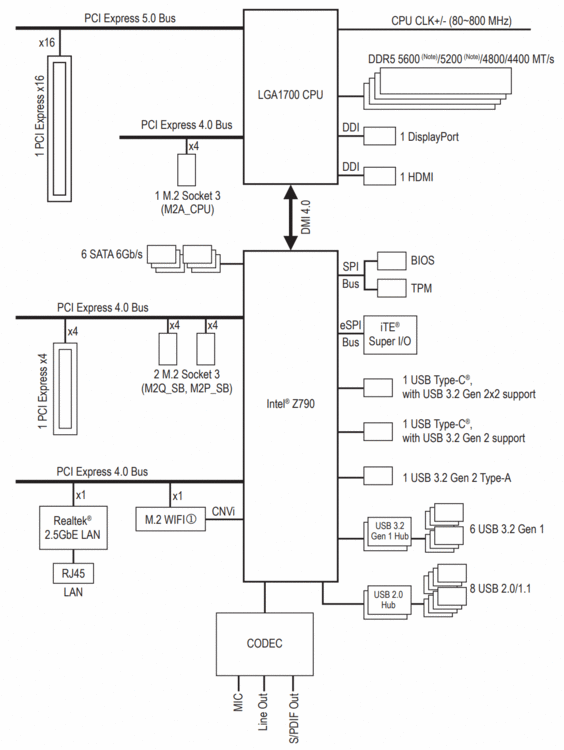
I haven't moved anything....I only have two slots so there's not much to shuffle in any case 🙂 Anyway......for the first time ever I'm looking at the MB block diagram: On the CPU side I have a HBA in the PCIx16 slot and a M.2 in M2A_CPU. This all seems to be working fine. So no issues there that I know of. The manual does say however: CPU: - 1 x PCI Express x16 slot, supporting PCIe 5.0 and running at x16 (PCIEX16) * The PCIEX16 slot can only support a graphics card or an NVMe SSD. If only one graphics card is to be installed, be sure to install it in the PCIEX16 slot. I'm picking that's a red herring....I don't have an NVME in that slot, nor graphics card. Looking at the Z790 chipset then - a single PCIe slot (x4) and two x4 M.2 slots (both occupied). There are no other slots....so I see no reason why a PCIe x1 NIC can't be put in the slot. There nothing that says for example that I must choose between the third M.2 slot or the PCIe card....and if there is bifurcation of the lanes then it looks like this is already done out of the box between the PCIe and M.2 slots as the default set up... New Intel210 card should be here this time tomorrow....so that will be interesting.
-
It's a tricky one.....a lot of the interface renaming seems to be coming form docker interfaces. The main puzzle I have is that my network cards do show up in Tools > System Devices. For example here is the onboard NIC: [10ec:8125] 0b:00.0 Ethernet controller: Realtek Semiconductor Co., Ltd. RTL8125 2.5GbE Controller (rev 05) The weird thing is that the errors in the message log like these: Nov 18 18:43:18 Svalbard kernel: pcieport 0000:00:01.0: AER: Corrected error message received from 0000:01:00.0 Nov 18 18:43:18 Svalbard kernel: pcieport 0000:01:00.0: PCIe Bus Error: severity=Corrected, type=Physical Layer, (Receiver ID) Nov 18 18:43:18 Svalbard kernel: pcieport 0000:01:00.0: device [10b5:8724] error status/mask=00000001/0000a000 Nov 18 18:43:18 Svalbard kernel: pcieport 0000:01:00.0: [ 0] RxErr Reference the PCI bus (based on these IDs): [10b5:8724] 01:00.0 PCI bridge: PLX Technology, Inc. PEX 8724 24-Lane, 6-Port PCI Express Gen 3 (8 GT/s) Switch, 19 x 19mm FCBGA (rev ca) [10b5:8724] 02:00.0 PCI bridge: PLX Technology, Inc. PEX 8724 24-Lane, 6-Port PCI Express Gen 3 (8 GT/s) Switch, 19 x 19mm FCBGA (rev ca) [10b5:8724] 02:08.0 PCI bridge: PLX Technology, Inc. PEX 8724 24-Lane, 6-Port PCI Express Gen 3 (8 GT/s) Switch, 19 x 19mm FCBGA (rev ca) [10b5:8724] 02:09.0 PCI bridge: PLX Technology, Inc. PEX 8724 24-Lane, 6-Port PCI Express Gen 3 (8 GT/s) Switch, 19 x 19mm FCBGA (rev ca) Not the actual card, which *seemed* to be working fine as it was passing traffic as expected. Now to be fair, the NIC and the HBA are both on the PCI bus, as are the NVMEs.....all I know now is that the memory is (probably) fine, and that without the extra Ethernet card everything is stable. So it could just the physical card itself, or a problem with the MB....I certainly don't have the other problems such as mac address not registering or not being able to use the card. All of that seems fine....and for periods of time post boot (10 minutes through to 10 hours) everything is fine before crashes start again.....with no card it has been four days now without a single error message or crash.
-
I am running 6.12.13. I did have the RTL8125 drivers added.....but it didn't seem to make anything better.....so I uninstalled them again. I find this curious as my motherboard has a RTl8125 chip also and it seems fine (although it runs at 2.5Gb/s on a simple connection, while the add-on card is limited to 1Gb/s and uses vLANs). How likely is it that there is a clash as I have two of the same? Unlikely I would think.....if it works for one it should work for the other....but who knows. It also used to be quite happy but then started crashing randomly. The only thing I can think of that changed is that I loaded a new BIOS version with the new 'safe' Intel microcode. Other than that nothing else has really changed (HW / driver wise at least). I can re-install the driver, and re-install the card.....but what's the bet the RX and crashing problems come back?
-
Not the problem, but it is always good to avoid a future problem! 🙂 Fixed!
-
I tried the RTL8125 drivers from the CA, but that didn't make any noticeable difference. My boot options are: append initrd=/bzroot pcie_aspm=off, nvme_core.default_ps_max_latency_us=5500 So power saving is disabled, and I had a weird thing with the NVME drives so found another post to set the max latency thing....without the NIC in there it has been perfectly stable... I have ordered a new NIC based on the I210 chipset (this one) which will hopefully also work, and as a backup (and to use with a laptop if I need to connect to ethernet) this one which should also work with Unraid as it uses the ASIX AX88179A chipset. That means I can test a new card in the slot, or test without using the slot at all. I'm hoping this will narrow down the problem to either a fault slot, or a card/driver fault..... This should be here tomorrow or the day after. If it doesn't work then I might retire the Unraid machine and make it my desktop machine (and if it fails under Windows get a MB replacement under warranty). A new machine would then be needed....which then leads to the question: Ryzen 9, Core Ultra 7 (both new, both will need Intel Arc for quick sync and Unraid 7) or build another Core i7 machine (noting that here at least MBs are hard to get unless you buy MSI or something crazy like an Asus ProArt). Either way I will have an answer before Black Friday.
-
I've narrowed it down to an extra Ethernet controller (it has a RTL8125 chip - similar to this one). With the card removed Unraid runs in safe mode, completes parity check with no errors. Now it back running normal mode, but without the extra Ethernet controller - so far no errors. The problem is that a bunch of my containers (some are important - like Frigate) are now offline as they rely on the vLANs that were routed through that interface....so I need to do something. If I put the card back I'm bound to get problems again. I'm running on a Gigabyte Z790M Aorus Elite board....with all three M2 slots occupied, and both PCI slots (when the NIC is in). I'm pretty sure the onboard NIC is also a RTL8125 chip, so I'm not convinced it is the driver. That leaves the card itself....or the motherboard....I could swap the card, but if I do, with what? And Intel-based one might be better but they are not cheap (here at least). I can also get from Amazon or ebay but delivery time is two weeks....and the shipping is more than the card. I've seen references to Unraid "supported" ethernet cards but all the links to the documentation are 404. So, for example, is there support for Intel 226 chipset, or should I look for an older Pro/1000 type card?
-
For some reason The only Intel Arc graphics cards on the market here are the Intel Arc A750....there seems to be nothing else....it's crazy..... Right now I'm running memtest again....2 passes in, still nothing. It's not definitive unless it fails, so you are ending up in a position where it it "might not be" the memory....I hope it isn't my LSI HBA. 😞 In the meantime I'm pulling together a price for an AMD-based solution and soon a Intel Core Ultra solution....




