RedHotRiplets
Members
-
Joined
-
Last visited
-
Alright, I am not happy to announce this, but the issue was as simple as using Firefox instead of Chrome. Or clearing cache/cookies.
-
Hi, I recently setup my Unraid server and it was working great as of last night. When I logged into it today, it seems it doesn't have access to the internet. When I go to Tools > Diagnostics > Download, it doesn't do anything. I can SSH to the server without issue. In Network Settings I have set three DNS servers: 8.8.8.8, 8.8.4.4, 192.168.1.254. My network is 192.168.4.0/22 Some of what I do in Unraid seems unresponsive, such as trying to stop the VM Manager; setting it to no and hitting Apply doesn't do anything. Even when I select shares, it just shows the Unraid loading screen. The Dashboard, Main, Tools, and Settings tabs work. I am at a loss. Any suggestions? Thanks, Matt riplets-diagnostics-20240917-1618.zip
-
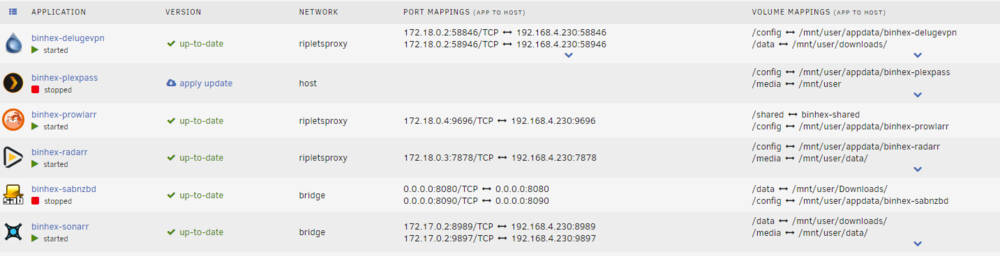
Hi, I think I have confused myself by watching too many TRaSH videos, and reading other information across the web so I figured I would come here for help. My folder structure is what Trash guides recommends. 1. Below are what I have configured, does this look correct? Deluge VPN Docker: Path: /data: /mnt/user/downloads/ Inside Deluge app: Download to: /data/incomplete Move completed to: /data/completed Extractor: Extract data to: /data/torrents/unzipped Radarr: Path: /media: /mnt/user/data/ Path: /data: /mnt/user/downloads/ Sonarr Container path: /data: /mnt/user/downloads/ Container path: /media: /mnt/user/data/ I get the following error inside of Radarr: "You are using docker; download client Deluge places downloads in /data/torrents/tv but this directory does not appear to exist inside the container. Review your remote path mappings and container volume settings." How do I resolve this? I thought my data was mapped correctly, but this is where I am confused. 2. I configured Prowlarr, and added both Radar and Sonar to it successfully. How does this work now? Do I search within Prowlarr, or Radarr/Sonarr? Both Radarr/Sonarr are giving me these errors: - No indexers available with Automatic Search enabled, Radarr will not provide any automatic search results - No indexers available with RSS sync enabled, Radarr will not grab new releases automatically I thought Prowlarr centralized the trackers, but how does Prowlarr interact with Radarr/Sonarr? I have more questions, but will start with these, and move on from there. Thanks! Matt