





sansi98
Members
-
Joined
-
Last visited
-
I did install the iSCSI plugin for Unraid Server plugin So I can't use the plug-in? But I don't want to uninstall the iSCSI plugin and Re-install it

-
I'm not sure where this Python came from; maybe it was pre-installed with the system? And, the boot/extras is empty

-
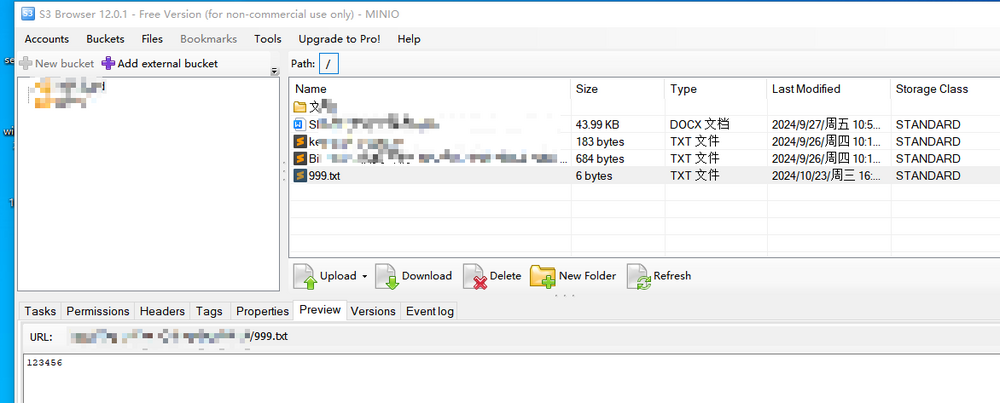
yes,This is the docker configuration This is the UNRAID file This is reading MINIO using the s 3 tool But I work just as well with /mnt/user/minio


-
plugin: installing: dwpython.plg Executing hook script: pre_plugin_checks plugin: downloading: dwpython.plg ... done Executing hook script: pre_plugin_checks ------------------------------------------------------------- !!! INSTALLATION ABORTED !!! python3 is already installed on your system. !!! Perhaps remnants in '/boot/extra' or by another plugin? ------------------------------------------------------------- plugin: run failed: '/bin/bash' returned 1 Executing hook script: gui_search_post_hook.sh Executing hook script: post_plugin_checks
-
You can use mergefs to merge multiple hard disks, and then minio uses the merged directory Then map /mnt/addons/minio to the minio container Note that it must be mounted in the /mnt/addons/ directory mkdir -p /mnt/addons/minio mergerfs /mnt/disk1/minio:/mnt/disk2/minio /mnt/addons/minio


